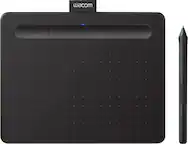
Wacom - One 14 (2025) Pen Display Drawing Tablet - White
Related Item

Specifications
- Screen Size14 inchesScreen Resolution1920 x 1080Active Area12.2 x 6.9 inTotal Storage Capacity0 gigabytesBattery ChemistryNot battery powered
- Key Specs
- Screen Size: 14 inches (Size of the screen, measured diagonally from corner to corner.)
- Screen Resolution: 1920 x 1080 (Screens come in a range of resolutions (measured in pixels, horizontal x vertical). The higher the resolution, the greater the picture quality.)
- Active Area: 12.2 x 6.9 in (The size of the screen area that a user interacts with, either by stylus and/or touch (if supported).)
- Total Storage Capacity: 0 gigabytes
- Battery Chemistry: Not battery powered
- General
- Brand: Wacom
- Model Number: DTC141W0
- Product Name: Wacom One 14 (2025) Pen Display Drawing Tablet
- Color: White
- Year of Release: 2025
- Display
- Display Type: LCD
- Screen Type: IPS
- Screen Size: 14 inches (Size of the screen, measured diagonally from corner to corner.)
- Screen Resolution: 1920 x 1080 (Screens come in a range of resolutions (measured in pixels, horizontal x vertical). The higher the resolution, the greater the picture quality.)
- Stylus Input: Active (Electromagnetic Resonance) (An active stylus/pen is able to communicate directly with a compatible device; active electromagnetic resonance (EMR) pens are powered via a device's screen and active electrostatic (AES) pens require an additional power source. A passive stylus does not have electronic features and is compatible with most capacitative touch screens.)
- Active Area: 12.2 x 6.9 in (The size of the screen area that a user interacts with, either by stylus and/or touch (if supported).)
- Aspect Ratio: 16:9 (The measurement of the width of a screen compared to the height of a screen, expressed as a ratio.)
- Storage
- Total Storage Capacity: 0 gigabytes
- Compatibility
- Operating System Compatibility: Windows, Mac OS, Chrome
- System Requirements: USB-C port with DisplayPort™ Alt Mode*, internet access to download driver. To achieve the maximum resolution and refresh rate on Wacom One 14, the host PC ports need to support 1920 x 1080@60Hz. *Thunderbolt 3 or later is also supported. (The software that a product must have for it to be able to integrate with another product.)
- Connectivity
- Interface(s): USB-C (Refers to the types of connections that devices use to interact and communicate with each other.)
- Power
- Charging Interface(s): USB-C (The connection for transmitting power to charge the device.)
- Battery Chemistry: Not battery powered
- Dimensions
- Product Height: 0.4 inches (The out of box height of the item. Height is measured as the vertical distance from the bottom of the item to the top as it would be primarily used or placed.)
- Product Width: 13.2 inches (The out of box width of the item. Width is measured as the horizontal distance from one side of the item to the other as it would be primarily used or placed.)
- Product Depth: 7.9 inches (The out of box depth of the item. Depth is measured as the distance from the front of the item to the back as it would be primarily used or placed.)
- Product Weight: 26.5 ounces (The out of box weight of the item.)
- Included
- Stylus Included: true
- Stylus Model Included: Wacom One Pen
- Warranty
- Warranty - Parts: 1 year
- Warranty - Labor: 1 year
- Other
- UPC: 753218983732
Ready to dive into digital art? The Wacom One drawing tablet is where your creative dreams begin. This graphics tablet with screen is the ideal pen display for creative beginners, casual artists, and visual thinkers looking to go digital or make the transition from traditional drawing. With a generous 14" anti-glare, anti-fingerprint screen and 98% sRGB color space coverage, you'll experience vibrant, true-to-life artwork with professional accuracy. The larger screen provides plenty of space to draw, sketch, annotate, or edit photos, while a smaller bezel means less real estate on your desk.
- BIGGER CANVAS, BETTER DETAIL:: Redesigned with more drawing area, the laminated 14" crisp IPS HD display offers generous space with 98% sRGB color accuracy and a paper-like texture that won’t glare or smudge – keeping you in your creative zone longer
- PRECISE, NATURAL FEEL:: Draw with the control that made Wacom a favorite; the battery-free pen never needs charging and captures everything from light lines to bold strokes with Wacom’s responsive pressure sensitivity
- COMPLETE CREATIVE STARTER KIT:: Includes trials of Clip Studio Paint Pro, Magma, Concepts & Foxit software, and Skillshare training courses - your jumpstart to creating beautiful art right away
- RELIABLE PERFORMANCE:: Wacom's proven reliability works seamlessly with your computer – no driver headaches, mysterious disconnects, or frustrating "why isn't this working?" moments common with cheaper alternatives
- COMPATIBILITY:: PC (Windows 10 or later), Mac (OS 11 or later), Chromebook; Easy plug-in via single USB-C: devices requiring HDMI require additional converter, cable and power adapter kit (sold separately)
- BIGGER CANVAS, BETTER DETAIL:: Redesigned with more drawing area, the laminated 14" crisp IPS HD display offers generous space with 98% sRGB color accuracy and a paper-like texture that won’t glare or smudge – keeping you in your creative zone longer
- PRECISE, NATURAL FEEL:: Draw with the control that made Wacom a favorite; the battery-free pen never needs charging and captures everything from light lines to bold strokes with Wacom’s responsive pressure sensitivity
- COMPLETE CREATIVE STARTER KIT:: Includes trials of Clip Studio Paint Pro, Magma, Concepts & Foxit software, and Skillshare training courses - your jumpstart to creating beautiful art right away
- RELIABLE PERFORMANCE:: Wacom's proven reliability works seamlessly with your computer – no driver headaches, mysterious disconnects, or frustrating "why isn't this working?" moments common with cheaper alternatives
- COMPATIBILITY:: PC (Windows 10 or later), Mac (OS 11 or later), Chromebook; Easy plug-in via single USB-C: devices requiring HDMI require additional converter, cable and power adapter kit (sold separately)
Whats Included
- Wacom One 14 Body
- USB-C Cable
- Wacom One Pen
- QSG, IPI
- Replacement nib (POM) x 3pcs
- Nib removal tool x 1pc
- Wacom One 14 Body
- USB-C Cable
- Wacom One Pen
- QSG, IPI
- Replacement nib (POM) x 3pcs
- Nib removal tool x 1pc
Q: What would be needed for space to save?
A: Thank you for the question. However, the question is not fully understood about what space it would save? Regards
Compare similar products
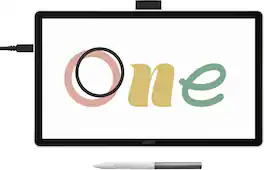
Ready to dive into digital art? The Wacom One drawing tablet is where your creative dreams begin. This graphics tablet with screen is the ideal pen display for creative beginners, casual artists, and visual thinkers looking to go digital or make the transition from traditional drawing. With a generous 14" anti-glare, anti-fingerprint screen and 98% sRGB color space coverage, you'll experience vibrant, true-to-life artwork with professional accuracy. The larger screen provides plenty of space to draw, sketch, annotate, or edit photos, while a smaller bezel means less real estate on your desk.

Say goodbye to traditional paper and hello to the digital canvas of the Wacom One 12, the redesigned Wacom One graphic tablet lets you express yourself with the natural feel of pen and paper on a full-color 11.6” HD screen. The Wacom One 12 is not just a drawing tablet with screen; it's a gateway to the world of digital art. Whether you're sketching, painting, creating animations or communicating your ideas, this graphics tablet is equipped with everything you need to express your artistic vision. With its seamless compatibility with PC, Mac, Chromebook, and Android devices, you can effortlessly bring your art to life on any platform. This product works with devices capable of running the latest version of Chrome OS and has been certified to meet Google's compatibility standards. Google is not responsible for the operation of this product or its compliance with safety requirements. Chromebook, Android, and the Works with Chromebook badge are trademarks of Google LLC.

No cords, no setup, no computer - just pick up the pen and start sketching. This lightweight all-in-one tablet delivers Wacom's legendary pen experience for spontaneous creativity, whether you're doodling on the couch or capturing an idea on the go. Running Android 14, an 11" anti-glare etched glass screen, and one-tap Quick Draw, it's perfect for anyone who wants to draw more often - no experience required. Just you, your pen, and a world of possibilities. No limits - just draw.
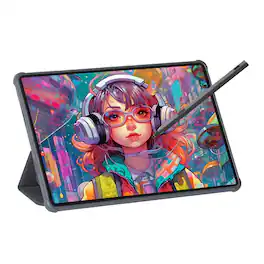
The sleek gray metal Viewedge Tab 11 (505g, 7.5mm thick) features an 11-inch Nano anti-glare display (1920x1200, 90Hz) for vivid visuals. Powered by MediaTek Helio G99, it has 6GB RAM, 128GB storage (expandable to 1TB), Wi-Fi 5, Bluetooth 5.0, 8MP front/13MP rear cams. It includes quad speakers, 8000mAh battery, USI 2.0 V Pen, and runs Android 14—ideal for work, study, or entertainment.
| Pros for Wacom - One 14 (2025) Pen Display Drawing Tablet - White | |||
|---|---|---|---|
| There were no pros for this product— | Overall Performance, Ease of use | Overall Performance, Pen Weight, Portability | There were no pros for this product— |
| Cons for Wacom - One 14 (2025) Pen Display Drawing Tablet - White | |||
| There were no cons for this product— | Compatibility | There were no cons for this product— | There were no cons for this product— |
Specs
Reviews
This product doesn't have any reviews yet.