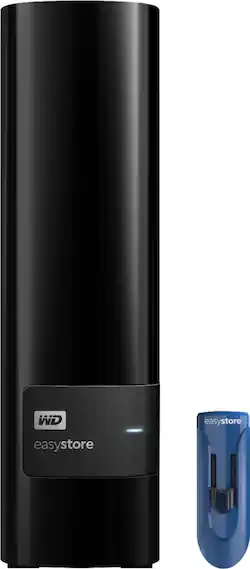
WD - Easystore 10TB External USB 3.0 Hard Drive with 32GB Easystore USB Flash Drive - Black
- Key Specs
- Storage Drive Type: HDD (Traditional, mechanical hard disk drives are the most common type of storage because they're relatively inexpensive and offer huge capacities. However, they also generate both noise and heat. Solid state drives, also known as SSDs, are many times faster than hard disk drives and have no moving parts to wear out, but typically offer less capacity for the same price.)
- Interface(s): USB 3.0 (Refers to the types of connections that devices use to interact and communicate with each other.)
- General
- Product Name: Easystore 10TB External USB 3.0 Hard Drive with 32GB Easystore USB Flash Drive
- Brand: WD
- Model Number: WDBCKA0100HBK-NE32
- Performance
- Storage Drive Type: HDD (Traditional, mechanical hard disk drives are the most common type of storage because they're relatively inexpensive and offer huge capacities. However, they also generate both noise and heat. Solid state drives, also known as SSDs, are many times faster than hard disk drives and have no moving parts to wear out, but typically offer less capacity for the same price.)
- Compatibility
- Internal Or External: External
- External Hard Drive Type: Desktop (Physical characteristics of the hard drive, including size, weight and how you connect to your device.)
- Interface(s): USB 3.0 (Refers to the types of connections that devices use to interact and communicate with each other.)
- Minimum System Requirements: Apple MacOS, Microsoft Windows 7 / 8.1 / 10
- Features
- Security Features: None
- Usage: Everyday computing
- Power
- Power Source: AC adapter
- Dimensions
- Product Height: 6.7 inches (The out of box height of the item. Height is measured as the vertical distance from the bottom of the item to the top as it would be primarily used or placed.)
- Product Width: 1.9 inches (The out of box width of the item. Width is measured as the horizontal distance from one side of the item to the other as it would be primarily used or placed.)
- Product Weight: 35.6 ounces (The out of box weight of the item.)
- Included
- Included Software: WD Drive Utilities, WD Backup, WD Discovery
- Other
- UPC: 718037865607
Only at Best Buy
Archive and share important data with this Western Digital easystore storage bundle. The 10TB desktop hard drive lets you opt for automatic continuous or scheduled backup tasks via the WD Discovery software. Access files from a projector, printer or another PC with the 32GB flash drive of this Western Digital easystore storage bundle.
- 10TB storage capacity: Provides ample space for storing documents, photos, music and more.
- USB 3.0 interface: Offers an easy-to-use connection to devices. Backward compatible with USB 2.0 for simple connection to your computer.
- Data transfer rates up to 5 Gbps with USB 3.0: Enable a rapid response when updating files.
- Automatic backup options: Allow you to use compatible software to back up your files to the server.
- Compatible with Mac and PC: For flexible installation options.
Whats Included
- 32GB Flash drive
- AC adapter
- Quick install guide
- USB cable
- WD Discovery™ software with WD Backup™ and WD Drive Utilities™
- easystore Desktop hard drive
A: I Just got this drive and shucked it. I am getting Seq read of 198 and Write of 147MB/s. Also, the documentation states a 2 year warranty.
Q: Does anyone knows if this are the red hard drives inside?
A: People on reddit.com/r/DataHoarder are saying that the drives are helium filled WD White drives
Q: DOEST WD EASYSTORE10 TB COME WITH WINDOWS 10
A: come with windows 10? no...does it work with windows 10...yes
A: The size of the hard drives are the issue... All Samsung tv's I have top out at 2tb. Your best bet is to use the best router you can afford with a usb 3 port, tri band with MIMO.. basically all the bells and whistles.. Go on their website or google the name and add max hard drive to it. The one I have for example only has a voltage limitation: "The Linksys EA8300 has one USB 3.0 port that is capable of supporting an external hard disk or flash drive with up to 1100 mA current draw." Also with a router you can watch on any laptop or tablet etc
A: Yakma Yes the situation about the 3.3V status is in effect with these White Labeled Red Drives. What that means is when you shell the drive from the enclosure ( which voids the Units Warranty) and attach it to a computer as an internal HDD then the white labeled HDD will not start up / spin up when the computer is powered on. The reason is that the Drive's logic board senses the 3.3 volt on pin 3 of the edge connector where the power connector attaches to. If that voltage is detected then the drive will not power up. here is a link to check about the 3.3v https://www.youtube.com/watch?v=9W3-uOl4ruc here is a link about shucking these drives - Doing so voids the Warranty.... https://www.youtube.com/watch?v=kEttNCJ5o9Y
A: Yes, you can repartition the drives. You do not need special software, as long as your system recognizes all 10TB of the drive, which most machines manufactured in the last 5 years can.
A: Yes, you should be able. It depends on myCloud if it will recognize all of the space available.
Q: Can this unit hang on a network or does it need to be connected to a PC/usb-connection device?
A: I’m using mine with the USB 3.0 input on my NETGEAR router — so it’s not restricted to PCs. It maps as a network drive on my home computers without issue!