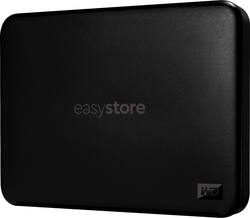
WD - Easystore 1TB External USB 3.0 Portable Drive - Black
- Key Specs
- Storage Capacity: 1000 gigabytes (Measured in megabytes (MB), gigabytes (GB) and terabytes (TB), this is the amount available for storing files, music, movies, photos and more. The total includes the capacity of the hard disk drive and solid state drive if both are included on the computer.)
- Storage Drive Type: SSD (Traditional, mechanical hard disk drives are the most common type of storage because they're relatively inexpensive and offer huge capacities. However, they also generate both noise and heat. Solid state drives, also known as SSDs, are many times faster than hard disk drives and have no moving parts to wear out, but typically offer less capacity for the same price.)
- Interface(s): Micro-USB Type B (Refers to the types of connections that devices use to interact and communicate with each other.)
- General
- Product Name: Easystore 1TB External USB 3.0 Portable Drive
- Brand: WD
- Model Number: WDBCHH0010BBK-WESN
- Color: Black
- Capacity
- Storage Capacity: 1000 gigabytes (Measured in megabytes (MB), gigabytes (GB) and terabytes (TB), this is the amount available for storing files, music, movies, photos and more. The total includes the capacity of the hard disk drive and solid state drive if both are included on the computer.)
- Performance
- Storage Drive Type: SSD (Traditional, mechanical hard disk drives are the most common type of storage because they're relatively inexpensive and offer huge capacities. However, they also generate both noise and heat. Solid state drives, also known as SSDs, are many times faster than hard disk drives and have no moving parts to wear out, but typically offer less capacity for the same price.)
- Compatibility
- Internal Or External: External
- External Hard Drive Type: Portable (Physical characteristics of the hard drive, including size, weight and how you connect to your device.)
- Interface(s): Micro-USB Type B (Refers to the types of connections that devices use to interact and communicate with each other.)
- Operating System Compatibility: Windows
- Minimum System Requirements: Windows 10+ and macOS11+ compatible, Reformatting may be required for other operating systems.
- Features
- Security Features: None
- Usage: Everyday computing, Backup
- Power
- Power Source: USB port
- Dimensions
- Product Height: 0.59 inches (The out of box height of the item. Height is measured as the vertical distance from the bottom of the item to the top as it would be primarily used or placed.)
- Product Width: 3.23 inches (The out of box width of the item. Width is measured as the horizontal distance from one side of the item to the other as it would be primarily used or placed.)
- Product Weight: 4.35 ounces (The out of box weight of the item.)
- Included
- Included Software: WD Drive Utilities, WD Backup
- Other
- UPC: 619659205232
Get everyday storage and backup for your precious photos, videos, music, and daily files with the WD easystore portable drive. Lightweight, flash-based durability and fast access to quickly expand storage and help keep your important files safe on the go.
- Plug-and-Play connectivity: Easily connect your drive with a hassle-free setup out of the box.
- Lightweight and Durable: Lightweight and durable flash-based portable drive for keeping everyday files safe at home, in the office, and on the go.
- Designed with the Planet in Mind: Made with over 50% recycled plastic (like disposable water bottles) this drive saves CO2 emissions, fresh water, and energy during the manufacturing process.
- USB 3.0 and USB 2.0 Compatibility: This drive offers compatibility with the latest USB 3.0 devices and backward compatibility with USB 2.0 devices.
- Expand Your Storage: Add 1TB of storage to your PC or Mac by easily offloading files to your WD easystore portable drive and saving more memories.
- Works with Windows and Mac: Formatted exFat to work seamlessly with Windows or macOS computers out of the box.
- WD Quality Inside and Out: We know your data is important to you. That’s why we only release products that meet our demanding requirements for durability and long-term reliability. On top of that, it comes with a two-year warranty.
Whats Included
- easystore 1TB External USB 3.0 Portable
- WD Backup and WD Drive Utilities software
- SuperSpeed USB-A data cable
- Owner's manual
Q: How can I get this portable hard drive to work with my MAC Time Machine?
A: Hello, Please be informed that the WD Easystore External drive comes preformatted in NTFS format for Windows OS, However, in order to use the drive for macOS you can reformat the drive with macOS supported HFS+J file system by using this link: https://support-en.wd.com/app/answers/detail/a_id/3879 Please be informed that reformatting is a data destructive process, please backup the data from the drive before reformatting it. Please refer to the link for time machine backup: https://support-en.wd.com/app/answers/detailweb/a_id/18952/kw/time%20machine -Need Help? Please see our "'Contact Us" page for information.
Q: Is this the older, rectangular design, or the newer, smaller, square design?
A: Hello Brian, Please be informed that the WD Easystore drive is a plug 'n' play device tested and designed for Windows and Mac computers. The easystore portable drive is both USB 3.0 ready and USB 2.0 compatible and comes with USB 3.0 Type-A Interface. In order to know more about the drive refer to the link: http://products.wdc.com/library/AAG/ENG/4078-705145.pdf -Need Help? Please see our "'Contact Us" page for information.
Q: Can this portable drive be used without the WD software? Just plug in and transfer selected files?
A: Yes, drag and drop.
A: Hello, Please be informed that the WD Easystore drive is a plug 'n' play device that has been tested and designed for Windows and Mac computers. This drive is compatible with Windows 10+ and macOS 11+. Compatibility may vary depending on the user's hardware configuration and operating system. Moreover, WD Backup software is now end of support. However you could use File History or Acronis on windows .You could refer to the link mentioned below: Windows 10 and 11 File History Backup and Restore to a WD DAS-https://support-en.wd.com/app/answers/detail/a_id/25298/kw/file%20history and for using Acronis you could refer to the link mentioned below : https://support-en.wd.com/app/answers/detailweb/a_id/30022/kw/acronis Please be informed that for backup on Mac you could use macOS Time Machine Backup and Restore to a WD DAS-https://support-en.wd.com/app/answers/detail/a_id/18952/kw/time%20machine. Check out the link to learn more about the drive: http://products.wdc.com/library/AAG/ENG/4078-705145.pdf -Need help? Please see our "'Contact Us'" page for details.
Q: Will this work with a Tablo dvr?
A: I'm sorry, but I'm not familiar with that.
A: Hello, We request you to try different USB ports, cables and computers to resolve the issue. If the issue persists, we request you to open a support ticket on the mentioned link: https://support-en.wd.com/app/ask/session/ the customer support team will contact you as soon as possible. -Need Help? Please see our "'Contact Us" page for information.