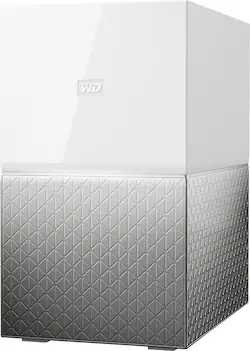
WD - My Cloud Home Duo 2-Bay 12TB Personal Cloud - White
- Key Specs
- Security Features: None
- Storage Capacity: 12000 gigabytes (Measured in megabytes (MB), gigabytes (GB) and terabytes (TB), this is the amount available for storing files, music, movies, photos and more. The total includes the capacity of the hard disk drive and solid state drive if both are included on the computer.)
- Number Of Drives Included: 2
- Number of Bays: 2 (Each bay, or enclosure, holds an individual drive.)
- Processor Model: Not Applicable (Your computer's processor is like its brain. Working in combination with system memory, the power of the processor determines the complexity of software you can run, how many programs you can have open at the same time, and how fast those programs will run. Most computers feature an AMD, Intel or Snapdragon processor.)
- General
- Product Name: My Cloud Home Duo 2-Bay 12TB Personal Cloud
- Brand: WD
- Model Number: WDBMUT0120JWT-NESN
- Color: White
- Security
- Security Features: None
- Features
- Storage Capacity: 12000 gigabytes (Measured in megabytes (MB), gigabytes (GB) and terabytes (TB), this is the amount available for storing files, music, movies, photos and more. The total includes the capacity of the hard disk drive and solid state drive if both are included on the computer.)
- Number Of Drives Included: 2
- Number of Bays: 2 (Each bay, or enclosure, holds an individual drive.)
- Power Supply: AC adapter
- Ports
- Number of RJ-45 Ports: 1 (An RJ-45 port, or jack, is an 8-pin connection between a device and a local area network (LAN), using an Ethernet, or RJ-45, cable.)
- Number of USB Ports (Total): 2
- Processor
- Processor Brand: Not Applicable
- Processor Model: Not Applicable (Your computer's processor is like its brain. Working in combination with system memory, the power of the processor determines the complexity of software you can run, how many programs you can have open at the same time, and how fast those programs will run. Most computers feature an AMD, Intel or Snapdragon processor.)
- Compatibility
- System Requirements: Apple MacOS, Microsoft Windows, Android, Apple iOS (The software that a product must have for it to be able to integrate with another product.)
- RAID Support: RAID 0, RAID 1, JBOD (A Redundant Array of Independent Disks (RAID) includes a collection of separate disks that your computer recognizes as one disk unit. Each configuration offers a different level of mirroring, striping and read/write speeds.)
- Ethernet Standard: 10/100/1000 (Each standard is a variation of the IEEE 802.3 set of computer networking technologies known as Ethernet. New versions evolved to include higher bandwidth, different physical media, and other new and improved features. Standards are often denoted by speeds (in Megabits per second). For example, a 10/100/1000 Ethernet port transmits at 10 Mbps, 100 Mbps, and 1000 Mbps (1 Gbps).)
- Memory
- Type of Memory (RAM): Not provided (Each type of RAM delivers a different level of speed, bandwidth, energy efficiency and performance.)
- Dimensions
- Product Height: 7 inches (The out of box height of the item. Height is measured as the vertical distance from the bottom of the item to the top as it would be primarily used or placed.)
- Product Width: 4 inches (The out of box width of the item. Width is measured as the horizontal distance from one side of the item to the other as it would be primarily used or placed.)
- Product Weight: 5.29 pounds (The out of box weight of the item.)
- Other
- UPC: 718037848501
Secure files with this My Cloud Home Duo personal storage device. The My Cloud Home Duo is an easy-to-use, dual-drive personal storage device that plugs directly into your Wi-Fi router at home so you can save all your digital content in one central place. With two drives set to Mirror Mode, all your content is automatically saved twice. You can automatically back up the photos and videos on your phone, and wirelessly back up and sync all your PC and Mac computers and cloud accounts. Use the USB port to quickly import photos, videos and documents from other devices, like USB flash drives and external hard drives. Access, upload and share those photos and videos from anywhere with an internet connection using My Cloud Home apps for mobile, desktop and web. Use these simple apps for a smooth streaming experience of your personal videos to any device, anywhere.
- 12TB storage capacity: Provides ample space for storing documents, photos, music and more in one central place.
- Data transfer rates up to 5 Gbps with USB 3.0: Rapidly import photos, videos and docs from USB flash drives and external hard drives.
- Two hard drives in the Mirror Mode (RAID 1): So all your photos, videos and files are stored on one drive and automatically duplicated onto the second drive for extra peace of mind.
- On-the-go access with the My Cloud Home mobile app, desktop app or MyCloud.com: Allows you to access, upload and share those photos and videos from anywhere with an internet connection using My Cloud Home apps for mobile, desktop and web.
- Time Machine compatible: Back up your entire system directly to the drive.
- Compatible with Apple MacOS, PC, Android and Apple iOS: For flexible installation options.
Whats Included
- Personal cloud storage
- Ethernet cable
- AC adapter
- Quick Install Guide
A: The unit contains 2 6TB drives. When you access it from your computer you only see 6TB. Internally the unit takes everything you write to the 6TB and "mirrors" it to the second drive. That is the way RAID1 works. This way if either drive fails, you have a copy.
A: It's hardwired using an Ethernet port, however once it's connected and setup it's accessible through WiFi and across the Internet. You can connect to it from within your wifi network or across the Internet if away from your wifi network. It's compatible with iOS, Android and Windows and MacOS using Western Digital's apps.
A: Hello Miranda, We would like to inform you that My Cloud Home Duo device needs to connected with the router directly using an ethernet cable. You could access it remotely on home.mycloud.com and to access it on your local network, Please map the device by following the steps mentioned in the below link: https://support-en.wd.com/app/answers/detailweb/a_id/34991/kw/local%20network%20access For more information about the drive refer to the User Manual: http://products.wdc.com/library/UM/ENG/4779-705163.pdf -Need Help? Please see our "'Contact Us" page for information.
A: Hello NLin, We would like to inform you that it is a Network attached storage HDD. WD My cloud home duo device needs to connected with the router directly using an ethernet cable. You could simply login to home.mycloud.com to access it remotely. To access it under your local network please refer to the following link: https://support-en.wd.com/app/answers/detailweb/a_id/34991/kw/local%20network%20access. For more information about the drive refer to the User Manual: http://products.wdc.com/library/UM/ENG/4779-705163.pdf -Need Help? Please see our "'Contact Us" page for information.
Q: what is the input voltage? can work with 220v?
A: The drive I bought (in the U.S.) comes with a 120v adaptor. The actual drive has a DC input, so it may be possible WD has an equivalent adaptor for the European market that would work on 220v.
A: Hello, Please be informed that you could replace the drive in My cloud home duo. For more information about the drive refer to the User Manual: http://products.wdc.com/library/UM/ENG/4779-705163.pdf -Need Help? Please see our "'Contact Us" page for information.
A: Short answer: Yes. You create a login for the drive and act as "administrator" for your cloud drive. You can then create a separate folder and give access to that folder to an individual (or more) and they (and you) are the only ones able to access that folder. I went on a trip to France with a group and took a LOT of pics I wanted to share. I had the original pics in MY folder, then created a shared folder and copied them into that. I could then give read or edit access to the shared folder so others could contribute pics while still protecting my originals. I had several individual (email IDs) for that folder, but you could create a folder and only provide ONE email access to it (although, as the administrator for the drive, YOU would also have access.)



















