Brother - INKvestment 1365 Wireless Color All-in-One Inkjet Printer with Auto Duplex Print (MFC-J1365DW), Great for Home Offices - White
FREE shipping to
More Buying Options
Related Item

Specifications
- NetworkingWirelessENERGY STAR CertifiedYesPrinter TypeAll In One, Printer, Copier, ScannerISO Color Print Speed9 pages per minuteISO Mono Print Speed16 pages per minuteOutput Tray Capacity50
- Key Specs
- Networking: Wireless
- ENERGY STAR Certified: true (Devices carrying the ENERGY STAR service mark, such as computer products and peripherals, kitchen appliances, and other products, generally use 20% to 30% less energy than required by federal standards.)
- Printer Type: All In One, Printer, Copier, Scanner
- ISO Color Print Speed: 9 pages per minute (The number of color pages able to be printed per minute in the device's default single-side mode, as tested by the International Standards Organization (ISO).)
- ISO Mono Print Speed: 16 pages per minute (The number of black ink (grayscale) pages able to be printed per minute in the device's default single-side mode, as tested by the International Standards Organization (ISO).)
- Output Tray Capacity: 50
- Touch Screen: false (Touch-screen devices make navigating more intuitive. Using a touch-screen display, you can do things such as tap to select, hold and drag to move items, swipe to scroll, and pinch to zoom.)
- General
- Brand: Brother
- Model Number: MFCJ1365DW
- Product Name: INKvestment 1365 Wireless Color All-in-One Inkjet Printer with Auto Duplex Print (MFC-J1365DW), Great for Home Offices
- Color: White
- Display Screen: true
- Display Screen Size: 1.8 inches
- Dimensions
- Product Height: 7.2 inches (The out of box height of the item. Height is measured as the vertical distance from the bottom of the item to the top as it would be primarily used or placed.)
- Product Width: 15.4 inches (The out of box width of the item. Width is measured as the horizontal distance from one side of the item to the other as it would be primarily used or placed.)
- Product Depth: 13.5 inches (The out of box depth of the item. Depth is measured as the distance from the front of the item to the back as it would be primarily used or placed.)
- Product Weight: 16.8 pounds (The out of box weight of the item.)
- Features
- Automatic Document Feeder: true
- Photo Printing: true
- Monochromatic/Color: Color
- Automatic Reduction/Enlargement: true
- Automatic Two-Sided Printing: true
- Tray Capacity: 150
- Duty Cycle: Up to 2,500 (The maximum number of pages per month that the device can produce without failing, as specified by the manufacturer.)
- Connectivity
- Wired Connectivity: USB-B
- Wireless Connectivity: Wi-Fi (The manner in which a device sends data to another device over a short distance without the use of wires or cables.)
- Minimum System Requirements: Windows: 10 Home / 10 Pro / 10 Education / 10 Enterprise, Windows 11 Home / 11 Pro / 11 Education / 11 Enterprise, Windows Server 2016 / 2019 / 2022; Mac(8): macOS v13 / v14 / v15, ChromeOS, Linux (Supported Package Management System: dpkg, rpm).
- Certifications Listings & Approvals
- EPEAT Qualified: true (The Electronic Product Environmental Assessment Tool (EPEAT) was designed to provide an environmental assessment tool for purchasers. In order to qualify for EPEAT, a product must meet all 23 required criteria.)
- EPEAT Level: Silver (The Electronic Product Environmental Assessment Tool (EPEAT) was designed to provide an environmental assessment tool for purchasers. In order to qualify for EPEAT, a product must meet all 23 required criteria. Products are rated Bronze, Silver or Gold based on how many of 28 optional criteria they meet (below 50%, 50%, 75%).)
- TWAIN Compliant: true (Products with this label are compliant with standards set by the TWAIN Working Group for regulating communication between software and digital imaging devices. Devices that are TWAIN compliant are compatible for use with each other without requiring additional software, even if they have different capabilities.)
- Scanner Info
- Scanner Type: Flatbed, Sheetfed
- Duplex Scan Function: false
- Scanner Resolution: Up to 1200 x 2400 (Refers to the number of pixels/dots, both horizontally and vertically, of the image produced by the scanner. Generally, the higher the resolution, the sharper and cleaner the produced image.)
- Fax Info
- Integrated Fax: false
- Ink
- Compatible Cartridges: Brother LC501
- Ink Subscription Service Available: true (The printer monitors ink usage and alerts the subscription provider when levels are low. A purchased subscription provides refills of ink based on usage.)
- Ink Cartridges Required: 1 x Black, 1 x Cyan, 1 x Magenta, 1 x Yellow (The quantity and color of ink cartridges required for the printer to operate.)
- Ink Cartridges Included: 1 x Black, 1 x Cyan, 1 x Magenta, 1 x Yellow (The quantity and color of ink cartridges included.)
- Ink Bags/Bottles Required: None (The quantity and color of ink bags/bottles required for the printer to operate.)
- Ink Bags/Bottles Included: None (The quantity and color of ink bags/bottles included.)
- Memory
- Memory Card Slot: false
- Paper Info
- Automatic Document Feeder Capacity: 20 sheets
- Maximum Document Length: 8.5 inches
- Maximum Document Width: 14 inches
- Supported Paper Sizes: Standard Tray: Up to 8.5" x 14" (Legal); Duplex: Up to 8.5" x 11" (Letter); ADF: Up to 8.5" x 14" (Legal)(11)
- Paper Feeder: Cassette tray
- Paper Handling: 150 Sheets
- Compatible Media Types: Standard Tray: Plain Paper, Inkjet Paper, Glossy Paper, Recycled Paper, Envelopes, Index Cards
- Copier Info
- Maximum Number Of Copies: 99
- Copier Resolution (Black): Up to 1200 x 1200 (Refers to the number of pixels/dots, both horizontally and vertically, of the image produced by the copier in black ink. Generally, the higher the resolution, the sharper and cleaner the produced image.)
- Copier Resolution (Color): Up to 1200 x 1200 (Refers to the number of pixels/dots, both horizontally and vertically, of the image produced by the copier in colored ink. Generally, the higher the resolution, the sharper and cleaner the produced image.)
- Performance
- Printer Resolution (Black): Up to 6000 x 1200 (Refers to the number of pixels/dots, both horizontally and vertically, of the image produced by the printer in black ink. Generally, the higher the resolution, the sharper and cleaner the produced image.)
- Printer Resolution (Color): Up to 6000 x 1200 (Refers to the number of pixels/dots, both horizontally and vertically, of the image produced by the printer in colored ink. Generally, the higher the resolution, the sharper and cleaner the produced image.)
- Approximate Page Yield (Black): 1200
- Approximate Page Yield (Color): 500
- Warranty
- Warranty - Parts: 2-year limited warranty
- Warranty - Labor: not applicable
- Other
- UPC: 012502679745
Looking for reliable printing with powerful efficiency-boosting features? The INKvestment 1365 Wireless Color Inkjet All-in-One Printer delivers. With versatile tools like automatic duplex (2-sided) printing, a 20-page single-sided automatic document feeder,(1) and wireless(2) and Cloud connectivity options(3) available on the 1.8” color display, this multifunction printer helps you get your work done easily. Perfect for printing anything you need with the right amount of ink in-box, this color inkjet printer outputs vibrant colors and bold, rich blacks at fast print speeds, and Page Gauge(4) monitors your ink usage so you know when you’re running low. When paired with the Brother Mobile Connect app,(5) setup is quick and easy – plus, you can print from virtually anywhere on your mobile device.(6) Produce beautiful prints in vibrant color and bold blacks at fast print speeds with Brother Genuine LC504 Ink cartridges – the only brand we recommend for your Brother printer.
- All-in-One Printer: This multifunction printer makes it easy to print, copy, and scan—all in one compact device. It's perfect for keeping your workspace organized and efficient. Includes one 1,200-page yield black cartridge and one 500-page yield cartridge for each color in cyan, yellow, and magenta(7).
- Innovative Technology: Enhance your workflow with Wi-Fi Direct, which allows you to print wirelessly even without an external network connection.
- Cloud App Connections: Print from and scan to popular Cloud apps(3), including Google Drive, Dropbox, Box, OneDrive, and more, from an impressive 1.8” color display that enhances clarity and ensures effortless operation.
- Productivity-Focused Printing Features: A 150-sheet paper tray(1), 20-page single-sided automatic document feeder (ADF)(1), and automatic duplex (2-sided) printing provide advanced media-handling capabilities.
- Wireless and USB Connectivity: Connect your way. Interface with your printer on your wireless network(2) or via USB.
- The Brother Mobile Connect app: Put the power of printing at your fingertips. Go mobile with the simple-to-use Brother Mobile Connect app(5) that delivers easy onscreen menu navigation for printing, copying, scanning, and device management from your mobile device.
- Fast Print Speeds: Engineered to print at fast speeds of up to 16 pages per minute (ppm) in black and up to(9) ppm in color(8).
- Reliable Print Quality: Crisp, clear printing up to 1,200 x 6,000 dpi (Windows) and 1,200 x 3,600 dpi (Mac). Brother inkjet printers produce beautiful prints in vibrant color or rich black & white for results you can be proud of.
- Customer Support: For customer service, visit us at www.brother-usa.com/support.
- Brother Genuine Ink: Reliable performance you can count on. Brother Genuine Ink is quality-tested to work seamlessly with your Brother printer. Choose Brother Genuine LC504 Ink, the only brand we recommend for use with your printer.
- All-in-One Printer: This multifunction printer makes it easy to print, copy, and scan—all in one compact device. It's perfect for keeping your workspace organized and efficient. Includes one 1,200-page yield black cartridge and one 500-page yield cartridge for each color in cyan, yellow, and magenta(7).
- Innovative Technology: Enhance your workflow with Wi-Fi Direct, which allows you to print wirelessly even without an external network connection.
- Cloud App Connections: Print from and scan to popular Cloud apps(3), including Google Drive, Dropbox, Box, OneDrive, and more, from an impressive 1.8” color display that enhances clarity and ensures effortless operation.
- Productivity-Focused Printing Features: A 150-sheet paper tray(1), 20-page single-sided automatic document feeder (ADF)(1), and automatic duplex (2-sided) printing provide advanced media-handling capabilities.
- Wireless and USB Connectivity: Connect your way. Interface with your printer on your wireless network(2) or via USB.
- The Brother Mobile Connect app: Put the power of printing at your fingertips. Go mobile with the simple-to-use Brother Mobile Connect app(5) that delivers easy onscreen menu navigation for printing, copying, scanning, and device management from your mobile device.
- Fast Print Speeds: Engineered to print at fast speeds of up to 16 pages per minute (ppm) in black and up to(9) ppm in color(8).
- Reliable Print Quality: Crisp, clear printing up to 1,200 x 6,000 dpi (Windows) and 1,200 x 3,600 dpi (Mac). Brother inkjet printers produce beautiful prints in vibrant color or rich black & white for results you can be proud of.
- Customer Support: For customer service, visit us at www.brother-usa.com/support.
- Brother Genuine Ink: Reliable performance you can count on. Brother Genuine Ink is quality-tested to work seamlessly with your Brother printer. Choose Brother Genuine LC504 Ink, the only brand we recommend for use with your printer.
Whats Included
- Brother MFC-J1365DW
- Starter Black Ink Cartridge (1,200 pages)(14), Starter Cyan, Magenta, Yellow Ink Cartridges (500 pages)(14)
- AC Power Cord
- Product Safety Guide
- Reference Guide
- Warranty Card
- Quick Setup Guide
- Brother MFC-J1365DW
- Starter Black Ink Cartridge (1,200 pages)(14), Starter Cyan, Magenta, Yellow Ink Cartridges (500 pages)(14)
- AC Power Cord
- Product Safety Guide
- Reference Guide
- Warranty Card
- Quick Setup Guide
Product Manuals
Disclaimers
- (1) Maximum Capacity based on using 20lb. paper.
- (2) Wireless connection required.
- (3) Requires an internet connection and an account with desired service.
- (4) Page Gauge is an estimate for informational purposes only. For actual cartridge yield information refer to go.brother/pageyield.
- (5) Free app download & wireless connection required. Compatibility may vary by device and operating system.
- (6) Free Brother Mobile Connect App download, wireless connection and connection of an eligible printer with Brother are required. Compatibility may vary by device, operating system and country.
- (7) Approximate page yields in accordance with ISO/IEC 24711. For additional page yield information, see go.brother/pageyield.
- (8) Based on ISO/IEC 24734 (after first set of ISO test pages). For inkjet print speed methodology, please visit www.brother-usa.com/printspeed. Print speeds vary with use. See manufacturer for info on print speed.
- (11) Documents greater than 11.7" in length must be fed one at a time through the ADF.
- (14) Approx. ink cartridge yield in accordance with ISO/IEC 24711 (letter/A4).
- (1) Maximum Capacity based on using 20lb. paper.
- (2) Wireless connection required.
- (3) Requires an internet connection and an account with desired service.
- (4) Page Gauge is an estimate for informational purposes only. For actual cartridge yield information refer to go.brother/pageyield.
- (5) Free app download & wireless connection required. Compatibility may vary by device and operating system.
- (6) Free Brother Mobile Connect App download, wireless connection and connection of an eligible printer with Brother are required. Compatibility may vary by device, operating system and country.
- (7) Approximate page yields in accordance with ISO/IEC 24711. For additional page yield information, see go.brother/pageyield.
- (8) Based on ISO/IEC 24734 (after first set of ISO test pages). For inkjet print speed methodology, please visit www.brother-usa.com/printspeed. Print speeds vary with use. See manufacturer for info on print speed.
- (11) Documents greater than 11.7" in length must be fed one at a time through the ADF.
- (14) Approx. ink cartridge yield in accordance with ISO/IEC 24711 (letter/A4).
Compare similar products

Looking for reliable printing with powerful efficiency-boosting features? The INKvestment 1365 Wireless Color Inkjet All-in-One Printer delivers. With versatile tools like automatic duplex (2-sided) printing, a 20-page single-sided automatic document feeder,(1) and wireless(2) and Cloud connectivity options(3) available on the 1.8” color display, this multifunction printer helps you get your work done easily. Perfect for printing anything you need with the right amount of ink in-box, this color inkjet printer outputs vibrant colors and bold, rich blacks at fast print speeds, and Page Gauge(4) monitors your ink usage so you know when you’re running low. When paired with the Brother Mobile Connect app,(5) setup is quick and easy – plus, you can print from virtually anywhere on your mobile device.(6) Produce beautiful prints in vibrant color and bold blacks at fast print speeds with Brother Genuine LC504 Ink cartridges – the only brand we recommend for your Brother printer.
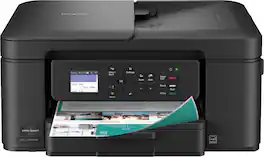
The Brother Work Smart 1360 Wireless All-in-One Refresh Subscription Eligible Inkjet Printer is the perfect choice for a reliable printer with robust efficiency-boosting features. With tools like automatic duplex (2-sided) printing, a 20-page single-sided automatic document feeder(1), and wireless(2) and Cloud connectivity(3) options available on the 1.8” color display, this multifunction printer helps you get your work done with simplicity and ease. Perfect for printing anything from to-do lists to business reports, this color inkjet printer outputs quality prints at fast speeds. Brother Page Gauge(4) monitors your ink usage so you know when you’re running low. When paired with the Brother Mobile Connect app(5), setup is quick and easy – plus, you’ll be able to print from virtually anywhere on your mobile device(6). Print Confidently with Brother Genuine LC501 Ink in your Brother Work Smart 1360 for reliable, consistent prints –it’s the only brand we recommend for your Brother printer.
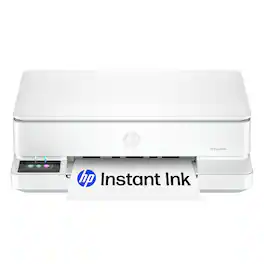
From America's most trusted printer brand, the HP Envy 6165e All-in-One delivers color printing, scanning and copying, plus 100-sheet paper capacity. It's AI-enabled to intuitively adapt to your workflow, with wireless and security features that keep your multifunction printer up to date and secure, and prints high-quality documents and photos every time with true-to-screen tech. This inkjet printer also lets you easily navigate print jobs with its intuitive color touchscreen.

The INKvestment 4355 Wireless Color Inkjet All-in-One Printer takes productivity to the next level. An easy-to-use 1.8” color display provides streamlined functionality, with the ability to connect directly to popular Cloud apps(1). Enhance your workflow with the included 150-sheet paper tray(2), 20-sheet single-sided automatic document feeder (ADF) (2), one-sheet manual feed slot(2), and automatic duplex (2-sided) printing. Get things done efficiently with advanced print speeds, Wi-Fi Direct, and multiple connectivity options. Plus, the convenience to complete your work wherever you go – you can print directly from your mobile device from virtually anywhere with the Brother Mobile Connect app(3). Produce beautiful prints in vibrant color and bold blacks at fast print speeds with LC506 Brother Genuine Ink cartridges – the only brand we recommend for your Brother printer.
| Pros for Brother - INKvestment 1365 Wireless Color All-in-One Inkjet Printer with Auto Duplex Print (MFC-J1365DW), Great for Home Offices - White | |||
|---|---|---|---|
| There were no pros for this product— | Print Quality, Setup Ease, Size, Connectivity, Noise Level | Print Quality, Connectivity, Overall Performance, Ease of Use, Setup | Print Quality, Setup Ease, Connectivity, Size, Paper Tray Capacity |
| Cons for Brother - INKvestment 1365 Wireless Color All-in-One Inkjet Printer with Auto Duplex Print (MFC-J1365DW), Great for Home Offices - White | |||
| There were no cons for this product— | There were no cons for this product— | Paper Tray Capacity | There were no cons for this product— |
Specs



Reviews
Customer Images
The vast majority of our reviews come from verified purchases. Reviews from customers may include My Best Buy members, employees, and Tech Insider Network members (as tagged). Select reviewers may receive discounted products, promotional considerations or entries into drawings for honest, helpful reviews.
- Rated 4 out of 5 stars
Good, but nothing really stands out
It’s an all in one inkjet printer with all the features you come to expect in an all in one printer these days. I suppose over a lower budget printer, you gain the 20 page automatic document scanning and auto-full duplex, but the rest of it just feels like everything you anticipate to be in a modern inkjet printer. The user interface of the physical buttons and their app, however, both feel very dated, but they work. The display is bright and clear enough to see what you need, like the directions through initial setup, but panning through rubber arrow buttons and OK just feels out of place for our current tech. Print quality is decent, but the copy quality is a bit rough by default. You can see how I scanned and printed their own adjustment sheet and how faded the colors came out, the banding in the grey and missing details. A little adjusting or black only can make a little difference. Print speed is listed as 16ppm black and 9 ppm color, but it all depends on what is on the page and does feel a bit slow when you are waiting for it to come out compared to other types of printers. This is fairly common for inkjet though. The initial ink cartridges do claim to have more ink than the typical start cartridges, but then they will keep pushing their Refresh EZ Print subscription services on you so that you can keep your ink stocked. Seems to be the way for all the printer makers these days. If you use your printer a lot, they do pan out to save you money on keeping ink in stock though. You can connect via 2.4 or 5Ghz WiFi, which I suppose is an improvement, as so many electronics only work with 2.4. So, you can move out of that crowded space and take advantage of better speeds. You can also connect via USB, cable not included. There is no Ethernet port if you prefer wired networks. Overall, it is a decent printer, nothing feels exceptional about it, but might have exactly the features you are looking for, like the document feeder and auto-duplex. There are just so many printers in this range and style that it really comes down to what you are exactly looking for.
This review is from Brother - INKvestment 1365 Wireless Color All-in-One Inkjet Printer with Auto Duplex Print (MFC-J1365DW), Great for Home Offices - White
Posted by DavidJr
- Rated 4 out of 5 stars
Good budget multifunction inkjet, clunky setup
This is a pretty good inkjet printer that delivers high quality color documents, but is a bit clunky to set up and has fairly cheap-feeling build quality. I set it up on a Windows 11 Dell desktop, and although I appreciated the ability to do so wirelessly from the Brother website, the process is very slow and clunky (despite a fast internet connection), and it failed the first time because it couldn’t detect the printer for some reason. Fortunately, it was able to detect the printer on the next attempt. There’s also a mobile app that can be used to set up and manage the printer, and setup can also be done via USB connection, but I didn’t test any of that. Printing is quiet and reasonably fast (9 ppm with standard color printing). The print quality is very good -- crisp, with vibrant colors. Installation and replacement of the ink cartridges is easy, with access on the front of the unit. Page yield is 500 per color cartridge, and 1200 if only using black. There’s an ink subscription option through Brother, but since I don’t anticipate using this as my main printer (I have a laser printer for that), I’ll just order replacement cartridges when needed. The paper tray defaults to standard Letter size, but can be expanded to Legal, which is a nice touch. It can’t print any wider than 8.5”, though, which is not unusual. The copy function works well, using either the flatbed or the automatic document feeder. There are separate buttons for black & white and color copies. The ADF works smoothly, and can hold up to 20 pages. Scanning also works well, using either Brother’s own software or the built-in Windows 11 Scan app. The control panel is operated using buttons only (no touchscreen), and the interface can be a bit confusing. But like all interfaces, I’m sure I’ll get used to it quickly. The printer itself is reasonably compact, and also fairly lightweight, so it’s good for small offices. Part of the reason it’s so light, though, is that the plastic feels a bit flimsy, and I can easily imagine some parts breaking easily (like the ink cartridge door or the flatbed lid). This is not too surprising given the price point, but it’s something to keep in mind. If klutzy people will be using the printer, you may want to consider a more solidly built unit. Overall, I would recommend this to anyone looking for a reasonably priced multifunction inkjet printer, with the caveat that setup may be a bit frustrating for the non-tech-savvy user. I have found that Brother printers are very reliable (my laser printer is a Brother as well), so I would expect the same with this one.
This review is from Brother - INKvestment 1365 Wireless Color All-in-One Inkjet Printer with Auto Duplex Print (MFC-J1365DW), Great for Home Offices - White
Posted by William C
- Rated 5 out of 5 stars
The little printer that does!
Looking for a printer these days can be a daunting job for a home office. Every big-name manufacturer advertises the latest and greatest new feature that we just can’t live without. But sometimes you just want a product that just works, while providing features that are useful and meaningful. I must admit that I have never really considered Brother for printers, always thinking that they were an entry level producer. Boy was I wrong! The INKvestment 1365 or model MFCJ1365DW is a right sized printer to fit in any space in your office or home. Its 1.8-inch LCD screen provides the proper amount of information for your print, scan and copying needs without overwhelming you with too much information. As far as the real estate it takes up in your home office the 1365 measures at 7.5” high, 15.5” wide and 13.5” deep. With a white body the 1365 doesn’t draw any undo attention to itself and blends nicely into its surroundings. It allows wireless printing from your computer and your mobile devices. The scanning bed measures 8.75 by 11.88 As far as the printing capacity is concerned, the 1365 can hold up to 50 pages of paper and can print 16 pages per minute in black and 9 pages per minute in color. The print quality in both black and white and color is stellar. Documents are printed clearly without any smudges. Color prints are bright and vibrant with very good color representation. Printing pictures really impressed me with their accuracy in color and details. For copying, the 1365 has a feeder that will hold 20 pages and can take single sided pages fed into the 1365 and produce double sided prints. For example, 20 individual pages in the feeder can output 10 double sided prints. For the scanning feature you need to download the Brother printer drivers on to your PC or load the Brother Printer app onto your mobile device. The scanning functions are controlled from there. The same feeder is also used for scanning multiple pages into your computer. The feeder moves each page smoothly through the scanning bed and out. Scanned documents display very clearly and so do pictures. There are two different versions of the Brother application, one for your PC and one for your mobile device. The PC version gives you basic Printing, Scanning tools and a link to an online for you to view more details on the 1365 and so on. The Mobile app provides much more information for the 1365 and functionality. Both versions of the app are clear and easy to use. All in all, this is the little printer that does! And what it does, it does very well. I would recommend it to anyone who is looking for an affordable printer that does what it says and does it very well.
This review is from Brother - INKvestment 1365 Wireless Color All-in-One Inkjet Printer with Auto Duplex Print (MFC-J1365DW), Great for Home Offices - White
Posted by Quincy0980