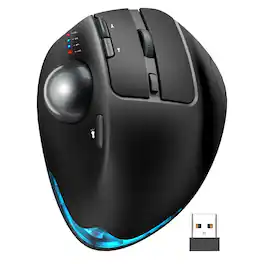
Cozy Serene - Wireless Mouse Rechargeable Trackball Computer Backlit Rollerball Thumb Laptop Mice - Wireless - Default
FREE shipping to
Related Item

Specifications
- Lighting TypeSingle colorConnection TypeWireless
- Key Specs
- Lighting Type: Single color
- Connection Type: Wireless
- General
- Brand: Cozy Serene
- Product Name: Wireless Mouse Rechargeable Trackball Computer Backlit Rollerball Thumb Laptop Mice
- Color: Default
- Features
- Mouse Type: Standard
- Lighting Type: Single color
- Performance
- Tracking Method: Optical (There are several types of computer mice, optical and laser being among the most common. Optical mice detect less detail and provide more precise and accurate movement. Laser mice detect more detail and can be used on a wider variety of surfaces, but are more sensitive to small movements.)
- Connectivity
- Connection Type: Wireless
- Operating System Compatibility: Android, Apple iOS, Linux, Mac, Windows
- Dimensions
- Product Height: 2.52 inches (The out of box height of the item. Height is measured as the vertical distance from the bottom of the item to the top as it would be primarily used or placed.)
- Product Length: 5.91 inches (The out of box length of the item. Length is measured as the longest dimension of the item.)
- Product Width: 4.29 inches (The out of box width of the item. Width is measured as the horizontal distance from one side of the item to the other as it would be primarily used or placed.)
- Product Weight: 0.79 grams (The out of box weight of the item.)
- Warranty
- Warranty - Parts: one-years Warranty
- Other
- UPC: 264147602033
Ergonomic design: You can choose the trackball mouse angle that suits you according to your needs, 0 and 18 . Proven: The 18 design is more in line with thedrooping wrist angle of sitting posture, especially for people who use computer mouse for a long time, giving you a more comfortable experiencePrecise thumb mouse:trackball mouse no longer needs to move the arm to control the cursor, but by turning the trackball, which will effectively reduce theand burden of the wrist and arm, and will not affect your efficiency even in a small spaceMulti-device wireless connection: Plug and play. This wireless mouse can connect to three devices at the same time viaand USB, and canfreely between PC, laptop and iPad with just one click - no delay, thereby improving work efficiency. Compatible with Windows, Android,PC laptops, desktops and other devicesRechargeable and backlight: Themouse has a built-in rechargeablewith longlife, allowing you to say goodbye to dry batteries. Thismouse also has a tail atmosphere light, which you can choose to turn on or off, and there are multiplelight modes for you to chooseAdjustable DPI, silent click: 5 DPI levels (800 1200 1600 2400 4800) allow you to choose the cursor sensitivity that you need, making tracking smoother and more precise. Our computer mouse reduces 90 noise, so you don't worry about disturbing others when you focus on workWarm Tips: If you are using a trackball mouse for the first time, it may take some time to getto its operation. We recommend that you spend 1-2 weeks to adapt, as many users find that this helps reduce theandon the wrist caused by long-term use of the mouse and improves comfort
- Wireless, Rechargeable, Silent, USB, Adjustable DPI: Wireless connectivity for clutter-free use. Rechargeable battery for extended usage. Silent operation for quiet environments. Adjustable DPI settings for precision control.
- Wireless, Rechargeable, Silent, USB, Adjustable DPI: Wireless connectivity for clutter-free use. Rechargeable battery for extended usage. Silent operation for quiet environments. Adjustable DPI settings for precision control.
Compare similar products
Ergonomic design: You can choose the trackball mouse angle that suits you according to your needs, 0 and 18 . Proven: The 18 design is more in line with thedrooping wrist angle of sitting posture, especially for people who use computer mouse for a long time, giving you a more comfortable experiencePrecise thumb mouse:trackball mouse no longer needs to move the arm to control the cursor, but by turning the trackball, which will effectively reduce theand burden of the wrist and arm, and will not affect your efficiency even in a small spaceMulti-device wireless connection: Plug and play. This wireless mouse can connect to three devices at the same time viaand USB, and canfreely between PC, laptop and iPad with just one click - no delay, thereby improving work efficiency. Compatible with Windows, Android,PC laptops, desktops and other devicesRechargeable and backlight: Themouse has a built-in rechargeablewith longlife, allowing you to say goodbye to dry batteries. Thismouse also has a tail atmosphere light, which you can choose to turn on or off, and there are multiplelight modes for you to chooseAdjustable DPI, silent click: 5 DPI levels (800 1200 1600 2400 4800) allow you to choose the cursor sensitivity that you need, making tracking smoother and more precise. Our computer mouse reduces 90 noise, so you don't worry about disturbing others when you focus on workWarm Tips: If you are using a trackball mouse for the first time, it may take some time to getto its operation. We recommend that you spend 1-2 weeks to adapt, as many users find that this helps reduce theandon the wrist caused by long-term use of the mouse and improves comfort

Desk life getting you down? Lift yourself up with Lift Vertical Ergonomic Mouse – a comfy and intuitive wireless mouse with quiet clicks crafted specially for small-to-medium hands. Available in right and left. Lift’s unique 57-degree angle elevates your wrist to give a feeling of relief — and sends a wave of comfort through the forearm and upper body. Scrolling feels second nature with SmartWheel, which easily shifts from precision to speed-scroll. Customize Lift ergo mouse using intuitive Logi Options+ Software.

Minimize movement and maximize comfort with the Logitech ERGO M575S wireless trackball mouse. Thumb control lets you move the cursor without moving your arm, while the sculpted ergonomic design fully supports your hand and keeps your forearm in a more natural position. This wireless ergonomic mouse has been developed by Logi Ergo Lab experts, user-tested and certified by ergonomists to give you 25% less muscle strain in your forearm . The smooth and responsive thumb control can be used anywhere – and since it doesn’t need to be moved, the ERGO M575S is perfect for tight setups and busy desks.

The MX Ergo S Plus is Logitech’s most advanced ergonomic trackball mouse yet, with a 20-degree tilt angle and a 10-degree detachable wedge, and precise thumb control - user-tested and certified by United States Ergonomics. The MX Ergo S wireless ergonomic mouse is sculpted to fit the palm of your hand while keeping it relaxed, and it tilts 20 to 30 degrees for 27% less muscle activity in the forearm, providing elevated comfort throughout your day. Work faster with 6 customizable buttons and a DPI button to effortlessly switch between speed and high-precision tracking. Now with 80% quieter clicks. For even more control that's tailored to your needs, assign time-saving shortcuts and Smart Actions using the Logi Options+ App. Connect your wireless mouse to 2 devices via Bluetooth or the included Logi Bolt receiver and switch between devices with a click of the Easy-Switch button.
| Pros for Cozy Serene - Wireless Mouse Rechargeable Trackball Computer Backlit Rollerball Thumb Laptop Mice - Wireless - Default | |||
|---|---|---|---|
| There were no pros for this product— | Ergonomics, Battery Life, Ease of use, Size, Bluetooth | Overall Performance, Ergonomics, Ease of Use, Connectivity, Noise Level | Overall Performance, Battery Life, Comfort, Accuracy, Click Sound |
| Cons for Cozy Serene - Wireless Mouse Rechargeable Trackball Computer Backlit Rollerball Thumb Laptop Mice - Wireless - Default | |||
| There were no cons for this product— | Wrist Pain, Click Noise, Price | There were no cons for this product— | There were no cons for this product— |
Specs
Reviews
This product doesn't have any reviews yet.