Everything for Back to School — and then someShop now

Main Content
In Curved Monitors

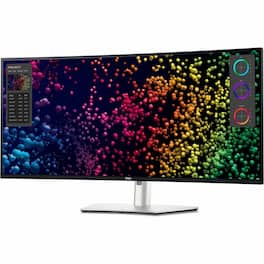
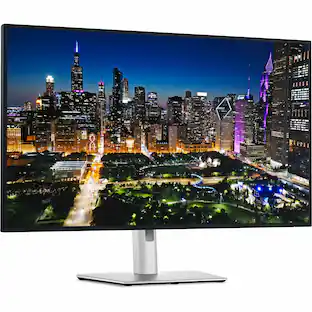
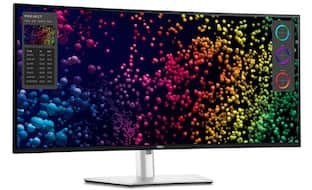
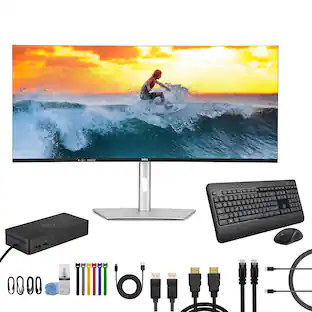
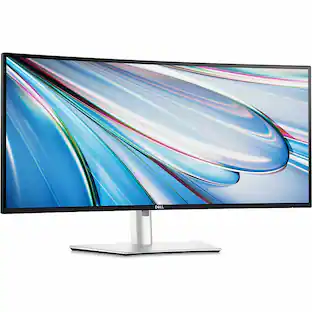
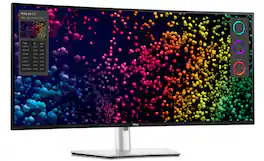
Dell - UltraSharp 39.7" IPS LED Curved 120Hz Monitor with HDR (USB, HDMI) - Black, Silver, Dual Color

Model: DELLU4025QW
SKU: 12564217
Sold & shipped by

Customers are saying

Customers express satisfaction with the product's excellent color accuracy and overall picture quality. They also appreciate its robust connectivity options, high resolution, and smooth 120Hz refresh rate.

Generated by AI based on customer reviews.

Highlights

Features
  • Immersive experience

    Completely immerse yourself with the 40" curved panel which is designed for comfort, productivity and style

  • VESA DisplayHDR 600

    This monitor is compatible with VESA DisplayHDR 600 high dynamic range

  • Viewing angle

    This stylish LED Monitor offers 178/178 degree viewing angles for some great viewing experience no matter where and how you look at it

  • VESA compatible

    VESA mount compatibility allows you to mount the display on a wall or with a stand depending on your specific needs

  • Brightness

    View your content easily in well-lit areas with 600 Nit brightness

  • Picture-in-Picture

    Picture-in-Picture (PiP) mode enables you to view content from multiple inputs simultaneously

  • Thunderbolt

    Thunderbolt I/O technology lets you move data between your devices and your computer with unprecedented speed

See all features
Specifications
  • Refresh Rate
    120Hz
    Maximum Resolution
    5120 x 2160
    Response Time
    5 milliseconds
    Panel Type
    IPS
    Synchronization Technology
    Not Applicable
Sponsored

Reviews

Rating 4.9 out of 5 stars with 23 reviews

5 star rating. 21 reviews4 star rating. 1 review3 star rating. 1 review
96% would recommend to a friend
Customers are sayingCustomers express satisfaction with the product's excellent color accuracy and overall picture quality. They also appreciate its robust connectivity options, high resolution, and smooth 120Hz refresh rate.
This summary was generated by AI based on customer reviews.
  • Color Accuracy (12)
  • Connectivity (11)
  • Resolution (4)
  • Refresh Rate (3)

Customer Images

The vast majority of our reviews come from verified purchases. Reviews from customers may include My Best Buy members, employees, and Tech Insider Network members (as tagged). Select reviewers may receive discounted products, promotional considerations or entries into drawings for honest, helpful reviews.

  • Rated 5 out of 5 stars

    WOW!!! THE BEST MONITOR ON THE MARKET PERIOD!

    The Dell 4025 40” 5k2k monitor is a super high resolution 5120x2160 monitor with a 120hz refresh rate and miniLED backlight so colors are borderline just as vibrant as OLED monitors, Blacks are truly BLACK, and although being the best monitor ever made for productivity, gaming on it is a one of a kind experience, because this is literally the only monitor on the market with such a high resolution that also has a 120 hertz refresh rate so gaming is smooth as the finest OLED gaming monitors available, but this monitor is higher resolution that any other monitor on the market short of the $6k resolution Apple ProRes monitor that costs over $6000, and the Dell 8k monitor that has higher resolution, but neither of these two aforementioned monitors have a high enough refresh rate to hold a candle to the smoothness offered by this monitor’s gaming prowess! You can’t go wrong with this monitor… Yes it is expensive, but it is WELL WORRH IT, and I could not be more pleased with my purchase! If you’re looking for the best of the best for Productivity but enjoy a little gaming on the side (in my case, Microsoft Flight Simulator is my Vice, then you owe it to yourself to give this monitor a try. I guarantee you won’t be disappointed. It is simply the best monitor currently on the market, PERIOD… Oh and I completely forgot to mention that it comes complete with a full fledged, full featured thunderbolt 4/USB/USB-C dock built in with at least 12 ports, a feature set that would cost an extra $300-$400 on its own as a standalone dock if it wasn’t built into this monitor, including 140W charging over USB-C/Thunderbolt, enough power to charge a brand new MacBook Pro at FULL SPEED! HIGHLY RECOMMENDED!!!!!!!!!!!!!

    This review is from Dell - UltraSharp 39.7" IPS LED Curved 120Hz Monitor with HDR (USB, HDMI) - Black, Silver, Dual Color

    Posted by Berndog

  • Rated 5 out of 5 stars

    Excellent upgrade, sharp image, great port options

    This new 5K monitor is a big difference coming from my Ultra Wide 1080 P monitor that I’ve had for 10 years. The image screen is very clear so it makes it easier to read so my eyes don’t get as tired, doing productivity work and all the port options and built-in KVM switch, make it easy to switch between different computers, and use the same keyboard and mouse.

    This review is from Dell - UltraSharp 39.7" IPS LED Curved 120Hz Monitor with HDR (USB, HDMI) - Black, Silver, Dual Color

    Posted by DanielS

  • Rated 5 out of 5 stars

    Great monitor for work

    I use this monitor in the office and it works excellently. Compared to a standard HP monitor it presents text and images much more clearly. I also notice that my eyes are less fatigued at the end of the day when using this monitor. I highly recommend this monitor in any work related setting.

    This review is from Dell - UltraSharp 39.7" IPS LED Curved 120Hz Monitor with HDR (USB, HDMI) - Black, Silver, Dual Color

    Posted by Anonymous

  • Rated 5 out of 5 stars

    Great monitor, worth the extra money!

    I bought this monitor to replace a 38" LG Ultrawide display that lasted less than 4-months. Needless to say, I am very happy that the LG broke as it gave me an opportunity to upgrade to this Dell 5K2K monitor. I use this with my MacBook Pro M3 Pro and it delivers all the goods. 120Hz refresh is great, colors are amazing, adjustability - height, tilt, pivot, are great and so is cord management. I love the fact that this becomes a defacto dock if you use the Thunderbolt 4 connectivity. I have webcam, 2.5Gb ethernet and speakers all hooked up to it and got rid of the external dock I used to use and reduced the clutter on my desk. The pop down usb hub on the bottom left of the monitor is a godsend when you need to juice up the wireless keyboard or attach external storage. Now, here are some not-so-goods: The monitor is a bit thick so mounting certain webcams and being able to tilt to position them properly may be difficult. The joy con for adjusting the monitor's settings is at the bottom right corner, and takes some getting used to. I wished you could select a default to come up when you first use it. I would set it to volume control. But it remembers the last setting you adjusted, so sometimes just to adjust the volume of its built-in speakers can be cumbersome. Although the monitor does have an antiglare coating, it is not quite as effective as LGs. As such, if you are in a bright room, glare could become an issue.

    This review is from Dell - UltraSharp 39.7" IPS LED Curved 120Hz Monitor with HDR (USB, HDMI) - Black, Silver, Dual Color

    Posted by JoeDaMan

  • Rated 5 out of 5 stars

    Awesome Productivity across macOS and Windows

    The Dell UltraSharp 40 Curved Thunderbolt™ Hub Monitor (U4025QW) has significantly enhanced my productivity across both Windows and macOS platforms. Its expansive 40-inch curved display with a 5K2K resolution (5120 x 2160) provides an ample workspace, allowing me to manage multiple applications and large datasets effortlessly. The built-in Thunderbolt™ hub simplifies connectivity, enabling seamless integration with various devices and peripherals. The image quality is exceptional, thanks to the IPS Black panel technology, which delivers high contrast and vibrant colors. Text appears sharp, and visuals are rendered with impressive clarity, making it ideal for tasks that require detailed image analysis.  In terms of features, the monitor boasts a 120Hz refresh rate, ensuring smooth transitions and reducing motion blur during fast-paced activities. The array of connectivity options, including multiple USB ports and Thunderbolt™ 4, caters to a wide range of devices, enhancing the overall user experience.  While the monitor is on the higher end of the price spectrum, its performance and feature set justify the investment for professionals seeking a top-tier display solution. Overall, the Dell UltraSharp 40 Curved Thunderbolt™ Hub Monitor is a remarkable tool for enhancing productivity and delivering superior image quality across different operating systems.

    This review is from Dell - UltraSharp 39.7" IPS LED Curved 120Hz Monitor with HDR (USB, HDMI) - Black, Silver, Dual Color

    Posted by SODDY

Compare similar products

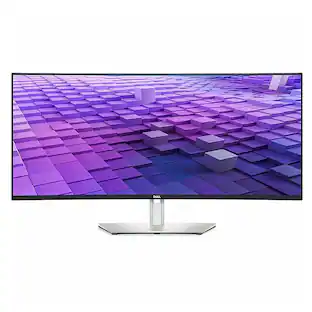
Dell - UltraSharp 39.7" IPS LED Curved 120Hz Monitor with HDR (USB, HDMI) - Black, Silver, Dual Color
4.9(23)

Transform the way you work with the Dell UltraSharp 40 Curved Thunderbolt Hub Monitor. This impressive 40" 5K curved monitor features a 120Hz refresh rate for an expansive field of view with smooth and responsive visuals. See true-to-life color with 99% DCI-P3/Display P3 color coverage and get a wide viewing angle with IPS Black panel technology that delivers deeper blacks with 2000:1 contrast ratio. Experience fast connectivity and image transmission with this Thunderbolt 4 hub monitor that delivers up to 140W power delivery (PD) through a single cable. Multitask effortlessly with Internal multistream transport (iMST). Partition your display as if there were two 2560x2160 physical monitors instead of one. No external software or DisplayPort splitter needed. New Network KVM feature on Dell Display Manager allows you to work across two PCs for improved productivity.
Dell - UltraSharp 37.5" IPS LED Curved 60Hz Monitor (VGA, USB, HDMI, DVI) - Black/Silver
5.0(6)

Introducing our first 37.5" WQHD+ monitor with IPS Black panel technology. The curved screen improves field of view while reducing reflection and eye fatigue to give you a comfortable, immersive experience. Admire the extraordinary world of your work through vibrant colours and deep blacks with this monitor that offers IPS Black panel technology with 2000:1 contrast ratio and 100% sRGB, 100% REC.709, 98% DCI-P3 and 98% Display P3 colour coverage. Experience enhanced eye comfort with ComfortView Plus, an always-on, built-in low blue light screen that reduces potentially harmful blue light emissions without compromising colour. Streamline your workflow with a single cable USB-C that transmits data and video signals while delivering up to 90W of power. Connect to a wide variety of devices with super speed USB-A and USB-Cports and expand connectivity with DP 1.4, HDMI 2.1 ports. Get a fast and stable connection with up to 2.5GbE provided by RJ45 with PXE boot, Mac Address pass-thru and Wake on Lan features. RJ45 lock feature gives you the flexibility to lock the wired Ethernet to a chosen PC while continuing to work from dual PC inputs. Conveniently-located USB-C (up to 15W power) and USB-A quick access ports make it easy to plug in external devices, and built-in dual 9W speakers save you the hassle altogether.

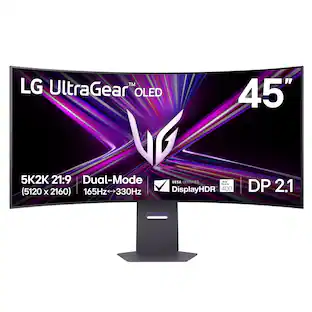
LG - UltraGear 45" OLED Dual Mode (5K2K WUHD 165Hz, WFHD 330Hz) 0.03ms G-Sync/FreeSync Premium Pro Gaming Monitor - Black

Unleash unparalleled gaming prowess with the world's first 5K2K WUHD (5120 x 2160) resolution OLED gaming monitor¹. This 45" curved UltraGear monitor elevates your gameplay experience with Dual Mode technology. Dual Mode lets a player switch between breathtaking UHD visuals at up to 165Hz, or Full HD at a blistering 330Hz for ultra-responsive gameplay in FPS, MOBA, or racing titles²—all at the touch of a hotkey. Immerse yourself in up to 1300 nits brightness in UltraGear OLED brilliance, boasting up to 98.5% DCI-P3 color coverage, a staggering 1.5M:1 contrast ratio, and DisplayHDR True Black 400. The dramatic 800R curve and 21:9 aspect ratio offer more vertical screen space than a 49” 32:9 display, pulling you deeper into the action like never before. A sleek, slim design offers adjustable height, tilt, and swivel controls for your perfect view, complemented by RGB backlighting to set the mood for your battlestation. Equipped with DisplayPort 2.1, HDMI 2.1 ports, and USB Type-C with 65W power delivery, plus NVIDIA G-SYNC Compatible and AMD FreeSync Premium Pro support, you’ll enjoy smooth, tear-free gaming at high refresh rates. UltraGear's 2-year limited warranty and OLED Care tools, give you OLED gaming peace of mind as well.

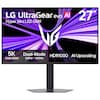
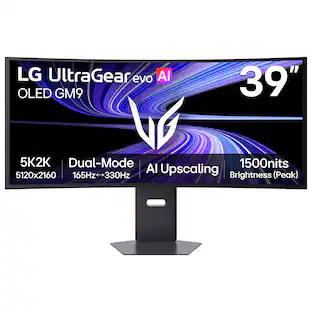
LG - UltraGear evo GX9 39" 5K2K OLED 165Hz 0.03ms G-SYNC FreeSync Premium Pro Gaming Monitor with DisplayHDR TRUE 500 - Black
4.8(12)

With UltraGear evo, experience the sweet spot of ultrawide OLED gaming with this 39-inch 5K2K (5120×2160) curved display. Designed in a wide 21:9 format with a 1500R curve, it expands your field of view while delivering crisp detail across a dense 143 PPI pixel canvas—more than 30% more pixels than a 32-inch 4K screen. 4th Gen Primary RGB Tandem OLED technology reaches up to 335 nits typical brightness and enhances contrast, color precision, and visual depth, supported by VESA DisplayHDR True Black 500 and UL-verified Perfect Black¹, Perfect Color, and Perfect Reproduction certifications. With Dual-Mode, switch between 5K2K at 165Hz for cinematic AAA gameplay or Wide Full HD at 330Hz² for ultra-responsive competitive play. A near-instant 0.03ms (GtG) response time with NVIDIA G-SYNC compatibility³ and AMD FreeSync Premium Pro keeps motion smooth and clear. UltraGear evo’s built-in processor powers AI Upscaling⁴ to enhance content toward the display’s 5K2K resolution—helping games and video look sharper without requiring a GPU upgrade. Modern connectivity—including DisplayPort 2.1⁵ (UHBR20), USB-C with 90W power delivery, and HDMI 2.1—supports high-bandwidth gaming setups and next-gen consoles, making this curved OLED gaming monitor the ideal intersection of size, speed, and visual precision.

Pros for Dell - UltraSharp 39.7" IPS LED Curved 120Hz Monitor with HDR (USB, HDMI) - Black, Silver, Dual Color
Connectivity, Color Accuracy, Resolution, Refresh RateConnectivity, Color QualityThere were no pros for this productOLED Quality

Specs

Questions & Answers
  • I have very limited vertical space- does the stand adjust to as low as 2 inches ?

    No, the monitor stand allows vertical adjustment, but the lowest height is approximately 4.5 to 5 inches from the desk to the bottom edge of the screen.

    Answered by YourDellTeam
    YourDellTeam response
  • What is the weight of the monitor?

    The product weight is 18.41 pounds.

    This question and answer was generated by AI based on customer and product data.
  • What is the maximum resolution of the monitor?

    The maximum resolution of the monitor is 5120 x 2160.

    This question and answer was generated by AI based on customer and product data.
  • How many HDMI inputs does the monitor have?

    This monitor has one HDMI input.

    This question and answer was generated by AI based on customer and product data.
  • Can the monitor be wall mounted?

    This monitor can be wall mounted.

    This question and answer was generated by AI based on customer and product data.
Ask a question
No content

Customers often buy these together

Sponsored

Finance Options

My Best Buy® Credit Card
Choose a benefit:Or
Lease to own

Finance Options

My Best Buy® Credit Card
Choose a benefit:Or
Lease to own