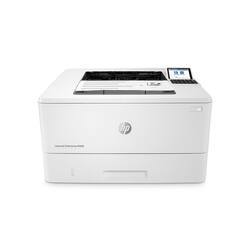
HP - LaserJet Enterprise M406dn Black-and- Laser Printer - White
- Key Specs
- Networking: Wired
- ENERGY STAR Certified: true (Devices carrying the ENERGY STAR service mark, such as computer products and peripherals, kitchen appliances, and other products, generally use 20% to 30% less energy than required by federal standards.)
- Printer Type: Printer
- Duty Cycle: Up to 100,000 (The maximum number of pages per month that the device can produce without failing, as specified by the manufacturer.)
- ISO Mono Print Speed: 40 pages per minute (The number of black ink (grayscale) pages able to be printed per minute in the device's default single-side mode, as tested by the International Standards Organization (ISO).)
- Monochromatic/Color: Monochromatic
- General
- Brand: HP
- Model Number: M406dn
- Product Name: LaserJet Enterprise M406dn Black-and-White Laser Printer
- Color: White
- Display Screen: true
- Display Screen Size: 2.7 inches
- Dimensions
- Product Height: 9.5 inches (The out of box height of the item. Height is measured as the vertical distance from the bottom of the item to the top as it would be primarily used or placed.)
- Product Width: 15 inches (The out of box width of the item. Width is measured as the horizontal distance from one side of the item to the other as it would be primarily used or placed.)
- Product Depth: 30.8 inches (The out of box depth of the item. Depth is measured as the distance from the front of the item to the back as it would be primarily used or placed.)
- Product Weight: 18.7 pounds (The out of box weight of the item.)
- Features
- Automatic Document Feeder: false
- Photo Printing: false
- Automatic Reduction/Enlargement: false
- Touch Screen: false (Touch-screen devices make navigating more intuitive. Using a touch-screen display, you can do things such as tap to select, hold and drag to move items, swipe to scroll, and pinch to zoom.)
- Automatic Two-Sided Printing: true
- Wide Format Printing: false (Machines with this function support printing on media with widths between 18 and 100 inches, such as posters, banners, canvases, and more.)
- Wide Format Scanning: false
- Certifications Listings & Approvals
- EPEAT Qualified: true (The Electronic Product Environmental Assessment Tool (EPEAT) was designed to provide an environmental assessment tool for purchasers. In order to qualify for EPEAT, a product must meet all 23 required criteria.)
- EPEAT Level: Silver (The Electronic Product Environmental Assessment Tool (EPEAT) was designed to provide an environmental assessment tool for purchasers. In order to qualify for EPEAT, a product must meet all 23 required criteria. Products are rated Bronze, Silver or Gold based on how many of 28 optional criteria they meet (below 50%, 50%, 75%).)
- Ink
- Compatible Cartridges: HP 58A Black LaserJet Cartridge, CF258A HP 58X High Yield Black LaserJet Cartridge
- Ink Subscription Service Available: false (The printer monitors ink usage and alerts the subscription provider when levels are low. A purchased subscription provides refills of ink based on usage.)
- Paper Info
- Paper Feeder: Tray loader
- Paper Handling: Paper (plain, EcoEFFICIENT, light, heavy, bond, colored, letterhead, preprinted, prepunched, recycled, rough); envelopes; labels
- Supported Paper Sizes: letter, legal, oficio, executive, statement, 4 x 6, 3 x 5, 5 x 7, 5 x 8, postcard (JIS), double postcard (JIS), 8.5 x 13, envelope (commercial No. 9, No. 10, Monarch); Custom: 3 x 5 to 8.5 x 14 in
- Tray Capacity: 700
- Media Weight (Maximum): 124 grams per square meter
- Performance
- Approximate Page Yield (Black): 3000
- Printer Resolution (Black): Up to 1200 x 1200 (Refers to the number of pixels/dots, both horizontally and vertically, of the image produced by the printer in black ink. Generally, the higher the resolution, the sharper and cleaner the produced image.)
- Output Tray Capacity: 150
- First Page Out Time: 6 seconds (The time it takes the printer to print and deliver the first page in the output tray. May depend on the complexity of the copy being printed.)
- Other
- UPC: 193905206018
Combine strong security, enhanced productivity and sustainability with the HP LaserJet Enterprise M406dn Printer. This black and white laser printer continually monitors memory activity to detect and stop attacks in real time, and automatically checks firmware during startup. With print speeds up to 42 ppm and first page out as fast as 6.3 seconds, this entry-level enterprise printer empowers your team to complete tasks quickly. Save paper with automatic two-sided printing and help reduce wasted supplies with HP Roam for Business. Protect your monochrome printer and produce sharp text, bold blacks and crisp graphics with Original HP toner cartridges with JetIntelligence.
- Easy to use, simple to manage: Print quickly and easily with the entry-level HP LaserJet Enterprise M406dn Printer, a laser printer with speeds up to 42 ppm and dynamic security
- Enhanced productivity to empower work teams: Give workgroups what they need to succeed with HP and third-party solutions, card reader support, and the ability to print directly from the 2.7" color display
- Build business efficiency: HP FutureSmart firmware can be updated with the latest features to optimize your investment for years to come
- The world's most secure printer: Outgoing connections are inspected to stop suspicious requests and thwart malware
- Automatic 2-sided printing: Speed through tasks and save paper by printing two-sided documents
- Sustainability is smart business: Reduce wasted paper and toner by only printing jobs that are truly needed, using HP Roam for Business
- Print cartridges you can trust: Avoid reprints, wasted supplies and service calls by using Original HP 58A/58X cartridges designed for your printer
Whats Included
- HP LaserJet Enterprise M406dn printer
- HP Black Original LaserJet Toner Cartridge (~3,000 pages)
- Getting started Guide
- 1 Power cord
Product Manuals
A: Hello, Sue. This HP LaserJet Enterprise M406dn printer can hold up to 10 envelopes at a time. An envelope feeder is not available for this printer.
A: undefined
Q: Does this printer use micr ink so that we can print Quick Book checks?
A: Yes. The printer can use either the 58A or high-capacty 58X toner, and there are MICR toners availble.
A: Unfortuantely, it is not wireless, so you'll need a USB cable to connect to a computer. Alternatively, it has a Ethernet port on the back and you can connect it to that so it's available on your network if you have one.
Q: Is this printer WiFi enabled
A: It doesn't ship with wireless capability. However, there is an accessory that you can buy that will let you add WiFi to the printer.
Q: Does this printer scan documents?
A: Unfortunately, it does not have a built-in scanner.
A: Thanks for your question. Yes, if your software supports it the printer can do this. You would need to load the letter and legal papers in different trays, and set the paper type to letter or legal as required. When you print, you would have the printer auto select the tray(by paper size).
A: Hi Jamin, thank you for the question. You would use HP smart application to install the drivers for the HP LaserJet Enterprise M406dn printer.














