JLab - Epic Wireless Mouse - Wireless - Black
About this product
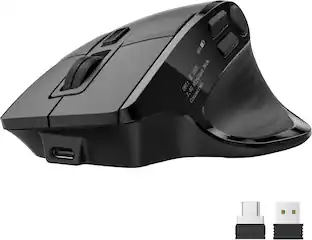
The Epic Wireless Bluetooth Mouse gives you the ultimate pro-level performance whether you’re crunching numbers, creating brilliant designs, or owning your opponents. Serious functionality and a sleek design make it an epic addition to any office setup. With the JLab Work App, customize your button functions and make your Epic Wireless Mouse truly yours.
Features
Connect Via Bluetooth Or USB
The Epic Wireless Mouse can be paired with up to 3 independent devices. You can pair with nearly any type of device using Bluetooth 5.2, or USB. We made it super easy for you to switch between saved devices with the push of a button.
Ergonomic Full-Size Mouse
Through our jlab Work App, you can program specific buttons to fit how you like to use your favorite applications. As a real-world example: copy your most used Excel formulas and paste it with a simple click of a button.
4+ Months Battery Life
Who wants to go digging around looking for batteries? We sure don’t. The Epic Wireless Mouse has a convenient rechargeable battery so you don’t ever have to skip a beat. And it’s better for the environment, with less waste.
Quiet Clicks & 9 Buttons/OLED Display
We’re familiar with the looks you get from your WFH colleagues when clicking noises get out of hand, so we've designed our mice with silent buttons so you can click away. With 6 customizable buttons for pro-level performance and an OLED display, this mouse defines the word: Epic.
Compatible With Windows, Macos And Chrome OS
Recommended operating systems: Windows 10 or later, macos 10.15 or later , Chrome OS , Works With Surface
Customizable
And when we’re talking buttons – we mean nine buttons that you can customize to crop, paste code, crunch formulas – whatever you need to get pro-level performance
Ease Of Use
Quick, real time access to battery life, DPI settings and device connection options. Ability to access hardware custom controls with no app required. You’re a wizard of efficiency and you’ve got the mouse to prove it
Silent Buttons
That’s why we design all of our mice with silent buttons so you can click away without raising any eyebrows (or ears)
100% Recyclable Packaging
JLab was the first major audio brand to have fully recyclable packages when we announced it in 2019. And fully recyclable is a big deal: This means after you open your product, you can put the box directly into the recycling bin and every component of it is recyclable. We looked at every detail to make it 100% recyclable.
Specifications
- Maximum Sensitivity2400 dots per inchNumber of Buttons (Total)9Connection TypeWireless
Reviews
Rating 4.3 out of 5 stars with 171 reviews
Customer Images
The vast majority of our reviews come from verified purchases. Reviews from customers may include My Best Buy members, employees, and Tech Insider Network members (as tagged). Select reviewers may receive discounted products, promotional considerations or entries into drawings for honest, helpful reviews.





Compare similar products

The Epic Wireless Bluetooth Mouse gives you the ultimate pro-level performance whether you’re crunching numbers, creating brilliant designs, or owning your opponents. Serious functionality and a sleek design make it an epic addition to any office setup. With the JLab Work App, customize your button functions and make your Epic Wireless Mouse truly yours.
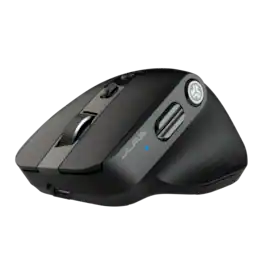
The Epic Mouse 2 delivers pro-level performance, increasing productivity with serious functionality. With its Infinity + Tilt scroll spreadsheets will beg for mercy, creative software will bend to your will, and lengthy websites will be a breeze. Brilliantly engineered with an ergonomic and silent click eight-button design, it’s an epic addition to any work setup. Leverage JLab Work app to customize button function and save up to three user profiles so switching is as easy as clicking send.

The JBuds Wireless Bluetooth Mouse offers full-sized functionality with a personalized approach. With seven buttons and a comfortable feel, you have everything you need to reach WFH greatness and you can save up to three user profiles. Switching between your favorite functions.

The JBuds Ergonomic Mouse offers blissful comfort with a personalized set-up for your favorite functions and tasks. With seven buttons, you have everything you need to reach working-from-home greatness, and everything you want to play your game, your way. The vertical design provides a natural angle for your wrist and hand, so switching between your favorite functions and your top devices is effortless.
| Pros for JLab - Epic Wireless Mouse - Wireless - Black | |||
|---|---|---|---|
| There were no pros for this product— | Overall Performance, Ergonomics, Battery Life, Button Functionality, Connectivity | Battery Life, Overall Performance, Ergonomics, Ease of use, Connectivity | Ergonomics, Battery Life, Ease of use, Overall Performance, Button Functionality |
| Cons for JLab - Epic Wireless Mouse - Wireless - Black | |||
| There were no cons for this product— | There were no cons for this product— | Click Noise, Scroll Wheel, Lag, Charging | Wrist Pain |
Specs
Customers often buy these together
Computer Keyboards
![esc ~ ! 1 tab caps lock shift ctrl F2 Fl # 2 3 Q W A S Z start opt L F3 $ 4 E D X alt cmd3 ) FS F4 A % 5 6 R T F G V C logi 44 HI & F9 FID FB F7 F6 * ) - - & 0 8 9 7 O P U I Y K L H J > < N M 1 B PM + = { [ : I ; ? I alt cmd D 2 4 300 3 1 F12 . * page I insert home up clear backspace 8 9 + 7 page A pg up end down home } I delete ] / 6 4 5 4 enter 2 3 enter 1 dn Pg end shift = 0 del ins etrl fn opt](https://pisces.bbystatic.com/image2/BestBuy_US/images/products/6539/6539505_sd.jpg;maxHeight=232;maxWidth=233?format=webp)
Logitech - MX Keys S Universal Full-size Wireless Scissor Keyboard for PC and Mac with Backlit keys - Black
Top Deal$119.99The price was $129.99


![Esc F1 F2 F3 F4 F5 F6 F7 F8 F9 F10 F11 F12 Print Screen Scroll Lock Pause Break 1 2 3 4 5 6 7 8 9 0 - + = Backspace Insert Home H Page Up A Num Look 1 I Tab Q W E R T Y U I o P { [ } ] I I Delete End IN Page Down 7 Home 8 9 Pg Up Caps A Lock A S D F G H J K L ; : DE g Enter 4 5 6 Shift Z X C V N M < > ? I Shift 1 End 2 3 Pp Dn Enter Ctrl Alt Alt Ctrl 0 Ins Del](https://pisces.bbystatic.com/image2/BestBuy_US/images/products/a588d446-5678-40ae-86b8-1f15e0026e66.jpg;maxHeight=232;maxWidth=233?format=webp)





![The text on the image reads:
888 DD DI DD 4 DSC i F2 F3 4 FS T6 ET 1. 1N IN F.. 11 1.. 114 1n F1 F12 118 in9 - a ee 1 8F 2 3 $ 4 % 5 A 6 & 7 . 8 I 9 I 0 ee I + = delete fn home page up clear - / + tab Q W E R T Y U I 0 P { [ ] ] | I delete end page down 7 8 9 ee caps lock A S D F G H J K L : I - return 4 5 6 + shift Z X C V N M < F > ? / shift a 1 2 3 control option 2 command 3 command option control Y - 0 enter
After grouping and correcting the text, it reads:
888 DD DI DD 4 DSC i F2 F3 4 FS T6 ET 1. 1N IN F.. 11 1.. 114 1n F1 F12 118 in9 - a ee 1 8F 2 3 $ 4 % 5 A 6 & 7 . 8 I 9 I 0 ee I + = delete fn home page up clear - / + tab Q W E R T Y U I 0 P { [ ] ] | I delete end page down 7 8 9 ee caps lock A S D F G H J K L : I - return 4 5 6 + shift Z X C V N M < F > ? / shift a 1 2 3 control option 2 command 3 command option control Y - 0 enter](https://pisces.bbystatic.com/image2/BestBuy_US/images/products/f4059d3a-0c2a-46ef-bcfd-4e11b9b26d5d.jpg;maxHeight=232;maxWidth=233?format=webp)






Customers ultimately bought

Explore tech essentials Sponsored
Razer Basilisk V3 Pro 35K Optical Gaming Mouse with HyperScroll Tilt Wheel
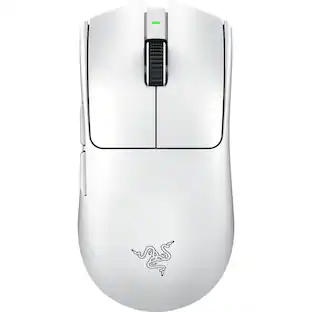
$129.99The price was $159.99Razer Viper V3 Pro Lightweight Optical Gaming Mouse with 95 Hour Battery Life - 8k Polling Rate
$129.99The price was $159.99



Discover related products
Acer USB C Docking Station With 2 HDMI, 9-IN-1 Docking Hub with USB A&C 3.0, SD/Micro SD, 100W Charging
$40.99The price was $47.99Acer USB C to HDMI Cable for Home Office 6.6FT (4K@60Hz), High-Speed Type C to HDMI 2.0 Braided Cord
$12.99The price was $13.99Epson EcoTank ET-2988 Wireless All-in-One Color Supertank Inkjet Printer
$149.99The price was $169.99AGPtek 8 in 1 External CD/DVD Drive for Laptop, USB 3.0 Ultra Slim Portable CD Burner with 4 USB Ports
$31.99The price was $32.99













Keep exploring
GravaStar Mercury X Pro Wireless 8K Hz Gaming Mouse with 32000 DPI and 49g Magnesium Alloy Frame
$139.95The price was $187.95