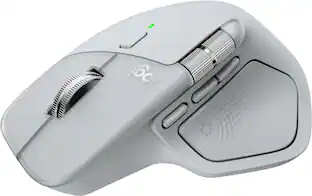
Logitech - MX Master 4 Creator Edition, Ergonomic Wireless Mouse with Advanced Performance Haptic Feedback - Wireless - Red
Reviews coming soon
About this product
The MX Master 4 Creator Edition makes its official debut as a physical canvas for those who shape the digital world. Crafted as a quiet nod to the designers, editors, and visual thinkers behind the screen, this edition translates the rituals of the studio directly onto the shell. Every millimeter holds a hidden homage to visual craft—from alignment crosshairs and center lines that mirror precision grids, to delicate Bézier nodes and timeline stamps marking shared moments in creative history. It’s a wearable draft of the creator’s native language, designed to honor the artboard-inspired instincts and obsessive attention to detail that prove creativity has no boundaries.
Features
Precision you can feel with the Haptic Sense Panel
Customizable (1) haptic feedback on specific actions, shortcuts, notifications enhancing productivity on this wireless Bluetooth mouse
Effortlessly access favorite tools with Actions Ring (2) on this MX Series mouse
A dynamic, customizable overlay adapts to each app, placing most used filters, adjustments, and shortcuts at your cursor
Scroll 1,000 lines per second and stop on a pixel with the MagSpeed scroll wheel
Logitech’s fastest (3), quietest, and most precise (4) scrolling experience
Enjoy 2X more powerful connectivity (7) with a USB-C dongle, advanced radio chip, and optimized antenna for faster, stronger, reliable performance
Or use Bluetooth for more versatility
Ergonomic mouse designed for comfort
MX Master 4 keeps you in flow with a natural tilt, intuitive buttons, and a thumb scroll wheel that reduces hand stress for fluid navigation
Quiet Clicks on MX Master 4
Reduce noise and distractions, offering a soft, satisfying feel with 90% less click noise (8)—perfect for focused workflows
Get a complimentary 1-month Adobe Creative Cloud subscription with your purchase of MX Master 4
Compatible with Googlebook laptops
Unlock the speed, precision and ergonomic comfort needed to power through your heaviest workflows
(1) Requires LogiOptions+ app, available for Windows and macOS. Haptic feedback panel customization is not supported on Googlebook laptops.
(2) Logitech Ergo Lab study (2025) with 37 MX Master mouse users tested across 8 desktop actions. Results may vary depending on assigned shortcuts. Limited Logi Options+ features available for Googlebook laptops (requires active Gemini AI features). Actions Ring customization and plugins not supported on Googlebook laptops
(3) Compared to Logitech Master 2S mouse with Logitech Options installed and Smooth scrolling enabled
(4) Compared to regular Logitech mouse without an electromagnetic scroll wheel
(7) Compared to MX Master 3S
(8) Compared to MX Master 3, MX Master 4 has 90% less Sound Power Level left and right click.
Specifications
- Maximum Sensitivity8000 dots per inchNumber of Buttons (Total)8Connection TypeWireless
Reviews
This product doesn't have any reviews yet.





Compare similar products
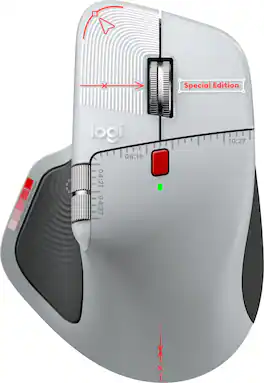
The MX Master 4 Creator Edition makes its official debut as a physical canvas for those who shape the digital world. Crafted as a quiet nod to the designers, editors, and visual thinkers behind the screen, this edition translates the rituals of the studio directly onto the shell. Every millimeter holds a hidden homage to visual craft—from alignment crosshairs and center lines that mirror precision grids, to delicate Bézier nodes and timeline stamps marking shared moments in creative history. It’s a wearable draft of the creator’s native language, designed to honor the artboard-inspired instincts and obsessive attention to detail that prove creativity has no boundaries.
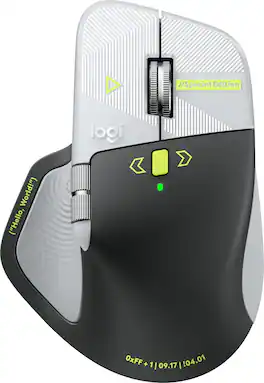
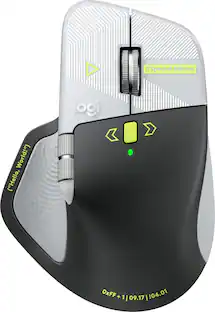
In honor of those who build our world line by line, the MX Master 4 Developer Edition transforms the tools of the trade into a wearable canvas. From syntax prompts and circuit traces to Easter eggs celebrating computing lore and open-source history, every detail holds meaning. Styled with terminal authenticity, it’s a living tribute to the craft of coding.

The ProArt Mouse MD301 features an ergonomic design with six programmable buttons, 8000 DPI for precise tracking, and tri-mode connectivity to connect up to five devices. The MD301 stays powered up to 180 days on a full charge and the integrated SmartShift Wheel enables free-spin scrolling or line-by-line control.

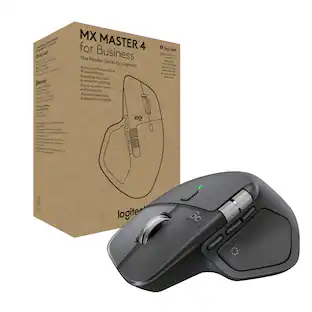
The Logitech MX Master 4 brings immersive control and precision you can feel with haptic feedback. Experience haptic feedback on specific actions, shortcuts, notifications like switching desktops, slider adjustments and more. Customize vibration intensity in Logi Options+. With Actions Ring shortcuts and MX Master 4, save up to 33% of your time by accessing tools and filters at your cursor, reducing repetitive movements by up to 63%. Experience uninterrupted performance with 2X more powerful connectivity, powered by an advanced radio chip, optimized antenna placement, and a new USB-C dongle.
| Pros for Logitech - MX Master 4 Creator Edition, Ergonomic Wireless Mouse with Advanced Performance Haptic Feedback - Wireless - Red | |||
|---|---|---|---|
| There were no pros for this product— | There were no pros for this product— | There were no pros for this product— | Ergonomics, Overall Performance, Haptic Feedback, Battery Life, Connectivity |
| Cons for Logitech - MX Master 4 Creator Edition, Ergonomic Wireless Mouse with Advanced Performance Haptic Feedback - Wireless - Red | |||
| There were no cons for this product— | There were no cons for this product— | There were no cons for this product— | Weight, Size |
Specs
Be the first to ask a question.
We’ll try to get your question answered within 24 hours by a Best Buy customer or brand representative.
Customers often buy these together
Computer Keyboards
![esc ~ ! 1 tab caps lock shift ctrl F2 Fl # 2 3 Q W A S Z start opt L F3 $ 4 E D X alt cmd3 ) FS F4 A % 5 6 R T F G V C logi 44 HI & F9 FID FB F7 F6 * ) - - & 0 8 9 7 O P U I Y K L H J > < N M 1 B PM + = { [ : I ; ? I alt cmd D 2 4 300 3 1 F12 . * page I insert home up clear backspace 8 9 + 7 page A pg up end down home } I delete ] / 6 4 5 4 enter 2 3 enter 1 dn Pg end shift = 0 del ins etrl fn opt](https://pisces.bbystatic.com/image2/BestBuy_US/images/products/6539/6539505_sd.jpg;maxHeight=232;maxWidth=233?format=webp)
Logitech - MX Keys S Universal Full-size Wireless Scissor Keyboard for PC and Mac with Backlit keys - Black
Top Deal$119.99The price was $129.99


![Esc F1 F2 F3 F4 F5 F6 F7 F8 F9 F10 F11 F12 Print Screen Scroll Lock Pause Break 1 2 3 4 5 6 7 8 9 0 - + = Backspace Insert Home H Page Up A Num Look 1 I Tab Q W E R T Y U I o P { [ } ] I I Delete End IN Page Down 7 Home 8 9 Pg Up Caps A Lock A S D F G H J K L ; : DE g Enter 4 5 6 Shift Z X C V N M < > ? I Shift 1 End 2 3 Pp Dn Enter Ctrl Alt Alt Ctrl 0 Ins Del](https://pisces.bbystatic.com/image2/BestBuy_US/images/products/a588d446-5678-40ae-86b8-1f15e0026e66.jpg;maxHeight=232;maxWidth=233?format=webp)





![The text on the image reads:
888 DD DI DD 4 DSC i F2 F3 4 FS T6 ET 1. 1N IN F.. 11 1.. 114 1n F1 F12 118 in9 - a ee 1 8F 2 3 $ 4 % 5 A 6 & 7 . 8 I 9 I 0 ee I + = delete fn home page up clear - / + tab Q W E R T Y U I 0 P { [ ] ] | I delete end page down 7 8 9 ee caps lock A S D F G H J K L : I - return 4 5 6 + shift Z X C V N M < F > ? / shift a 1 2 3 control option 2 command 3 command option control Y - 0 enter
After grouping and correcting the text, it reads:
888 DD DI DD 4 DSC i F2 F3 4 FS T6 ET 1. 1N IN F.. 11 1.. 114 1n F1 F12 118 in9 - a ee 1 8F 2 3 $ 4 % 5 A 6 & 7 . 8 I 9 I 0 ee I + = delete fn home page up clear - / + tab Q W E R T Y U I 0 P { [ ] ] | I delete end page down 7 8 9 ee caps lock A S D F G H J K L : I - return 4 5 6 + shift Z X C V N M < F > ? / shift a 1 2 3 control option 2 command 3 command option control Y - 0 enter](https://pisces.bbystatic.com/image2/BestBuy_US/images/products/f4059d3a-0c2a-46ef-bcfd-4e11b9b26d5d.jpg;maxHeight=232;maxWidth=233?format=webp)
Mouse Pads






More to consider


Explore tech essentials Sponsored
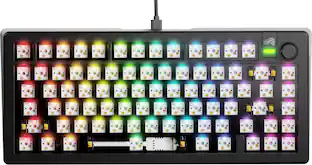
Glorious GMMK 3 PRO 75% Barebones Wired Mechanical Linear Switch Gaming Keyboard with Hot-swappable Switches
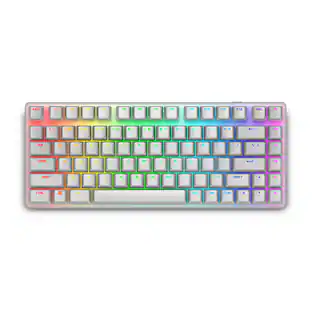
Clearance$96.99The price was $239.99Alienware Pro 75% Wireless Mechanical Gaming Keyboard with RGB Back Lighting
$179.99The price was $199.99



Discover related products
Acer USB C Docking Station With 2 HDMI, 9-IN-1 Docking Hub with USB A&C 3.0, SD/Micro SD, 100W Charging
$42.99The price was $47.99Acer USB C to HDMI Cable for Home Office 6.6FT (4K@60Hz), High-Speed Type C to HDMI 2.0 Braided Cord
$12.99The price was $13.99Logitech X56 HOTAS Microsoft Flight Simulator RGB Dual-Throttle and Joystick
$247.00The price was $275.00














Keep exploring
GravaStar Mercury X Pro Wireless 8K Hz Gaming Mouse with 32000 DPI and 49g Magnesium Alloy Frame
$139.95The price was $187.95Womier G57 Wireless Gaming Mouse, 8000 DPI, 2.4G/Bluetooth/USB-C Rechargeable Mice for PC/Mac
$23.99The price was $24.99