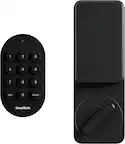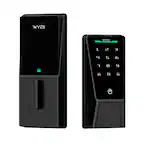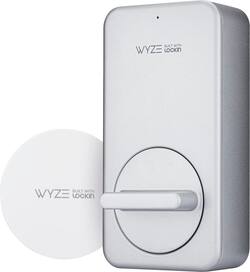
Wyze - Lock Smart Lock Wi-Fi Retrofit Deadbolt with App/Keypad/Voice Assistant Access - Silver
- Key Specs
- Color Finish: Silver
- Lock Type: Deadbolt
- Lock/Unlock Mechanism: App, Voice assistant (There are several technologies used by smart locks to manage access, such as biometrics, Bluetooth, or NFC. Some locks allow codes to be entered via a keypad or touchscreen; digital keys can often be sent to multiple authorized devices or temporarily shared with guests.)
- Power Source: Battery-powered
- Installation Type: Retrofit
- Wireless Connectivity: Bluetooth, Wi-Fi (The manner in which a device sends data to another device over a short distance without the use of wires or cables.)
- General
- Brand: Wyze
- Model Number: WLCKG1
- Product Name: Lock Smart Lock Wi-Fi Retrofit Deadbolt with App/Keypad/Voice Assistant Access
- Color: Silver
- Color Finish: Silver
- Features
- Finish: Stainless steel
- Lock Type: Deadbolt
- Lock/Unlock Mechanism: App, Voice assistant (There are several technologies used by smart locks to manage access, such as biometrics, Bluetooth, or NFC. Some locks allow codes to be entered via a keypad or touchscreen; digital keys can often be sent to multiple authorized devices or temporarily shared with guests.)
- Auto Unlock: true (Locks with this feature automatically unlock when certain conditions are met, such as coming within range of a home wireless network or when activated via a mobile app.)
- Unlock Notifications: true
- Shareable Keys: true (This feature allows a single key to be shared with multiple users or authorized devices.)
- Number of Key Fobs Included: 1
- Remote Monitoring Capabilities: true (Monitor)
- Power
- Power Source: Battery-powered
- Rechargeable Battery: false
- Battery Size: 1/2AA (The battery size required for operation.)
- Number of Batteries Required: 4
- Low-Battery Indicator: true
- Compatibility
- Installation Type: Retrofit
- App Compatible: true (The product can be connected to a program or software application on a mobile device, which then receives collected data from the product.)
- Wireless Connectivity: Bluetooth, Wi-Fi (The manner in which a device sends data to another device over a short distance without the use of wires or cables.)
- Operating System Compatibility: Android, Apple iOS
- Works With: Amazon Alexa, Google Home (Compatible with or able to be connected to other smart devices or applications.)
- Voice Assistant Built-in: Amazon Alexa, Google Assistant (A digital assistant built into the device that uses voice commands to answer questions and control smart devices.)
- Performance
- Minimum Operating Temperature: -5 degrees fahrenheit (The lowest recommended ambient (surrounding) temperature in which the product can ideally operate stated by the manufacturer. Generally long-term exposure of the product to temperatures less than the minimum can result in ineffective operation.)
- Maximum Operating Temperature: 200 degrees fahrenheit (The highest recommended ambient (surrounding) temperature in which the product can ideally operate stated by the manufacturer. Generally long-term exposure of the product to temperatures more than the maximum can result in ineffective operation.)
- Warranty
- Warranty - Parts: 1 year limited
- Warranty - Labor: 1 year limited
- Other
- UPC: 859696007370
Wyze Lock is a staple in our smart home wizardry. This is a smart lock that that does what you expect, and really all that you need from a smart lock. Wyze Lock is Wi-Fi capable, so you can control it remotely from your phone to let the dog walker in, or make sure it gets locked after you left on your vacation in such a rush. That’s not all this bad boy can do. Wyze Lock comes equipped with App and knows when you arrive home and automatically unlocks as you approach the door. Once inside, Wyze Lock’s built-in gyroscope detects when the door is closed and automatically locks behind you. It’s got all that and more. Like we said, all the tech you need, now at a price you can afford.
- Wyze smart lock: Lock or unlock your door from anywhere using the Wyze app. Wyze Lock connects to your WiFi via the included Wyze Lock Gateway. Enable auto-lock and auto-unlock to never have to think about keys or codes again
- Simple sharing: Wyze Lock lets you easily share access to your home with friends, family, contractors, dog walkers, and really, whoever you want. See a history of lock and unlock events. Wyze Lock gives you complete control of who has access to your home
- Door position detection: Wyze Lock not only tells you the lock status, but also if the door is open or closed. Unlike other locks, Wyze Lock has a built-in gyroscope to know the position of the door. No need for separate sensors
- Keyless door entry: Simply walk up to your door and have it unlock automatically and then lock behind you once you're inside. Purchase Wyze Lock Keypad and Wyze Cam separately for added security and surveillance. Works with your current key and deadbolt.
- Easy installation: Seriously. Wyze Lock installs in 15 minutes (we timed it!) and only requires a screwdriver. It works with most single-cylinder deadbolts and takes the place of the inside thumb latch.
- Long battery life: Don’t worry about getting locked out because of the batteries. Wyze Lock uses low power and allows for a 6 month battery life on normal usage.
- Keep your key: Wyze Lock doesn't alter the exterior of the door meaning you can still use your existing keys to get in the house.
- Secret code: Install the Wyze Lock Keypad (not included) and use a code to get in and out. With anti-peeping technology, don't worry if someone watches you enter the code. Add any extra digits before or after your code and Wyze Lock will still unlock.
- Know who came home: See the full history of the Lock including how it was locked/unlocked, who did it, and when.
- Use your voice: Ask Alexa or Google Assistant to lock your doors before going to bed.
- Wyze smart lock: Lock or unlock your door from anywhere using the Wyze app. Wyze Lock connects to your WiFi via the included Wyze Lock Gateway. Enable auto-lock and auto-unlock to never have to think about keys or codes again
- Simple sharing: Wyze Lock lets you easily share access to your home with friends, family, contractors, dog walkers, and really, whoever you want. See a history of lock and unlock events. Wyze Lock gives you complete control of who has access to your home
- Door position detection: Wyze Lock not only tells you the lock status, but also if the door is open or closed. Unlike other locks, Wyze Lock has a built-in gyroscope to know the position of the door. No need for separate sensors
- Keyless door entry: Simply walk up to your door and have it unlock automatically and then lock behind you once you're inside. Purchase Wyze Lock Keypad and Wyze Cam separately for added security and surveillance. Works with your current key and deadbolt.
- Easy installation: Seriously. Wyze Lock installs in 15 minutes (we timed it!) and only requires a screwdriver. It works with most single-cylinder deadbolts and takes the place of the inside thumb latch.
- Long battery life: Don’t worry about getting locked out because of the batteries. Wyze Lock uses low power and allows for a 6 month battery life on normal usage.
- Keep your key: Wyze Lock doesn't alter the exterior of the door meaning you can still use your existing keys to get in the house.
- Secret code: Install the Wyze Lock Keypad (not included) and use a code to get in and out. With anti-peeping technology, don't worry if someone watches you enter the code. Add any extra digits before or after your code and Wyze Lock will still unlock.
- Know who came home: See the full history of the Lock including how it was locked/unlocked, who did it, and when.
- Use your voice: Ask Alexa or Google Assistant to lock your doors before going to bed.
Whats Included
- Wyze Lock
- Wyze Gateway
- 4 AA Alkaline Batteries
- 1 retrofit kit
- Wyze Lock
- Wyze Gateway
- 4 AA Alkaline Batteries
- 1 retrofit kit
Q: What is the typical battery life of this Wyze Lock?
A: The Wyze Lock has a long battery life of about 6 months with normal usage.
Q: Does the Wyze Lock require a separate sensor to detect if the door is open or closed?
A: No, the Wyze Lock has a built-in gyroscope that can tell if the door is open or closed.
Q: How does the Wyze Lock connect to my home network?
A: The Wyze Lock connects to your WiFi network using the included Wyze Lock Gateway.
Q: Can I still use my regular keys with this Wyze Lock installed?
A: Yes, the Wyze Lock does not change your door's exterior, allowing you to still use your existing keys.
Q: Does this smart lock work with voice assistants?
A: Yes, you can use Alexa or Google Assistant to lock your door.
Q: Can you still use the key if needed?
A: You still have to use the key to open it manually from outside.
A: You will utilize your existing deadbolt. The inside part will need to be removed to install, so not really just a stick on device, but is just a screw in process. The outside will remain completely the same. Batteries have lasted over 6 months. I believe I have only changed them once after owning for almost 1 year. Locking and unlocking multiple times every day.