AcuRite - Weather Station with Color Display and Wireless Sensor for Indoor and Outdoor Conditions - Black
- General
- Brand: AcuRite
- Model Number: 02099HD
- Product Name: Weather Station with Color Display and Wireless Sensor for Indoor and Outdoor Conditions
- Color: Black
- Warranty
- Warranty - Parts: 1 year
- Warranty - Labor: 1 year
- Other
- Clock Display: true
- Batteries Included: false (Indicates whether the product comes with the required batteries for its operation.)
- Number of Batteries Required: 2
- Calendar: true
- Temperature Measurement Type: Fahrenheit and Celsius
- Humidity Tracking: true
- Indoor And Outdoor Temperature Tracking: Indoor/Outdoor
- Maximum Number Of Sensors: 1
- Sensor Battery Size: AA
- UPC: 072397020992
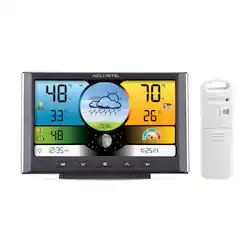
The AcuRite weather station features a vibrant color display with a built-in thermometer and hygrometer to provide indoor temperature and humidity measurements. The included outdoor wireless weather sensor wirelessly relays the current outdoor temperature and humidity readings and generates a customized forecast using elevation and barometric pressure data. Enjoy automatic daylight saving time updates for convenience, and use the humidity level indicator to judge indoor comfort levels with just a glance.
- Real-time conditions with forecast: Receive indoor and outdoor temperature and humidity measurements, barometric pressure data, and a hyperlocal forecast 12 hours from your current conditions.
- Comprehensive weather data: Stay informed with the heat index, dew point, moon phase, time, and date, along with daily and all-time high/low records and trend arrows for temperature and humidity measurements.
- Color, auto-dimming display: Choose between 100%, 60%, or 15% brightness, or utilize the auto-dim mode, which automatically reduces brightness to 15% between 9:01 p.m. And 6:59 a.m.
- Programmable alarms: Set custom thresholds for temperature and humidity to receive an audible beep and on-display flash when conditions meet your custom values.
- Wirelessly transmitted weather data: Use the integrated hanger to mount your outdoor wireless sensor to a post or tree within 330 feet (100 meters) of the indoor display to wirelessly receive weather measurements over a 433 mhz frequency.
Product Manuals
Q: What type of batteries does the outdoor sensor use?
A: The outdoor sensor requires two AA batteries, which are not included.
Q: What is the warranty on this weather station?
A: This AcuRite weather station comes with a 1-year warranty for both parts and labor.
Q: Does this weather station provide a forecast?
A: Yes, it generates a customized forecast using elevation and barometric pressure data, providing a hyperlocal forecast 12 hours out.
Q: How far away from the indoor display can the outdoor sensor be placed?
A: The outdoor sensor can be placed up to 330 feet (100 meters) away from the indoor display.
Q: What type of display does the Acurite weather station have?
A: This weather station features a vibrant color display.
Q: Can I set alarms for specific temperature and humidity levels?
A: Yes, you can set custom alarms for temperature and humidity. The device will beep and flash when those conditions are met.
Q: Does the weather station show the heat index?
A: Yes, the weather station provides information on the heat index, dew point, moon phase, time, and date.
Q: The indoor temperature is far from correct, what is the problem and how do I correct it?
A: We apologize that your unit's indoor temperature is inaccurate, but we are happy to assist! Please ensure you are using fresh alkaline batteries in the display as well as the included power adapter, then perform the following reset. ***This will clear all data on the display.*** 1. Remove all power, AC adapter and/or batteries from the display unit for a full five minutes. 2. Press and hold down the reset button, located in the battery compartment, for 20 seconds if applicable. 3. Plug back into AC power and/or insert recommended batteries. 4. Press and hold down the reset button for an additional 20 seconds if applicable. 5. Verify that the unit has powered on and once a connection has been made, attempt to set time and date. Please allow the unit at least 20 minutes to adjust to its surroundings before comparing readings. If the unit is still inaccurate, please reach out to our support team via live chat or email request on the AcuRite Support website. Have a great day! Haylee AcuRite Support Team