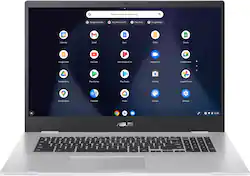
ASUS - 17.3" Chromebook - Intel Celeron N4500 - 4GB Memory - 32GB eMMC - Transparent Silver
- General
- Product Name: 17.3" Chromebook - Intel Celeron N4500 - 4GB Memory - 32GB eMMC - Transparent Silver
- Brand: ASUS
- Other
- UPC: 195553266659
ASUS Chromebook is made for boosting productivity and multitasking while having more fun — all day, every day. This ultimate 17-inch device is powered by up to a quad-core Intel Pentium processor and gives you the freedom of up to 17-hour battery life. The slim-bezel design fits more screen into the compact chassis for easy multitasking and incredibly immersive entertainment, and the device is your gateway to the best of Google, including the rich library of apps for work or play on the Google Play. With speedy performance, robust security and convenient features, ASUS Chromebook is perfect for learning or working from anywhere.
- Google Chrome OS: Chromebook is a computer for the way the modern world works, with thousands of apps, built-in virus protection and cloud backups. It is secure, fast, up-to-date, versatile and simple.
- 17.3" Full HD: The 1920 x 1080 resolution boasts impressive color and clarity. Energy-efficient LED backlight.
- 4GB system memory for basic multitasking: Adequate high-bandwidth RAM to smoothly run multiple applications and browser tabs all at once.
- 32GB eMMC: This ultracompact system is ideal for mobile devices and applications, providing enhanced storage capabilities, streamlined data management, quick boot-up times and support for high-definition video playback.
- Clamshell Design: Offers versatile design with laptop, audience, tabletop and presentation modes
- Built-in cloud support: Easily save your files to your Google Drive account for secure access wherever you go. You can also sync with your other devices running Chrome and even work offline when needed. Fees may apply.
- Intel® UHD Graphics: On-processor graphics with shared video memory provide everyday image quality for Internet use, basic photo editing and casual gaming.
- Weighs 5.34 lbs. and measures 0.78" thin: Ultrathin and ultralight for maximum portability, featuring a smaller screen size and omitting the DVD/CD drive to achieve the compact form factor. Lithium-polymer battery.
- Built-in media reader for simple photo transfer: Supports SD, SDHC and SDXC memory card formats.
- Wireless/Wired connectivity (Wi-Fi 6 - 802.11ax): Connect to a Wireless-AX router for nearly 3x the speed, more capacity and wider coverage than Wireless-N. Backward-compatible with all other Wi-Fi networks and hotspots.
- Built-in HD webcam with microphone: Makes it easy to video chat with family and friends or teleconference with colleagues over Google Hangouts or other popular applications.
- Additional port: Headphone/microphone combo jack. Note: This laptop does not include a built-in DVD/CD drive.
- Built-in virus protection and Google products: Work, play and do right out of the box with Search, Gmail, Talk, YouTube and Hangouts, then personalize with the Chrome Web Store. Multiple layers of protection defend against viruses and malware.
- Additional port: Headphone/microphone combo jack.
A: The Chrome OS AUE(Auto Update Expiration) date is June 2029. The Chromebook will still work properly after this date.
Q: What ports (USB, HDMI etc.) does it have?
A: 2 USB C Ports One on each side (The charging USB C port is on the left) Headphone jack (Audio jack) MicroSD Card slot 2 normal USB ports (one on each side) If the ports aren’t to your liking you can simply purchase a HUB with all the desired ports you want and it should work just fine.
A: The 4GB and 32GB are soldered and there is no upgrade path for anything inside of this device. That having been said, it'll take at least a 1TB microsd card for storage, and the current version of chrome OS runs very well in 4GB. It'll even run in 2GB without the android subsystem and some other fattening components. I've tested chrome os with 8 and 16GB systems before. Other than disk caches and the like, it runs about the same as it does on 4gb. Speed differences are negligible. Probably would want another 2-4GB by the time we get neared to the device end-of-life (2029), but at these prices...I won't care.
A: The Chromebook is also the model number: ASUS Chromebook CX1 (CX1700).
Q: Can memory be expanded if needed?
A: The RAM or memory is not expandable or upgradeable.
Q: Can you view, edit and save google sheets on this device?
A: Yes, you should be able to do work on all the available programs made available through google. (Sheets, Docs, Slides, etc)
Q: Can I transfer photos and assorted downloads from my PC to this laptop?
A: Yes, you should be able to transfer most files and photos either by using a USB drive, external hard drive, or micro USB or by using Google Photos.
A: As this is a Chromebook, it already has antivirus protection. However if you want to use another product on the side of caution to prevent malware it wouldn’t be a problem. Norton and Bitdefender are two well-known compatible apps for Chromebooks.




















