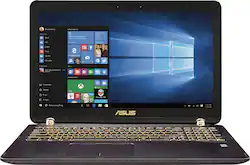
ASUS - Q524UQ 2-in-1 15.6" Touch-Screen Laptop - Intel Core i7 - 12GB Memory - 2TB Hard Drive - Chocolate Black
- Key Specs
- Screen Type: Full HD Widescreen LED
- Screen Size: 15.6 inches (Size of the screen, measured diagonally from corner to corner.)
- Screen Resolution: 1920 x 1080 (Full HD) (Screens come in a range of resolutions (measured in pixels, horizontal x vertical). The higher the resolution, the greater the picture quality.)
- Touch Screen: true (Touch-screen devices make navigating more intuitive. Using a touch-screen display, you can do things such as tap to select, hold and drag to move items, swipe to scroll, and pinch to zoom.)
- Processor Model: Intel 6th Generation Core i7 (Your computer's processor is like its brain. Working in combination with system memory, the power of the processor determines the complexity of software you can run, how many programs you can have open at the same time, and how fast those programs will run. Most computers feature an AMD, Intel or Snapdragon processor.)
- Storage Type: HDD
- System Memory (RAM): 12 gigabytes (Random-access memory (RAM) is a computing device's short-term data storage, which allows active information to be accessed quickly. The size and type of RAM determines how efficiently the device can handle large amounts of information at one time. For example, gaming or video editing requires more RAM for optimal performance.)
- 2-in-1 Design: true (A laptop and a tablet combined in one lightweight, portable device. Sometimes referred to as "convertible" or "hybrid" laptops, these devices deliver the processing power and keyboard of a laptop. When you're ready to play, either detach the screen or fold your 2-in-1 into tablet mode to comfortably watch movies, play games, read an e-book and more.)
- Backlit Keyboard: true (Integrated lights allow for visibility of the keys in low-light conditions.)
- General
- Product Name: Q524UQ 2-in-1 15.6" Touch-Screen Laptop - Intel Core i7 - 12GB Memory - 2TB Hard Drive
- Brand: ASUS
- Model Number: Q524UQ-BBI7T14
- Display
- Screen Type: Full HD Widescreen LED
- Screen Size: 15.6 inches (Size of the screen, measured diagonally from corner to corner.)
- Screen Resolution: 1920 x 1080 (Full HD) (Screens come in a range of resolutions (measured in pixels, horizontal x vertical). The higher the resolution, the greater the picture quality.)
- Touch Screen: true (Touch-screen devices make navigating more intuitive. Using a touch-screen display, you can do things such as tap to select, hold and drag to move items, swipe to scroll, and pinch to zoom.)
- Processor
- Processor Brand: Intel
- Processor Model: Intel 6th Generation Core i7 (Your computer's processor is like its brain. Working in combination with system memory, the power of the processor determines the complexity of software you can run, how many programs you can have open at the same time, and how fast those programs will run. Most computers feature an AMD, Intel or Snapdragon processor.)
- Processor Model Number: N/A
- Storage
- Storage Type: HDD
- Hard Drive Capacity: 2000 gigabytes (The amount of data that can be stored on the device's mechanical hard drive. Hard disk drives (HDDs) typically have larger capacities than solid state drives (SSDs) but may have slower speeds.)
- Hard Drive RPM: 5400 revolutions per minute (A hard drive's data is stored on disks, or platters, that spin while transferring information to the host system. The higher the RPM, the faster the hard drive's performance.)
- Memory
- System Memory (RAM): 12 gigabytes (Random-access memory (RAM) is a computing device's short-term data storage, which allows active information to be accessed quickly. The size and type of RAM determines how efficiently the device can handle large amounts of information at one time. For example, gaming or video editing requires more RAM for optimal performance.)
- Type of Memory (RAM): DDR4 SDRAM (Each type of RAM delivers a different level of speed, bandwidth, energy efficiency and performance.)
- System Memory RAM Speed: 2133 megahertz (How fast the information-storing hardware operates. The faster the RAM, the faster memory can be transferred to other system components. Ultimately, faster RAM improves operational efficiency.)
- System Memory RAM Expandable To: 16 gigabytes (Adding more random-access memory (RAM) to a computer speeds up performance and improves efficiency. Upgrades to memory are limited by the number of expansion slots for additional RAM and existing RAM installed on the device.)
- Compatibility
- Operating System: Windows 10 (The operating system manages all software and hardware, including files, memory and connected devices. Most importantly, it lets you interact with your device and your programs in a visual way; otherwise, you'd be typing computer code to get anything done.)
- Operating System Architecture: 64-bit (An operating system (OS) manages computer hardware, software resources, and programs in conjunction with the system's processor. 64-bit operating systems can handle more data at once than 32-bit systems, resulting in faster speeds, more effiency, and overall improved performance.)
- Connectivity
- Number of VGA Ports: 0 (VGA (Video Graphics Adapter or Video Graphics Array) is a display standard that transmits via analog signals. This type of interface is typically used to connect a computer to a display device such as a monitor, projector, or TV.)
- Power
- Battery Cells: 4-cell
- Features
- 2-in-1 Design: true (A laptop and a tablet combined in one lightweight, portable device. Sometimes referred to as "convertible" or "hybrid" laptops, these devices deliver the processing power and keyboard of a laptop. When you're ready to play, either detach the screen or fold your 2-in-1 into tablet mode to comfortably watch movies, play games, read an e-book and more.)
- Backlit Keyboard: true (Integrated lights allow for visibility of the keys in low-light conditions.)
- Media Card Reader: true (A hardware device that allows for access to data on a memory card and enables the transfer of its files to a computer. These devices may have one or multiple slots for various types of memory cards, and may be integrated into the computer or available as an external device.)
- Audio Technology: ASUS Bang & Olufsen ICEpower
- Speaker Type: Stereo speakers
- Dimensions
- Product Height: 0.9 inches (The out of box height of the item. Height is measured as the vertical distance from the bottom of the item to the top as it would be primarily used or placed.)
- Product Width: 15 inches (The out of box width of the item. Width is measured as the horizontal distance from one side of the item to the other as it would be primarily used or placed.)
- Product Depth: 10 inches (The out of box depth of the item. Depth is measured as the distance from the front of the item to the back as it would be primarily used or placed.)
- Certifications Listings & Approvals
- ENERGY STAR Certified: true (Devices carrying the ENERGY STAR service mark, such as computer products and peripherals, kitchen appliances, and other products, generally use 20% to 30% less energy than required by federal standards.)
- EPEAT Qualified: false (The Electronic Product Environmental Assessment Tool (EPEAT) was designed to provide an environmental assessment tool for purchasers. In order to qualify for EPEAT, a product must meet all 23 required criteria.)
- Included
- Included Software: EverNote, Flipboard, TripAdvisor, Dropbox, Zinio, Microsoft Office 365 Personal (1 month subscription)
- Numeric Keypad: true
- Other
- UPC: 889349388839

Only at Best Buy
Bring gaming power to any location with this Asus laptop. Flip-and-fold functionality lets you find a comfortable viewing or gaming position whether you're at home or sitting in a crowded waiting room. NVIDIA GeForce graphics with dedicated memory support complex gaming, and the Full HD screen delivers images in crisp detail on this Asus laptop.

- Windows 10 operating system: Windows 10 brings back the Start Menu from Windows 7 and introduces new features, like the Edge Web browser that lets you markup Web pages on your screen. Learn more ›
- 15.6" Full HD touch screen for hands-on control: The 1920 x 1080 resolution boasts impressive color and clarity. Natural finger-touch navigation makes the most of Windows 10. LED backlight.
- 6th Gen Intel® Core™ i7-6500U mobile processor: Ultra-low-voltage platform. Dual-core, four-way processing performance. Intel Turbo Boost Technology delivers dynamic extra power when you need it.
- 12GB system memory for full-power multitasking: Plenty of high-bandwidth RAM to smoothly run your games and photo- and video-editing applications, as well as multiple programs and browser tabs all at once.
- 2TB hard drive for ample file storage space: Holds a sizeable collection of digital photos, music, HD videos and DVD-quality movies. 5400 rpm spindle speed for standard read/write times.
- 360° flip-and-fold design: Offers versatile functionality with laptop, audience, tabletop, presentation and tablet modes.
- Cloud support lets you access your files anywhere: Store your photos, videos, documents and other files on Dropbox for secure access across multiple devices. Fees may apply.
- NVIDIA GeForce 940MX graphics: Driven by 2GB dedicated video memory to quickly render high-quality images for videos and games.
- Stream entertainment from your laptop to your TV: Intel® Wireless Display (c) wirelessly transmits content to your HDTV* — photos, music, Web videos, Internet TV — whether on the hard drive or online.
- Built-in stereo speakers: Bang & Olufsen ICEpower audio optimizes the sound to generate high-quality audio from ultraslim devices.
- Bluetooth interface syncs with compatible devices: Wirelessly transfer photos, music and other media between the laptop and your Bluetooth-enabled cell phone or MP3 player, or connect Bluetooth wireless accessories.
- 4 USB 3.0 ports maximize the latest high-speed devices: USB 3.0 ports are backward-compatible with USB 2.0 devices (at 2.0 speeds).
- HDMI output expands your viewing options: Connect to an HDTV or high-def monitor to set up two screens side by side or just see more of the big picture.
- Thunderbolt port for connecting advanced monitors and external drives: This single interface supports both high-speed data and high-def video — plus power over cable for bus-powered devices — ideal for digital content creators.
- Built-in media reader for simple photo transfer: Supports SD and SDXC memory card formats.
- Next-Gen Intel® Wireless-AC connectivity (2x2, 867 Mbps): Connect to a Wireless-AC router for nearly 6x the speed, more capacity and wider coverage than Wireless-N (150 Mbps). Backward-compatible with other Wi-Fi networks and hotspots.
- Backlit keyboard: Allows you to enjoy comfortable and accurate typing, even in dim lighting.
- Basic software package included: 1 month trial of Microsoft Office 365 Personal.
- Additional ports: Headphone/microphone combo jack.
Whats Included
- 4-cell battery
- ASUS Q524UQ 2-in-1 15.6" Touch-Screen Laptop - Intel Core i7 - 12GB Memory - 2TB Hard Drive
- Power adapter
- Subwoofer
A: Currently typing this answer on my ASUS Q524UQ: Having since purchased this computer to gain a more decisive answer to my original question, I proceeded with removing the bottom panel, which was quite simple with the correct Torx bit and careful removal. Upon removal, on the middle of the motherboard there is an M.2 PCIe Slot (M Key) readily available. An image will be provided for reference. However, given that M.2 PCIe SSDs come in different sizes, the most common being 22MM Wide by 80MM Long, signified by '2280' under product descriptions or dimensions, this particular slot looks slightly smaller. Not having yet purchased an SSD of this form factor due to their current retail prices still being relatively high, I have not been able to verify whether or not one of 2280 size fits. For the time being, I have swapped out the 2TB HDD for a much, MUCH faster 512GB SSD, re-installing Windows 10 by means of a recovery USB flash drive created prior. If someone else chooses to install an M.2 PCIe SSD, please provide your response to this answer and your overall experience.
A: I used this laptop to edit Photoshop images while rendering a video with Adobe Premiere which is CPU and memory hungry. I purposely rendered a video, played music with Windows Media, had Photoshop, Adobe Premier, Dreamweaver, the Internet, and Outlook open. Windows Media playback refreshed a couple of time but I expected that as my desktop would do the same. It can handle it...
Q: What games will this be able to run on high settings?
A: I play Diablo III and all of the Modern Warfare games on it with max settings, no problem.
Q: why is this laptop not on the asus website? Is it because it is brand new?
A: Yes, generally it takes some time for a new computer to reach the manufactures own website. Also some computers are made for specific retailers and have a unique model number for the retailer (like bestbuy). Therefore the only time it will show up on the website is for warranty and support information.
Q: Are those plastic hinges sturdy? They seem easily breakable
A: They are great actually! Plus they make the computer even more gorgeous! The look is really what sold me on this computer with all its great specs as well, but just the whole look is just so sleek
Q: Does anyone know what stylus would be compatible with this device?
A: You can use any stylus with this device.
Q: Can you add an additional SSD drive in addition to the 2 TB HDD that's already installed?
A: You definitely can add an SSD drive. I have added one and it works great. Refer to very first answered question. Another poster gave very good instructions.
Q: How do you connect via hardwire to your router with this model?
A: ASUS sells a USB to Ethernet Adapter on its web site:






















