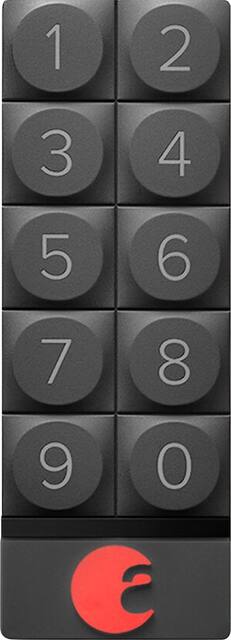
August - Smart Keypad
- Key Specs
- Lock Type: Deadbolt
- Power Source: Battery-powered
- Installation Type: Retrofit
- Color Finish: Dark gray
- General
- Product Name: Smart Keypad
- Brand: August
- Model Number: AUG-SK-GRAY
- Color Finish: Dark gray
- Features
- Lock Type: Deadbolt
- Unlock Notifications: true
- Remote Monitoring Capabilities: true (Monitor)
- Power
- Power Source: Battery-powered
- Compatibility
- Installation Type: Retrofit
- Operating System Compatibility: Apple iOS, Android
- Works With: Amazon Alexa, Apple HomeKit, Google Assistant (Compatible with or able to be connected to other smart devices or applications.)
- Other
- UPC: 863246000056
August Smart Keypad: With this smart keypad, you can be sure that regular visitors can enter your home with ease. Use the August app on your Apple® iOS or Android smartphone to program unique keyless entry codes and monitor frequent visitors.
- Download the app for simple programming: Use your Apple iOS or Android device to program unique codes for visitors and track who visits your home.
- Keyless access with unique entry codes: Create separate codes for friends, family or regular maintenance workers.
- Lock the door with a touch: Easily lock the door behind you.
- 2 AAA batteries included: Battery-operated design eliminates wiring and tangles for simple use.
Whats Included
- Smart Keypad
- 2 AAA batteries, 2 screws, 2 wall anchors, double-sided tape
Q: Can you program this from anywhere?
A: You can add a passcode from anywhere if you also have the August Connect (this allows you to access the lock over the internet). Other than that, you just need to be within distance of the lock so that the lock can know it is supposed to accept that code.
A: It comes with hardware to mount it to a wall. Simple and easy. Either use the sticky industrial tape it comes with or use the small wall anchor provided. There is a feature in the August app to activate the keypad and set up a few pass codes! Simple!
Q: Does this light up in any way? How can it be seen in the dark?
A: it has a nice red backlight. however it doesn't come on until you press a button. this has been an issue for me due to hitting the wrong number to turn the light on. it takes a solid 30 seconds for it to reset to put the right number in.
Q: How often do you need to change the batteries?
A: In practice I have found it prudent to change the AAA batteries (2) every month ...likely to be less frequent if you put the unit into power saving mode.
A: Actually -- this is a bit confusing (probably why 2 different people gave different answers). The deal is: If you have an AppleTV 4th. generation or later, HomeKit uses it automatically as its "hub" out to the Internet. (You can also designate an iPad as the hub for this purpose, but obviously - it has to be left at home on your wi-fi network for that to work. So the AppleTV just makes more sense as one in most cases.) With that "hub" in place, HomeKit has a way to talk to August devices that have been added to it. You have to remember though -- the August locks and keypads run on low power Bluetooth. So their range isn't more than 10-12 feet or so from the device talking to them. That's great if you're using the August app on a smartphone that's near the lock as you walk up to the door. But not so great for these hubs to communicate with them. If your doors are only 10 feet or so away from your AppleTV, you're good. Otherwise -- you might have issues. In my own case? My back kitchen door is working pretty good with an August lock and HomeKit. But that's because I have an AppleTV in the family room that's right off of the kitchen. My side door on my detached garage also has an August lock and HomeKit just gets errors trying to lock or unlock it. The Bluetooth commands just can't reach it from the AppleTV in the house. So I'm going to try buying the August Connect device and placing it out in my garage, attached to my wireless satellite router that's already in the garage. That *should* get it going.
Q: Is there a backup to open the lock if the batteries die?
A: yes...the key or it turns by hand if your using from inside house.
A: per august website: Yes, the August Smart Keypad is designed and tested for outdoor use. The operating temperatures that we have tested in are: Operating Temperature: -13 to 122 Fahrenheit (-25℃ to 50℃) Storage Temperature: -22 to 140 Fahrenheit (-30℃ to 60℃) Operating Humidity: 0 to 95%
Q: Can this be used on a bedroom door?
A: It only works with the august lock, so if you have installed the august lock on your bedroom door then yes, it would work.



















