Epson - Expression Photo XP-970 Wireless All-In-One Inkjet Printer - Black
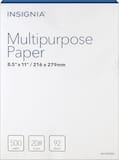 Insignia™ - Multipurpose 8.5" x 11" 500-Count Paper - White$9.29
Specifications
- NetworkingWired, WirelessENERGY STAR CertifiedYesPrinter TypeCopier, Printer, ScannerISO Color Print Speed8 pages per minuteISO Mono Print Speed8.5 pages per minuteOutput Tray Capacity30
- Key Specs
- Networking: Wired, Wireless
- ENERGY STAR Certified: true (Devices carrying the ENERGY STAR service mark, such as computer products and peripherals, kitchen appliances, and other products, generally use 20% to 30% less energy than required by federal standards.)
- Printer Type: Copier, Printer, Scanner
- ISO Color Print Speed: 8 pages per minute (The number of color pages able to be printed per minute in the device's default single-side mode, as tested by the International Standards Organization (ISO).)
- ISO Mono Print Speed: 8.5 pages per minute (The number of black ink (grayscale) pages able to be printed per minute in the device's default single-side mode, as tested by the International Standards Organization (ISO).)
- Output Tray Capacity: 30
- Touch Screen: true (Touch-screen devices make navigating more intuitive. Using a touch-screen display, you can do things such as tap to select, hold and drag to move items, swipe to scroll, and pinch to zoom.)
- General
- Brand: Epson
- Model Number: C11CH45201
- Product Name: Expression Photo XP-970 Wireless All-In-One Inkjet Printer
- Color: Black
- Display Screen: true
- Display Screen Size: 4.3 inches
- Dimensions
- Product Height: 11.6 inches (The out of box height of the item. Height is measured as the vertical distance from the bottom of the item to the top as it would be primarily used or placed.)
- Product Width: 18.9 inches (The out of box width of the item. Width is measured as the horizontal distance from one side of the item to the other as it would be primarily used or placed.)
- Product Depth: 26.3 inches (The out of box depth of the item. Depth is measured as the distance from the front of the item to the back as it would be primarily used or placed.)
- Product Weight: 19.4 pounds (The out of box weight of the item.)
- Features
- Automatic Document Feeder: false
- Photo Printing: true
- Wide Format Printing: true (Machines with this function support printing on media with widths between 18 and 100 inches, such as posters, banners, canvases, and more.)
- Wide Format Scanning: false
- Monochromatic/Color: Color
- Automatic Reduction/Enlargement: true
- Automatic Two-Sided Printing: true
- Tray Capacity: 120
- Duty Cycle: Light (The maximum number of pages per month that the device can produce without failing, as specified by the manufacturer.)
- Connectivity
- Wired Connectivity: USB-B, Ethernet
- Wireless Connectivity: Wi-Fi (The manner in which a device sends data to another device over a short distance without the use of wires or cables.)
- Minimum System Requirements: Windows, macOS
- Scanner Info
- Scanner Type: Flatbed
- Duplex Scan Function: false
- Scanner Resolution: Up to 4800 (Refers to the number of pixels/dots, both horizontally and vertically, of the image produced by the scanner. Generally, the higher the resolution, the sharper and cleaner the produced image.)
- Ink
- Compatible Cartridges: Epson T277
- Ink Cartridges Required: 1 x Black, 1 x Cyan, 1 x Magenta, 1 x Yellow, 1 x Light cyan, 1 x Light magenta (The quantity and color of ink cartridges required for the printer to operate.)
- Ink Cartridges Included: 1 x Black, 1 x Cyan, 1 x Magenta, 1 x Yellow, 1 x Light cyan, 1 x Light magenta (The quantity and color of ink cartridges included.)
- Ink Bags/Bottles Required: None (The quantity and color of ink bags/bottles required for the printer to operate.)
- Ink Bags/Bottles Included: None (The quantity and color of ink bags/bottles included.)
- Memory
- Memory Card Type: CompactFlash (CF), Memory Stick Duo, Secure Digital, Secure Digital Extended Capacity (SDXC), Secure Digital High Capacity (SDHC)
- Memory Card Slot: true
- Paper Info
- Maximum Document Length: 17 inches
- Maximum Document Width: 11 inches
- Supported Paper Sizes: 3.5" x 5", 4" x 6", 5" x 7", 8" x 10", 8.5" x 11", 11" x 17", A4, B5, A5, A6, half letter, executive, 16:9 wide, inkjet-printable CDs/DVDs
- Paper Feeder: Multipurpose tray
- Paper Handling: 100-sheet input tray, 30-sheet output tray, 20-sheet dedicated photo paper tray
- Copier Info
- Maximum Number Of Copies: 99
- Copier Resolution (Black): Up to 5760 x 1440 (Refers to the number of pixels/dots, both horizontally and vertically, of the image produced by the copier in black ink. Generally, the higher the resolution, the sharper and cleaner the produced image.)
- Copier Resolution (Color): Up to 5760 x 1440 (Refers to the number of pixels/dots, both horizontally and vertically, of the image produced by the copier in colored ink. Generally, the higher the resolution, the sharper and cleaner the produced image.)
- Performance
- Printer Resolution (Black): Up to 5760 x 1440 (Refers to the number of pixels/dots, both horizontally and vertically, of the image produced by the printer in black ink. Generally, the higher the resolution, the sharper and cleaner the produced image.)
- Printer Resolution (Color): Up to 5760 x 1440 (Refers to the number of pixels/dots, both horizontally and vertically, of the image produced by the printer in colored ink. Generally, the higher the resolution, the sharper and cleaner the produced image.)
- Warranty
- Warranty - Parts: 1 year
- Warranty - Labor: 1 year
- Other
- UPC: 010343949485
Epson Expression Photo XP-970 All-In-One Printer: Print directly from a smartphone or tablet with this Epson Expression all-in-one printer. Ultra HD inks and a wide-format design let you print stunning large borderless photos, and smaller pictures can be printed in as little as 11 seconds. Intuitive touch-screen controls make this Epson Expression all-in-one printer simple and easy to use. Prints up to 8.5 ISO ppm*, up to 8 ISO ppm* in color
- Prints up to 8.5 ISO ppm* in black, up to 8 ISO ppm* in color: Produces documents quickly.
- Be sure you have the right cartridge: Enter your printer's model number into Ink and Toner Finder to find compatible cartridges. Get started ›
- Works with Amazon Alexa for voice control: Ask a compatible voice assistant (device required) to help you print shopping lists, to-do lists, various crossword puzzles and games, coloring activities, comics and more.
- Works with Google Assistant for voice control: Ask a compatible voice assistant (device required) to help you print your Google Calendar, various crossword puzzles and games, coloring activities, comics and more.
- Ideal for home or small business use: This inkjet printer offers excellent print quality for photos and documents and accepts a variety of paper types and sizes.
- Wireless and mobile printing capability**: Connect this printer to your home or office network with built-in Ethernet or wireless LAN. Plus, print from your mobile device with free Epson iPrint, Google Cloud, or Mopria Print Service.
- Tablet and smartphone printing: Epson Connect enables simple wireless printing from most smartphones, tablets and more.
- Apple AirPrint enabled**: Allows Apple iPad and iPhone printing.
- Six-cartridge drop-on-demand MicroPiezo inkjet technology: Supports Epson Claria Photo HD 277 standard-capacity and Epson Claria Photo HD 277XL high-capacity black, cyan, magenta, yellow, light cyan, and light magenta cartridges.
- Up to 5760 x 1440 dpi (dots per inch) color resolution: The high resolution offers remarkable quality and detail in documents and photos.
- Six individual print cartridges are economical: Only replace an ink cartridge (black, cyan, magenta, yellow, light cyan, and light magenta) when its color runs out.
- Standard paper handling: 100-sheet input and 30-sheet output capacity.
- 4.3" LCD touch screen: Use the intuitive touch screen to print, store files, and access business apps** directly from the printer.
- More connectivity options: Built-in memory card slots let you simply plug in your memory card and print.
- USB port for simple connectivity: The high-speed USB offers a simple way to plug in and print from a USB drive, camera, or other devices.
- More print, copy, and scan solutions: Automatically print two-sided documents, scan documents to your computer or directly to e-mail and more.
- Prints up to 8.5 ISO ppm* in black, up to 8 ISO ppm* in color: Produces documents quickly.
- Be sure you have the right cartridge: Enter your printer's model number into Ink and Toner Finder to find compatible cartridges. Get started ›
- Works with Amazon Alexa for voice control: Ask a compatible voice assistant (device required) to help you print shopping lists, to-do lists, various crossword puzzles and games, coloring activities, comics and more.
- Works with Google Assistant for voice control: Ask a compatible voice assistant (device required) to help you print your Google Calendar, various crossword puzzles and games, coloring activities, comics and more.
- Ideal for home or small business use: This inkjet printer offers excellent print quality for photos and documents and accepts a variety of paper types and sizes.
- Wireless and mobile printing capability**: Connect this printer to your home or office network with built-in Ethernet or wireless LAN. Plus, print from your mobile device with free Epson iPrint, Google Cloud, or Mopria Print Service.
- Tablet and smartphone printing: Epson Connect enables simple wireless printing from most smartphones, tablets and more.
- Apple AirPrint enabled**: Allows Apple iPad and iPhone printing.
- Six-cartridge drop-on-demand MicroPiezo inkjet technology: Supports Epson Claria Photo HD 277 standard-capacity and Epson Claria Photo HD 277XL high-capacity black, cyan, magenta, yellow, light cyan, and light magenta cartridges.
- Up to 5760 x 1440 dpi (dots per inch) color resolution: The high resolution offers remarkable quality and detail in documents and photos.
- Six individual print cartridges are economical: Only replace an ink cartridge (black, cyan, magenta, yellow, light cyan, and light magenta) when its color runs out.
- Standard paper handling: 100-sheet input and 30-sheet output capacity.
- 4.3" LCD touch screen: Use the intuitive touch screen to print, store files, and access business apps** directly from the printer.
- More connectivity options: Built-in memory card slots let you simply plug in your memory card and print.
- USB port for simple connectivity: The high-speed USB offers a simple way to plug in and print from a USB drive, camera, or other devices.
- More print, copy, and scan solutions: Automatically print two-sided documents, scan documents to your computer or directly to e-mail and more.
Whats Included
- Epson Expression Photo XP-970 Wireless All-In-One Printer
- CD-ROM for product setup
- Power cord
- Maintenance box
- 6x Claria Photo HD 277 Ink cartridges
- Owner's manual
- Epson Expression Photo XP-970 Wireless All-In-One Printer
- CD-ROM for product setup
- Power cord
- Maintenance box
- 6x Claria Photo HD 277 Ink cartridges
- Owner's manual
Disclaimers
- *Requires a high-speed Internet connection.
- *Requires a high-speed Internet connection.
Q: What type of scanner does this Epson printer have?
A: This Epson printer has a flatbed scanner.
Q: How many cartridges does this Epson printer use?
A: This printer uses six individual ink cartridges.
Q: Is this Epson printer compatible with Apple AirPrint?
A: Yes, this printer is Apple AirPrint enabled, allowing you to print from your Apple iPad and iPhone.
Q: Can I print directly from a memory card with this Epson printer?
A: Yes, the built-in memory card slots allow you to print directly from your memory card.
Q: Does this Epson printer have a touch screen?
A: Yes, it has a 4.3" LCD touch screen for easy navigation and operation.
Q: What is the maximum print resolution of this Epson printer?
A: This printer offers a high resolution of up to 5760 x 1440 dpi (dots per inch).
Q: Can I print from my phone or tablet with this printer?
A: Yes, Epson Connect enables simple wireless printing from most smartphones and tablets.
Q: Does this Epson printer offer wireless connectivity?
A: Yes, this printer can connect to your home or office network with built-in Ethernet or wireless LAN.
Compare similar products

Epson Expression Photo XP-970 All-In-One Printer: Print directly from a smartphone or tablet with this Epson Expression all-in-one printer. Ultra HD inks and a wide-format design let you print stunning large borderless photos, and smaller pictures can be printed in as little as 11 seconds. Intuitive touch-screen controls make this Epson Expression all-in-one printer simple and easy to use.Prints up to 8.5 ISO ppm*, up to 8 ISO ppm* in color

Generate stunning pictures with this Epson Expression wide-format printer. Its six individual ink colors produce brilliant borderless prints up to 13" x 19", and the large 50-sheet rear specialty tray lets you complete projects efficiently. This Epson Expression wide-format printer supports wireless and wired connectivity for printing photos from a tablet or smartphone.Prints up to 9.2 ISO ppm (black), up to 9.0 ISO ppm (color).

The EcoTank Photo ET-8550 wireless all-in-one prints lab-quality, wide-format color photos, graphics and everyday documents — all at an incredible value. Epson’s cartridge-free, 6-color Claria ET Premium Ink system delivers vibrant colors and sharp text for all your creative projects. With low-cost replacement ink bottles, print 4" x 6" photos for about 4 cents each compared to 40 cents with cartridges (1). Print everything from borderless 13" x 19" photos to customized CDs/DVDs. You can even print on cardstock and other media up to 1.3 mm thick. For added convenience, each set of bottles lets you print for up to 2 years (2). Plus, save up to 80 percent with replacement ink bottles vs. ink cartridges (3) — that’s about $2,000 on each set (3). The EcoTank Photo lets you do it all with affordable in-house printing.
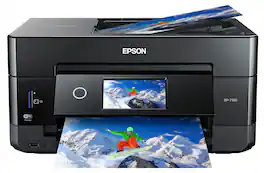
Get creative with this Epson Expression Premium XP-7100 Small-in-One printer. This compact device quickly prints gorgeous, durable photos with smudge-resistant Claria ink and lets you explore your creativity with specialty paper and DVD printing. This Epson Expression Premium XP-7100 Small-in-One printer gets the job done quickly with the 30-page auto document feeder and two-sided printing, scanning and copying.Fast print speeds up to 15.8 ISO ppm* in black, up to 11 ISO ppm* in color; creates a 4" x 6" photo-quality print in as little as 12 seconds.*
| Pros for Epson - Expression Photo XP-970 Wireless All-In-One Inkjet Printer - Black | |||
|---|---|---|---|
| Print Quality, Ease of use, Setup, Size, Connectivity | Print Quality, Ease of use, Size, Setup, Wireless | Print Quality, Ease of use, Overall Performance, Setup | Print Quality, Ease of use, Overall Performance, Size, Setup |
| Cons for Epson - Expression Photo XP-970 Wireless All-In-One Inkjet Printer - Black | |||
| Noise Level | Paper Jam, Noise Level, Reliability, Scanner | Paper Jam, Price, Output Tray | Paper Tray |
Specs



Reviews
Customers are saying
Customers are satisfied with the Expression Photo XP-970 Wireless All-In-One Printer, especially the excellent photo print quality and ease of use. Many users found the setup process to be simple, and they appreciate the printer's connectivity and compact size. The touchscreen and sleek design were also noted as positive features, while a few users mentioned the noise level as a minor drawback.
Customer Images
The vast majority of our reviews come from verified purchases. Reviews from customers may include My Best Buy members, employees, and Tech Insider Network members (as tagged). Select reviewers may receive discounted products, promotional considerations or entries into drawings for honest, helpful reviews.
- Rated 5 out of 5 stars
Epson - Expression Photo XP-970 Wireless All-In-On
I just received my new printer after owning a Canon for 9 1/2 years! I figured if I’m getting a new printer I want a higher DPI than my Canon. This printer is amazing. Easy set up. Super easy wi-fi set up. Print from iPhone is incredibly easy. The printer is quiet too. Prints are so beautiful and the ones I printed were photos I’ve taken with my iPhone not my Canon DLSR camera (can’t wait to see how those look). Worth the money & I bought it on sale too. Win win!
Posted by PMGPhoto
- Rated 5 out of 5 stars
Small business owner
I’m very happy with this printer! I have been through two printers and always had an issue printing my art prints and stickers on thicker paper but this printer took all kinds of paper I threw at it. This printer is also good with ink I went through 100+ prints and stickers until I had to replace the ink which the cost for ink wasn’t to bad. The colors are vibrant and highest quality. I would highly recommend this printer to anyone who is interested.
Posted by NesaPieces
- Rated 4 out of 5 stars
Its good enough for the hobby
I got this printer to make stickers with my cricut. Setting it up didnt take too long. I havent had any issues with the ink running or smearing with my sticker paper or when touched by water. Just as a note: with cricut design space it uses the printers default settings - which so far as i can tell you can't change on the printer its self. It wasted maybe 10 sheets of sticker paper trying to get the alignment right. I'd have it show up great on the tests and then look awful when printed on the glossy sticker paper. Turns out i needed to adjust the settings on my computer. It was really irritating. Other thank than no complaints. Ive made a lot of stickers and haven't needed to replace the ink yet.
Posted by JustMakingStickers