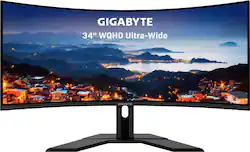
GIGABYTE - 34" LED UltraWide WQHD FreeSync Monitor with HDR (HDMI, DisplayPort) - Black
- Key Specs
- Refresh Rate: 144Hz (The number of frames per second the device can produce natively without enhancement. Higher rates help produce smooth, seamless pictures.)
- Maximum Resolution: 3440 x 1440 (Maximum resolution refers to the highest number of pixels that a screen can process and display. Higher resolution signals produce more detailed images.)
- Panel Type: VA (Technology that affects response time and image quality.)
- Synchronization Technology: FreeSync Premium (AMD Adaptive Sync) (Generally, these technologies allow syncing between a computer/console game's frame rate and the device's refresh rate for a smoother display without tearing.)
- Screen Size: 34 inches (Size of the screen, measured diagonally from corner to corner.)
- General
- Product Name: 34" LED UltraWide WQHD FreeSync Monitor with HDR (HDMI, DisplayPort)
- Brand: GIGABYTE
- Operating System Compatibility: Apple iOS, Windows, Not Applicable, Mac
- Model Number: G34WQC
- Display
- Refresh Rate: 144Hz (The number of frames per second the device can produce natively without enhancement. Higher rates help produce smooth, seamless pictures.)
- Maximum Resolution: 3440 x 1440 (Maximum resolution refers to the highest number of pixels that a screen can process and display. Higher resolution signals produce more detailed images.)
- Contrast Ratio: 3000:1 (Measured difference between a displayed image's brightest whites and darkest blacks. The larger the first number, the more detail and color that can be displayed.)
- Display Type: LED
- Panel Type: VA (Technology that affects response time and image quality.)
- Synchronization Technology: FreeSync Premium (AMD Adaptive Sync) (Generally, these technologies allow syncing between a computer/console game's frame rate and the device's refresh rate for a smoother display without tearing.)
- Aspect Ratio: 21:9 (The measurement of the width of a screen compared to the height of a screen, expressed as a ratio.)
- Curved Screen: true
- Brightness: 320 candela per square meter (A measure of the total light output.)
- Screen Size: 34 inches (Size of the screen, measured diagonally from corner to corner.)
- High Dynamic Range (HDR): true (An HDR-compatible 4K TV or other HDR-compatible product displays HDR video content when it's available from sources like 4K Ultra HD Blu-ray Discs and 4K streaming services.)
- High Dynamic Range Format: VESA Certified DisplayHDR 400 (There are a few HDR formats that tell the TV or other HDR-compatible product how to best utilize its capabilities to display HDR content. HDR technology can support one or multiple formats, each with various benefits to picture quality.)
- Connectivity
- Number of DisplayPort Inputs (Total): 2
- Headphone Jack: true (The device features an interface that allows for the connection of headphones.)
- Compatibility
- Wall Mountable: true (The product is able to be secured to a wall. Some products are designed ready to mount, while others may require additional hardware/accessories for installation.)
- VESA Wall Mount Standard: 100mm x 100mm (VESA wall mount standards refer to the spacing of screw holes built into a TV in order to fit with standard TV wall mounts. These standards are implemented into most TVs and monitors.)
- Features
- Tiltable: true
- Adjustable Stand Height: true
- Anti-Glare: true (Product has features, such as a matte finish, that reduce the likelihood for screen glare.)
- Integrated Speaker(s): true
- Dimensions
- Product Width: 31.8 inches (The out of box width of the item. Width is measured as the horizontal distance from one side of the item to the other as it would be primarily used or placed.)
- Product Weight: 18 pounds (The out of box weight of the item.)
- Stand Included: true
- Certifications & Listings
- ENERGY STAR Certified: false (Devices carrying the ENERGY STAR service mark, such as computer products and peripherals, kitchen appliances, and other products, generally use 20% to 30% less energy than required by federal standards.)
- EPEAT Qualified: false (The Electronic Product Environmental Assessment Tool (EPEAT) was designed to provide an environmental assessment tool for purchasers. In order to qualify for EPEAT, a product must meet all 23 required criteria.)
- Warranty
- Manufacturer's Warranty - Parts: 3 Year
- Manufacturer's Warranty - Labor: 3 years
- Other
- UPC: 889523021859
GIGABYTE gaming monitors pack upscale performance into a streamlined package. The G34WQC provides an immersive experience with its ultra-wide display while capturing fluid gameplay and great color accuracy with 1ms response time, 144Hz refresh rate, and compatibility with graphic card software.
- Display Size: 34 Inch VA Panel
- Display Resolution: WQHD 3440x1440 VA Display
- Refresh Rate: 144Hz Refresh Rate
- Response Time: 1ms (MPRT) Response Time
- HDR Ready: Studio Grade VESA Display HDR400 and 90% DCI-P3 (120% sRGB) Color Gamut
- AMD FreeSync Premium: Smooth Gameplay with AMD FreeSync Premium
- Game Above The Curve: Native 1500R Curvature
- Gaming Feature: GIGABYTE Classic Tactical Features with OSD Sidekick
- Stand Adjustments: Head & Tilt adjustable stand
- Display Input: 1x Display Port 1.4, 2x HDMI 2.0
- VESA Mountable: VESA Wall Mount Compatible 100x100mm
- Blue Light Filter: Low Blue Light & Flicker-Free
- Warranty: 3 Years Warranty, Parts and Labor
A: Have to enable 144hz in the settings on the monitor and in the graphic card settings under Nividia control panel. If you need help check YouTube should fine a easy walkthrough explaining how to turn 144hz on in nividia settings
A: It is a 1440 monitor. So comparing to others, it is the halfway point between HD and 4k. This resolution is a nice step up from standard HD but a little easier for a computer to handle than a full 4k (2160) monitor when used for gaming. It is technically an HDR400 rated monitor, however that is essentially entry level HDR and would need some fine tuning to make it very effective. Comparing to other monitors in the price point, most claiming to have HDR are also rated the same at 400 level.
A: It is 1500R
A: You should be able to run the resolution... It is more a matter of what detail settings you have going in your games. I would think that you should be able to run games decently with an good framerate if only based on the 1080 but I wouldn't expect a 144 refresh rate on ultra settings. There's going to be other factors such as RAM, SSD vs HDD, and CPU etc.
A: It does have speakers but it might as well not have them. It other words they are laughably quiet and tin sounding. It does have a 3.5mm audio jack however should you want to use it for audio pass through.
Q: does this display support g sync?
A: It is not officially gsync supported, but will work with 10 series cards and newer.
Q: Does it support monitor mount
A: Yes, standard 100mm VESA. You'll need to remove the included stand mount with a screw driver.
Q: Does this support HDMI 2.1 ?
A: It looks like only HDMI 2.0 https://www.gigabyte.com/Monitor/G34WQC/sp#sp



















