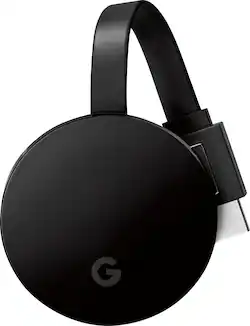
Google - Chromecast Ultra 4K Streaming Media Player - Black
- Key Specs
- Maximum Supported Resolution: 2160p (4K)
- High Dynamic Range (HDR): true (An HDR-compatible 4K TV or other HDR-compatible product displays HDR video content when it's available from sources like 4K Ultra HD Blu-ray Discs and 4K streaming services.)
- Operating System Compatibility: Apple iOS, Android, Windows, Mac, Chrome
- Remote Control Included: false
- Works With: Google Assistant (Compatible with or able to be connected to other smart devices or applications.)
- General
- Product Name: Chromecast Ultra 4K Streaming Media Player
- Brand: Google
- Model Number: NC2-6A5-D
- Features
- Smart Capable: true (Smart, or smart-capable devices are able to connect directly to your home network in order to stream content from the Internet, run Internet-based apps, or connect to other smart devices.)
- Compatibility
- App Compatible: true (The product can be connected to a program or software application on a mobile device, which then receives collected data from the product.)
- Bluetooth Enabled: false (The device is capable of communicating with another device via Bluetooth, provided they are within the required range of each other. A Bluetooth-enabled device must also be the same Bluetooth version or higher than the accessory it is intended to pair with.)
- Compatible Wireless Standard(s): Wireless AC (The wireless networking standard(s) the device is backwards compatible with. This includes networking protocols based on the IEEE 802.11 standard (alphabetically ascending) and the Wi-Fi Alliance standard (numerically ascending), both of which provide high-throughput wireless local area networks (WLANs). Devices designed to work with specific standard(s) will be backwards compatible with previous versions but may not run at optimal performance when using earlier iterations.)
- Interface(s): Ethernet (Refers to the types of connections that devices use to interact and communicate with each other.)
- Works With: Google Assistant (Compatible with or able to be connected to other smart devices or applications.)
- Display
- High Dynamic Range Format: HDR 10 (There are a few HDR formats that tell the TV or other HDR-compatible product how to best utilize its capabilities to display HDR content. HDR technology can support one or multiple formats, each with various benefits to picture quality.)
- Other
- UPC: 811571018284
Introducing Chromecast Ultra
Delivers everything you love about Chromecast plus faster processing speeds and up to 4K Ultra HD & HDR picture quality*. Chromecast Ultra works with iPhone®, iPad®, Android devices, Mac®, Windows®, and Chromebooks.
- Watch what you want, when you want: Enjoy TV shows, movies, videos, songs, games, sports and more from over 2000 apps like Disney+, Netflix, YouTube, YouTube TV and HBO NOW. Find more at g.co/chromecast/ ¹
- Make the most of your TV: With support for 4K Ultra HD TVs with HDR, you can get the most out of your setup. Chromecast Ultra automatically optimizes your content for the best picture quality possible.²
- High-speed wireless connectivity: Built-in 802.11ac Wi-Fi connects to the Internet through your wireless home network (wireless router required and sold separately).
- Everything you love about Chromecast and more: Use your phone to play, pause, control the volume and more. And you can still text or call without interrupting what's playing.
- Mirror your Android phone or laptop: Easily view your device's screen on your TV. If you can see it on your phone, you can see it on your TV.
- Start streaming with just your voice: Works with Google Home so you can stream and control content using just your voice.³
- Pint-sized powerhouse: It's small size fits behind almost any TV. But it packs enough processing power to make sure your shows load fast and stream smoothly.
Whats Included
- Chromecast Ultra Streaming Media Player
- Power cable
- Power adapter with Ethernet port
- Owners manual
Q: What is the different between the new one and the previous one ?
A: The previous one doesn't support 4K and UHD. It would only go upto 1080P. The Ultra is going to be a lot faster, processing-wise and streaming-wise. Another huge difference is the price. The previous one costs only $35 and the Ultra is double the price. If you have a 4K TV and got a lot of 4K content to watch, I'd recommend you go with the Ultra. But if not, then go with the regular $35 chromecast, which pretty much does the same job.
Q: Will this stream live TV to my non smart TV, and do I have to use my cell phone as a remote?
A: You can use any Android or iOS smartphone and/or tablet. You download the Google Home app to make everything work. As for what you can stream, that depends. First, your TV doesn't have to be Smart, but it must have a HDMI input. Next, whatever you want to "cast" to your tv must have that option available within the app. Apps such as Hulu, Netflix, NHL Center Ice, You Tube, etc, all have a cast option. You simply start watching on your phone, then hit the cast icon and boom, it is on your tv. Your phone/tablet screen can power off and the picture will still cast to your TV. You can even multitask and use your phone/tablet for other things while watching TV. Pretty cool stuff.
A: This is a digital media receiver. It will allow you to stream media such as photos, videos and live TV through an existing wireless Internet connection.
Q: How do you connect a laptop to this device so you can cast to the TV?
A: Step 1: Plug in your Chromecast device Plug Chromecast into your TV, then connect the USB power cable to your Chromecast. Then either plug the other end of the USB power cable into an open USB port on your TV OR into the included power adapter which you will then plug into a power outlet. Note: Only use the provided AC adapter. Step 2: Connect your Chromecast device Double check that the Chromecast and the mobile device, tablet, or laptop you are using to set up Chromecast with are both on the same Wi-Fi network. Step 3: Download the Google Home app On your mobile device, tablet, or laptop, download the Google Home app Chromecast cast icon https://play.google.com/store/apps/details?id=com.google.android.apps.chromecast.app Step 4: Set up Chromecast Follow these simple Chromecast setup instructions. https://support.google.com/chromecast/answer/2998456 Step 5: Cast content Learn how to cast from Chrome to your TV https://support.google.com/chromecast/topic/4602553 or cast from Chromecast-enabled apps to your TV. https://support.google.com/chromecast/answer/3006709
Q: Can this new Ultra one use the 5ghz network or is it still limited to the 2.4 like the previous gen?
A: The new chromecast ultra does work with my 5 ghz network. It's the main reason I purchased it. I wanted to upgrade from an older roku I had
Q: Does the Chromecast Ultra support Dolby Atmos output (e.g. from Vudu)?
A: According to articles I've read, the Chromecast Ultra supports 4K UHD, Dolby Vision, HDR10, and Dolby Digital Plus.
Q: what is the chromecastultra used for in tv?
A: The Chromecast is used to stream apps onto your TV such as Netflix, Amazon Prime Video, Hulu, etc.
Q: Will it support MLB and NHL?
A: Works with NHL. I bought it just for that purpose. I would assume it works with the MLB app as well.














