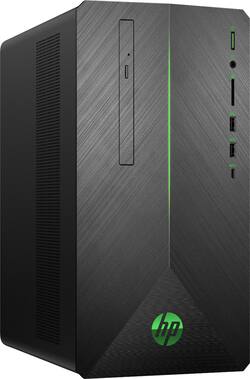
HP - Gaming Desktop - AMD Ryzen 7 2700 - 16GB Memory - AMD Radeon RX 580 4GB - 1TB HDD + 128GB SSD - Black
- Key Specs
- Processor Model: AMD 2nd Generation Ryzen 7 (Your computer's processor is like its brain. Working in combination with system memory, the power of the processor determines the complexity of software you can run, how many programs you can have open at the same time, and how fast those programs will run. Most computers feature an AMD, Intel or Snapdragon processor.)
- Storage Type: SSD, HDD
- Total Storage Capacity: 1128 gigabytes
- System Memory (RAM): 16 gigabytes (Random-access memory (RAM) is a computing device's short-term data storage, which allows active information to be accessed quickly. The size and type of RAM determines how efficiently the device can handle large amounts of information at one time. For example, gaming or video editing requires more RAM for optimal performance.)
- General
- Product Name: Gaming Desktop - AMD Ryzen 7 2700 - 16GB Memory - AMD Radeon RX 580 4GB - 1TB HDD + 128GB SSD
- Brand: HP
- Model Number: 690-0034
- Processor
- Processor Brand: AMD
- Processor Model: AMD 2nd Generation Ryzen 7 (Your computer's processor is like its brain. Working in combination with system memory, the power of the processor determines the complexity of software you can run, how many programs you can have open at the same time, and how fast those programs will run. Most computers feature an AMD, Intel or Snapdragon processor.)
- Processor Model Number: 2700
- Storage
- Storage Type: SSD, HDD
- Total Storage Capacity: 1128 gigabytes
- Solid State Drive Capacity: 128 gigabytes (The amount of data that can be stored on the device's solid state drive (SSD). SSD is a flash-based storage with faster speeds than a hard disk drive (HDD).)
- Hard Drive Capacity: 1000 gigabytes (The amount of data that can be stored on the device's mechanical hard drive. Hard disk drives (HDDs) typically have larger capacities than solid state drives (SSDs) but may have slower speeds.)
- Solid State Drive Interface: SATA (Connects the solid state drive to the host system. PCI and SATA interfaces are the most common; PCI interfaces are typically faster, but SATA interfaces are compatible with a wider range of systems.)
- Hard Drive Interface: SATA (Connects the hard drive to the host system for transferring data between the hard disk cache and system memory. IDE and SATA interfaces are primarily used for personal computing, while larger servers and workstations typically use SAS or SCSI.)
- Hard Drive RPM: 7200 revolutions per minute (A hard drive's data is stored on disks, or platters, that spin while transferring information to the host system. The higher the RPM, the faster the hard drive's performance.)
- Hard Drive Accelerator: None (A module integrated (or added) into a PC to improve performance speed. By acting as a high-speed cache, an accelerator speeds up access times to the hard drive, which results in faster web browsing, improved gaming experience, and overall more responsiveness.)
- Memory
- System Memory (RAM): 16 gigabytes (Random-access memory (RAM) is a computing device's short-term data storage, which allows active information to be accessed quickly. The size and type of RAM determines how efficiently the device can handle large amounts of information at one time. For example, gaming or video editing requires more RAM for optimal performance.)
- Type of Memory (RAM): DDR4 SDRAM (Each type of RAM delivers a different level of speed, bandwidth, energy efficiency and performance.)
- System Memory RAM Speed: 2666 megahertz (How fast the information-storing hardware operates. The faster the RAM, the faster memory can be transferred to other system components. Ultimately, faster RAM improves operational efficiency.)
- Number of Memory Sticks Included: 3
- System Memory RAM Expandable To: 32 gigabytes (Adding more random-access memory (RAM) to a computer speeds up performance and improves efficiency. Upgrades to memory are limited by the number of expansion slots for additional RAM and existing RAM installed on the device.)
- Compatibility
- Operating System: Windows 10 Home (The operating system manages all software and hardware, including files, memory and connected devices. Most importantly, it lets you interact with your device and your programs in a visual way; otherwise, you'd be typing computer code to get anything done.)
- Connectivity
- Ethernet Card: 10/100/1000 (Also known as an Ethernet adapter, this card plugs into a computer's motherboard and enables it to access an Ethernet network. Ethernet data transmission speeds are measured in Mbps (megabits per second) and Gbps (gigabits per second). For example, a 10/100 Ethernet port transmits 10 and 100 Mbps, while a 10/100/1000 Ethernet port transmits 10 and 100 Mbps and has a maximum speed of 1000 Mbps (1 Gbps).)
- Expansion
- Number of M.2 Slots: 2 (This interface is most commonly used for high-speed solid state drives (SSDs), and is often used in laptops due to its small size.)
- Number Of Internal 2.5" Bays: 1
- Number Of Internal 3.5" Bays: 1
- Number Of External 5.25" Expansion Bays: 1
- Features
- Media Card Reader: true (A hardware device that allows for access to data on a memory card and enables the transfer of its files to a computer. These devices may have one or multiple slots for various types of memory cards, and may be integrated into the computer or available as an external device.)
- Audio Technology: 5.1 channel surround
- Size: Standard
- Dimensions
- Product Height: 13.3 inches (The out of box height of the item. Height is measured as the vertical distance from the bottom of the item to the top as it would be primarily used or placed.)
- Product Width: 6.7 inches (The out of box width of the item. Width is measured as the horizontal distance from one side of the item to the other as it would be primarily used or placed.)
- Product Depth: 11 inches (The out of box depth of the item. Depth is measured as the distance from the front of the item to the back as it would be primarily used or placed.)
- Certifications Listings & Approvals
- ENERGY STAR Certified: true (Devices carrying the ENERGY STAR service mark, such as computer products and peripherals, kitchen appliances, and other products, generally use 20% to 30% less energy than required by federal standards.)
- EPEAT Qualified: false (The Electronic Product Environmental Assessment Tool (EPEAT) was designed to provide an environmental assessment tool for purchasers. In order to qualify for EPEAT, a product must meet all 23 required criteria.)
- Included
- Included Software: HP Recovery Manager, HP Support Assistant, HP Games Powered by WildTangent, Netflix, McAfee LiveSafe (30 days trial), CyberLink Power Media Player, Dropbox (25 GB Cloud Storage) (free for 1 year), HP JumpStart and HP Connection Optimizer
- Other
- UPC: 192545572552
Experience powerful graphics and virtual reality with this HP Pavilion gaming desktop. It has an AMD Ryzen processor to handle intense gaming, and the 16GB of DDR4 RAM provides fast processing speeds. This HP Pavilion gaming desktop has a 1TB hard drive and 128GB solid-state drive for a large game collection and quick boot times.
- Windows 10 operating system: Windows 10 brings back the Start Menu from Windows 7 and introduces new features, like the Edge Web browser that lets you markup Web pages on your screen. Learn more ›
- Virtual Reality Ready: This computer has the required specs to run Virtual Reality hardware and software and is compatible with Oculus Rift, HTC Vive, and Windows Mixed Reality Ultra.
- 16GB system memory for intense multitasking and gaming: Reams of high-bandwidth DDR4 RAM to smoothly run your graphics-heavy PC games and video-editing applications, as well as numerous programs and browser tabs all at once.
- DVD/CD burner: Reads and writes to a variety of media formats, including DVD+R/RW, DVD-R/RW and CD-R/RW.
- 1TB hard drive and 128GB solid state drive (SSD) for a blend of storage space and speed: The hard drive provides ample storage, while the SSD delivers faster start-up times and data access.
- Cloud support lets you access your files anywhere: Store your photos, videos, documents and other files on Dropbox for secure access across multiple devices. Fees may apply.
- AMD Radeon RX 580 graphics: Driven by 4GB GDDR5 dedicated video memory to quickly render high-quality images for videos and games.
- Built-in media reader for simple photo transfer: Supports SD, SDHC and SDXC memory card formats.
- 2 SuperSpeed 10Gbs USB 3.1 ports: Ultra-fast data connections to transfer large files rapidly.
- 2 USB 2.0 ports: Quick plug-and-play connectivity for your devices and accessories.
- Next-generation wireless connectivity: Connects to your network or hotspots on all current Wi-Fi standards. Connect to a Wireless-AC router for speed nearly 3x faster than Wireless-N. Gigabit LAN port also plugs into wired networks.
- Bluetooth 4.2 interface syncs with compatible devices: Wirelessly transfer photos, music and other media between the desktop and your Bluetooth-enabled cell phone or MP3 player, or connect Bluetooth wireless accessories.
- Multimedia software package included: HP Recovery Manager, HP Support Assistant, HP Games Powered by WildTangent, Netflix, McAfee LiveSafe (30 days trial), and more.
- Additional ports: Microphone and headphone jacks. HDMI output.
Whats Included
- HP Pavilion Gaming 690-0034
- Mouse, keyboard
Product Manuals
A: According to BestBuy WebChat it is a typo, it really is a 2nd Generation and not as stated a 1st Gen. The Model Number 2700 is correct. I was also able to verify this on the HP-Website by entering the Model Number of the PC (Model:690-0034) that is listed on the Top of this Article.. https://support.hp.com/us-en/document/c06124757
A: I bought the PC for this exact reason. I got it on sale, and at the sale price, the PC was cheaper than buying the parts individually, so I thought I'd just transfer the PC to an old tower for better airflow (and so I could connect multiple hard drives). Turns out this PC has a proprietary motherboard and power supply. The motherboard won't even mount to a standard case because the mount holes are in different locations. The motherboard also doesn't have typical headers for the front I/O connections. It only has 3 total SATA ports. The power supply only has two power connectors for hard drives and a very weird Fan ATX connector I've never seen on a motherboard. It's built for the proprietary motherboard. Long story short, I had to buy a new motherboard (and Windows) and power supply to move it to another tower. You'd also want to buy a new CPU cooler as the included one is barely adequate. But as soon as I moved the PC and installed the better CPU fan, I went from 90C+ CPU temps under load to 52C.
A: This model has no sound card- built into motherboard. read my full review here to see my workaround and suggestions. --- I'll start by saying I love this PC. Performance is phenomenal. so fast. and multitasking is awesome. I use primarily for multimedia/graphic design work (Photoshop/Illustrator/video editing and conversion). Gaming works very well. more than enough RMA and video card more than ample. My set up is with a dual monitor set up (HP Pavilion 23xw's) I also have a an HP external USB Floppy Drive (I have a Yamaha keyboard/piano that uses floppy) and I use a Logitech Z506 5.1 surround set up. --- 2 changes I had to make for this system (this is to help others avoid problems). - The Primary SSD hardrive is by far the fastest ype of hard drive (NVMe M.2 SSD) and was great; however, the small 128GB size was not sufficient for someone like me who installs Adobe suite/etc. I upgraded to a Western Digital Black SN750 500GB NVMe M.2 SSD (up to 3470MB/s). It also increased performance/speed slightly and slightly noticeable faster boot up as well. set aside original as a back up. - sound: some will find this very helpful- PC has many ports even for video, but sound is where I found it lacked. It has 1 sound output jack on the rear for stereo only (virtual surround at best). No bueno. One might suppose to simply buy the latest Asus or Sound Blaster Sound blaster card as I did- I mean, it has an open PCI-e slot right? WRONG. it's physically there. you'll install the card. it will show the card hardware in Device Manger. it will not install software or function at all despite Windows even identifying it. It's listed, but not there. Listen carefully. The PCI-e slot is not to be used while you are using aNVMe M.2 SSD drive. It utilizes the PCI-e slot's pathway to function (part of why they are so fast verses standard SATA SSD's. so the slot is not functional. Workaround: press CTRL+SHIFT+ESC to open Task Manager. scroll down to find Realtek Audio Manager. Right click it and select OPEN FILE LOCATION. Right click the same icon (now labeled as RtkNGUI64 app and create a shortcut for yourself (make life easier). open the audio manager. click on Listening Experience. then on Speaker Configuration. adjuster to your 5.1 set up (check mark Center, Subwoofer, Side Pair. Bottom shows Back Panel where colored ports are for Stereo out, Mic in, and Line in. plug your main stereo wire to the main port (green). then plug in the pink one your center/subwoofer, then the blue one side speakers. It automatically configures those input ports to now be out put ports. VIOLA!!! you have full surround sound. (Not as premium as a dedicated sound card, but it works just fine. - If you need a mic, buy a USB mic or headphone/mic set. If you still need a premium sound card, rest assured that the many USB 3 ports on the back of the PC will gladly take an external sound card, which will work just fine also.
Q: Do I have to take the cover off to remove the plastic backing off the HDMI on back of computer?
A: There are three display ports. To get the HDMI to work you need a display port to HDMI adapter or dongle.Then you can plug your HDMI cable from the monitor into the dongle or plug the Display port adapter cable into your monitor
Q: People say we can't connect this model to Internet. Is it true?
A: No, it's not true. As laid out in the specs, this computer has several internet connection options, including next-generation wireless connectivity and Ethernet. It connects to your network or hotspots on all current Wi-Fi standards. Connect to a Wireless-AC router for speed nearly 3x faster than Wireless-N. The Gigabit LAN port also plugs into wired networks.
A: OS is installed on the SSD not the HDD. But you could change it I guess. However if you are planning on swapping the SSD to something larger, not this the SSD in this PC is M.2 SATA SSD and not the 2.5" Inch form factor. As long you use the same Microsoft Account the OS Key will transfer based on the Microsoft account, no need to renter a key.
A: Only green and stays on when PC turns on. Try HP Phoenix Control Software (only tune on/off) https://support.hp.com/us-en/document/c04743564
Q: At what FPS will this run cod ww2. And is it compatible with free sync monitor
A: Yes, it is FreeSync compatible!