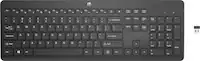
Incase - Ergonomic Keyboard EN Layout Designed by Microsoft - Black
Related Item

Specifications
- Form FactorFull-size, ErgonomicConnection TypeWired
- Key Specs
- Form Factor: Full-size, Ergonomic (The size, arrangement, and physical configuration of the product.)
- Connection Type: Wired
- General
- Brand: Incase
- Model Number: LXM-00001
- Product Name: Ergonomic Keyboard EN Layout Designed by Microsoft
- Color: Black
- Functions
- Form Factor: Full-size, Ergonomic (The size, arrangement, and physical configuration of the product.)
- Connectivity
- Connection Type: Wired
- Wired Connectivity: USB-A (USB 2.0 Gen2)
- Compatibility
- Operating System Compatibility: Windows, Mac
- Dimensions
- Product Height: 10.33 inches (The out of box height of the item. Height is measured as the vertical distance from the bottom of the item to the top as it would be primarily used or placed.)
- Product Width: 19.84 inches (The out of box width of the item. Width is measured as the horizontal distance from one side of the item to the other as it would be primarily used or placed.)
- Product Depth: 2.39 inches (The out of box depth of the item. Depth is measured as the distance from the front of the item to the back as it would be primarily used or placed.)
- Product Weight: 2.25 ounces (The out of box weight of the item.)
- Warranty
- Warranty - Parts: 1 year
- Warranty - Labor: 1 year
- Other
- UPC: 650450267333
Made for a comfortable all-day typing experience, the Incase Ergonomic Keyboard, Designed by Microsoft, is slim, refined and considered. The keyboard features an ergonomic split keyset, improved cushioned palm rest, short cut keys, and supportive structure intended to reduce fatigue while enhacing your creative experience.
- Design: Designed by Microsoft.
- Comfort: Exceptional comfort – work all day, with reduced risk of fatigue and injury, on our ergonomist-approved design.
- Support: Excellent support – improved cushion and ergonomically tested palm rest covered in premium fabric provides all-day comfort and promotes a neutral wrist posture.
- Accessibility: Built-in shortcuts – Be more productive with dedicated function keys for Microsoft 365, emojis, search, easy access to media controls and more.
- Number Pad: Crunch numbers fast – work quickly and efficiently with a dedicated, integrated number pad.
- Design: Designed by Microsoft.
- Comfort: Exceptional comfort – work all day, with reduced risk of fatigue and injury, on our ergonomist-approved design.
- Support: Excellent support – improved cushion and ergonomically tested palm rest covered in premium fabric provides all-day comfort and promotes a neutral wrist posture.
- Accessibility: Built-in shortcuts – Be more productive with dedicated function keys for Microsoft 365, emojis, search, easy access to media controls and more.
- Number Pad: Crunch numbers fast – work quickly and efficiently with a dedicated, integrated number pad.
Whats Included
- Ergonomic Keyboard EN Layout EN/FR/ES/PT
- Ergonomic Keyboard EN Layout EN/FR/ES/PT
Q: How does this keyboard provide support for comfortable typing?
A: It has an improved cushion and ergonomically tested palm rest covered in premium fabric for all-day comfort and a neutral wrist posture.
Q: What type of connection does this keyboard use?
A: This keyboard uses a wired USB-A (USB 2.0 Gen2) connection.
Q: Why is this keyboard good for long typing sessions?
A: The Incase Ergonomic Keyboard is designed for comfort, with an ergonomist-approved design to reduce fatigue and injury risk during extended use.
Q: What operating systems is this keyboard compatible with?
A: This keyboard is compatible with Windows operating systems.
Q: Does this keyboard have a number pad?
A: Yes, this keyboard has a dedicated, integrated number pad for efficient numerical input.
A: greed, what else?
Compare similar products
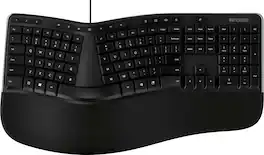
Made for a comfortable all-day typing experience, the Incase Ergonomic Keyboard, Designed by Microsoft, is slim, refined and considered. The keyboard features an ergonomic split keyset, improved cushioned palm rest, short cut keys, and supportive structure intended to reduce fatigue while enhacing your creative experience.

Whether you just got a new computer or are simply upgrading your current setup, you can’t go wrong with this Insignia NS-PK4KCB23 Full-Size Wireless Ergonomic Membrane Keyboard. Its plug-and-play technology easily connects to your Windows, macOS or ChromeOS system with a simple USB dongle. An ergonomic design with wrist support makes it a comfortable to use for longer lengths of time. Membrane switch keys provide a smooth typing experience, while a full-size number pad helps you input information more accurately, and multimedia keys keep a variety of functions like audio controls within easy reach.

X9 Performance X9ERGOKEY – Split Ergonomic Keyboard for Maximum Comfort and Productivity Enhance your typing experience with the X9 Performance X9ERGOKEY, a split ergonomic keyboard designed to boost comfort and efficiency. Say goodbye to wrist strain and fatigue with its integrated cushioned palm rest, ensuring optimal support during long hours of work. Whether you’re a professional, student, or avid typist, this ergonomic keyboard wired is built for seamless functionality and ease of use. Key Features: ✔ Ergonomic Split Design – Encourages natural wrist, palm, and forearm positioning to minimize strain, making it an ideal carpal tunnel keyboard. ✔ Built-In Wrist Cushion – Provides enhanced support and comfort for an improved typing experience. ✔ Full-Sized Layout with 110 Keys – Includes a 17-key numeric keypad for effortless data entry and calculations. ✔ 17 Shortcut & Multimedia Keys – Quick access to frequently used commands and applications. ✔ LED Indicators – Stay informed with clear indicators for Caps Lock, Num Lock, and Functions Lock. ✔ Adjustable Kickstand – Customize your typing angle for maximum comfort or lay it flat on your desk. ✔ Plug & Play Connectivity – Simply connect the 5ft USB-A cable to any laptop or PC (Windows, Chromebook, iOS) for instant functionality. Technical Specifications: ✔ Compatible with: Windows, Chromebook, and iOS ✔ Connection Type: USB-A (Wired, 5ft cable) ✔ Dimensions: 1.5" (H) x 19" (W) x 9.85" (D) ✔ Weight: 2.25 lbs Why Choose the X9ERGOKEY? Designed for ultimate comfort and efficiency, this split keyboard ergonomic reduces stress on your hands and wrists, making it ideal for extended use. The full-sized keyboard and shortcut keys allow for seamless navigation, while the plug-and-play USB connectivity ensures effortless setup. This curved keyboard supports natural hand positioning and is a great keyboard for carpal tunnel support. Worry-Free Warranty & Support At X9 Performance, we stand behind our products. Every purchase comes with friendly customer support and hassle-free returns for your peace of mind. Upgrade your workspace today with the X9 Performance X9ERGOKEY – the perfect corded keyboard solution for comfortable and productive typing! Whether you need a teclado ergonomico or a keyboard ergonomic keyboards, this model has you covered.

Type more naturally with ERGO K860 – an advanced ergonomic keyboard that promotes a more relaxed typing posture – reducing wrist bending and offering wrist support. A curved keyframe helps reduce wrist strain, while a pillowed wrist rest keeps your forearms elevated to help prevent excessive bending. This Logitech ERGO keyboard features Perfect Stroke keys for quiet performance and responsiveness, and the 2-year battery life offers long-lasting use.
| Pros for Incase - Ergonomic Keyboard EN Layout Designed by Microsoft - Black | |||
|---|---|---|---|
| Overall Performance | Ergonomics, Ease of use, Keyboard Size, Wireless, Price | There were no pros for this product— | Ergonomics, Ease of use, Wrist Rest, Bluetooth, Key Feel |
| Cons for Incase - Ergonomic Keyboard EN Layout Designed by Microsoft - Black | |||
| There were no cons for this product— | Key Response | There were no cons for this product— | Price, Size |
Specs
Reviews
Customers are saying
Customers enjoy the overall performance of the Ergonomic Keyboard EN Layout Designed by Microsoft. Users find that this keyboard will suit them just fine. There are no cons mentioned for this product.
The vast majority of our reviews come from verified purchases. Reviews from customers may include My Best Buy members, employees, and Tech Insider Network members (as tagged). Select reviewers may receive discounted products, promotional considerations or entries into drawings for honest, helpful reviews.
- Rated 3 out of 5 stars
Wish this keyboard had collapsable legs
This keyboard doesn't have lets on the front / bottom side, so it cannot side above an open laptop, so despite being a very nice keyboard, it takes up too much room on my desk. I wish it had those little, collapsable legs on either wide of the bottom, as it'd be the perfect peripheral for me if it did.
Posted by sfyoung10ca
- Rated 5 out of 5 stars
Ergonomic Keyboard Never Leave Me Bored
If you like the Microsoft 4000 or the newer Microsoft Ergonomic Wired Keyboard, this will suit you just fine. I own both the Microsoft and Incase versions of the latter and notice no difference between them. I also find no need for a wrist pad when using this keyboard.
Posted by NickNeptune
- Rated 5 out of 5 stars
Real nice ergonomic keyboard
This keyboard replaced my old micro**** keyboard that gave out after years of use. This Incase keyboard has the same layout and more importantly, still has the ergonomic wave so that your hands are in a natural position. I like this keyboard so much, I am ordering a second one. I would recommend this keyboard to anyone that is looking for an ergonomic keyboard. Your wrists will thank you.
Posted by Phil