- Key Specs
- Cable Length: 6 feet
- Connector Type (End 1): DVI-D
- Gender (End 1): Male
- Connector Type (End 2): HDMI Type A
- Gender (End 2): Male
- In-Wall Rated: false
- Connector Finish: Other
- General
- Brand: Insignia™
- Model Number: NS-PI06502
- Product Name: 6' DVI-D-to-HDMI Cable
- Color: Black
- Quantity: 1
- Connectivity
- Cable Type: DVI, HDMI
- Cable Length: 6 feet
- Product Type: Cable
- Connector Type (End 1): DVI-D
- Gender (End 1): Male
- Connector Type (End 2): HDMI Type A
- Gender (End 2): Male
- Environmental
- In-Wall Rated: false
- Indoor Or Outdoor Use: Indoor (Indicates the appropriate environment product was designed to be used in.)
- Material
- Connector Finish: Other
- Warranty
- Warranty - Parts: 1 year
- Warranty - Labor: 1 year
- Other
- UPC: 600603166778
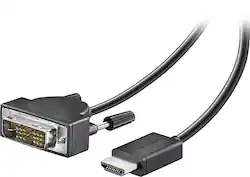
This 6' Insignia™ NS-PI06502 cable allows you to easily connect your PC or laptop with a DVI output to a high-definition monitor or projector with an HDMI input. The cable supports up to 1920 x 1200 monitor resolutions, so you can enjoy clear, detailed visuals.
- Connects a PC or laptop with a DVI output: To a high-definition monitor or projector with an HDMI input.
- Supports monitor resolutions up to 1920 x 1200 resolution: Plus supports digital video signals to deliver sharp, crisp images.
- Maintains single-link DVI resolutions up to 2.75MP at 60Hz: To reduce flickering.
- 6' length: For flexible placement options.
Whats Included
- Insignia™ 6' DVI-D-to-HDMI Cable
Product Manuals
A: The answer to your question is yes. It will work on a monitor that has a DVI input from a computer with HDMI out.
Q: My Alienware alpha only does hdmi but the monitor I bought uses only vga or dvi. Will this work?
A: Yes. It should work fine. Just remember, the DVI connector only passes video signal through. No audio. You will need to use the speaker/headphone out on the computer for audio, or get a HDMI audio extractor.
A: It depends on what type of connections you have on the monitor. You already said it does not have a DVI plug in but if it has a HDMI, the DVI to HDMI cable will work. If you do not have a HDMI plug in then you probably only have a VGA plug in. Then you need to see if you have a VGA on the computer and jut get a VGA cord.
Q: I have a projector that has a DVI connect but my computer only has usb or HDMI
A: This cable will get the signal out of the computer via the HDMI port and into the DVI on the projector, but the DVI connection is ONLY video. You will also need a separate cable for the audio (probably a 1/8" headphone connector) - either to the tiny speaker in the projector or a real speaker system.
A: Yes
Q: Insignia™ - 6' DVI-D-to-HDMI Cable
A: Jeff I used it to connect a Mac Book Pro with a HDMI output to a DVI TV so yes
Q: how do i connect to monitors to one computer so that they can run independently ?
A: purchase a graphic card with dual monitor support. they can range from $40-$1200
Q: Can't find a right Cable to connect PC laptop to the TV
A: Should work for the video. Keep in mind DVI is video only. You will still need to establish a feed for your audio.