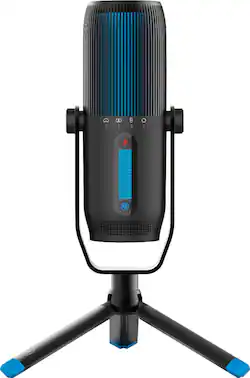
JLab - TALK PRO Professional Plug & Play USB Microphone - Black
- Key Specs
- Polar Pattern: Cardioid, Omnidirectional, Bidirectional, Stereo
- Output(s): USB Type C
- Microphone Type: Condenser microphones
- Wireless: false
- General
- Product Name: TALK PRO Professional Plug & Play USB Microphone
- Brand: JLab
- Model Number: MTALKPRORBLK4
- Color: Black
- Dimensions
- Product Height: 6.7 inches (The out of box height of the item. Height is measured as the vertical distance from the bottom of the item to the top as it would be primarily used or placed.)
- Product Length: 2.4 inches (The out of box length of the item. Length is measured as the longest dimension of the item.)
- Product Width: 2.4 inches (The out of box width of the item. Width is measured as the horizontal distance from one side of the item to the other as it would be primarily used or placed.)
- Product Weight: 0.57 pounds (The out of box weight of the item.)
- Cord Length: 120 inches
- Audio
- Polar Pattern: Cardioid, Omnidirectional, Bidirectional, Stereo
- Output(s): USB Type C
- Features
- Microphone Type: Condenser microphones
- Wireless: false
- Mute Function: true
- Compatibility
- Camera/Camcorder Compatible: false
- Included
- Number of Microphones Included: 3
- Warranty
- Manufacturer's Warranty - Parts: 2
- Manufacturer's Warranty - Labor: 2
- Other
- UPC: 812887019347
Meet Talk PRO, JLab’s ultimate professional level USB microphone featuring the highest quality 192kHz/24BIT resolution in the game. Offering 3 studio quality condensers and 4 directional pattern modes, this microphone has the capability to professionally tackle any recording project: music, podcasts, game streams, voiceover, and ASMR. With top-notch volume and gain controls and a quick-mute button, the Talk PRO offers a hassle-free experience with clear sound for any occasion.
- Professional Grade Recording: Studio quality resolution of 192kHz/24BIT with 3 condensers
- 4 Directional Pattern Modes: Cardioid, Omni, Stereo, and Bidirectional. Cardioid is great for individual podcasting, gaming, and calls. Stereo is great for music recoring and ASMR, and Bidrectional is ideal for two person interviews, multi-player gaming, and duet music recording.
- Control Your Recording: Adjust the gain control if there is any sensitivity and adjust the loudness with volume control
- Quick Mute: Quick mute button for easy access
- Zero Latency: 3.5mm AUX input for real-time listening with zero latency
- Plug & Play: Includes 10ft USB/USB-C plastic coating cable (90-degree nickel-plated connector) to plug into your device and record hassle-free
- Microphone Stand: Tripod stand with standard 5/8” input for swivel mounting
Product Manuals
Q: Can this microphone be used for singing?
A: Yes! -JLab
A: Talk microphone can work with XBOX when sound settings are properly set. -JLab
A: Hi, When you get a chance, please reach out to us either via email [email protected] or shoot us a call at 405.445.7219 Monday-Thursday between 8am-4:30pm p.t Friday 8am-2pm p.t so that we can answer all of your needed questions. With love from the Lab!
A: Hi! Please contact our support team at [email protected]. We'll see what we can do to help :)
Q: Can this mic be used with an Iphone that you are recording with?
A: Yes, you can, but you will need an OTG adapter.
Q: So do we receive 3 individual microphones when we purchase this?
A: No buddy, you get the talk go for 50, the talk pro for 150 and I forgot how much was the other one
Q: how do i install on my desktop
A: Hey there, you may need to access your privacy settings on the computer and allow access to the microphone. Please try this. If this doesn't work please make sure the cable is all the way in the microphone's port. There is a chance the cable is faulty and in order to know this, you will have to replace it with a different USB-A to USB-C you have lying around (if you do not have one that's okay). If none of these work please contact us for help. We will be sure to figure out a solution and get you up and running. -JLab Audio


















