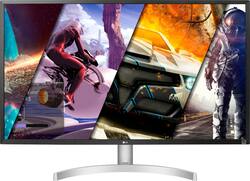
LG - 32” UHD (3840 x 2160) HDR Monitor with AMD FreeSync - (DisplayPort, HDMI) - White
- Key Specs
- Refresh Rate: 60Hz (The number of frames per second the device can produce natively without enhancement. Higher rates help produce smooth, seamless pictures.)
- Maximum Resolution: 3840 x 2160 (Maximum resolution refers to the highest number of pixels that a screen can process and display. Higher resolution signals produce more detailed images.)
- Response Time: 4 milliseconds (The speed at which pixels can change colors is called response time. It is measured in milliseconds (ms).)
- Panel Type: VA (Technology that affects response time and image quality.)
- Synchronization Technology: FreeSync (AMD Adaptive Sync) (Generally, these technologies allow syncing between a computer/console game's frame rate and the device's refresh rate for a smoother display without tearing.)
- Screen Size: 32 inches (Size of the screen, measured diagonally from corner to corner.)
- General
- Product Name: 32” UHD (3840 x 2160) HDR Monitor with AMD FreeSync - (DisplayPort, HDMI)
- Brand: LG
- Operating System Compatibility: Not Applicable
- Model Number: 32UL500-W
- Display
- Refresh Rate: 60Hz (The number of frames per second the device can produce natively without enhancement. Higher rates help produce smooth, seamless pictures.)
- Maximum Resolution: 3840 x 2160 (Maximum resolution refers to the highest number of pixels that a screen can process and display. Higher resolution signals produce more detailed images.)
- Native Resolution: 3840 x 2160 (Native resolution of a screen refers to its single, fixed resolution. Sometimes screens must scale an image up or down in order to fit the native resolution. This can cause a loss of resolution or detail.)
- Contrast Ratio: 3000:1 (Measured difference between a displayed image's brightest whites and darkest blacks. The larger the first number, the more detail and color that can be displayed.)
- Response Time: 4 milliseconds (The speed at which pixels can change colors is called response time. It is measured in milliseconds (ms).)
- Display Type: LED
- Panel Type: VA (Technology that affects response time and image quality.)
- Synchronization Technology: FreeSync (AMD Adaptive Sync) (Generally, these technologies allow syncing between a computer/console game's frame rate and the device's refresh rate for a smoother display without tearing.)
- Aspect Ratio: 16:9 (The measurement of the width of a screen compared to the height of a screen, expressed as a ratio.)
- Curved Screen: false
- Brightness: 300 candela per square meter (A measure of the total light output.)
- Screen Size: 32 inches (Size of the screen, measured diagonally from corner to corner.)
- High Dynamic Range (HDR): true (An HDR-compatible 4K TV or other HDR-compatible product displays HDR video content when it's available from sources like 4K Ultra HD Blu-ray Discs and 4K streaming services.)
- High Dynamic Range Format: HDR 10 (There are a few HDR formats that tell the TV or other HDR-compatible product how to best utilize its capabilities to display HDR content. HDR technology can support one or multiple formats, each with various benefits to picture quality.)
- Horizontal Viewing Angle: 178 degrees (The maximum angle at which the display can be viewed with acceptable visual performance from either side.)
- Connectivity
- Number of DisplayPort Inputs (Total): 1
- Number of HDMI Inputs (Total): 2
- Headphone Jack: true (The device features an interface that allows for the connection of headphones.)
- Compatibility
- Wall Mountable: true (The product is able to be secured to a wall. Some products are designed ready to mount, while others may require additional hardware/accessories for installation.)
- VESA Wall Mount Standard: 100mm x 100mm (VESA wall mount standards refer to the spacing of screw holes built into a TV in order to fit with standard TV wall mounts. These standards are implemented into most TVs and monitors.)
- Features
- Tiltable: true
- Adjustable Stand Height: false
- Anti-Glare: true (Product has features, such as a matte finish, that reduce the likelihood for screen glare.)
- Built-In Webcam: false
- Integrated Speaker(s): true
- Dimensions
- Product Height With Stand: 20.4 inches
- Product Height Without Stand: 16.7 inches
- Product Width: 28.7 inches (The out of box width of the item. Width is measured as the horizontal distance from one side of the item to the other as it would be primarily used or placed.)
- Product Depth (With Stand): 8.2 inches
- Product Depth Without Stand: 1.9 inches
- Product Weight: 13.7 pounds (The out of box weight of the item.)
- Stand Included: true
- Stand Width: 6.3 inches (The horizontal measurement of the stand/base, or the distance from the outside of one leg to the outside of the opposite leg, as it is attached to the product.)
- Power
- Power Consumption: 50 watts
- Power Saving/Off Mode: 0.5 watts (This mode will turn the display and/or the device off, or into a standby mode, after a preset length of time with no activity to conserve power.)
- Certifications Listings & Approvals
- ENERGY STAR Certified: false (Devices carrying the ENERGY STAR service mark, such as computer products and peripherals, kitchen appliances, and other products, generally use 20% to 30% less energy than required by federal standards.)
- EPEAT Qualified: false (The Electronic Product Environmental Assessment Tool (EPEAT) was designed to provide an environmental assessment tool for purchasers. In order to qualify for EPEAT, a product must meet all 23 required criteria.)
- Warranty
- Manufacturer's Warranty - Parts: 1 year
- Manufacturer's Warranty - Labor: 1 year
- Other
- UPC: 719192641761
The UHD 4K monitor that does it all. At 32" and 16:9 screen ratio, LG's UHD monitor features great color, contrast, clarity, detail and responsiveness. It shines as a productivity powerhouse, delivering a flexible workstation experience and easy setup, yet amplifies gaming with cutting-edge features and elevates entertainment with HDR10 and AMD FreeSync.
- LG UltraFine Monitor: Create with vivid color and clarity. Whether it's video, photography or graphic design, LG UltraFine monitors are your canvas. Do your best work with picture quality composed of precise detail and spot-on color accuracy.
- Precise Color Expression: With DCI-P3 95% (Typ.) and HDR10 in 32-inch UHD 4K, offering 4 times as many pixels as Full HD, your work shines for clear, and precise color as desired, resulting in easy reproduction of images on screen.
- Immersive Gaming: 32UL500 boosts the new era of 4K HDR console gaming experience, not only bringing unprecedented thrills with decent image, and sound, but also helping you win more battles with AMD FreeSync™, Dynamic Action Sync and Black Stabilizer.
- AMD FreeSync: Fluid and rapid motion. With AMD FreeSync™ technology, console gamers can experience seamless, fluid movement throughout high resolution, fast-paced games. AMD FreeSync™ virtually eliminates screen tearing and stuttering.
- HDR Compatibility: The result is the most true with vivid brightness, and wide color range when playing on LG UHD 4K monitor with HDR10 technology in support of DCI-P3 (Typ.) color space.
Q: Can someone confirm if the monitor has external speakers
A: This has speakers built in
Q: my questions are. What year is the monitor? and what version is the displayport?
A: The LG 32” UHD (3840 x 2160) VA Monitor with HDR 10 Compatibility and AMD FreeSync, Model # 32UL500-W.AUS is a 2019 model and the DisplayPort is version 1.2...^IFV
Q: Would this monitor be good to use for editing photos with Photoshop and Lightroom?
A: One of the reasons I purchased this monitor was to curate and manage photos. It's advertised to be to provide 95% color accuracy, and it is much better than previous monitors I've used. But those were FHD monitors and this is UHD. I haven't compared it against any of the monitors that advertise higher accuracy, but all of those were at least $100 more, which was another consideration for me. It's good enough for me, but I'm sure there are better.
Q: Does this monitor come with an HDMI cable?
A: Yes, this monitor comes with an HDMI cable as well as a display port cable.
A: If you mean to use the PS5 for fast, online gaming then go for an IPS monitor instead of this VA monitor. This monitor has nice color interpretation if you will play games with nice colors and graphics. Types of screen display technologies: IPS - Best refresh rate VA - Great color, great refresh rate TN - Best color, low refresh rate
Q: what is display port version on this monitor is 1.4 ?
A: The DisplayPort for the LG 32” UHD HDR10 Monitor with AMD FreeSync™, Model # 32UL500-W is a DisplayPort 1.2...^IFV
Q: Does this monitor include a built-in camera?
A: No camera
A: The LG 32” UHD (3840 x 2160) HDR Monitor with AMD FreeSync - White, Model # 32UL500-W has a native resolution of 3840 x 2160.It will not upscale 1080p and when you display 1080p on the monitor, you will have black bars above and below the picture...^IFV




















