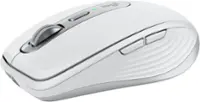
Logitech - MX ERGO S PLUS Wireless Ergonomic Trackball Mouse with 6 Programmable Buttons - Wireless - Graphite
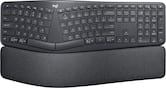 Logitech - ERGO K860 Ergonomic Full-size Wireless Scissor Keyboard for Windows and Mac with Palm Rest - Black$149.99
More Buying Options
Specifications
- Lighting TypeNoneMaximum Sensitivity2048 dots per inchNumber of Buttons (Total)8Connection TypeWireless
The MX Ergo S Plus is Logitech’s most advanced ergonomic trackball mouse yet, with a 20-degree tilt angle and a 10-degree detachable wedge, and precise thumb control - user-tested and certified by United States Ergonomics. The MX Ergo S wireless ergonomic mouse is sculpted to fit the palm of your hand while keeping it relaxed, and it tilts 20 to 30 degrees for 27% less muscle activity in the forearm, providing elevated comfort throughout your day. Work faster with 6 customizable buttons and a DPI button to effortlessly switch between speed and high-precision tracking. Now with 80% quieter clicks. For even more control that's tailored to your needs, assign time-saving shortcuts and Smart Actions using the Logi Options+ App. Connect your wireless mouse to 2 devices via Bluetooth or the included Logi Bolt receiver and switch between devices with a click of the Easy-Switch button.
- Advanced thumb control: The MX Ergo S Advanced wireless trackball mouse gives more control with less movement; switch between speed and high-precision tracking at the tap of a button.
- 20-degree tilt angle or 30-degree with a detachable wedge: An advanced wireless ergonomic mouse with a tilt angle for better forearm posture, reducing muscle strain by 27%; now with 80% quieter clicks.¹ ⁵
- Contoured for your hand: The MX Ergo S Plus is certified by United States Ergonomics for improved comfort, with a sculpted ergonomic design, 20-degree tilt angle, and 10-degree detachable wedge.
- Boost your productivity using the Logi Options+ App: Experience enhanced control in your daily tasks with 6 customizable buttons, time-saving shortcuts, and Smart Actions.²
- Quick USB-C charging: Enjoy up to 24h of use from a 1 min charge or up to 120 days with a full charge; charges with a USB Type C to Type C or USB Type A to Type C cable (not included).³
- Dual wireless connectivity: Connect your rechargeable wireless mouse via Bluetooth or Logi Bolt USB receiver (included); switch between computers with a tap of the Easy-Switch button.
- Made with recycled plastic: The plastic parts in the MX Ergo S Plus wireless rechargeable mouse are made of 26% certified post-consumer recycled plastic.⁴
- Complete your advanced setup: Pair the MX Ergo S Plus with the ERGO K860 ergonomic split-curved keyboard, featuring an integrated cushioned palm rest for all-day comfort.
- 1-month of Adobe Creative Cloud on us (a value of $59.99)*: Pair two of the world’s top creative tools. Buy one MX Ergo S Plus and claim your free 1-month Adobe Creative Cloud membership. *Value calculated based on Adobe Creative Cloud All Apps monthly value of $59.99 valid on Adobe.com on Sept 12, 2024. Terms & Conditions apply.¹ ² ³
Whats Included
- Advanced Wireless Trackball
- Wedge
- Logi Bolt Receiver
- Quick Start Guide
- (Cable not included)
Disclaimers
- ¹ In the forearm with 20-degree angle, compared to a Logitech M650 mouse.
- ² Requires Logi Options+ app, available for recent versions of Windows and macOS at logi.com/optionsplus.
- ³ Battery life may vary based on user and computing conditions.
- ⁴ Excludes plastic in receiver, printed wiring assembly, cables, and packaging.
- ⁵ Sound level comparison between MX Ergo S and MX Ergo. Left click dBA measured by the Logitech internal lab at 1m.
Q: How long does the battery last on a single charge?
A: A full charge can last up to 120 days, and a quick 1-minute charge provides up to 24 hours of use.
Q: Is this mouse compatible with both Windows and Mac?
A: Yes, the mouse is compatible with Windows 10 or later, macOS 11 or later, iPadOS 14 or later, ChromeOS, and Linux.
Q: How many buttons can be customized on this mouse?
A: The MX Ergo S Plus mouse offers 6 customizable buttons for personalized settings.
Q: What type of connectivity does this mouse have?
A: This mouse has dual wireless connectivity options: Bluetooth and Logi Bolt USB receiver.
Q: Does this mouse have a tilt feature?
A: Yes, the mouse has a 20-degree tilt angle and comes with a detachable 10-degree wedge for a total of 30 degrees tilt.
Q: Is this mouse suitable for people with small hands and/or kids?
A: Kids CAN use it BUT I have pretty Big hands. Thats One of the major reasons I got it. But thats fairly subjective. Its definitely AWESOME to be able to SPIN the ball fast with a little flick of the thumb and it goes all the way across the screen if you wan it to!! GOOOD LUUCCK!! Yahusha(Jesus Original/ REAL NAME) Love us ALL!!!
Q: What power cord fits this MX ergo S Plus mouse?
A: The MX ERGO S Plus mouse can be charged using a USB-C cable.
Q: Is left handed model available?
A: No, a left-handed model is not currently available for the Logitech MX ERGO S PLUS.
Compare similar products

The MX Ergo S Plus is Logitech’s most advanced ergonomic trackball mouse yet, with a 20-degree tilt angle and a 10-degree detachable wedge, and precise thumb control - user-tested and certified by United States Ergonomics. The MX Ergo S wireless ergonomic mouse is sculpted to fit the palm of your hand while keeping it relaxed, and it tilts 20 to 30 degrees for 27% less muscle activity in the forearm, providing elevated comfort throughout your day. Work faster with 6 customizable buttons and a DPI button to effortlessly switch between speed and high-precision tracking. Now with 80% quieter clicks. For even more control that's tailored to your needs, assign time-saving shortcuts and Smart Actions using the Logi Options+ App. Connect your wireless mouse to 2 devices via Bluetooth or the included Logi Bolt receiver and switch between devices with a click of the Easy-Switch button.

Minimize movement and maximize comfort with the Logitech ERGO M575S wireless trackball mouse. Thumb control lets you move the cursor without moving your arm, while the sculpted ergonomic design fully supports your hand and keeps your forearm in a more natural position. This wireless ergonomic mouse has been developed by Logi Ergo Lab experts, user-tested and certified by ergonomists to give you 25% less muscle strain in your forearm . The smooth and responsive thumb control can be used anywhere – and since it doesn’t need to be moved, the ERGO M575S is perfect for tight setups and busy desks.

Introducing Logitech MX Master 3S for Mac – an iconic mouse remastered for Mac. Now with Quiet Clicks and 8K DPI any-surface tracking for more feel and performance in your Mac computer set-up. Get creative with a complimentary 1-month Creative Cloud subscription with your purchase of MX Master 3S for Mac, and create, make, and do like never before.
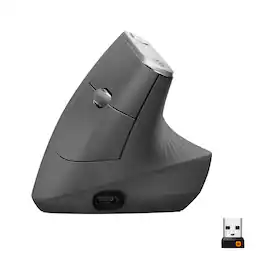
MX Vertical is an advanced ergonomic mouse that combines science-driven design with the elevated performance of Logitech’s MX series. The natural handshake position of MX Vertical reduces wrist pressure and forearm strain. The unique 57° vertical angle has been optimized for an ergonomic posture without compromising a pixel of performance. MX Vertical features a 4000 DPI high-precision sensor, resulting in 4x less hand movement and reducing fatigue. And the cursor speed switch allows you to instantly adjust DPI speed and accuracy with the touch of a button. MX Vertical stays powered for up to four months on a full charge – and gets three hours of use from a one-minute quick charge.
| Pros for Logitech - MX ERGO S PLUS Wireless Ergonomic Trackball Mouse with 6 Programmable Buttons - Wireless - Graphite | |||
|---|---|---|---|
| Overall Performance, Battery Life, Comfort, Accuracy, Click Sound | Overall Performance, Ergonomics, Ease of Use, Connectivity, Noise Level | There were no pros for this product— | Ergonomics, Battery Life, Overall Performance, Ease of use, Bluetooth |
| Cons for Logitech - MX ERGO S PLUS Wireless Ergonomic Trackball Mouse with 6 Programmable Buttons - Wireless - Graphite | |||
| There were no cons for this product— | There were no cons for this product— | There were no cons for this product— | Wrist Pain, Size, Scroll Wheel, Price |