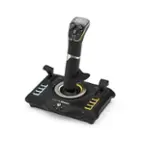
Logitech - Pro Flight Yoke System Gaming Controller for PC - Black
FREE shipping to
More Buying Options

Specifications
- WirelessNoCompatible Platform(s)Mac/Windows
- Key Specs
- Wireless: false
- Compatible Platform(s): Mac/Windows
- General
- Brand: Logitech
- Model Number: 945-000023
- Product Name: Pro Flight Yoke System Gaming Controller for PC
- Color: Black
- Features
- Product Type: Controller
- Headset Jack: false
- Rumble Vibration: false
- Analog Joysticks: false
- Lighting Type: None
- Illumination: false
- Connectivity
- Wireless: false
- Dimensions
- Product Height: 7.3 inches (The out of box height of the item. Height is measured as the vertical distance from the bottom of the item to the top as it would be primarily used or placed.)
- Product Width: 12.2 inches (The out of box width of the item. Width is measured as the horizontal distance from one side of the item to the other as it would be primarily used or placed.)
- Product Length: 18.3 inches (The out of box length of the item. Length is measured as the longest dimension of the item.)
- Product Weight: 4.6 pounds (The out of box weight of the item.)
- Cord Length: 5.9 inches
- Compatibility
- Compatible Platform(s): Mac/Windows
- Warranty
- Warranty - Parts: 2 years
- Warranty - Labor: None
- Other
- UPC: 097855127884
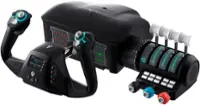
Control your flight game realistically with this Logitech G Pro Flight yoke system. Its durable stainless steel shaft with precision bearings provides smooth front-to-back and side-to-side movement, and its LCD chronograph display lets you set timer and stopwatch functions. The throttle quadrant of this Logitech G Pro Flight yoke system has fully programmable levers for customized engine control.
- Realistic yoke controls: Provide the perfect introduction for the aspiring pilot or enhancing muscle memory of experienced pilots for the perfect translation of real-world skills.
- Stainless steel yoke shaft: Robust, smooth and accurate control of your virtual aircraft in flight simulators.
- 3 axis lever throttle quadrant: Gives control of the throttle, pitch and mixture of your plane in their own dedicated unit, which can be mounted either side of your Yoke to give you full control in complete comfort.
- POV Hat, 14 button controls, and 3-position mode switch: Offer at least 54 programmable controls, giving you most of your aircraft’s functions under your fingertips.
- 2 position desk clamp: Provides mounting flexibility for a wide range of desks with a robust, secure clamping force to ensure your controls stay where you need them.
- More sustainable: Certified carbon neutral: the carbon impact of the product and packaging has been reduced to zero.
Whats Included
- Pro Flight Yoke System yoke and throttle
- 2 desk clamps
- User documentation
Product Manuals
Q: Can you taxi with this without rudder pedals?
A: It’s difficult to taxi without rudder pedals. You can assign rudder trim to the buttons on the throttle quadrant that will assist but it will be much easier with rudder pedals.
Q: When will this item be back in stock?
A: Seems like never.
Q: How far do the clamps open up? The top of the table I want to use this on is thick.
A: Anything over 2" would be too thick
Q: What type of batteries does the system use?
A: Hi FryChuck. No batteries ! The yoke plugs into an available USB 2.0 (or 3.0) slot on your computer. That way it gets powered, and of course returns control information. The throttle control plugs into the yoke via a circular connector (similar to the PC keyboard connectors).
Q: Does this work on Xbox or ps4 or a Mac?
A: No, the Logitech Pro Flight Yoke System is not compatible with Xbox, PlayStation, or Mac. It is compatible with Windows 11, Windows 10, Windows 8.1, Windows 7, and later versions.
Q: Will this work as a steering wheel with driving games?
A: Hello Oldgamer! The Pro Flight Yoke System Gaming Controller for PC won't work as a steering wheel for racing games no unfortunately, as it is designed for flight simulation. - Mathieu from Logitech
Q: can this work for star wars squadrons
A: Hello travisspencer! Although you could possibly make the Pro Flight Yoke System Gaming Controller for PC work with Star Wars Squadrons, it would probably require a lot of adjustments and configurations, so not something we would recommend. On the other hand, The Pro Flight X52 Flight System Gaming Controller or the Extreme 3D Pro Joystick would be better suited solutions for space flying and dogfights. - Mathieu from Logitech
Q: what is the length, width and height, including the mounting bracket in inches, of the yoke system?
A: Hi rich, Here are the physical specifications of the Flight Yoke System. Flight Yoke Length: 14.96" - 18.26" / Width: 12.2" / Height: 7.28" / Weight (w/o clamps): 62.61 oz. / Weight (w/ clamps): 73.86 oz. Yoke Clamp Length: 6.57" / Width: 6.10" / Height: 9.72". For more specifications, here's a link to the product support page: https://support.logi.com/hc/en-us/articles/360023462873-Flight-Yoke-System-Technical-Specifications. - Richard from Logitech
Compare similar products

Control your flight game realistically with this Logitech G Pro Flight yoke system. Its durable stainless steel shaft with precision bearings provides smooth front-to-back and side-to-side movement, and its LCD chronograph display lets you set timer and stopwatch functions. The throttle quadrant of this Logitech G Pro Flight yoke system has fully programmable levers for customized engine control.

Developed by world-class aeronautical engineers and pilots, the Turtle Beach VelocityOne Flight Universal Control System offers the most immersive, authentic flying experience on the market. A true-to-life 180 yoke handle with built-in rudder controls provide precise, long-lasting control of any aircraft. The modular throttle quadrant with integrated trim wheel and included custom lever handles offers at-home aviators enhanced customization for both light and heavy aircrafts. The Flight Management Display and an authentic status indicator panel offers real-time alerts and critical flight details. Setup is easy with a simple USB connection for Xbox Series X|S & Xbox One or Windows 10 PCs.

Bring realistic flight control to your flight simulation with the Bravo Throttle Quadrant from Honeycomb Aeronautical. Six commercial or general aviation levers give you realistic control. In addition to flaps, spoilers, and thrust reversers, this throttle also utilizes an annunciator panel and TOGA button for multiple configurations. Seven two-way programmable switches and 14 warning lights allow for craft-specific performance. Along with autopilot and backlit buttons, the Bravo Throttle Quadrant also features adjustable lever tension and a trim wheel. This flight control is compatible with MAC and Windows PCs and with X-Plane 11, Prepar3D, and Microsoft Flight Simulator.

Dominate the competition using these Honeycomb Alpha flight controls. The solid-steel shaft provides stable control, while 180-degree yoke rotation and self-centering mechanism eliminate dead zones, providing a true-to-life flight experience. Dual linear ball bearings deliver fluid handling. These Honeycomb Alpha flight controls feature a dual-mounting system for secure attachment on your tabletop.
| Pros for Logitech - Pro Flight Yoke System Gaming Controller for PC - Black | |||
|---|---|---|---|
| There were no pros for this product— | Ease of use, Quality, Buttons, Customization, Realism | Build Quality | Build Quality, Feel, Setup Ease, Performance |
| Cons for Logitech - Pro Flight Yoke System Gaming Controller for PC - Black | |||
| There were no cons for this product— | Yoke, Throttle, Setup | There were no cons for this product— | There were no cons for this product— |
Specs
Reviews
Customer Images
The vast majority of our reviews come from verified purchases. Reviews from customers may include My Best Buy members, employees, and Tech Insider Network members (as tagged). Select reviewers may receive discounted products, promotional considerations or entries into drawings for honest, helpful reviews.
- Rated 5 out of 5 stars
GREAT!!!
It's amazing how much this expands your depth in flight simulator. The controls well with large or smaller aircraft. it works with XPlane or FS. The realism you gain is amazing. I have flown over 500NMs with this set so far and I'm happy with it.
This review is from Logitech - Pro Flight Yoke System Gaming Controller for PC - Black
Posted by GirafesWearDiapers
- Rated 2 out of 5 stars
It’s so cool
It is so fun I play it so much especially with Microsoft flight simulator
This review is from Logitech - Pro Flight Yoke System Gaming Controller for PC - Black
Posted by
- Rated 4 out of 5 stars
Constantly uncentered
Feels like a quality made project. Easy plug and play. Unfortunately, this system does not have a calibration feature and is frequently not centered. You can watch a YouTube video to change code to center it. Seems a little difficult. Luckily, I am able to unplug the USB connection to the computer each time and it recentará itself.
This review is from Logitech - Pro Flight Yoke System Gaming Controller for PC - Black
Posted by TraumaRN1018