Customer Ratings & Reviews


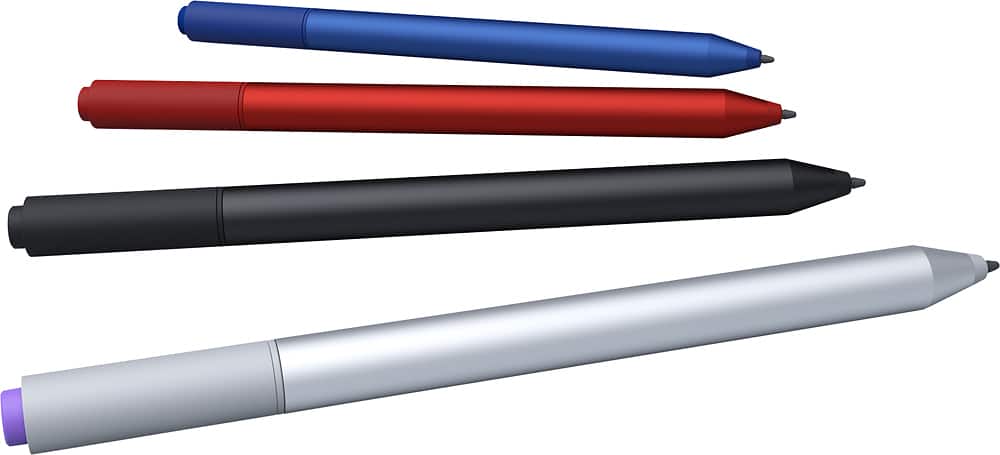
- Model:
- 3UY-00030
- |
- SKU:
- 5483032
Customer reviews
Rating 4.6 out of 5 stars with 376 reviews
(376 customer reviews)to a friend
Customers are saying
Customers are pleased with the Surface Pen's ease of use, accuracy, and writing experience, frequently praising its natural feel and compatibility with Surface devices. Many appreciate the pen's lightweight design and the ability to take notes effortlessly. However, some customers express concerns regarding the pen's cost and battery life, while others mention issues with the tip and button functionality. The price point is a recurring negative comment.
This summary was generated by AI based on customer reviews.
- Pros mentioned:Color
Rated 5 out of 5 stars
Just as good as the SP3 Silver...
||Posted .This reviewer received promo considerations or sweepstakes entry for writing a review.Identical to the SP3 pen in every way, except it's BLACK!!!! (and matches my keyboard, SP3 skin and just about everything else I happen to own. Did I need this? No, did I want it because I use it every day and it matched and it's Black??? Yeah. :)
This review is from Surface Pen for Microsoft Surface Pro 3 and Surface 3 - Black
I would recommend this to a friend - Pros mentioned:Ease of useCons mentioned:Price
Rated 5 out of 5 stars
awesome
||Posted .This reviewer received promo considerations or sweepstakes entry for writing a review.Works great, should have bought one sooner, kind of pricey but after using it I understand why.
This review is from Surface Pen for Microsoft Surface Pro 3 and Surface 3 - Black
I would recommend this to a friend - Pros mentioned:Accuracy
Rated 5 out of 5 stars
surprisingly good
||Posted .This reviewer received promo considerations or sweepstakes entry for writing a review.Having been used to inaccurate e-pens in the past I bought this with low expectations but with the intent of giving it a fair chance. I have to say that the accuracy and fluidity of this pen is almost equal to that of a real pen. A few bugs in the writing and word recognition software notwithstanding, I am very happy with this product.
This review is from Surface Pen for Microsoft Surface Pro 3 and Surface 3 - Red
I would recommend this to a friend Rated 5 out of 5 stars
perfect
||Posted .This reviewer received promo considerations or sweepstakes entry for writing a review.This is a very cool item...it feels lighter and better than the original ugly purple stylus
This review is from Surface Pen for Microsoft Surface Pro 3 and Surface 3 - Black
I would recommend this to a friend- Cons mentioned:Battery life
Rated 4 out of 5 stars
Good Stylus - A little too sensative
||Posted .This reviewer received promo considerations or sweepstakes entry for writing a review.If you are solely interested in writing in Onenote, for example, this is a great device. However if selecting items, files, folders is your main usage I have found that a regular rubber tipped stylus as used with the iPad might be a better choice. I have found the MS stylus to be far too sensitive even when it is not in direct contact with the screen. My addition concern is replacement of the 4A battery. It can be found but not at any regular stores I have tried so far.
This review is from Surface Pen for Microsoft Surface Pro 3 and Surface 3 - Black
I would recommend this to a friend - Pros mentioned:Color, Ease of use
Rated 5 out of 5 stars
It is what it is
||Posted .This reviewer received promo considerations or sweepstakes entry for writing a review.I like the color red. This digitizer works like the original and is red. Can't go wrong.
This review is from Surface Pen for Microsoft Surface Pro 3 and Surface 3 - Red
I would recommend this to a friend - Pros mentioned:Ease of use
Rated 5 out of 5 stars
Works perfectly
||Posted .This reviewer received promo considerations or sweepstakes entry for writing a review.Very useful and easy to mark with pen. Virtually indispensable. Surprisingly light.
This review is from Surface Pen for Microsoft Surface Pro 3 and Surface 3 - Black
I would recommend this to a friend - Pros mentioned:Accuracy, Ease of use
Rated 4 out of 5 stars
Great pen
||Posted .This reviewer received promo considerations or sweepstakes entry for writing a review.Pen is very accurate on writing and taking notes. Can have hand on surface and still be writing with the pen
This review is from Surface Pen for Microsoft Surface Pro 3 and Surface 3 - Red
I would recommend this to a friend - Pros mentioned:Ease of use
Rated 5 out of 5 stars
Awesome stylus with Surface 3.
||Posted .This reviewer received promo considerations or sweepstakes entry for writing a review.I have tried to use a stylus with my iPad 2, but was disappointed. Granted, the iPad was designed to NOT use a stylus. But there are times when it comes in handy. I find the Surface 3 and the Pen combination to be easy to use and works very well. This is a major step toward making a tablet actually useful for work.
This review is from Surface Pen for Microsoft Surface Pro 3 and Surface 3 - Red
I would recommend this to a friend - Pros mentioned:Ease of use
Rated 5 out of 5 stars
Useful
||Posted .This reviewer received promo considerations or sweepstakes entry for writing a review.I don't like how this has to be an additional purchase for the surface 3 but its certainly a great accessory. Palm rejection works well. Quick launch of one note is actually rather handy after trying to use it for a while. I do wish that it gives the option to launch something other than one note though.
This review is from Surface Pen for Microsoft Surface Pro 3 and Surface 3 - Black
I would recommend this to a friend - Pros mentioned:Accuracy
Rated 5 out of 5 stars
Good Value as Compared to Third Party Pens
||Posted .This reviewer received promo considerations or sweepstakes entry for writing a review.Thin, lightweight, accurate, and very useful with the Surface 3 Tablet.
This review is from Surface Pen for Microsoft Surface Pro 3 and Surface 3 - Black
I would recommend this to a friend - Pros mentioned:Ease of useCons mentioned:Button functionality
Rated 3 out of 5 stars
Nice to have
||Posted .This reviewer received promo considerations or sweepstakes entry for writing a review.I love that I can use this pen to write on my surface so neatly and with minimal errors. It also comes in pretty handy when I'm feeling lazy and don't want to type on the screen when I'm in tablet mode without my keyboard. Con - the top button of my pen has never worked and I have yet to figure out how to fix whatever my problem is with it.
This review is from Surface Pen for Microsoft Surface Pro 3 and Surface 3 - Black
I would recommend this to a friend - Pros mentioned:Ease of useCons mentioned:Battery life
Rated 4 out of 5 stars
Very functional and responsive Pen
||Posted .This reviewer received promo considerations or sweepstakes entry for writing a review.Makes touch entry easy. Only complaint is Pen needs battery for a little extra functionality.
I would recommend this to a friend - Pros mentioned:Accuracy
Rated 5 out of 5 stars
Excellent stylus
||Posted .This reviewer received promo considerations or sweepstakes entry for writing a review.Using a few different stylus' for my Samsung Note tablet, I must say that this stylus from Microsoft is the best I have used for a tablet. I love my surface pro 3. It is amazing. The stylus is super accurate. Your hand does not impact the screen like it does on the Samsung Note. I highly recommend this stylus. I also love the blue color!
I would recommend this to a friend - Cons mentioned:Price
Rated 4 out of 5 stars
Not included with Surface 3 purchase
||Posted .This reviewer received promo considerations or sweepstakes entry for writing a review.Although not as sensitive as my Wacom pen, it does a good job for my uses on the Surface 3. My only complaint is that I think it should have been included in the purchase price like it is in the Surface Pro tablets. I paid $450 for the Surface 3. You would think the pen would be included!
I would recommend this to a friend - Pros mentioned:Stylus
Rated 5 out of 5 stars
Simply needed a second one, saw this with discount
||Posted .This reviewer received promo considerations or sweepstakes entry for writing a review.Short & sweet... I own an i7 512 GB Surface Pro 3 which only included a single pen & have a docking station to use with it & simply needed a second pen to leave on the dock. Saw this one on shelf as a returned (& discounted) item & picked it up! Great pen, that goes with a great Surface Pro 3.
I would recommend this to a friend - Pros mentioned:Color
Rated 5 out of 5 stars
great replacement pen/stylus
||Posted .This reviewer received promo considerations or sweepstakes entry for writing a review.My daughter had lost her pen/stylus and I had given her mine so when I went to get a new one and saw the red one I knew right away which one it would be. It works just as well as the original one that came with my Surface Pro 3 and I'm very pleased with it. Much easier to find this color.
This review is from Surface Pen for Microsoft Surface Pro 3 and Surface 3 - Red
I would recommend this to a friend Rated 5 out of 5 stars
Surface Pen for writing
||Posted .This reviewer received promo considerations or sweepstakes entry for writing a review.The surface pen is a great tool to allow a mouse-like functionality. If you're like me, you have some hefty fingers that need to go on a diet (as I've learned, finger foods don't make fingers fit... Go figure). What this pen enables is a mouse cursor type navigation. It works by hovering your pen over the Microsoft surface (any pro edition, or the Surface 3), and a little dot appears to indicate where your "cursor" is. to select something, you simply tap the item you wish to select, and voila... You essentially left clicked. Hold in on that object, and you're right clicking! Also the two side buttons become useful for website navigation, and the quick jump to One Note makes note taking a whole lot easier (read: quicker and more centralized than those sloppy yellow sticky notes you put everywhere... And then that one sticky note with your password on it. Which you should feel ashamed about... Because that's defeating the purpose of passwords. SHAME ON YOU.)
This review is from Surface Pen for Microsoft Surface Pro 3 and Surface 3 - Black
I would recommend this to a friend- Pros mentioned:Ease of use
Rated 5 out of 5 stars
Perfect Mate to the Surface 3
||Posted .This reviewer received promo considerations or sweepstakes entry for writing a review.Microsoft made a genius move by making this little device compatible with the Surface 3/Surface 3 Pro. It makes the computer that much more easy to use. Plus it cuts way down on screen fingerprints!
This review is from Surface Pen for Microsoft Surface Pro 3 and Surface 3 - Black
I would recommend this to a friend - Pros mentioned:Ease of use
Rated 5 out of 5 stars
Way cool tool!
||Posted .This reviewer received promo considerations or sweepstakes entry for writing a review.I am a realtor and this pen works great to take notes when I am with a client. I would recommend purchasing a cover with a pen holder so you can easily take it with you and not worry about losing it. If purchasing a Surface, it's a great addition.
This review is from Surface Pen for Microsoft Surface Pro 3 and Surface 3 - Black
I would recommend this to a friend
People also viewed
- $79.00Your price for this item is $79.00
- $99.00Your price for this item is $99.00$129.00The comparable value for this item is $129.00
- $129.00Your price for this item is $129.00
- $99.00Your price for this item is $99.00
- $39.99Your price for this item is $39.99
- $39.99Your price for this item is $39.99
- $19.99Your price for this item is $19.99$32.99The comparable value for this item is $32.99
- $66.49Your price for this item is $66.49$69.99The comparable value for this item is $69.99
- $74.99Your price for this item is $74.99$129.00The comparable value for this item is $129.00
- $107.99Your price for this item is $107.99$129.99The comparable value for this item is $129.99
- $79.99Your price for this item is $79.99
- $35.99Your price for this item is $35.99$49.99The comparable value for this item is $49.99
- $99.99Your price for this item is $99.99
- $49.99Your price for this item is $49.99
- $129.99Your price for this item is $129.99
- $9.99Your price for this item is $9.99
- $40.99Your price for this item is $40.99
- $28.99Your price for this item is $28.99$38.99The comparable value for this item is $38.99