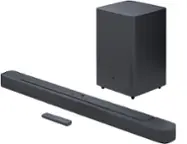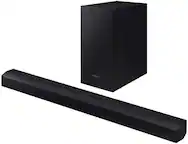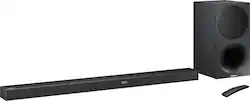
Samsung - 3.1-Channel Soundbar System with 7" Wireless Subwoofer - Black
- Key Specs
- Wireless Connectivity: Bluetooth (The manner in which a device sends data to another device over a short distance without the use of wires or cables.)
- Wireless Subwoofer Connectivity: true
- Wall Mountable: true (The product is able to be secured to a wall. Some products are designed ready to mount, while others may require additional hardware/accessories for installation.)
- General
- Brand: Samsung
- Model Number: HW-M550/ZA
- Product Name: 3.1-Channel Soundbar System with 7" Wireless Subwoofer
- Color: Black
- Audio
- Number of Channels: 3.1 (The number of discrete channels of sound output. This can be a single number or multiple numbers separated by decimal(s). The first number is the primary, horizontally directed audio channels. The number after the first decimal, if applicable, is the number of subwoofer outputs or channels. The number after the second decimal, if applicable, is the number of height or atmospheric channels designed to immerse the listener by producing overhead sound effects.)
- Surround Sound Supported: DTS, Dolby Digital (Surround sound systems use multiple audio channels and speakers to create an immersive sound experience for the listener. There are also various proprietary technologies that imitate this kind of sound via a device's built-in speakers or soundbar.)
- Minimum Frequency Response: 40 hertz (Describes the maximum range of frequencies or musical tones a product can reproduce, from very low tones to very high treble tones. The minimum frequency or musical tone the speaker can reproduce. High treble tones have higher frequencies while low tones and deep bass have lower frequencies.)
- Maximum Frequency Response: 20 kilohertz (Describes the maximum range of frequencies or musical tones a product can reproduce, from very low tones to very high treble tones. The maximum frequency or musical tone the speaker can reproduce. High treble tones have higher frequencies while low tones and deep bass have lower frequencies.)
- RMS Power: 340 watts (The maximum amount of continuous power the device is able to handle.)
- Connectivity
- Wireless Connectivity: Bluetooth (The manner in which a device sends data to another device over a short distance without the use of wires or cables.)
- Wireless Subwoofer Connectivity: true
- Satellite Speakers: Optional (sold separately) (Using satellite speakers in conjunction with a soundbar allows for a surround sound experience; the soundbar can serve as a center channel speaker while satellites provide rear channel audio or additional front channel audio.)
- Number of HDMI Inputs (Total): 1
- Number of USB Inputs: 1
- Number of Optical Audio Inputs: 1
- Number of HDMI Outputs (Total): 1
- Features
- Wall Mountable: true (The product is able to be secured to a wall. Some products are designed ready to mount, while others may require additional hardware/accessories for installation.)
- Speaker
- Subwoofer: Included
- Dimensions
- Product Height: 2.12 inches (The out of box height of the item. Height is measured as the vertical distance from the bottom of the item to the top as it would be primarily used or placed.)
- Product Width: 39.78 inches (The out of box width of the item. Width is measured as the horizontal distance from one side of the item to the other as it would be primarily used or placed.)
- Product Depth: 3.44 inches (The out of box depth of the item. Depth is measured as the distance from the front of the item to the back as it would be primarily used or placed.)
- Product Weight: 4 pounds (The out of box weight of the item.)
- Subwoofer Height: 15.7 inches
- Subwoofer Width: 8.03 inches
- Subwoofer Depth: 13.78 inches
- Subwoofer Weight: 21 pounds
- Included
- Remote Control Included: true
- Cable(s) Included: None
- Mounting Hardware Included: true
- Certifications Listings & Approvals
- ENERGY STAR Certified: true (Devices carrying the ENERGY STAR service mark, such as computer products and peripherals, kitchen appliances, and other products, generally use 20% to 30% less energy than required by federal standards.)
- Other
- UPC: 887276202044
Create a sleek home entertainment setup with this Samsung sound bar, featuring Dolby Digital technology for clear, uninterrupted enjoyment. Available sound modes let you set your audio system according to what you're watching, and six integrated speakers create an immersive experience. This Samsung sound bar is Bluetooth compatible with enabled devices.
- 340W total system power: Provides dynamic sound.
- Wireless subwoofer with 7" driver: Offers powerful bass.
- Dolby Digital decoder: Reproduces multichannel audio to deliver a cinematic audio experience.
- Volume control: Lets you find a comfortable listening level.
- Inputs: 1 mini jack, 1 optical digital audio, 1 micro-USB type B and HDMI.
- Outputs: HDMI.
- Built-in Bluetooth: Makes it easy to enjoy tracks stored on a compatible Bluetooth-enabled device.
- Remote control: Enables simple operation from a distance.
- Supports a variety of file formats: Including WAV, WMA, AAC, MP3, FLAC and OGG, so you can enjoy your favorite media.
- Wall-mountable: Comes with the included bracket.
Whats Included
- Samsung 3.1-Channel Soundbar System with 7" Wireless Subwoofer
- Wallmount Kit
- Power adapter
Product Manuals
Q: I have a 65 in Sony tv and wondered if this soundbar would work well on my Sony.
A: Yes...If you set the following settings...otherwise the system will seem to be under performing UNLESS you have an amplifying device between the speakers and TV. First - set the soundbar BASS setting to +6 and MOVIE. The go into the TV settings...sounds...expert settings...equalizer and max out the woofer setting. Then go into HDMI input audio format and set it to PCM. This means the sound received has already been decoded by the sending device; Set the Digital output format to DTS Neo 2:5. If you have the Samsung UHD BlueRay player - set its output to PCM as well. That means it does all decoding before sending sound to the sound bar. Your speakers and especially the woofer should be rocking and rolling now. You will now be blown away by the Blueray movie sound as well.
A: Hi all. I was displeased at first..until i hooked it to my phone via Bluetooth and it really bumped! Here is what youve gotta do: You need to use the hdmi cord (arc port) instead of included optical. Then mess with the settings on the TV audio. For newer Samsung TV, go to sound, exper settings, set hdmi input to Pcm, digital output to dts neo 2.5 will get you booming.
A: The volume button is tricky - don't press down on it like a button; it's really a toggle switch. Place your thumb below the "button" and push it UP to increase the volume or DOWN to decrease it. I thought the same thing until we figured it out.
Q: What is the difference between this model HW-M550/ZA and the HW-K550/ZA?
A: I was told by an employee the k550 models were from 2016. And the m550 model is from 2017.
A: You can connect the HDMI ARC port on the TV to the HDMI Out port of the soundbar. That the best way. Its more better than Optical as HDMI passes more audio types than optical.
A: 39 7/8" end to end
A: This Soundbar is not capable of 4K/HDR passthrough so your tv won’t register 4K content without being directly hooked up to the source material. You may have to use the optical cable to be able to watch 4K content while having the sound from the bar. Also I have read several articles about the bass and I guess you have to go into your tv settings as well as turn up the bass on sub to +6. If you change your tv settings after that, you should be able to get more bass out of it. Just look up tv settings for bass for the Soundbar and you should get a few articles about it. Hope this helps out!!
A: Older TV won't necessarily have the HDMI ARC connection. I have an older Samsung that I had an old Samsung soundbar hooked to via the optical cable. It worked fine. I could adjust volume with TV remote. My TV has HDMI ports but the are not HDMI ARC ports. So I hooked it up with the optical cable again. The result is the soundbar works but I no longer can control the sound with my TV remote. Checked with support and in order to control via TV remote, I have to have HDMI ARC port.