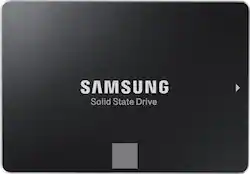
Samsung - 860 EVO 1TB Internal SATA 2.5" Solid State Drive
- Key Specs
- Storage Drive Type: SSD (Traditional, mechanical hard disk drives are the most common type of storage because they're relatively inexpensive and offer huge capacities. However, they also generate both noise and heat. Solid state drives, also known as SSDs, are many times faster than hard disk drives and have no moving parts to wear out, but typically offer less capacity for the same price.)
- Maximum Read Speed: 550 megabytes per second (The greatest speed at which the device can read information; for example, opening files.)
- Maximum Write Speed: 520 megabytes per second (The greatest speed at which the device can write information; for example, saving files.)
- Interface(s): SATA (Refers to the types of connections that devices use to interact and communicate with each other.)
- General
- Product Name: 860 EVO 1TB Internal SATA 2.5" Solid State Drive
- Brand: Samsung
- Model Number: MZ-76E1T0B/AM
- Performance
- Storage Drive Type: SSD (Traditional, mechanical hard disk drives are the most common type of storage because they're relatively inexpensive and offer huge capacities. However, they also generate both noise and heat. Solid state drives, also known as SSDs, are many times faster than hard disk drives and have no moving parts to wear out, but typically offer less capacity for the same price.)
- Maximum Read Speed: 550 megabytes per second (The greatest speed at which the device can read information; for example, opening files.)
- Maximum Write Speed: 520 megabytes per second (The greatest speed at which the device can write information; for example, saving files.)
- Compatibility
- Internal Or External: Internal
- Interface(s): SATA (Refers to the types of connections that devices use to interact and communicate with each other.)
- Bare Drive: true (Drive is sold without any pre-installed software.)
- Features
- Security Features: Software
- Data Encryption: true
- Encryption Algorithm: 256-bit AES (The algorithm standard used to encrypt data on a device.)
- Usage: Everyday computing, Gaming, Performance computing
- Memory
- Cache Buffer Size: 1 megabytes (The data capacity of the cache buffer (or disk buffer) that acts as temporary memory for the drive. The cache holds the most recently and frequently used data to save the drive the extra step of pulling it from permanent storage every time it's needed, which helps increase the drive's overall speed.)
- NAND Flash Memory Type: V-NAND (Single Level Cell (SLC) stores 1 bit of data per memory cell; Multi Level Cell (MLC) stores 2 bits per cell, Triple Level Cell (TLC) 3 bits, and Quad Level Cell (QLC) 4 bits. Vertical NAND (V-NAND) or 3D NAND stores more data by layering cells vertically. Similarly, there are 3D MLC, 3D TLC and 3D QLC stacked cells.)
- Dimensions
- Product Height: 0.27 inches (The out of box height of the item. Height is measured as the vertical distance from the bottom of the item to the top as it would be primarily used or placed.)
- Product Width: 3.94 inches (The out of box width of the item. Width is measured as the horizontal distance from one side of the item to the other as it would be primarily used or placed.)
- Product Weight: 0.19 ounces (The out of box weight of the item.)
- Other
- UPC: 887276232294
Upgrade a compatible computer with this Samsung 860 Evo series solid-state drive. Its 1TB of memory provides plenty of room for game downloads, work archives or media files, and the maximum 550MB/s read and 520MB/s write speeds support quick data transfers. This Samsung 860 Evo series solid-state drive is compatible with SATA 6 Gb/s, 3 Gb/s and 1.5 Gb/s interfaces. Speeds are consistent, even under heavy workloads and multi-tasking allowing for a faster file transfer. Benefit from faster, more fluid communication with your host system. The Samsung 860 EVO is specially designed to enhance performance of mainstream PCs and laptops.
- 1TB storage capacity: Provides ample storage space for your music, movies and other files.
- SATA III interface: Offers simple connection to your computer.
- Data transfer rates up to 600 MBps: For quick response when updating files.
- AES 256-bit hardware encryption: Helps safeguard sensitive data.
Whats Included
- Samsung 860 EVO 1TB Internal SATA Solid State Drive for Laptops
A: You must buy everything else. It only comes with the SSD only - as in there is only 1 thing inside the box.
Q: Will this work as an internal hard drive for a PS4?
A: Yes it will work with the PS4. I have it installed in my PS4 Pro but the regular PS4 is also compatible.
A: Yes. This is compatible with 2012 MacBook pro. I just installed this drive in my 2012 MacBook pro and performance of my machine has increased 10 fold.
A: Yes it does, although you have to download it from Samsung's website.
A: If this is a second hard drive in your machine, it will be automatically detected, but you need to use the Windows Disk Manager tool to format the drive. If you are replacing a drive, use Samsung's Data Migration Software (https://www.samsung.com/semiconductor/minisite/ssd/download/tools/) before you remove the old hard drive to transfer all your data to the new drive. You'll need a cable to connect the Samsung SSD to a USB port in order to transfer the data. I found this one on Amazon: "StarTech.com SATA to USB Cable - USB 3.0 to 2.5” SATA III Hard Drive Adapter - External Converter for SSD/HDD Data Transfer" I've used it with two Samsung drives and it worked great.
Q: does it compatible with my Asus Q524UQK laptop?
A: Your laptop is normal and 2.5" is standard for most laptops. Remember good return policy.
Q: Will this work on a WIndows 10. I read on another site the highest was 8?
A: I have Windows 10,it works.
Q: Will this Intall/Work in a Dell XPS 8700 Desktop? Are any Additional Parts/Cables, etc needed?
A: It should work just fine. The only issue you may run into is that if you want to clone your existing drive to the SSD - you will most likely need a converter cable - USB to SATA. They are somewhere around $7 to $12 on Amazon. This cable will connect and power the drive from a USB port - and you can download the Samsung data transfer utility - install it and clone your current drive to the SSD. Then - with the computer off - replace the old drive with the Samsung SSD. If you want to continue to use the old drive, then you will need a second SATA cable and power connector to connect it. Make sure you set the Samsung to be the first boot drive in CMOS if you wish to do this. Then after installing the SSD (and adding a second SATA data cable for the old drive - it should boot the the Samsung SSD. I always recommend running a chkdsk on the current drive before cloning to the new SSD. It will save time - and frustration of finding that the old drive had issues - and the copy may stop or fail.

















