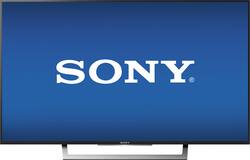
Sony - 43" Class (42.5" Diag.) - LED - 2160p - Smart - 4K Ultra HD TV with High Dynamic Range
- Key Specs
- Display Type: LED
- Screen Size Class: 43 inches (The group size measurement of a screen. This differs from a screen size measured diagonally from corner to corner.)
- High Dynamic Range (HDR): true (An HDR-compatible 4K TV or other HDR-compatible product displays HDR video content when it's available from sources like 4K Ultra HD Blu-ray Discs and 4K streaming services.)
- High Dynamic Range Format: Dolby Vision, HDR 10, Hybrid Log-Gamma (HLG) (There are a few HDR formats that tell the TV or other HDR-compatible product how to best utilize its capabilities to display HDR content. HDR technology can support one or multiple formats, each with various benefits to picture quality.)
- Motion Enhancement Technology: Motionflow XR 240 (Proprietary technologies produced in addition to the Refresh Rate that smooth out faster moving pictures to reduce blur and pixelation.)
- Specific Manufacturer Technologies: Live Colour; BRAVIA Sync Function (This is technology that's specific to a TV brand (sometimes called proprietary technology). Here you'll see terms related to picture quality, brightness, processors and more.)
- Smart Platform: Android TV (Just like a computer, a smart TV needs an operating system (also called a smart platform) in order to access the Internet, connect with entertainment apps, and play streaming content. Some common TV smart platforms are; Roku TV, Android TV, and Chromecast.)
- General
- Brand: Sony
- Model Number: XBR43X800D
- Product Name: 43" Class (42.5" Diag.) - LED - 2160p - Smart - 4K Ultra HD TV with High Dynamic Range
- Color: Black
- Dimensions
- Product Height With Stand: 24.13 inches
- Product Width: 37.88 inches (The out of box width of the item. Width is measured as the horizontal distance from one side of the item to the other as it would be primarily used or placed.)
- Product Depth With Stand: 8.63 inches
- Product Height Without Stand: 22.25 inches
- Product Depth Without Stand: 1.81 inches
- Product Weight With Stand: 29.1 pounds
- Product Weight Without Stand: 27.1 pounds
- Display
- Display Type: LED
- Screen Size: 42.5 inches (Size of the screen, measured diagonally from corner to corner.)
- Screen Size Class: 43 inches (The group size measurement of a screen. This differs from a screen size measured diagonally from corner to corner.)
- High Dynamic Range (HDR): true (An HDR-compatible 4K TV or other HDR-compatible product displays HDR video content when it's available from sources like 4K Ultra HD Blu-ray Discs and 4K streaming services.)
- High Dynamic Range Format: Dolby Vision, HDR 10, Hybrid Log-Gamma (HLG) (There are a few HDR formats that tell the TV or other HDR-compatible product how to best utilize its capabilities to display HDR content. HDR technology can support one or multiple formats, each with various benefits to picture quality.)
- Curved Screen: false
- Motion Enhancement Technology: Motionflow XR 240 (Proprietary technologies produced in addition to the Refresh Rate that smooth out faster moving pictures to reduce blur and pixelation.)
- Language(s) Displayed: English, French, Spanish (The available language options for displayed text or captions.)
- Features
- Remote Control Type: Standard
- Specific Manufacturer Technologies: Live Colour; BRAVIA Sync Function (This is technology that's specific to a TV brand (sometimes called proprietary technology). Here you'll see terms related to picture quality, brightness, processors and more.)
- Smart Capable: true (Smart, or smart-capable devices are able to connect directly to your home network in order to stream content from the Internet, run Internet-based apps, or connect to other smart devices.)
- Smart Platform: Android TV (Just like a computer, a smart TV needs an operating system (also called a smart platform) in order to access the Internet, connect with entertainment apps, and play streaming content. Some common TV smart platforms are; Roku TV, Android TV, and Chromecast.)
- Screen Mirroring: false (Casts the screen of one device onto another wirelessly, using a common protocol (typically Bluetooth).)
- TV Tuner: Digital (The ATSC TV Tuner is a component built into conventional TV sets or other devices for receiving over-the-air broadcast TV without a cable/satellite box. Digital tuners may be purchased separately and connected to a device if it does not have one built in.)
- Connectivity
- RF Antenna Input: true (This input is used to connect devices such as antennas or cable boxes to a TV via a coaxial cable.)
- Number Of USB Port(s) (Total): 3 (The total number of USB ports including all generations and versions.)
- Audio
- Built-In Speakers: true
- Surround Sound Supported: Other (Surround sound systems use multiple audio channels and speakers to create an immersive sound experience for the listener. There are also various proprietary technologies that imitate this kind of sound via a device's built-in speakers or soundbar.)
- Speaker Output: 20 watts
- Power
- ENERGY STAR Certified: false (Devices carrying the ENERGY STAR service mark, such as computer products and peripherals, kitchen appliances, and other products, generally use 20% to 30% less energy than required by federal standards.)
- EPEAT Qualified: false (The Electronic Product Environmental Assessment Tool (EPEAT) was designed to provide an environmental assessment tool for purchasers. In order to qualify for EPEAT, a product must meet all 23 required criteria.)
- Estimated Annual Operating Cost: 13 United States dollars (Predicted cost of operating the product under average conditions for one year.)
- Estimated Annual Electricity Use: 102 kilowatt hours (Predicted amount of electricity needed to operate the product under average conditions for one year.)
- Included
- Stand Included: true
- Box Dimension
- Height: 27.4 inches
- Width: 42.2 inches
- Depth: 6.2 inches
- CubicDimension: 7169 inches
- Other
- UPC: 027242896529
This Sony 43-inch 4K Android TV features four times more clarity than HD for exceptional quality viewing when streaming sports, television shows or movies. Conveniently control your TV from your phone or tablet and make selections with voice search. Receive personalized recommendations from Google Play, and stream PS3 games directly to this Sony 43-inch 4K Android TV.
- 42.5" screen (measured diagonally from corner to corner): A great size for a living room or mid-sized home theater space.
- Built-in Wi-Fi Smart TV means a huge world of entertainment: Stream from Netflix, YouTube, Pandora, Amazon Video, Google Play, and more.
- 2160p resolution for breathtaking HD images: Watch 4K movies and TV shows at 4x the resolution of Full HD, and upscale your current HD content to gorgeous, Ultra HD-level picture quality.
- High dynamic range (HDR) creates a more realistic picture: HDR technology expands the contrast and color range of the existing pixels on your TV to reveal a better, brighter, more colorful image. The picture quality is noticeably more natural.
- LED TVs perform well in all lighting conditions: They also deliver plasma-like deep blacks and rich colors.
- Wireless Connectivity: Provides fast and reliable streaming with Wi-Fi.
- Advanced TV sound: Two 10W main channel speakers, S-FORCE Front Surround Sound.
- 4 HDMI inputs for the best home theater connection: High-speed HDMI delivers up to 2160p picture and digital surround sound in one convenient cable. HDMI cable not included.
- Enjoy the picture from multiple angles: 178° horizontal and vertical viewing angles provide a clear picture for viewers seated near the side of the screen.
- Motionflow XR 240 technology: Enjoy fast-moving movies, sports and video games with virtually no motion blur.
- 3 USB inputs: Easily connect your digital camera, camcorder or other USB device.
Whats Included
- Batteries, IR Blaster
- Power adapter
- Sony 43" Class (42.5" Diag.) - LED - 2160p - Smart - 4K Ultra HD TV with High Dynamic Range
- Sony RMT-TX200U remote control
- Stand
Product Manuals
A: HOPE THIS HELPS YOU I GOT THIS INFO FROM SOMEONE ELSE SO I COPY AND PASTE IT FOR YOU ( SEMPER FI ) August 4, 2016 LWill1979 from Lenoir City, TN This is my review of this excellent product. At first, I was very baffled by the thin nature of this thing. I really like the overall look of it and enjoy all the benefits and features that it has to offer as well. For those of you wanting to know if it is compatible with the XBOX One S, I can tell you that it is....BUT....you have to know two important things to get it to work right or it won't work. First of all, in order for the XBOX One S to recognize the 60hz, 2.2, and HDR10 requirements, you HAVE TO plug the HDMI cord into Port 2 or 3. Port 1 or 4 do not work for it. Then do a complete power cycle of the XBOX One S (turn it off, unplug it, count to 30, plug it back in, and turn it back on again). When it comes back up, it should automatically detect it and you will be good to go. But wait! There's one more step before you power cycle it! You have to go to the TV's menu settings and change the HDMI output to Enhanced instead of Standard. And use the HDMI cord that comes with the XBOX One S. It took me a whole day to figure both of these things out and lots of time spent with Sony Support Chat and XBox Support Chat. Thanks so much!! LOL But it is a GREAT product and you're getting all the features and benefits of the XBOX One S with it. I don't use it to watch TV. I don't have a cable connection where I keep my television. This is strictly for Netflix, YouTube, and gaming. For those three needs, I am thoroughly impressed! I upgraded from an old Westinghouse 40" LCD 1080p TV with no bells and whistles at all. The thing was bulky and heavy as well. When I got this one, I was like...WOW!!! Definitely amazing.
A: Hi JRPRO, Another android device is not required to set up this TV. An article here will explain the step-by-step process: https://us.en.kb.sony.com/app/answers/detail/a_id/58068/c/65,66/kw/58068%20%20 Hope this helps . Regards, Vincent
A: Yes, be veeeery careful if you are interested in buying this TV. Terrific picture if you are sitting either directly in front of it or about two feet or so to the right or left of center. After that the colors are washed out and the picture is "foggy". I was quite disappointed, since Sony says that the picture is good for 178 degrees, which is a lie. Apparently what they mean to say is that the picture doesn't turn completely black from that angle, but that claim is deceptive since the loss of picture quality is dramatic. I returned the unit.
Q: Do you need an Android device in order to set up the software on this TV?
A: Hi, HowardFH, Another Android device is not necessary for setting up this unit but having an active Google® account is advisable. For the instructions, check this out: https://us.en.kb.sony.com/app/answers/detail/a_id/58068/c/65,66/kw/58068%20%20. Regards, Vincent
A: It has been perfect with my PS4 and X1. I haven't seen any sign of excessive blur/judder while gaming. The input lag is very low as well,so twitch gaming won't be an issue. What you gain with the loss of 120hz native IPS panel is a VA panel with superior contrast,Triluminous display and the newer X1 with HDR10 support.
A: Yes, it meets all of the Xbox One S 4K requirements.
Q: Does this TV uses an IPS or VA panel?
A: It is an AUO VA panel. It is likely a new generation AMVA panel which offer higher contrast and improved viewing angles over other VA variants.
Q: what is the weight of the tv?
A: Hi Strike. Here is the weight of the TV, with and without its stand: TV only: 27.1 lb (12.3 kg) TV with stand: 29.1 lb (13.2 kg). -Mark




















![The text on the image reads:
17 F8 Home P End F10 PgUp it PgDn F12 Ies Del * 8 ( 9 ) 0 I I + = Backspace I o P : [ ] ] I / K L : : .. . Enter M V > . ? / Shift Alt <
The corrected text should be:
17 F8 Home PgUp it PgDn F10 F12 Ies Del * 8 ( 9 ) 0 I I + = Backspace I o P : [ ] ] I / K L : : .. . Enter M V > . ? / Shift Alt <
The corrected text groups the keys in a more organized manner, making it easier to read and understand.](https://pisces.bbystatic.com/image2/BestBuy_US/images/products/699c06f5-6aba-4ab2-bbf6-114986b58b2a.jpg;maxHeight=144;maxWidth=200?format=webp)
