

Sony - Digital Voice Recorder
This item is no longer available in new condition.
See similar items below.
Description
Features
Voice-Operated Recording (VOR)
Activates the recorder only when audible sound is present, conserving space and eliminating soundless passages.
4GB internal flash memory
Provides ample space for storing lectures, notes and more.
5 recording modes
Offer options optimized for different situations and settings to help you achieve quality results.
Cue and Review with slide control
Provides sound during fast-forward and rewind modes to help you find specific passages.
5 folders
Provide convenient storage for voice recordings and audio files. Personalized folder names (with a PC) allow you to customize each folder, so you can quickly locate your files.
Track mark button
Helps you identify important points during recording and playback. Easy search lets you rewind or fast forward in short increments to quickly locate a segment in a long recording.
Compatible with Dragon NaturallySpeaking software
For voice-to-print functionality (software not included).
Scene select
Automatically optimizes the microphone for the recording situation to ensure quality results. Hi/Lo microphone sensitivity allows you to choose between conference or lecture recording options.
Digital Pitch Control (DPC)
Enables you to play back the recording at the speed of your choice without altering the pitch.
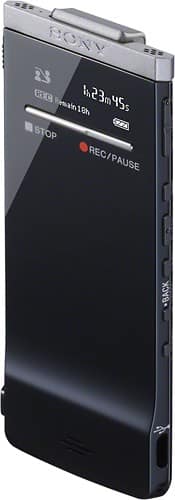
LED screen
Offers a clear view and can be turned off to conserve battery life. A multilanguage menu supports English, French and Spanish.
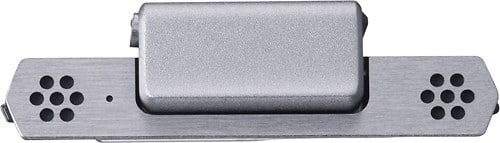
Built-in stereo microphone
Ensures clear recordings. An integrated sound damper helps isolate microphone elements from surface noise while recording. Intelligent Noise Cut mode reduces ambient noises during recording for clear playback.
USB port
For easy connectivity with a Mac or PC. Quick charge provides up to 60 minutes of recording time after 3 minutes of charging with the included USB cable.
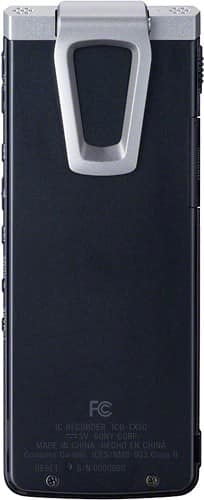
Pocket clip
Helps secure the recorder in your shirt pocket and doubles as a recording stand for easy tabletop recording.
What's Included
Sony Digital Voice Recorder
Stereo headphones, noise damper, USB extension cable, application software, Sound Organizer CD-ROM
Owner's manual
Other
- FormatDigital
- Removable MemoryYes
- <a href="javascript:winopengld('1087340511721','pcmcat38200050027','cat12080')">Voice Activated</a>Yes
- UPC027242839847
Customer reviews
Rating 4.8 out of 5 stars with 4 reviews
(4 customer reviews)to a friend
Rated 5 out of 5 stars
Excellent recording
||Posted .This reviewer received promo considerations or sweepstakes entry for writing a review.I purchased this since I conduct interviews over the phone and it's ease of use is fantastic! When writing articles, I am able to play and then transcribe simply. It's not the cheapest nor the most expensive, but you definitely get your money's worth, plus it has a convenient clip on for putting in your pocket and being able to record conversations. Highly recommended.
I would recommend this to a friendRated 5 out of 5 stars
Nice replacement for a cassette tape recorder
||Posted .This reviewer received promo considerations or sweepstakes entry for writing a review.Great little recorder to use at work or on the road.
I would recommend this to a friendRated 5 out of 5 stars
great recorder
||Posted .This reviewer received promo considerations or sweepstakes entry for writing a review.i love this recorder, its so slim i can hide it in my shirt and no one would notice. i use it to record lectures and the playback is quite great.
I would recommend this to a friendRated 4 out of 5 stars
Good device
||Posted .This reviewer received promo considerations or sweepstakes entry for writing a review.I like it. The recorder has a program that makes easier the files manage. All the drivers and programs are charged in the internal memory.
I would recommend this to a friend
Customer reviews from sony.com
See all sony.com reviewsUser rating, 3 out of 5 stars with 7 reviews on sony.com.
3.0(7 reviews)
Q: QuestionHow sensitive is Microphone pickupQuestion relates to Sony Digital voice recorder Model: ICDTX50 SKU: 4895466. Microphone seems to be fixed on the top of the recorder. How well does it pick up sound if I keep it in my shirt pocket while recording? Can the direction of the microphone be changed? what is the optimal distance at which recording can be done?
Asked by Anonymous.
- A:Answer You can choose the Mic Sensitivity of the IC recorder based on the location and requirement. The available Mic Sensitivity options are: High: To record a sound far away from the IC recorder or a low sound, such as recording in a spacious room. Medium: To record the sound of a normal conversation or meeting, such as recording in a meeting space or during interview. Low: To record dictation with a microphone in front of your mouth, sound near the IC recorder, or a loud sound. The IC recorder also has Scene Select option: (Shirt Pocket, Meeting, Voice Notes, Interview and My Scene options. The Shirt Pocket option allows good recording quality when the IC recorder is kept inside your shirt. The direction of the built In Microphone cannot be changed.
Answered by SonyListens

Q: QuestionCan you download onto CD? How does this one really differ from the 99 version?
Asked by Ozzie.
- A:Answer To transfer the Voice files to a CD, use the supplied Sound Organizer Software. Click on Burn CD/DVD at the left side of the Sound Organizer Software, select the Voice files and then click on the type of CD you want to create. Provide the exact Model # of the other Digital Voice Recorder with which you want to compare the Sony ICDTX50 Voice Recorder. This Digital Voice Recorder has a Memory Card slot which offers access to additional recording time using optional flash memory media that can be removed and stored or used to transfer recordings to a computer. It also has intelligent noise cut mode, easy search feature to rewind or fast forward in short increments making it easier to locate a segment in a long recording for review. It also has the Digital Pitch Control feature which enables the recording to be played at a faster or slower rate without changing the pitch. It is designed with a pocket clip that keeps the Recorder secured in your shirt pocket and doubles as a recording stand for tabletop recording. It has a Noise Damper that helps isolate the microphone elements from desk/surface noise when recording. There are different Scene Selections that allows you to select how to automatically adjust the unit to the optimal settings: notes, lectures, music etc. Again, the Track Mark feature helps to identify important points during recording or playback with a simple press of the Track Mark button. Refer the following Marketing Specifications link to view all the detailed features in it. http://www.docs.sony.com/release/specs/ICDTX50_mksp.pdf
Answered by SonyListens
Q: QuestionNoise DamperHave had problem in the past regarding surface noise on m previous sony digital voice recorder (ICD-UX523). I am wondering if the Noise Damper on the ICD-TX50 will have large diffrence. I am assumeing since it is not as hollow it might.
Asked by Billy.
- A:Answer In the Sony ICDTX50 IC recorder by attaching the noise damper to the IC recorder, you can reduce vibration noises from a table or other surface where the IC recorder is placed. When recording with the IC recorder placed on a table, you can reduce noise by attaching the supplied noise damper to the IC recorder. By placing the IC recorder on a handkerchief, etc., you can also record with clear, low-noise sound, minimizing vibration noise from the desk.
Answered by SonyListens
Q: Questionvoice recorder specsI want to purchase a voice recorder that I can use with external microphones, for interviews. I've seen recorders with two internal mics but wouldn't external capability be helpful? I purchased MacSpeech Scribe and understand that I need a recorder that is mp4, air or aiff capable. Thanks for help.
Asked by Cathryn.
- A:Answer You can purchase the Voice Recorder ICDSX712 to use with external microphones for interviews.
Answered by SonyListens
Q: QuestionHow do you find a digital recorder which has an easy off switch, from either listening or recording?
Asked by Anonymous.
- A:Answer The Digital Voice Recorders do not have an OFF Switch. It is required to set the Switch to the Hold position to set it to OFF. If there is no operation attempted for approximately 5 seconds in the stop mode, the display of the Sony ICDTX50 Digital Voice Recorder turns OFF automatically (in the power saving mode). If there is no further operation attempted for approximately 10 minutes, the Recorder turns OFF completely (automatic Power-off function). In the standby mode, on the other hand, the Recorder turns OFF automatically if there is no operation attempted for 24 hours.
Answered by SonyListens
Most viewed
- $299.00Your price for this item is $299.00$349.00The comparable value for this item is $349.00
- Year End Deal$799.00Your price for this item is $799.00
- $399.99Your price for this item is $399.99$499.99The comparable value for this item is $499.99
- $99.99Your price for this item is $99.99$129.99The comparable value for this item is $129.99
- $160.99Your price for this item is $160.99
- $499.99Your price for this item is $499.99
- $929.99Your price for this item is $929.99$1,099.99The comparable value for this item is $1,099.99
- $599.99Your price for this item is $599.99
- $249.00Your price for this item is $249.00$299.00The comparable value for this item is $299.00
- $799.00Your price for this item is $799.00
- Year End Deal$249.99Your price for this item is $249.99
- Year End Deal$199.99Your price for this item is $199.99
- Year End Deal$15.99Your price for this item is $15.99
- $199.99Your price for this item is $199.99
- $679.99Your price for this item is $679.99$979.99The comparable value for this item is $979.99
- $579.99Your price for this item is $579.99$849.99The comparable value for this item is $849.99
- $599.99Your price for this item is $599.99$899.99The comparable value for this item is $899.99
- $649.99Your price for this item is $649.99$1,049.99The comparable value for this item is $1,049.99
- $299.99Your price for this item is $299.99$699.99The comparable value for this item is $699.99