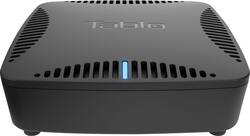
Tablo - DUAL LITE OTA DVR with WiFi
- Key Specs
- Maximum Supported Resolution: 1080p
- High Dynamic Range (HDR): false (An HDR-compatible 4K TV or other HDR-compatible product displays HDR video content when it's available from sources like 4K Ultra HD Blu-ray Discs and 4K streaming services.)
- Operating System Compatibility: Not Applicable
- Storage Type: External
- Power Source: AC adapter
- General
- Product Name: DUAL LITE OTA DVR with WiFi
- Brand: Tablo
- Model Number: TDNS2B-01-CN
- Compatibility
- App Compatible: true (The product can be connected to a program or software application on a mobile device, which then receives collected data from the product.)
- Bluetooth Enabled: false (The device is capable of communicating with another device via Bluetooth, provided they are within the required range of each other. A Bluetooth-enabled device must also be the same Bluetooth version or higher than the accessory it is intended to pair with.)
- Compatible Wireless Standard(s): Wireless AC (The wireless networking standard(s) the device is backwards compatible with. This includes networking protocols based on the IEEE 802.11 standard (alphabetically ascending) and the Wi-Fi Alliance standard (numerically ascending), both of which provide high-throughput wireless local area networks (WLANs). Devices designed to work with specific standard(s) will be backwards compatible with previous versions but may not run at optimal performance when using earlier iterations.)
- Playable Formats: H.264
- Interface(s): USB (Refers to the types of connections that devices use to interact and communicate with each other.)
- Warranty
- Manufacturer's Warranty - Parts: 1 year
- Manufacturer's Warranty - Labor: 1 year
- Other
- UPC: 696106000053
Cut the cable cord with this Tablo DUAL LITE DVR. It streams or records from two over-the-air HD channels at once, so you won't miss your favorite shows, and it lets you skip over distracting commercials. This Tablo DUAL LITE DVR uses either dual-band Wi-Fi or Ethernet to connect to your home network, so you can place your TV antenna in the best location for OTA signal reception. 
- Tablo OTA DVR: Browse, record, and stream free, Over-The-Air (OTA) HDTV programs on any device without the expense or commitment of cable or satellite contracts.
- Two OTA tuners: Allow you to watch, pause, and record live HDTV programs. Browse upcoming programs using advanced search and filters. Schedule and manage recordings by episode or series. (Digital HDTV antenna required)
- Whole-Home & Out-of-Home Streaming: Watch your favorite live and recorded TV shows on to up to six internet-connected devices inside and outside your home.
- Tablo live TV app: Helps you to stream live and recorded HDTV content to all of your favorite connected devices, including iOS and Android mobile devices, computers, Smart TVs, streaming media players and gaming systems.
- USB port: Provides quick plug-and-play connectivity to an external hard drive to extend your recording capacity. (USB hard drive sold separately).
- High-speed wireless connectivity: Built-in 802.11ac dual-band Wi-Fi connects to your wireless home network allowing for streaming live and recorded HDTV content to all the connected devices inside. (wireless router required and sold separately).
Whats Included
- 3 ft ethernet cable
- Power adapter
- Quick Start Guide
- Tablo DUAL LITE OTA DVR with WiFi
A: Yes you can record off the air programs via a tv antenna connection. There is a guide service that has a nominal fee that provides a tv guide for all the over the air channels in your area. You can use the guide to set up future recordings of programs. You can set these up as individual recordings or you can set up a series recording that will record either all of the shows in the series or only the new shows in the series at your option. Note that the Dual unit allows you to record two shows at the same time. If you do not want to subscribe to the guide service you can set up recordings by date, time, and channel. Newer "Smart TV's" provide apps that make using the unit very easy. I would recommend connecting the unit directly to you home router via an ethernet cable rather than WiFi. This helps prevent any possible buffering due to WiFi over the air congestion.
A: This device provides a means to record and stream over-the-air TV channels. It can be accessed from a web browser, smartphone apps, or apps available for Roku or other similar devices. Once you access it, it provides a guide with time-based and program-based listings so that you can either stream live TV or set up to record programs. The guide includes all programs that are available based on your over-the-air channels for the next two weeks. By selecting a particular program, you can select to record one episode or all episodes in the series as they are broadcast. To my knowledge, this device cannot be used to stream Netflix and other streaming content providers. Instead, it gives you the capability to record and stream over-the-air TV channels to the same devices you use to watch these other services (Roku, smartphone, PC, etc.). For example, I use a Roku to stream Netflix, DirectTV Now, and Tablo to stream content to my old analog TVs.
Q: How much does it cost for subscription? While recording 2 programs can you e watch a 3rd?
A: Currently it is around $50 a year. If you are relying on the Tablo as your only source of OTA programs, then you wouldn't be able to watch a 3rd program if you are simultaneously recording two other channels. However, if you have your system set up as I do, where my TV has a tuner that can receive OTA signals as well, you can watch one channel on your TV at the same time the Tablo is recording two different channels. Hopefully, that's not too confusing.
A: It works well like this. Only thing I don't like is you get a nag screen warning you your Cloud DVR has expired. It lasts for about 10 seconds or until you play something.. This is suppose to go away after 30 days after your free subscription expires. Let's hope.
A: No internal recording capabilities, you add a USB external hard drive for storage. The recordings are easy to schedule. The recording schedule will last as long as your subscription to their guide lasts. There is a lifetime option that for me was barely more than one month's cable bill, so I bought that.
A: No, Internal storage is not included... It accepts a USB 2.0 input. Personally, I just grabbed a 64GB flash drive I had sitting on my desk and plugged it in. Reformatted it with the Roku app and all was well! The nice thing about this is you are not paying for storage that you don't need / want. If you don't have a need for 8TB of DVR storage, you don't need to plug it in. I actually have a Network Storage device and have installed a different app on my laptop which lets me extract DVR recordings and move them over to my NAS for permanent storage thus allowing me to just use that 64GB flash drive. Good luck.
Q: Does it work ok with cable tv?
A: No. This is strictly for over the air antennas. It also requires an external hard drive to use as a DVR.
A: The Tablo should work fine within your home, as long as you have a good strong signal from your antenna. The channel guide would likely download successfully at the speed you have. The Roku is receiving the video from the Tablo thru your wireless router and is not dependent on your internet provider speed, but the speed of your router. The Tablo is receiving video from your antenna.