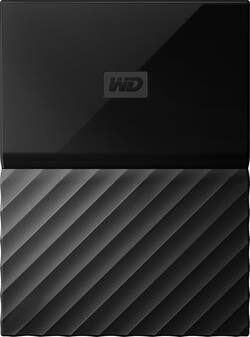
WD - My Passport for Mac 4TB External USB 3.0 Portable Hard Drive - Black
- Key Specs
- Storage Drive Type: HDD (Traditional, mechanical hard disk drives are the most common type of storage because they're relatively inexpensive and offer huge capacities. However, they also generate both noise and heat. Solid state drives, also known as SSDs, are many times faster than hard disk drives and have no moving parts to wear out, but typically offer less capacity for the same price.)
- Interface(s): USB 3.0 (Refers to the types of connections that devices use to interact and communicate with each other.)
- General
- Product Name: My Passport for Mac 4TB External USB 3.0 Portable Hard Drive
- Brand: WD
- Model Number: WDBP6A0040BBK-WESN
- Performance
- Storage Drive Type: HDD (Traditional, mechanical hard disk drives are the most common type of storage because they're relatively inexpensive and offer huge capacities. However, they also generate both noise and heat. Solid state drives, also known as SSDs, are many times faster than hard disk drives and have no moving parts to wear out, but typically offer less capacity for the same price.)
- Compatibility
- Internal Or External: External
- External Hard Drive Type: Portable (Physical characteristics of the hard drive, including size, weight and how you connect to your device.)
- Interface(s): USB 3.0 (Refers to the types of connections that devices use to interact and communicate with each other.)
- Minimum System Requirements: Apple OS X 10.8 Mountain Lion, Apple OS X 10.9 Mavericks, Apple OS X 10.10 Yosemite, Apple OS X 10.11 El Capitan
- Features
- Security Features: Password Protection
- Data Encryption: true
- Encryption Algorithm: 256-bit AES (The algorithm standard used to encrypt data on a device.)
- Power
- Power Source: USB port
- Dimensions
- Product Height: 0.8 inches (The out of box height of the item. Height is measured as the vertical distance from the bottom of the item to the top as it would be primarily used or placed.)
- Product Width: 4.3 inches (The out of box width of the item. Width is measured as the horizontal distance from one side of the item to the other as it would be primarily used or placed.)
- Product Weight: 8.8 ounces (The out of box weight of the item.)
- Included
- Included Software: WD Security, WD Drive Utilities, WD Backup
- Other
- UPC: 718037851402
Secure your files confidently with this 4TB Western Digital My Passport for Mac. Its 5 Gbps data transfer rate enables rapid backup of even the largest files, and it weighs just 0.54 lbs. for portability. Preinstalled WD Security software ensures data stays safe on this Western Digital My Passport for Mac.
- 4TB storage capacity: Provides ample space for storing documents, photos, music and more.
- USB 3.0 interface: Offers an easy-to-use connection to devices. Backward compatible with USB 2.0 for simple connection to your computer.
- Data transfer rates up to 5 Gbps with USB 3.0: Enable a rapid response when updating files.
- Automatic backup options: Allow you to use compatible software to back up your files to the server.
- Password protection and 256-bit AES hardware encryption: Help keep your files secure.
- Time Machine compatible: Back up your entire system directly to the drive.
- Portable design: Lets you take your data on the go.
- Compatible with PC and Mac: For flexible installation options.
- *500GB of WD2go® cloud storage PLUS FILERECOVERY® software included FREE! Only @ BBY: One year cloud storage & Filerecovery license with included WD Discovery software.
Whats Included
- WD My Passport for Mac WDBP6A0040BBK - hard drive
- USB 3.0 cable
- Software
Product Manuals
A: The "for Mac" version is already formatted for the Mac operating system; whereas the other version is formatted for PC environment. However, if you don't mind formatting yourself and would like this HD in a different color then black (I have not yet seen any color versions in the "for Mac" choice), you can buy the PC version and format the drive for your Mac (the drives for that are already included on the HD). Hope this helps!
A: The desktop drive can also act as a network drive, meaning you can back up your other devices on your home network without having to physically connect them. As for reliability, most external HDD's are reliable. The biggest difference is footprint (size) and that the desktop version requires a separate power adapter. All HDD external drives will produce some noise both reading and writing. This particular drive is pretty quiet unless you are doing lots of reading and writing, like a first time full backup. If you want absolute quiet, you need a SSD (solid state drive (basically a big thumb drive with no moving parts)). The cord is not long enough to reach the floor, but if you are using an external drive, it's not recommended to leave it on the floor anyway. Basically, any computer device should be elevated off the floor to reduce static electricity effects and damage from spilled liquids or tripping. However, if you have to put it on the floor, get a USB extension.
A: Mine came with a short cord where one plugged into the drive and the other end that plugged into my mac is a normal USB 2.0 end. Depending on what year your mac is i.e., 2017 with all USB -c ports, then you would need an adapter or a cord that would plug into the updated mac ports.
Q: Is it compatible with Windows 10?
A: You will have to format a Mac formatted hard drive with a Macintosh to have a FAT or (better) an ex-Fat partition before it can be seen by a Windows computer.
Q: Is this compatible with High Sierra?
A: Yes, it is.
Q: can i used this for my xbox one x\
A: This model is formatted for Mac. You would want the model formatted for Windows.
Q: Hello, does the WD 3 year warranty come with the My Passport for Mac 4tb if I buy it from Best Buy?
A: undefined
Q: CAN YOU DOWN LOAD OFF I PADS?
A: No, you can’t.




















