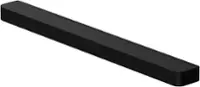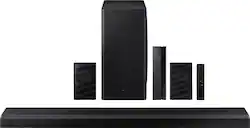
Samsung - 5.1.2-Channel Soundbar with Dolby Atmos/DTS:X
- General
- Product Name: 5.1.2-Channel Soundbar with Dolby Atmos/DTS:X
- Brand: Samsung
- Other
- UPC: 887276524580
Explore realistic 3D audio with sound precisely projected from above, in front, behind and to the side of you with the latest acoustic technologies.
- Elevated sound from every direction: Explore realistic 3D audio with sound precisely projected from above, in front, behind and to the side of you with the latest acoustic technologies.
- Immersing you in captivating sound: The complete audio entertainment experience with 5 channels, 1 subwoofer and 2 up-firing channels.
- Q Soundbar & Samsung TV, in perfect harmony: that tracks with each scene with perfectly synchronized audio from your compatible Samsung TV and soundbar for a harmonious, cinematic experience.
- More sound without the wires: Let the sound flow around you with wireless rear speakers, taking surround sound to next level for more dynamic entertainment.
- Ready to hear your command: With Alexa built into your soundbar, utilize all of Alexa's functionality including playing music, asking about the weather and more--without needing a separate device.
- Optimized sound to suit your space: Automatically calibrates sound to properly fill your space when paired with a Samsung QLED TV.
- Sound optimized for each scene: Forget rewinding to catch what was said. Enjoy dynamically optimized audio with enhanced voice clarity for whatever you are watching, including sports, games, movies and more.
- Catch every word without distractions: Emphasizes the voices in each scene so you can hear every line of dialogue clearly.
- Feel the depth of moving sound: Get pulled into what you're watching with panoramic sound that moves with the action on-screen.
- Hear better. Play better.: Level up with 3D directional audio from up-firing speakers. Acoustic Beam® and powerful woofers automatically sync sound with the on-screen action, while crosstalk cancellation minimizes distractions.
- Connect, listen, enjoy: Easily connect your Soundbar to your TV with either Wi-Fi or Bluetooth
Whats Included
- Remote Controller
- HDMI Cable
- Wallmount Kit
- Battery for Remote Controller
- Power Adapter
- Rubber Foot
A: Hi Guitarman! The rear speakers and subwoofer connecting to the HW-Q850A use a 5.8GHz frequency by default. The radio frequency channel of the Subwoofer and Surround Speaker can be changed as below : 1. With the power of the Soundbar on, vertically press and hold the WOOFER button on the remote controller for at least 5 seconds. - The display shows “W-CH” and the currently set radio frequency channel. 2. Press the Up/Down button on the remote controller to change the radio frequency channel, and then press the Play button. - The display shows “OK” and then the frequency is set to the changed channel. - You can exit the setting mode by pressing any button other than Up/Down or Play. ^Tim
A: Hi Churd! Thank you for sharing your concerns with the audio cutting out. So that we can better troubleshoot towards a solution, please reach out to Samsung Support at: 1-800-SAMSUNG (ask for Soundbars), available 8AM -12AM EST, 7 days a week, text HELP to 62913, LiveChat on Samsung.com, or Email: https://www.samsung.com/us/support/#contact_us_for_support We look forward to hearing from you. ^Tim
A: Hi Mark! There are two ways to utilize the HDMI connections on the soundbar. HDMI ARC allows you to connect your devices to the TV, then run one HDMI from the soundbars output to the TVs HDMI ARC port. All sound from the TV will then play through the soundbar. Alternatively, you can connect a device to the soundbars HDMI input, then run an HDMI cable from the soundbar's output to the TV. This will allow you to play the audio from the device through the soundbar, and pass the video through to the TV. ^Tim
A: Hi markjholloway! The HW-Q850A is not brand specific and is compatible with HDMI, digital optical, and Bluetooth wireless audio connections. Check the back of your TV, or consult the user manual if needed, to determine if your TV supports one of these two audio connections for compatibility with the HW-Q850A Samsung Soundbar. ^Tim
A: Hi! I’m sorry to see that you are having difficulties with connecting your subwoofer. So that we can better troubleshoot towards a solution, please reach out to Samsung Support at: 1-800-SAMSUNG (ask for TVs), available 8AM - 12AM EST, 7 days a week, or Chat with us on Samsung.com: https://www.samsung.com/us/support/contact/ We look forward to hearing from you. ^Patty
A: Hi RobertR! The HW-Q850A is a Best Buy exclusive soundbar and rear speaker bundle. Both the HW-Q800A and HW-Q850A feature the same subwoofer. ^Tim
A: Hi LCJ! You can use the mounting hardware included with the HW-Q850A along with the Rocketfish mounting adapter found at the following link from Best Buy to allow the soundbar to swivel with the TV: https://www.bestbuy.com/site/rocketfish-universal-soundbar-mounting-system-black/6354301.p?skuId=6354301 ^Tim
A: Hi Excited - You can't go wrong adding either the Q850A or Q950A to your Q80T TV! The Q850A is a 5.1.2 channel Dolby Atmos soundbar. The Q950A is an 11.1.4 channel Dolby Atmos soundbar with wide speakers placed at each corner of the soundbar to produce a wider range of sound, delivering an immersive surround sound experience. Both soundbars include Q-Symphony, SpaceFit Sound, AirPlay 2, Game Pro Mode, Built-in Voice Assistants, Tap Sound, Active Voice Amplifier, Acoustic Beam Technology, and HDMI eARC support. In addition to the features included in both soundbars, the Q950A features Auto EQ technology which can detect and correct low-frequency response peaks caused by the room dimensions and the subwoofer location. The Q950A also includes our new SWA-9500S Rear Speaker Kit with Dolby Atmos technology, which no longer require a wireless module connection. ^Gina