Canon - imageCLASS MF3010VP Wired -and-White All-In-One Laser Printer - Black
- Key Specs
- Networking: Wired
- ENERGY STAR Certified: false (Devices carrying the ENERGY STAR service mark, such as computer products and peripherals, kitchen appliances, and other products, generally use 20% to 30% less energy than required by federal standards.)
- Printer Type: All In One
- ISO Mono Print Speed: 19 pages per minute (The number of black ink (grayscale) pages able to be printed per minute in the device's default single-side mode, as tested by the International Standards Organization (ISO).)
- Monochromatic/Color: Monochromatic
- General
- Brand: Canon
- Model Number: 5252B037
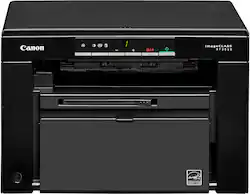
- Product Name: imageCLASS MF3010VP Wired Black-and-White All-In-One Laser Printer
- Color: Black
- Display Screen: true
- Display Screen Size: 1 inches
- Dimensions
- Product Height: 10 inches (The out of box height of the item. Height is measured as the vertical distance from the bottom of the item to the top as it would be primarily used or placed.)
- Product Width: 14.7 inches (The out of box width of the item. Width is measured as the horizontal distance from one side of the item to the other as it would be primarily used or placed.)
- Product Depth: 10.9 inches (The out of box depth of the item. Depth is measured as the distance from the front of the item to the back as it would be primarily used or placed.)
- Product Weight: 16.8 pounds (The out of box weight of the item.)
- Features
- Automatic Document Feeder: false
- Photo Printing: false
- Automatic Reduction/Enlargement: false
- Touch Screen: false (Touch-screen devices make navigating more intuitive. Using a touch-screen display, you can do things such as tap to select, hold and drag to move items, swipe to scroll, and pinch to zoom.)
- Automatic Two-Sided Printing: false
- Wide Format Scanning: false
- Connectivity
- Wired Connectivity: USB-A
- Minimum System Requirements: Windows® 7, Windows Vista®, Windows XP/2000, Mac® OS X 10.4.9 & up, Linux (print only)
- Certifications Listings & Approvals
- EPEAT Qualified: false (The Electronic Product Environmental Assessment Tool (EPEAT) was designed to provide an environmental assessment tool for purchasers. In order to qualify for EPEAT, a product must meet all 23 required criteria.)
- Ink
- Compatible Cartridges: Canon 125
- Ink Subscription Service Available: false (The printer monitors ink usage and alerts the subscription provider when levels are low. A purchased subscription provides refills of ink based on usage.)
- Ink Cartridges Required: 1 x Black (The quantity and color of ink cartridges required for the printer to operate.)
- Ink Cartridges Included: 1 x Black (The quantity and color of ink cartridges included.)
- Copier Info
- Copier Resolution (Black): Up to 600 x 600 (Refers to the number of pixels/dots, both horizontally and vertically, of the image produced by the copier in black ink. Generally, the higher the resolution, the sharper and cleaner the produced image.)
- Scanner Info
- Duplex Scan Function: false
- Scanner Resolution: Up to 600 x 600 (Refers to the number of pixels/dots, both horizontally and vertically, of the image produced by the scanner. Generally, the higher the resolution, the sharper and cleaner the produced image.)
- Scanner Type: Flatbed
- Fax Info
- Integrated Fax: false
- Paper Info
- Paper Feeder: Cassette
- Paper Handling: Cassette: Plain, Recycled, Heavy, Bond, Label, Envelope, Small Document
- Supported Paper Sizes: Cassette: Letter, Legal, Statement, Executive; Envelope: COM10, Monarch, C5, DL; Custom (Min. 3" x 5" to Max. 8.5" x 14")
- Tray Capacity: 150
- Performance
- Approximate Page Yield (Black): 1600
- Printer Resolution (Black): Up to 600 x 600 (Refers to the number of pixels/dots, both horizontally and vertically, of the image produced by the printer in black ink. Generally, the higher the resolution, the sharper and cleaner the produced image.)
- Output Tray Capacity: 100
- Recommended Monthly Volume: 100-1000 (The maximum number of pages that can be printed per month, as recommended by the manufacturer. Printing in excess of this number may reduce the machine's overall lifespan or print quality over time.)
- First Page Out Time: 8 seconds (The time it takes the printer to print and deliver the first page in the output tray. May depend on the complexity of the copy being printed.)
- Other
- UPC: 013803352894
The imageCLASS MF3010 is designed for home and small office environments where black-and-white multifunction capability is needed, and productivity and ease of use are priorities. This model has paper capacity of up to 150 sheets and is backed by Canon's Service and Support network.
- Toner family number: Works with Canon Toner 125 Black Cartridge
- 600 dpi (dots per inch) for good print quality: Provides sufficient resolution for producing quality documents and photos.
- USB port for simple connectivity: One high-speed USB 2.0 port offers a standard connection to your PC or a simple way to plug in and print with a USB drive, camera or other device.
- Toner family number: Works with Canon Toner 125 Black Cartridge
- 600 dpi (dots per inch) for good print quality: Provides sufficient resolution for producing quality documents and photos.
- USB port for simple connectivity: One high-speed USB 2.0 port offers a standard connection to your PC or a simple way to plug in and print with a USB drive, camera or other device.
Whats Included
- imageCLASS MF3010VP
- Toner Cartridge 125, Black
- Starter Toner in Printer
- Power Cord
- USB Cable
- User Software CD
- Getting Started Guide
- Warranty Card
- imageCLASS MF3010VP
- Toner Cartridge 125, Black
- Starter Toner in Printer
- Power Cord
- USB Cable
- User Software CD
- Getting Started Guide
- Warranty Card
Q: How do I connect this printer to my computer?
A: This printer connects to your computer using the high-speed USB 2.0 port.
Q: What is the paper capacity of this Canon printer?
A: This Canon printer has a paper capacity of up to 150 sheets.
Q: What is the approximate page yield for the black toner cartridge?
A: The approximate page yield for the black toner cartridge is 1600 pages.
Q: Can this printer scan documents in color?
A: Yes, this printer can scan documents in color.
Q: Does this printer have a duplex printing feature?
A: No, this printer does not support automatic two-sided printing.
Q: What is the print resolution of this printer?
A: This printer has a print resolution of up to 600 x 600 dpi.
Q: Does this have to be set up wireless Can I use this as a copy machine only
A: This does not have to be set up wirelessly and does not connect to internet. Yes, you can use it just as a copy machine. Lift the cover, place the item you want to photocopy face down on the glass, close the cover, then press the copy button. Very simple to operate. This is my favorite purchase ever from Best Buy.
Q: Does it come with toner included?
A: Yes, mine came with a starter toner and a full-size toner