Dazzling Pops - aurora generation controller for windows pc android switch ios steam deck hall joysticks and rgb light - Black
Color
BlackFREE shipping to
Related Item

Specifications
- WirelessNoCompatible Platform(s)Mac
- Key Specs
- Wireless: false
- Compatible Platform(s): Mac
- General
- Brand: Dazzling Pops
- Product Name: aurora generation controller for windows pc android switch ios steam deck hall joysticks and rgb light
- Color: Black
- Features
- Product Type: Controller
- Connectivity
- Wireless: false
- Compatibility
- Compatible Platform(s): Mac
- Warranty
- Warranty - Parts: 1 year
- Other
- UPC: 5402640681802
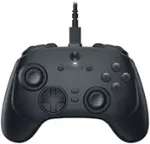
Hall Effect Joysticks Enjoy enhanced joystick control with our two Hall Effect sensors. These sensors provide precise and reliable input detection for smooth and accurate in-game movement. Whether you're navigating a virtual world or taking precise aim, our Hall Effect technology ensures a seamless gaming experience. Customizable Back Keys The controller features 2 additional programmable buttons on the back, allowing you to customize trigger combos or any other features to enhance your gaming convenience and experience. There are also two back button switches for easy access. Wireless Connection The Gaming Controller adopts 2.4G wireless transmission technology, which has the characteristics of stable signal, strong anti-interference, long connection distance and delay elimination. The handle is plug and play, no additional drive required. Note: For 2.4G connection, you need to press and hold the A button first, then press and hold the HOME button for 3 seconds, it will start pairing with the receiver. For Bluetooth connection, press and hold the HOME button for 3 seconds. Large Capacity Battery Say goodbye to game interruptions.The AceGamer Aurora controller is equipped with a 1000mAh upgraded battery, which provides an extra-long playtime on a single charge. With longer battery life, you can immerse yourself in games for longer without worrying about running out of power. Multi-Platform Compatibility Our controller is designed to be compatible with various platforms, including PC Windows 7,Windows 10and later version, Switch, iOS, and Android. Supports PC games running through Steam. No matter which device you prefer for gaming, our controller provides seamless connectivity and smooth gameplay across multiple platforms, ensuring versatility and convenience.!Note!: The controller is not compatible with the Xbox system. Double Rotary Motorr dual vibration adjustable, vibration intensity can be adjusted in four grades, the real experience of the game in the collision, vibration, shooting and other scenes. How to connect 1. For 2.4G receiver connection, first press and hold the A button, then press and hold the HOME button for 3 seconds to begin pairing with the receiver. For Bluetooth connection, press and hold the HOME button for 3 seconds. 2. Bluetooth connection: Press and hold the HOME button on the controller for approximately 3 seconds to initiate Bluetooth pairing. Enable Bluetooth search on your PC, then click to connect to Xbox Wireless Controller. Once Bluetooth pairing is successful, LED2 will illuminate.
- Black: Hall Effect Joysticks Enjoy enhanced joystick control with our two Hall Effect sensors. These sensors provide precise and reliable input detection for smooth and accurate in-game movement. Whether you're navigating a virtual world or taking precise aim, our Hall Effect technology ensures a seamless gaming experience. Customizable Back Keys The controller features 2 additional
Compare similar products
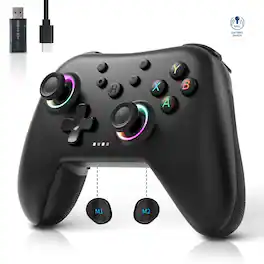
Hall Effect Joysticks Enjoy enhanced joystick control with our two Hall Effect sensors. These sensors provide precise and reliable input detection for smooth and accurate in-game movement. Whether you're navigating a virtual world or taking precise aim, our Hall Effect technology ensures a seamless gaming experience. Customizable Back Keys The controller features 2 additional programmable buttons on the back, allowing you to customize trigger combos or any other features to enhance your gaming convenience and experience. There are also two back button switches for easy access. Wireless Connection The Gaming Controller adopts 2.4G wireless transmission technology, which has the characteristics of stable signal, strong anti-interference, long connection distance and delay elimination. The handle is plug and play, no additional drive required. Note: For 2.4G connection, you need to press and hold the A button first, then press and hold the HOME button for 3 seconds, it will start pairing with the receiver. For Bluetooth connection, press and hold the HOME button for 3 seconds. Large Capacity Battery Say goodbye to game interruptions.The AceGamer Aurora controller is equipped with a 1000mAh upgraded battery, which provides an extra-long playtime on a single charge. With longer battery life, you can immerse yourself in games for longer without worrying about running out of power. Multi-Platform Compatibility Our controller is designed to be compatible with various platforms, including PC Windows 7,Windows 10and later version, Switch, iOS, and Android. Supports PC games running through Steam. No matter which device you prefer for gaming, our controller provides seamless connectivity and smooth gameplay across multiple platforms, ensuring versatility and convenience.!Note!: The controller is not compatible with the Xbox system. Double Rotary Motorr dual vibration adjustable, vibration intensity can be adjusted in four grades, the real experience of the game in the collision, vibration, shooting and other scenes. How to connect 1. For 2.4G receiver connection, first press and hold the A button, then press and hold the HOME button for 3 seconds to begin pairing with the receiver. For Bluetooth connection, press and hold the HOME button for 3 seconds. 2. Bluetooth connection: Press and hold the HOME button on the controller for approximately 3 seconds to initiate Bluetooth pairing. Enable Bluetooth search on your PC, then click to connect to Xbox Wireless Controller. Once Bluetooth pairing is successful, LED2 will illuminate.
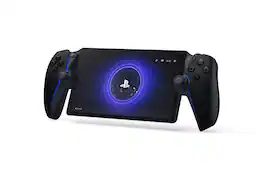
Play your PS5® console over Wi-Fi with console quality controls using PlayStation Portal™ Remote Player. Put Your PS5 in the Palm of Your Hand: PlayStation Portal™ Remote Player gives you access to the games on your PS5® console over a Wi-Fi network, letting you jump into gaming on a gorgeous 8” LCD screen capable of 1080p resolution play at 60fps, all without needing to play on a TV. Play Your Game Collection with Remote Play: PlayStation Portal™ Remote Player can play compatible games you have installed on your PS5® console, including your favorite games for PS5 and PS4. Enjoy Cloud Streaming for PS5® Games with PlayStation Plus®Premium: Stream select titles from the Game Catalog, Classics Catalog, and even select digital PS5® games in Your Library from PlayStation™Store, without needing to wait for downloads. Experience Breathtaking Immersion with DualSense® Wireless Controller Features and 3D Audio: Feel the incredible immersion of haptic feedback and adaptive triggers in supported games, and surround yourself with sound via Tempest 3D AudioTech in supported games when a compatible audio device is connected.
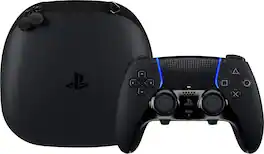
Sharpen your skills in style with the highly customizable DualSense Edge Midnight Black wireless controller. Bring the controller and its components wherever play takes you with the included Midnight Black carrying case.
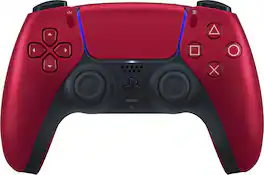
Ignite your gaming sessions with the metallic finish of the Volcanic Red DualSense wireless controller.
| Pros for Dazzling Pops - aurora generation controller for windows pc android switch ios steam deck hall joysticks and rgb light - Black | |||
|---|---|---|---|
| There were no pros for this product— | Overall Performance, Portability, Screen Quality, Battery Life, Comfort | Overall Performance, Feel, Ergonomics, Customization, Button Functionality | Overall Performance, Feel, Color, Design, Ease of use |
| Cons for Dazzling Pops - aurora generation controller for windows pc android switch ios steam deck hall joysticks and rgb light - Black | |||
| There were no cons for this product— | Connectivity, Input Lag, Frame Rate | Stick Drift, Connectivity, Battery Life | Stick Drift, Price, Size, Weight |
Specs



Reviews
This product doesn't have any reviews yet.