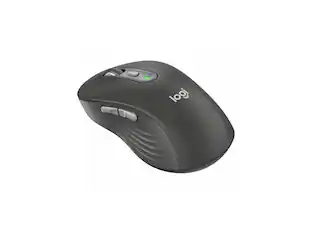
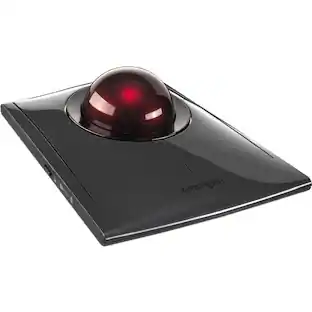
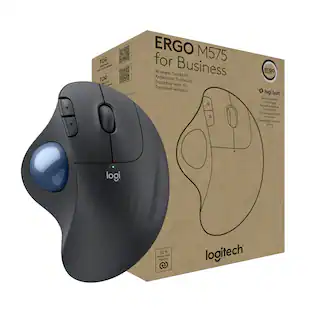
Logitech - Ergo M575S Wireless Trackball Mouse - Wireless - Graphite Blue
Reviews coming soon
About this product
Wireless ergonomic trackball mouse with comfortable thumb control, Bluetooth and encrypted USB dongle connectivity, precise smooth tracking, and compatibility with PC and Mac. Designed to reduce hand movement during long work sessions and finished in graphite with a blue trackball for easy visibility.
Features
Ergonomic Trackball Design
Ergonomic trackball design reduces wrist and hand movement for greater comfort during extended use.
Ergonomic Thumb Control
Connect via Bluetooth or the included encrypted USB dongle for a secure, reliable wireless connection with PC or Mac.
Smooth Precise Tracking
Provides precise, smooth cursor control ideal for small desks or limited workspaces.
Secure Wireless Connectivity
Graphite body with a blue trackball for a distinctive look and easy ball visibility during operation.
Cross-Platform Compatibility
Compatible with PC and Mac for versatile use across desktop and laptop setups.
Specifications
- Connection TypeWireless
Reviews
This product doesn't have any reviews yet.
Compare similar products

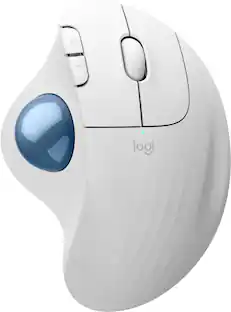
Wireless ergonomic trackball mouse with comfortable thumb control, Bluetooth and encrypted USB dongle connectivity, precise smooth tracking, and compatibility with PC and Mac. Designed to reduce hand movement during long work sessions and finished in graphite with a blue trackball for easy visibility.

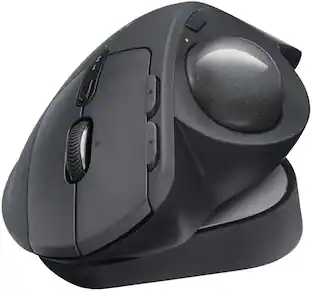
The MX Ergo S Plus is Logitech’s most advanced ergonomic trackball mouse yet, with a 20-degree tilt angle and a 10-degree detachable wedge, and precise thumb control - user-tested and certified by United States Ergonomics. The MX Ergo S wireless ergonomic mouse is sculpted to fit the palm of your hand while keeping it relaxed, and it tilts 20 to 30 degrees for 27% less muscle activity in the forearm, providing elevated comfort throughout your day. Work faster with 6 customizable buttons and a DPI button to effortlessly switch between speed and high-precision tracking. Now with 80% quieter clicks. For even more control that's tailored to your needs, assign time-saving shortcuts and Smart Actions using the Logi Options+ App. Connect your wireless mouse to 2 devices via Bluetooth or the included Logi Bolt receiver and switch between devices with a click of the Easy-Switch button.

ERGO M575 Trackball features a sculpted shape and smooth thumb control. Certified by US Ergonomics, it is designed to keep hands relaxed and improve forearm posture. Get precise tracking on any surface and adjust cursor speed to your preference. Plus, customizable buttons and quiet clicks improve the work experience.

Minimize movement and maximize comfort with the Logitech ERGO M575S wireless trackball mouse. Thumb control lets you move the cursor without moving your arm, while the sculpted ergonomic design fully supports your hand and keeps your forearm in a more natural position. This wireless ergonomic mouse has been developed by Logi Ergo Lab experts, user-tested and certified by ergonomists to give you 25% less muscle strain in your forearm . The smooth and responsive thumb control can be used anywhere – and since it doesn’t need to be moved, the ERGO M575S is perfect for tight setups and busy desks.
| Pros for Logitech - Ergo M575S Wireless Trackball Mouse - Wireless - Graphite Blue | |||
|---|---|---|---|
| There were no pros for this product— | Ergonomics, Overall Performance, Battery Life, Ease of Use, Connectivity | There were no pros for this product— | Ergonomics, Overall Performance, Ease of Use, Connectivity, Battery Life |
| Cons for Logitech - Ergo M575S Wireless Trackball Mouse - Wireless - Graphite Blue | |||
| There were no cons for this product— | Weight | There were no cons for this product— | Button Sensitivity, Compatibility |
Specs
Be the first to ask a question.
We’ll try to get your question answered within 24 hours by a Best Buy customer or brand representative.
Customers often buy these together
Computer Keyboards
![esc ~ ! 1 tab caps lock shift ctrl F2 Fl # 2 3 Q W A S Z start opt L F3 $ 4 E D X alt cmd3 ) FS F4 A % 5 6 R T F G V C logi 44 HI & F9 FID FB F7 F6 * ) - - & 0 8 9 7 O P U I Y K L H J > < N M 1 B PM + = { [ : I ; ? I alt cmd D 2 4 300 3 1 F12 . * page I insert home up clear backspace 8 9 + 7 page A pg up end down home } I delete ] / 6 4 5 4 enter 2 3 enter 1 dn Pg end shift = 0 del ins etrl fn opt](https://pisces.bbystatic.com/image2/BestBuy_US/images/products/6539/6539505_sd.jpg;maxHeight=232;maxWidth=233?format=webp)
Logitech - MX Keys S Universal Full-size Wireless Scissor Keyboard for PC and Mac with Backlit keys - Black
Top Deal$119.99The price was $129.99

![Esc F1 F2 F3 F4 F5 F6 F7 F8 F9 F10 F11 F12 Print Screen Scroll Lock Pause Break 1 2 3 4 5 6 7 8 9 0 - + = Backspace Insert Home H Page Up A Num Look 1 I Tab Q W E R T Y U I o P { [ } ] I I Delete End IN Page Down 7 Home 8 9 Pg Up Caps A Lock A S D F G H J K L ; : DE g Enter 4 5 6 Shift Z X C V N M < > ? I Shift 1 End 2 3 Pp Dn Enter Ctrl Alt Alt Ctrl 0 Ins Del](https://pisces.bbystatic.com/image2/BestBuy_US/images/products/a588d446-5678-40ae-86b8-1f15e0026e66.jpg;maxHeight=232;maxWidth=233?format=webp)






![The text on the image reads:
888 DD DI DD 4 DSC i F2 F3 4 FS T6 ET 1. 1N IN F.. 11 1.. 114 1n F1 F12 118 in9 - a ee 1 8F 2 3 $ 4 % 5 A 6 & 7 . 8 I 9 I 0 ee I + = delete fn home page up clear - / + tab Q W E R T Y U I 0 P { [ ] ] | I delete end page down 7 8 9 ee caps lock A S D F G H J K L : I - return 4 5 6 + shift Z X C V N M < F > ? / shift a 1 2 3 control option 2 command 3 command option control Y - 0 enter
After grouping and correcting the text, it reads:
888 DD DI DD 4 DSC i F2 F3 4 FS T6 ET 1. 1N IN F.. 11 1.. 114 1n F1 F12 118 in9 - a ee 1 8F 2 3 $ 4 % 5 A 6 & 7 . 8 I 9 I 0 ee I + = delete fn home page up clear - / + tab Q W E R T Y U I 0 P { [ ] ] | I delete end page down 7 8 9 ee caps lock A S D F G H J K L : I - return 4 5 6 + shift Z X C V N M < F > ? / shift a 1 2 3 control option 2 command 3 command option control Y - 0 enter](https://pisces.bbystatic.com/image2/BestBuy_US/images/products/f4059d3a-0c2a-46ef-bcfd-4e11b9b26d5d.jpg;maxHeight=232;maxWidth=233?format=webp)





Customers ultimately bought
Logitech MX ERGO S PLUS Wireless Ergonomic Trackball Mouse with 6 Programmable Buttons
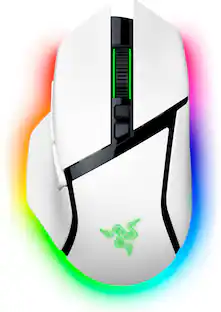
Top Deal$99.99The price was $119.99Razer Basilisk V3 Pro 35K Optical Gaming Mouse with HyperScroll Tilt Wheel
$129.99The price was $159.99
Explore tech essentials Sponsored
Logitech ERGO K860 Ergonomic Full-size Wireless Scissor Keyboard for Windows and Mac with Palm Rest
Top Deal$119.99The price was $149.99CORSAIR MAKR PRO 75 Hall Effect DIY keyboard - full aluminum build, gasket mounting, and 8kHz polling
$178.99The price was $249.99CORSAIR K65 PLUS RGB 75% Wireless Mechanical Pre-Lubricated MLX Red Linear Switch Gaming Keyboard with Hot-Swappable Switches
Top Deal$129.99The price was $159.99