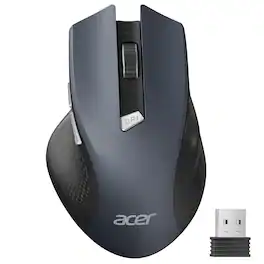
Acer - Wireless Mouse for Laptop, 2.4GHz Computer Mouse 3 Adjustable DPI Office Cordless USB Mice with USBA Receiver - Wireless - Black
Color
Black$2.99 shipping to
Related Item

Specifications
- Maximum Sensitivity1600 dots per inchConnection TypeWireless
- Key Specs
- Maximum Sensitivity: 1600 dots per inch (Mouse sensitivity is measured in dots per inch (DPI). The higher the DPI, the more sensitive the mouse is and may be more useful for high-density pixel screens. Lower DPI typically means more precision and accuracy in mouse movement.)
- Connection Type: Wireless
- General
- Brand: Acer
- Model Number: ACER-M04B-BBY
- Product Name: acer Wireless Mouse for Laptop, 2.4GHz Computer Mouse 3 Adjustable DPI Office Cordless USB Mice with USBA Receiver
- Color: Black
- Features
- Mouse Type: Standard
- Performance
- Handedness: Right-handed
- Tracking Method: Optical (There are several types of computer mice, optical and laser being among the most common. Optical mice detect less detail and provide more precise and accurate movement. Laser mice detect more detail and can be used on a wider variety of surfaces, but are more sensitive to small movements.)
- Maximum Sensitivity: 1600 dots per inch (Mouse sensitivity is measured in dots per inch (DPI). The higher the DPI, the more sensitive the mouse is and may be more useful for high-density pixel screens. Lower DPI typically means more precision and accuracy in mouse movement.)
- Minimum Sensitivity: 800 dots per inch (Mouse sensitivity is measured in dots per inch (DPI). The higher the DPI, the more sensitive the mouse is. Lower DPI typically means more precision and accuracy in mouse movement, but higher DPI may be useful for high-density pixel screens.)
- Connectivity
- Connection Type: Wireless
- Wireless Connectivity: Radio Frequency (RF - 2.4 Ghz/Low Latency) (The manner in which a device sends data to another device over a short distance without the use of wires or cables.)
- Operating System Compatibility: Universal
- Plug and Play Operation: true
- Power
- Mouse Power Source: Battery-powered
- On/Off Switch: true
- Rechargeable Battery (Mouse): false
- Batteries Included: false (Indicates whether the product comes with the required batteries for its operation.)
- Dimensions
- Product Height: 0.1 inches (The out of box height of the item. Height is measured as the vertical distance from the bottom of the item to the top as it would be primarily used or placed.)
- Product Length: 5.1 inches (The out of box length of the item. Length is measured as the longest dimension of the item.)
- Product Width: 3.2 inches (The out of box width of the item. Width is measured as the horizontal distance from one side of the item to the other as it would be primarily used or placed.)
- Product Weight: 85.2 grams (The out of box weight of the item.)
- Warranty
- Warranty - Parts: 1 year
- Warranty - Labor: None
- Other
- UPC: 195133316934
acer Wireless Mouse for Laptop, 2.4GHz Computer Mouse 3 Adjustable DPI Office Cordless USB Mice with USBA Receiver, 6 Buttons, 1600 DPI, Medium to Large Sized Hands Compatible with PC, Laptop, Desktop
- Plug and Play for Home Office: The wireless computer mouse features 2.4GHz connectivity, delivering a stable, interference-free connection up to 32ft. Designed for medium to large sized hands, it ensures comfortable use all day. Simply plug in the USB-A receiver for instant pairing—no drivers needed. 📌📌 If the mouse isn’t suitable, place the USB receiver in the battery compartment and return both.
- 3-Level Adjustable DPI for Smooth and Precise Cursor Control: This travel USB mouse offers 3 adjustable DPI settings (800, 1200, 1600), allowing you to customize sensitivity for precise design work. Effortlessly switch to match your task and elevate your productivity. 📌 Please remove the film at the bottom of the mouse before use.
- Effortless Browsing for Smooth and Comfortable Navigation: Equipped with forward and backward buttons, this computer mice streamlines your workflow, making it easy to navigate through web pages and files with a simple click. 📌Side button does not work on Mac.
- Visible Indicator Light: The pc mouse features a visual indicator for DPI levels and low battery alerts. The red light flashes once for 800 DPI, twice for 1200 DPI, and three times for 1600 DPI. When the battery level is below 10%, the light flashes red until the mouse is completely out of power.
- Click to Wake for Instant and Convenient Activation: With smart sleep mode, it saves power by standby after 10 inactive minutes, just 2-3 clicks to wake. This efficient design delivers 3-month battery life—3x longer than motion-wake mice. Engineered for durability, its buttons and scroll wheel are tested for 10 million clicks, ensuring long-term reliability and consistent performance.
- Plug and Play for Home Office: The wireless computer mouse features 2.4GHz connectivity, delivering a stable, interference-free connection up to 32ft. Designed for medium to large sized hands, it ensures comfortable use all day. Simply plug in the USB-A receiver for instant pairing—no drivers needed. 📌📌 If the mouse isn’t suitable, place the USB receiver in the battery compartment and return both.
- 3-Level Adjustable DPI for Smooth and Precise Cursor Control: This travel USB mouse offers 3 adjustable DPI settings (800, 1200, 1600), allowing you to customize sensitivity for precise design work. Effortlessly switch to match your task and elevate your productivity. 📌 Please remove the film at the bottom of the mouse before use.
- Effortless Browsing for Smooth and Comfortable Navigation: Equipped with forward and backward buttons, this computer mice streamlines your workflow, making it easy to navigate through web pages and files with a simple click. 📌Side button does not work on Mac.
- Visible Indicator Light: The pc mouse features a visual indicator for DPI levels and low battery alerts. The red light flashes once for 800 DPI, twice for 1200 DPI, and three times for 1600 DPI. When the battery level is below 10%, the light flashes red until the mouse is completely out of power.
- Click to Wake for Instant and Convenient Activation: With smart sleep mode, it saves power by standby after 10 inactive minutes, just 2-3 clicks to wake. This efficient design delivers 3-month battery life—3x longer than motion-wake mice. Engineered for durability, its buttons and scroll wheel are tested for 10 million clicks, ensuring long-term reliability and consistent performance.
Disclaimers
- NOTE: The AAA batteries are not included. The USB-A receiver is conveniently stored in the battery compartment at the back of the mouse. Make sure the battery cover is fully embedded in the slot to prevent loosening.
- NOTE: The AAA batteries are not included. The USB-A receiver is conveniently stored in the battery compartment at the back of the mouse. Make sure the battery cover is fully embedded in the slot to prevent loosening.
Q: How do I set the right and left buttons to do anything?
A: To customize your Acer-M04B wireless mouse buttons, use the operating system's mouse settings to swap left/right clicks or remap buttons with a third-party utility like XMouse Control. For basic swaps, go to Settings > Devices > Mouse in Windows and change the "Primary button" to Left or Right
Compare similar products
acer Wireless Mouse for Laptop, 2.4GHz Computer Mouse 3 Adjustable DPI Office Cordless USB Mice with USBA Receiver, 6 Buttons, 1600 DPI, Medium to Large Sized Hands Compatible with PC, Laptop, Desktop

Logitech Wireless Mouse Marathon M705 lets you power on... and on. It uses less power than comparable wireless mice from other companies, so you'll go up to three full years between battery changes.¹ And it uses a tiny wireless receiver that stays plugged in to your computer, so your mouse is ready to go-whenever, wherever, and for as long as it takes. Plus, hyper-fast scrolling means you'll fly through long documents to find what you need in a flash. Advanced Optical Tracking means you'll get smooth, responsive cursor control. And the sculpted, right-hand shape means you'll be as comfortable finishing up as you were getting started.

Eliminate the most common computer mouse issue—the cord. With the Best Buy Essentials Bluetooth Optical 6-Button Mouse, you can navigate the web without the limitations of a cable. Compatible with both Windows and Mac computers, simply pair the mouse using wireless Bluetooth 5.1 connection. It has 6 buttons that grant you total control, including left, right, scroll, DPI adjustment, forward and back. An ambidextrous design allows you to use your left or right hand. Optical technology detects when the mouse moves to deliver an accurate 1600 DPI response. We also included two (2) AAA batteries, so you’re ready to go right out of the box. Let us improve your computer navigation by going wireless with this Best Buy-backed mouse.

Eliminate the most common computer mouse issue—the cord. With the Best Buy Essentials Wireless Mouse with USB Receiver, you can navigate the web with speed and accuracy. Compatible with both Windows and Mac computers, simply insert the included nano receiver into one of your computer’s USB ports to wirelessly connect the mouse. It has just 3 buttons and an ambidextrous design for simple control. Optical technology detects when the mouse moves to deliver an accurate 1600 DPI response. We also included a AA battery, so you won’t have to worry about keeping the mouse powered until the LED indicator starts to blink. Let us improve your computer navigation by going wireless with this Best Buy-backed mouse.
| Pros for Acer - Wireless Mouse for Laptop, 2.4GHz Computer Mouse 3 Adjustable DPI Office Cordless USB Mice with USBA Receiver - Wireless - Black | |||
|---|---|---|---|
| There were no pros for this product— | Ease of use, Battery Life, Overall Performance, Size, Scroll Wheel | Overall Performance, Ease of use, Price, Battery Life, Bluetooth | Ease of use, Overall Performance, Price, Size, Wireless |
| Cons for Acer - Wireless Mouse for Laptop, 2.4GHz Computer Mouse 3 Adjustable DPI Office Cordless USB Mice with USBA Receiver - Wireless - Black | |||
| There were no cons for this product— | Sensitivity, Weight, Lag, Surface Compatibility | Scroll Wheel | Click Sound, Grip |
Specs
Reviews
Customer Images
The vast majority of our reviews come from verified purchases. Reviews from customers may include My Best Buy members, employees, and Tech Insider Network members (as tagged). Select reviewers may receive discounted products, promotional considerations or entries into drawings for honest, helpful reviews.
- Rated 5 out of 5 stars
Good Wireless Mouse for Daily Use
I have been using this Acer wireless mouse for a few weeks and it works really well for everyday tasks. Setup was simple, just plug in the USB receiver and it connects quickly. The mouse feels comfortable and moves smoothly on most surfaces. I like that it has three DPI settings for different speeds. The clicks are slightly loud but not bad. Overall it is a good and affordable mouse that feels solid and reliable for work or study.
Posted by VarunP
- Rated 5 out of 5 stars
I love this mouse
I love this mouse! My hand sits comfortably on it, and I adore how smoothly it moves. The material is nice and I like how I can scroll sideways, which is especially helpful while working with large excel files
Posted by JianZ
- Rated 5 out of 5 stars
Contours with your hand
This is the best mouse I've ever used. I work from home and it is incredibly important for me to have a comfortable wrist grip. This fits the contours of my hand very well and helps reduce fatigue. It connects easily with the usb and I've had no complaints.
Posted by Eliza83






