FREE shipping to
More Buying Options
Related Item

Highlights
- Key Specs
- Wi-Fi Range: 5500 square feet (The device will provide a Wi-Fi connection to this approximate area.)
- Number Of LAN Ports: 3 (Number of devices able to be connected to the Local Area Network (LAN). LAN ports allow wired connections to other networking devices (wireless access points, range extenders, etc.) in order to share the internet connection received through a WAN port.)
- Wi-Fi Speed: 6.6 gigabits per second (The maximum rate at which data is transferred between a network device and wireless router.)
- General
- Brand: ASUS
- Model Number: 90IG0590-MA1G4V
- Product Name: ZenWiFi AX Wireless-AX Wi-Fi Router
- Color: White
- Security
- Firewall Type: None (The method the firewall uses to filter and process data to increase network security, primarily by blocking malicious traffic requests while allowing legitimate traffic through.)
- Network
- Ethernet Standard: 10/100/1000/2500 (Each standard is a variation of the IEEE 802.3 set of computer networking technologies known as Ethernet. New versions evolved to include higher bandwidth, different physical media, and other new and improved features. Standards are often denoted by speeds (in Megabits per second). For example, a 10/100/1000 Ethernet port transmits at 10 Mbps, 100 Mbps, and 1000 Mbps (1 Gbps).)
- Number of Antennas: 6
- Frequency Band: 2.4 GHz, 5.0 GHz (Bands may be grouped into categories such as low- and high-band VHF (Very High Frequency), low- and high-band UHF (Ultra High Frequency), or certain frequency channels (measured in MHz or GHz). Generally, higher frequencies transmit information faster but have shorter range than lower frequencies.)
- Wireless Networking Standard: Wi-Fi 6 (The wireless networking standard used by the device. Each iteration of the standard developed by the Wi-Fi Alliance corresponds to an existing IEEE 802.11 protocol; for example, standard 802.11ac (or AC) is termed Wi-Fi 5. Refers specifically to the standard the device is designed to use, but ultimately determines product interoperability and backward compatibility including previous versions.)
- Wireless Standard: AX (The wireless networking protocol used by the device. Each iteration of the protocol is based on the 802.11 standard developed by the Institute of Electrical and Electronics Engineers (IEEE) Standards Association. Denoted by letters following 802.11 (802.11a, 802.11ac, etc.), each version, published in alphabetical order, encompasses all previous versions.)
- Wi-Fi Range: 5500 square feet (The device will provide a Wi-Fi connection to this approximate area.)
- Certifications Listings & Approvals
- ENERGY STAR Certified: true (Devices carrying the ENERGY STAR service mark, such as computer products and peripherals, kitchen appliances, and other products, generally use 20% to 30% less energy than required by federal standards.)
- Features
- Integrated Modem: false
- Wireless: true
- Ports
- Number Of WAN Ports: 1 (Number of devices able to be connected to the Wide Area Network (WAN). This type of port may simply be labeled "Internet," and it allows the device to share its internet connection with all devices connected to it via LAN ports.)
- Port Type(s): RJ-45, USB (USB 2.0 connects external drives, gaming controllers, smartphones, MP3 players and other accessories.USB 3.0 transfers data faster than USB 2.0, but only when used with USB 3.0 devices.USB Type-C provides fast speeds and versatile power, featuring connectors with identical ends that plug in upside down or right side up. Adapters allow for video as well as backward compatibility.Thunderbolt provides ultra-high bandwidth for fast data transfer between devices featuring a Thunderbolt or MiniDisplayPort connection.HDMI allows you to connect a projector or display HD media on your HDTV or monitor.Media card slots allow you to transfer photos from your digital camera or camcorder.)
- Number Of LAN Ports: 3 (Number of devices able to be connected to the Local Area Network (LAN). LAN ports allow wired connections to other networking devices (wireless access points, range extenders, etc.) in order to share the internet connection received through a WAN port.)
- Speed
- Wired Speed: 2500 megabits per second (The maximum rate at which data is transferred between a network device and router using an Ethernet cable.)
- Wi-Fi Speed: 6.6 gigabits per second (The maximum rate at which data is transferred between a network device and wireless router.)
- Gigabit Ethernet Speed: true (Supports the gigabit Ethernet networking standard, which has a data rate of at least one gigabit per second, or 1,000 Mbps.)
- Compatibility
- Voice Assistant Built-in: No (A digital assistant built into the device that uses voice commands to answer questions and control smart devices.)
- Dimensions
- Product Height: 6 3/10 inches (The out of box height of the item. Height is measured as the vertical distance from the bottom of the item to the top as it would be primarily used or placed.)
- Product Length: 3 inches (The out of box length of the item. Length is measured as the longest dimension of the item.)
- Product Width: 6 2/5 inches (The out of box width of the item. Width is measured as the horizontal distance from one side of the item to the other as it would be primarily used or placed.)
- Product Weight: 1.58 pounds (The out of box weight of the item.)
- Warranty
- Warranty - Parts: 2 year limited
- Warranty - Labor: 2 years
- Other
- UPC: 192876579015
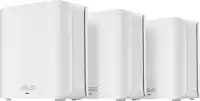
The ZenWiFi AX system consists of a pair of ASUS AX WiFi routers, featuring technologies that give you superfast, reliable and secure WiFi connections inside or outside your home! ZenWiFi AX works perfectly with smart home services including Alexa skills and IFTTT and is available in black or white to suit your decor.
- Wireless Router: Provides Wi-Fi so you can enjoy wireless internet connectivity on your Wi-Fi-supported devices.
- 2.5 Gigabit Ethernet: 2.5 Gigabit Ethernet - Seamless connectivity for fast data transfer up to 2.5 Gbps
- Number of ports: It features 3 Network (RJ-45) ports for wired connection of up to 3 computers
- 825 MB/s Wireless Transmission Speed: It Offers upto 825 MB/s data transfer rates for fast and efficient operations
- 2.4GHz and 5GHz frequency with (IEEE 802.11ax compliant): Enjoy smooth and uninterrupted wireless transmission with dual-band frequency support
- Desktop: Can be placed on desktop surfaces for standalone installation
- Warranty: Comes with a 2 year limited warranty that proves that this wireless router has passed high-quality standards in design, material, and workmanship
Whats Included
- Owner's manual
Product Manuals
A: You can add multiple mesh nodes beyond the two, but not sure if there's a limit. I don't think they sell individual mesh nodes at the moment, but you can actually add any other Asus router that supports AIMesh. Pretty cool that it doesn't restrict you to this particular model.
A: Interestingly, I'm in the process of dealing with Asus support on this very matter. While hand-off from the primary node (ie. "router"), to the mesh node in the back of the house is very seamless. This applies equally to my Windows 10 laptop (Lenovo Yoga), as well as my android & iOS devices. However, the same can NOT be said in the other direction, as the mesh node doesn't hand-off to the primary node. it's not that it sometimes works, and sometimes doesn't work...the problem is that, from mesh node, to primary node, it NEVER hands off.
A: It seems like incoming inventory is extremely limited. I grabbed one last week when it suddenly showed as in stock. I don't think it was but a couple hours later that it was again out of stock. It would be great if Asus and Best Buy could work on inventorying this for others who want what seems to be a solid mesh system.
A: Another (potential) disadvantage of the Orbi system: As of Sept'20, it does not have Parental Control yet. NetGear is pushing it out in a firmware update sometime around Dec'20. This stopped me looking at Orbi. I don't need to wait 3 months for it to be *maybe* be installed. And that is straight from NetGear support. Lower Tech NetGear products have Parental Control, but not their ~$500 system... Hard pass.
Q: What is the square foot coverage of this model
A: According to the ASUS website this system will cover 5500 square feet. The one unit system is rated to cover 2750 square feet.
A: This would out perform the wifi modem provided by Spectrum. Juts set the modem in bridge mode then disable the wifi from the unit provided by Spectrum or exchange it for a modem only and save the extra rent for the wifi. The AIMESH works as intended but uses the 2nd 5ghz band as backbone to main station, using a ethernet backbone provides even better wifi experience.
A: It’s a solid and feature rich router. There is like 40 connected devices in my network and It gives me 3x better speed than my previous AC2700 router. I also have an access point (ASUS ac1900 router) connected to it using Ethernet which handles all my smart/2.4ghz devices well. Complaints: I had to reboot it couple of times so far, once in a while rebooting actually helps refreshes your system, there is an option so it can be scheduled. Sometimes the devices wouldn’t get connected to the nearest node or router I had to bind them. It seem it settling down well with no or less issues.
Compare similar products
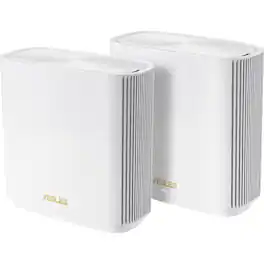
The ZenWiFi AX system consists of a pair of ASUS AX WiFi routers, featuring technologies that give you superfast, reliable and secure WiFi connections inside or outside your home! ZenWiFi AX works perfectly with smart home services including Alexa skills and IFTTT and is available in black or white to suit your decor.
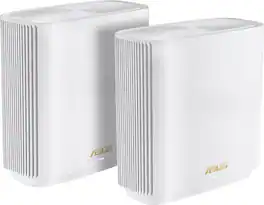
The ASUS ZenWiFi XT9 mesh system consists of a pair of ASUS AX7800 tri-band Wi-Fi 6 mesh routers, featuring unique technologies that give you superfast, reliable and secure Wi-Fi connections for your streaming videos, gaming and all other smart IoT gadgets.
Explore ultimate technology with the ASUS RT-AXE7800 tri-band Wi-Fi 6E router. Its breakthrough performance of up to 7800 Mbps Wi-Fi speed can meet and exceed your internet needs, with comprehensive network protection provided by advanced ASUS security tech. Gear up for ultrafast connectivity!

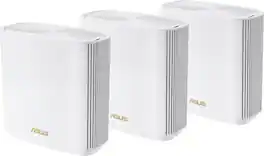
Experience uninterrupted streaming, video calls, gaming and more with Wi-Fi 6E whole home tri-band mesh system. Routers previously operated on 2.4 GHz and 5 GHz bands, with Wi-Fi 6E, connected devices can now operate on the 6 GHz band resulting in faster speeds, greater capacity and expanded coverage throughout your home. Take full advantage of internet plans up to 2.5 Gbps using one 2.5 Gbps WAN/LAN port. Three Deco units work together to provide speeds up to 5400 Mbps and coverage up to 7,200 sq. ft. reaching every corner of your home.
| Pros for ASUS - ZenWiFi AX Wireless-AX Wi-Fi Router - White | |||
|---|---|---|---|
| There were no pros for this product— | There were no pros for this product— | Coverage, Speed, Setup, Range, Signal Strength | Speed, Coverage, Range, Setup, Ease of use |
| Cons for ASUS - ZenWiFi AX Wireless-AX Wi-Fi Router - White | |||
| There were no cons for this product— | There were no cons for this product— | Connectivity, Performance | Connection, Lag, Parental Controls |
Specs
Reviews
Customer Images
The vast majority of our reviews come from verified purchases. Reviews from customers may include My Best Buy members, employees, and Tech Insider Network members (as tagged). Select reviewers may receive discounted products, promotional considerations or entries into drawings for honest, helpful reviews.
- Rated 5 out of 5 stars
Solved all of our wifi problems
I will preface this review with some information about our prior wifi installation to give you an idea of what we were dealing with and how the ASUS Zenwifi tri-band fits in here. Prior to installing the Asus mesh, we had a single Netgear Nighthawk router handling our 1400ft² house. Overall the performance was fine for most of our stuff inside; outside was a different story. We spend a lot of time on our back patio, use an Amazon Echo out there for streaming audio and occasionally we like to take an iPad out to watch streaming television. The problem was that we could not get any reliable wifi out there in the 5Ghz band. It had to run at 2.4ac to get streaming content and it was just not reliable. We are in a subdivision with neighbors on 3 sides and all of them have wifi running. So it is a crowded spectrum issue here along with the fact that my cable modem is located in an opposite corner of the house. The Nighthawk router had a very good run, to be sure. I think I had had it maybe 7 years here and it had never failed us other than maybe needing a reboot occasionally. But the range and inability to get the higher performance of the 5Ghz outside drove me to investigating a more modern mesh system. I definitely wanted to get something that supported the new wifi 6 home network specification and after reading reviews and determining that a wired backhaul between nodes was out of the question here, a tri-band setup with dedicated backhaul channel was a must have. After reading many reviews - taking them all with a grain of salt, as should everyone - I determined that the Asus ZenWiFi AX XT8 was probably our best bet to try first. This system features two identical nodes, each of which can serve as the main router and the other as remote node. They have to be installed in a location where they can "talk" clearly in the 5Ghz dedicated 3rd band. I set the main router up in the same location the Nighthawk had sat in for years, in our back corner office where the cable internet comes into the house. The mesh node device I moved out into our living room where it has a clear shot to the patio area. It worked first try. As soon as I got both the router and node setup and configured the backhaul connection in both the browser and iOS apps showed up as "Great!" It took maybe 30 minutes to get everything hooked up. I saved a lot of time by just using our old SSID setup to avoid having to reprogram every IOT device we have. As soon as the network came back up everything we have connected to the new devices pretty much as before. I did have one problem with our Ambient Weather WS-2000 weather station. For some reason the console did not want to stay connected to the mesh. I solved that problem by basically doing a reset on the weather station that included a firmware upgrade. Since I did that the disconnection problems have stopped. I also had an issue with our Ryobi garage door opener that I fixed by resetting (erasing the old network and reinstalling it) Those were the only two devices with hiccups. Everything else just reconnected and worked. I guess the key thing I want to share is that our old problems with getting 5Ghz wifi anywhere in the house or on the patio are completely gone. I keep our wifi bands separate, meaning I have two SSIDs running: "Network" and "Network-5" (not their real names, of course, but you get the drift.) Now with the Asus mesh, we just leave our personal devices on the "-5" side and move about wherever we want. We do not have to worry about which radio we are connected to. The mesh system handles all of the handoffs from main unit to node seamlessly. I do not have to manage any of it. It just works. And that is the answer to my biggest question about Asus mesh operations. Would I have to somehow nurse the thing or spend hours trying to make the handoffs seamless? I did not. Right out of the box after configuring things we found that we could move freely about and the brains of the mesh system would hand devices back and forth between the node and the main router without any intervention or dropouts. Out on our patio, where I could barely get a 5Ghz signal before, I get super performance. My iphone 12 variant has a wifi 6 radio and I can get 400mbs download speed sitting outside! The main thing is we are no longer getting streaming dropouts out there and we never have to worry about changing our devices to the 2.4Ghz band. Our problems have been solved. Granted, we do not have a large house and I have no idea how the Asus would perform in another environment. What I do know is that it absolutely works as advertised in our place. Everything about it, including the control interface via web or app, is straight-forward and not fussy. The Asus is on the more expensive side for a mesh system but considering it is both wifi-6 enabled and tri-band equipped with a dedicated radio backhaul, it is not a bad bet for the $450 price point. About my only caveat would be how would it work in a multi-story with only two nodes? That one I can't answer, but I do know that the system can be expanded to more than two if needed as all of the mesh units are identical and can be configured on the fly. All in all I really recommend this mesh system. Happy we got it.
This review is from ASUS - ZenWiFi AX Wireless-AX Wi-Fi Router - White
Posted by Homebrew
- Rated 1 out of 5 stars
Firmware ruined everything - only for basic users
I use this product for almost a year now and it’s getting worse with every firmware upgrade. If you’re an advanced user using many wireless devices (Smart home, security systems etc.) on both 2.4GHz and 5GHz frequencies then just buy something else. Cameras go offline all the time, smart home bridge go offline, since December upgrade some of the Sonos speakers won’t connect to AX model at all (known issue). An option is to downgrade firmware but then you’re at security risk. I added my old Asus RT68 router to the mesh and binded “problematic” devices to that router. They work fine until.. Asus firmware still moves them to AX routers “because they know better” even if you bind the device (pic added). Some wireless devicess will show as “wired” and firmware won’t give you an option to re-connect. Extremely problematic with hardwired cameras since there is no option to power-cycle it. I really hoped that this product will work for my home especially that I use Asus routers for years and was happy with them. It did for the first 4-5 months until 2020 Q3 firmware upgrades. If you’re a basic user and will just use it for computer, tablet or phone it will most likely work. If you have more wireless devices on the network try something else. I really wish that I could still return it because I will be replacing this expensive hardware with other brand shortly
This review is from ASUS - ZenWiFi AX Wireless-AX Wi-Fi Router - White
Posted by Mike
- Rated 5 out of 5 stars
So Good
Easy to setup and much faster than our AT&T/Pace 5268 gateway. I’m very happy with this product.
This review is from ASUS - ZenWiFi AX Wireless-AX Wi-Fi Router - White
Posted by ThatGuyJoe