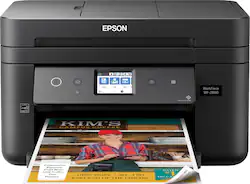
Epson - WorkForce WF-2860 Wireless All-In-One Inkjet Printer - Black
- Key Specs
- Networking: Wired, Wireless
- ENERGY STAR Certified: true (Devices carrying the ENERGY STAR service mark, such as computer products and peripherals, kitchen appliances, and other products, generally use 20% to 30% less energy than required by federal standards.)
- Printer Type: All In One
- ISO Color Print Speed: 14 pages per minute (The number of color pages able to be printed per minute in the device's default single-side mode, as tested by the International Standards Organization (ISO).)
- ISO Mono Print Speed: 7.5 pages per minute (The number of black ink (grayscale) pages able to be printed per minute in the device's default single-side mode, as tested by the International Standards Organization (ISO).)
- Touch Screen: true (Touch-screen devices make navigating more intuitive. Using a touch-screen display, you can do things such as tap to select, hold and drag to move items, swipe to scroll, and pinch to zoom.)
- General
- Brand: Epson
- Model Number: C11CG28201
- Product Name: WorkForce WF-2860 Wireless All-In-One Inkjet Printer
- Color: Black
- Display Screen: true
- Display Screen Size: 2.4 inches
- Dimensions
- Product Height: 10 inches (The out of box height of the item. Height is measured as the vertical distance from the bottom of the item to the top as it would be primarily used or placed.)
- Product Width: 16.4 inches (The out of box width of the item. Width is measured as the horizontal distance from one side of the item to the other as it would be primarily used or placed.)
- Product Weight: 14.1 pounds (The out of box weight of the item.)
- Features
- Automatic Document Feeder: true
- Photo Printing: true
- Monochromatic/Color: Color
- Automatic Reduction/Enlargement: true
- Automatic Two-Sided Printing: true
- Tray Capacity: 150
- Duty Cycle: Up to 5,000 (The maximum number of pages per month that the device can produce without failing, as specified by the manufacturer.)
- Certifications Listings & Approvals
- EPEAT Qualified: false (The Electronic Product Environmental Assessment Tool (EPEAT) was designed to provide an environmental assessment tool for purchasers. In order to qualify for EPEAT, a product must meet all 23 required criteria.)
- Scanner Info
- Scanner Type: Flatbed
- Scanner Resolution: Up to 1200 x 2400 (Refers to the number of pixels/dots, both horizontally and vertically, of the image produced by the scanner. Generally, the higher the resolution, the sharper and cleaner the produced image.)
- Fax Info
- Integrated Fax: true
- Ink
- Compatible Cartridges: 202 Standard-capacity (Black/Cyan/Magenta/Yellow), 202XL High-capacity (Black/Cyan/Magenta/Yellow)
- Paper Info
- Automatic Document Feeder Capacity: 30 sheets
- Maximum Document Length: 47.2 inches
- Maximum Document Width: 8.5 inches
- Supported Paper Sizes: 3.5" x 5", 4" x 6", 5" x 7", 8" x 10", 8.5" x 11" (letter), 8.5" x 13", 8.5" x 14" (legal), A4, A6, half letter, executive, user definable (3.5" - 47.2" in length)
- Compatible Media Types: Plain Paper, Epson Bright White Paper, Brochure and Flyer Paper Matte Double-sided, Presentation Paper Matte, Photo Paper Glossy
- Copier Info
- Maximum Number Of Copies: 99
- Copier Resolution (Black): Up to 600 x 1200 (Refers to the number of pixels/dots, both horizontally and vertically, of the image produced by the copier in black ink. Generally, the higher the resolution, the sharper and cleaner the produced image.)
- Performance
- Printer Resolution (Color): Up to 4800 x 1200 (Refers to the number of pixels/dots, both horizontally and vertically, of the image produced by the printer in colored ink. Generally, the higher the resolution, the sharper and cleaner the produced image.)
- Approximate Page Yield (Black): 210
- Approximate Page Yield (Color): 165
- Connectivity
- Minimum System Requirements: Windows 10, Windows 8, 8.1, Windows 7, Windows Vista, Mac OS X 10.6 - 10.13.x , Windows Server 2003 SP or later, Windows Server 2016
- Other
- UPC: 010343939882
Share print, copy and fax resources through Wi-Fi with this Epson all-in-one printer. It prints with four-color inkjet technology and automatic duplexing for colorful, two-sided output and uses USB 2.0 for compatibility with a wired desktop or server. This Epson all-in-one printer copies documents directly and clearly with a CIS scan element.
- Be sure you have the right cartridge: Enter your printer's model number into our Ink and Toner Finder to find compatible cartridges. Get started ›
- Prints up to 14 ISO ppm* in black, up to 7.5 ISO ppm* in color: Produces documents quickly.
- Ideal for home or small business use: Offers excellent print quality for photos and documents, and accepts a variety of paper types and sizes.
- Wireless and mobile printing capability: Connect this printer to your home or office network with built-in Ethernet or wireless LAN. Plus, print from your mobile device with the free Epson iPrint app.
- Tablet and smartphone printing: Epson Connect enables simple wireless printing from most smartphones, tablets and more.
- Apple® AirPrint enabled: Allows Apple iPad® and iPhone® printing.
- Up to 4800 x 1200 dpi (dots per inch) color resolution: High resolution for producing incredible quality and detail in documents and photos.
- Four individual print cartridges are economical: Only replace an ink cartridge (black, cyan, magenta or yellow) when its color runs out.
- Large paper tray for high-volume printing and copying: Reload less often with a 150-sheet input tray. Copy, scan or fax multiple pages easily with a 30-sheet automatic document feeder.
- 2.4" CGD (color graphics display) touch screen: Use the intuitive touch screen to print, store files and access business apps directly from the printer.
- One USB port for simple connectivity: Offers a standard connection to your PC.
- More print, copy and scan solutions: Automatically print two-sided documents, scan documents to your computer or directly to e-mail, send quick faxes and more.
Whats Included
- 4 Claria Ink cartridges (Black/Cyan/Magenta/Yellow)
- CD-ROM with drivers
- Epson WorkForce WF-2860 Wireless All-In-One Inkjet Printer
- Power cord
Product Manuals
Q: WF 2860 HOW MANY WILL BE PRINTED BEFORE I HAVE TO BUY ANOTHER BLACK
A: With the Trial ink that comes in the package I was able to get about 69 black and white documents and 31 color documents before having to change the black out. I still have a good bit of yellow, magenta, and blue left so I left them alone. I did swap the black out for the XL version when I changed it so I can update later.
Q: Can this printer print on card stock?
A: It actually does not print on card stock or any kind of thick paper. If you print on anything but plain paper save yourself some grief and buy a different printer. Most infuriating printer I’ve ever owned. This is an answer I found from the manufacturer: No. The Epson WorkForce WF-2860 All-in-One Printer do not support card stock or thick paper. This product only support plain paper and paper distributed by Epson that weighs 17 lb (64 g/m2) to 24 lb (90 g/m2). The following are the paper types supported by this printer: • Epson Bright White Paper • Epson Photo Paper Glossy • Epson Premium Photo Paper Glossy • Epson Ultra Premium Photo Paper Glossy • Epson Ultra Premium Photo Paper Luster • Epson Premium Photo Paper Semi-gloss • Epson Presentation Paper Matte • Epson Premium Presentation Paper Matte • Epson Ultra Premium Presentation Paper Matte • Epson Premium Presentation Paper Matte Double- sided • Epson Brochure & Flyer Paper Matte Double-sided
A: It does NOT scan double-sided.
A: Hi tim, Yes, you can turn off WiFi using the front panel controls of the WF-2860. Regards, Mark - The Epson Team.
A: Check the review, I purchased mine on my own.
Q: Can this printer scan and enlarge?
A: Hello ckoch. The WF-2860 can enlarge copies from 25%-400%. Also, to enlarge when scanning, you can select a higher resolution/dpi and different file sizes. Regards, Kevin - The Epson Team.
Q: Can I use this printer for iron on transfers? If not, can you recommend one that does?
A: Hello rcl. The WF-2860 works with Epson Iron-on Cool Peel Transfer paper, which can be used with t-shirts. Please note we have not tested other brands of transfer paper with the machine. If you plan to use 3rd party paper, we recommend trying a small batch first to ensure it works properly and has satisfactory image quality. Regards, Kevin - The Epson Team.
Q: can the printer print on cd's
A: Hi obeone, No, the Epson WorkForce WF-2860 does not support CD/DVD printing. Regards, Alexander - The Epson Team.