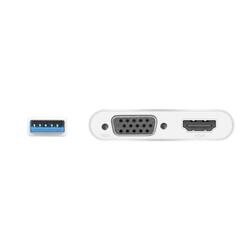
j5create - USB 3.0 to Dual VGA HDMI Multi-Monitor Adapter - Silver
- Key Specs
- Connector Type (End 1): HDMI Type A
- Connector Type (End 2): VGA
- General
- Product Name: USB 3.0 to Dual VGA HDMI Multi-Monitor Adapter
- Brand: j5create
- Compatibility: Windows 10 or later. macOS 10.9 or later. Available USB Type-A port (USB 3.1 / 3.0 is recommended)
- Model Number: JUA360
- Color: Silver
- Connectivity
- Cable Type: HDMI, VGA
- Product Type: Adapter
- Connector Type (End 1): HDMI Type A
- Connector Type (End 2): VGA
- Other
- UPC: 847626001871
The USB 3.0 to HDMI & VGA Multi-Monitor Adapter acts as an external video card for your MacBook or Windows computers. It allows you to add two additional displays through your USB 3.0 port, boosting your productivity by giving you more screen space to work from. With this USB 3.0 Multi-Monitor Adapter, you can quickly install the driver with a simple USB plug-in. Afterwards, connect the device to your monitors using HDMI cables and then you will have a dual-display workstation.
- Increase Efficiency: Easily add two extra displays to any computer.
- Dual HDMI & VGA Multi Display: Supports resolutions up to 2048 x 1152 @ 60 Hz.
- Supports 4 Display Modes: Mirroring mode, clone one screen onto another. Extended mode, extend your desktop across multiple displays. Primary mode, have individual applications open on each monitor. Display Rotation, view an image or report vertically.
Whats Included
- 1 - JUA360 USB 3.0 to HDMI & VGA Multi-Monitor Adapter
- 1 - Quick Installation Guide
Q: Can this support 2 additional monitors to a lap top
A: Yes, with the required drivers installed on the computer. Depending on the OS you have, different instructions apply.
A: The USB 3.0 to HDMI & VGA Multi-Monitor Adapter requires an installation of a driver for functionality. If the computer has network access and administrative rights, Windows can automatically install the driver when the device is plugged in or visit j5create website and under the Support tab, download and install the required drivers manually.
Q: Wil this work on Samsung tv? Thnks, lefteyeyob
A: For the USB 3.0 to HDMI & VGA Multi-Monitor Adapter to work on a Samsung TV. You would need to connect the Adapter to a computer with an available USB Type-A port (USB 3.1 / 3.0 is recommended). This Adapter will also require an installation of a driver. Drivers are located on j5create website under the "Support" tab. Once installation is completed, connect either the VGA or HDMI to your TV, with the correct input source selected. ** Feel free to contact j5create Technical Support if you require further assistance. Their information can be found on our website under the "Support" tab. Thank you.
A: The JUA360 does allow connectivity for an additional VGA and HDMI monitor to your computer on top of the built-in HDMI. If you require further assistance, feel free to contact support on the casing and a rep will be ready to assist.