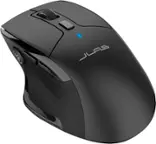
JLab - Go Charge Wireless Scroll Mouse - Wireless - Black
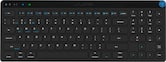 JLab - JBuds Wireless Keyboard - Black$34.99$39.99
Related Item

Specifications
- Connection TypeWireless
- Key Specs
- Connection Type: Wireless
- General
- Brand: JLab
- Model Number: MGOCHRGMSRBLK124
- Product Name: Go Charge Wireless Scroll Mouse
- Color: Black
- Features
- Mouse Type: Compact
- Performance
- Tracking Method: Trackball (There are several types of computer mice, optical and laser being among the most common. Optical mice detect less detail and provide more precise and accurate movement. Laser mice detect more detail and can be used on a wider variety of surfaces, but are more sensitive to small movements.)
- Connectivity
- Connection Type: Wireless
- Wireless Connectivity: Bluetooth (The manner in which a device sends data to another device over a short distance without the use of wires or cables.)
- Operating System Compatibility: Universal
- Dimensions
- Product Height: 5.03 inches (The out of box height of the item. Height is measured as the vertical distance from the bottom of the item to the top as it would be primarily used or placed.)
- Product Length: 2.68 inches (The out of box length of the item. Length is measured as the longest dimension of the item.)
- Product Width: 0 inches (The out of box width of the item. Width is measured as the horizontal distance from one side of the item to the other as it would be primarily used or placed.)
- Product Weight: 0.15 grams (The out of box weight of the item.)
- Warranty
- Warranty - Parts: 2 years
- Warranty - Labor: 2 years
- Other
- UPC: 812887017589
The GO Charge Wireless Bluetooth Mouse is small, comfortable in your hand, and dare we say—kind of cute? Your everything go-to, it goes with you from desk to café to coworking space and beyond. We see you digital nomads. Three saved device connections means you can seamlessly switch connections as easily as you switch filters.
- Connectivity: The GO Charge Mouse connects via Bluetooth and allows you to save up to three device connections, making it easy to switch between your laptop, tablet, and smartphone.
- Multiple Devices: The GO Charge Mouse supports seamless switching between three saved devices, enabling you to effortlessly move from one device to another.
- Charging: The GO Charge Mouse is rechargeable via USB-C, providing a convenient and fast charging experience without the need for batteries.
- Portable: The GO Charge Mouse is compact and lightweight, making it easy to carry with you wherever you go, whether you're working at a desk, in a café, or at a coworking space.
- Connectivity: The GO Charge Mouse connects via Bluetooth and allows you to save up to three device connections, making it easy to switch between your laptop, tablet, and smartphone.
- Multiple Devices: The GO Charge Mouse supports seamless switching between three saved devices, enabling you to effortlessly move from one device to another.
- Charging: The GO Charge Mouse is rechargeable via USB-C, providing a convenient and fast charging experience without the need for batteries.
- Portable: The GO Charge Mouse is compact and lightweight, making it easy to carry with you wherever you go, whether you're working at a desk, in a café, or at a coworking space.
Q: Can the mouse be used with different operating systems?
A: This mouse is compatible with different operating systems.
Q: What is the tracking method used by the mouse?
A: The tracking method used by the Go Charge Wireless Scroll Mouse is trackball.
Q: How many devices can the mouse connect to?
A: This mouse allows you to seamlessly switch between three saved device connections.
Q: What type of connection does the mouse use?
A: The Go Charge mouse uses a wireless connection type.
Q: Does the mouse have a usb-c connection?
A: It has a USB-C for charging but otherwise it is wireless/Bluetooth.
Q: Is the included dongle USB C?
A: undefined
Q: How do I take it apart? I don't see any screws or panels.
A: undefined
Q: How do I disable the side muttons?
A: In the computer settings, under devices
Compare similar products

The GO Charge Wireless Bluetooth Mouse is small, comfortable in your hand, and dare we say—kind of cute? Your everything go-to, it goes with you from desk to café to coworking space and beyond. We see you digital nomads. Three saved device connections means you can seamlessly switch connections as easily as you switch filters.

Eliminate the most common computer mouse issue—the cord. With the Best Buy Essentials Bluetooth Optical 6-Button Mouse, you can navigate the web without the limitations of a cable. Compatible with both Windows and Mac computers, simply pair the mouse using wireless Bluetooth 5.1 connection. It has 6 buttons that grant you total control, including left, right, scroll, DPI adjustment, forward and back. An ambidextrous design allows you to use your left or right hand. Optical technology detects when the mouse moves to deliver an accurate 1600 DPI response. We also included two (2) AAA batteries, so you’re ready to go right out of the box. Let us improve your computer navigation by going wireless with this Best Buy-backed mouse.
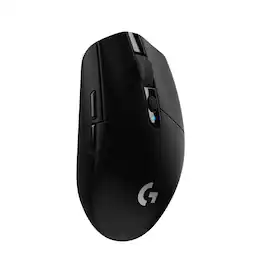
G305 features the next-gen HERO sensor with 12,000 DPI sensitivity and LIGHTSPEED wireless 1 ms performance. It’s long-lasting with 250 gaming hours from one AA battery (an indicator light reminds you before you need a new AA), ultra-portable with built-in nano receiver storage, lightweight weighing in at 99 grams, and ready to game with 6 programmable buttons. G305 is the LIGHTSPEED wireless mouse for all.

The JBuds Wireless Bluetooth Mouse offers full-sized functionality with a personalized approach. With seven buttons and a comfortable feel, you have everything you need to reach WFH greatness and you can save up to three user profiles. Switching between your favorite functions.
| Pros for JLab - Go Charge Wireless Scroll Mouse - Wireless - Black | |||
|---|---|---|---|
| Overall Performance, Battery Life, Portability, Connectivity, Noise Level | Bluetooth, Overall Performance, Ease of use, Price, Battery Life | Overall Performance, Battery Life, Ease of use, Price, Weight | Battery Life, Overall Performance, Ease of use, Bluetooth, Ergonomics |
| Cons for JLab - Go Charge Wireless Scroll Mouse - Wireless - Black | |||
| There were no cons for this product— | Scroll Wheel | Lag, Scroll Wheel, Side Buttons, Ergonomics | Scroll Wheel, Lag, Click Noise, Charging |
Specs
Reviews
Customers are saying
Customers love the Go Charge Wireless Scroll Mouse for its portability and intuitive connectivity. Users appreciate the overall performance and find the battery life satisfactory. The mouse is also praised for its silent operation, lightweight design, and comfortable use. Additionally, the inclusion of a USB-C charging port is a welcomed feature.
Customer Images
The vast majority of our reviews come from verified purchases. Reviews from customers may include My Best Buy members, employees, and Tech Insider Network members (as tagged). Select reviewers may receive discounted products, promotional considerations or entries into drawings for honest, helpful reviews.
- Rated 5 out of 5 stars
Good buy
Very convenient and comfortable to use and the best thing I don’t have to buy batteries
Posted by HadiB
- Rated 5 out of 5 stars
Quiet and responsive
I recently switched to the JLab - Go Charge Wireless Scroll Mouse from my old Logitech, and I have to say, it’s been a game changer. One of the first things I noticed is how quiet the clicks are. If you work in a shared space, this feature is a blessing. The responsiveness is on par with my Logitech, so I didn’t sacrifice performance for quietness. Another big plus is that it is wireless, which means no more tangled cords. The connection with the included dongle is seamless and so far I have not experienced any connection issues with my computer. Another plus, it charges quickly with a USB-C charger which is super convenient since most of our devices use this type of cable. I love that I can get a good amount of use - several days - from just a short recharge. What really stands out is how much lighter the JLab mouse feels in my hand compared to the Logitech. It makes long hours of work much more comfortable. Overall, I’m impressed with the JLab Go Charge mouse. It combines quiet operation, great responsiveness, and lightweight design, making it a fantastic upgrade.
Posted by Lenlen
- Rated 5 out of 5 stars
Mice, can’t live with 'em can’t live without them.
Before the arrival of this mouse, I was, as they say, one mouse shy of mischief. It’s not that I only had one mouse, but at least one of them had to be shifted from one computer to another to pull double duty. Starting with the unboxing, packaging is minimal and straightforward. There is a USB-C port on the front of the mouse allowing for the Go Charge Mouse to be aptly named while charging with the included, surprisingly long, USB-A to USB-C charge cable. During charging, you get a big red or green slim surrounding lit reminder as to how things are progressing. When the battery is getting low during use, it will flash the light near the lower edge and will take several hours to charge, but will give you up to four months of use depending upon rate of usage according to the manufacturer’s website. The mouse itself is very attractive in its matte coat, while it’s four feet float effortlessly over smooth surfaces. Although it’s a compact size and ready, willing and able to travel, it is still comfortable in a larger-sized hand. Following a growing trend, this mouse uses not only the 2.4 GHz-dongled connection, but can also store two Bluetooth connections via a handy, bottom-mounted switch, that doubles as the Bluetooth pairing button as well. So why buy this one? Well, it’s handily cordless, it can be recharged when it needs a little pick-me-up and it’s inexpensive. Another upside is that the included USB-A dongle is not from the usual suspect’s brands that all look alike and make for a positively maddening experience when trying to sort out which dongle goes with which mouse or mouse and keyboard. Unfortunately, the dongle is only the traditional USB-A, necessitating an adapter for your dongle to port into the growing cadre of laptops supplied only with USB-C ports. Fortunately, with the two Bluetooth positions available, using the dongle is not mandatory on Bluetooth-enabled devices. Other positive aspects of this mouse are the mechanically quiet clicking and scrolling actions and the ability to toggle the sensitivity among the three presets of 800/1200/1600 DPI. However, trying to figure out which DPI setting you are on and trying to select a particular one is still a bit of a mystery to me as no instructions or indicators are provided for that. Also, the two programmable side buttons’ instructions might also be located on that same, not included, set of instructions that got lost on the cutting room floor. Is it adept at gaming? It wasn’t necessarily designed to be a gaming mouse, so, expect cordless performance that is theoretically slightly faster on the dongle connection as opposed to the Bluetooth (although I haven’t measured that myself). In typical office-type use, it seemed perfectly fine for all the usual tasks. So overall, I like this mouse. It works well, it looks great and it’s not from the usual suspects. With its two-year warranty, you have some extra assurance it will be hanging around for a while.
Posted by Dustmaker