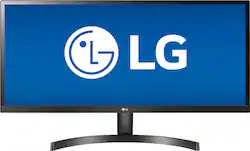
LG - 34WL500-B 34" IPS LED UltraWide FHD FreeSync Monitor with HDR (HDMI) - Black
- Key Specs
- Refresh Rate: 75Hz (The number of frames per second the device can produce natively without enhancement. Higher rates help produce smooth, seamless pictures.)
- Maximum Resolution: 2560 x 1080 (Maximum resolution refers to the highest number of pixels that a screen can process and display. Higher resolution signals produce more detailed images.)
- Response Time: 5 milliseconds (The speed at which pixels can change colors is called response time. It is measured in milliseconds (ms).)
- Panel Type: IPS (Technology that affects response time and image quality.)
- Synchronization Technology: FreeSync (AMD Adaptive Sync) (Generally, these technologies allow syncing between a computer/console game's frame rate and the device's refresh rate for a smoother display without tearing.)
- Screen Size: 34 inches (Size of the screen, measured diagonally from corner to corner.)
- General
- Brand: LG
- Model Number: 34WL500-B
- Product Name: 34WL500-B 34" IPS LED UltraWide FHD FreeSync Monitor with HDR (HDMI)
- Color: Black
- Operating System Compatibility: Windows
- Display
- Refresh Rate: 75Hz (The number of frames per second the device can produce natively without enhancement. Higher rates help produce smooth, seamless pictures.)
- Maximum Resolution: 2560 x 1080 (Maximum resolution refers to the highest number of pixels that a screen can process and display. Higher resolution signals produce more detailed images.)
- Native Resolution: 2560 x 1080 (Native resolution of a screen refers to its single, fixed resolution. Sometimes screens must scale an image up or down in order to fit the native resolution. This can cause a loss of resolution or detail.)
- Contrast Ratio: 1000:1 (Measured difference between a displayed image's brightest whites and darkest blacks. The larger the first number, the more detail and color that can be displayed.)
- Response Time: 5 milliseconds (The speed at which pixels can change colors is called response time. It is measured in milliseconds (ms).)
- Display Type: LED
- Panel Type: IPS (Technology that affects response time and image quality.)
- Synchronization Technology: FreeSync (AMD Adaptive Sync) (Generally, these technologies allow syncing between a computer/console game's frame rate and the device's refresh rate for a smoother display without tearing.)
- Aspect Ratio: 21:9 (The measurement of the width of a screen compared to the height of a screen, expressed as a ratio.)
- Curved Screen: false
- Brightness: 250 candela per square meter (A measure of the total light output.)
- Screen Size: 34 inches (Size of the screen, measured diagonally from corner to corner.)
- High Dynamic Range (HDR): true (An HDR-compatible 4K TV or other HDR-compatible product displays HDR video content when it's available from sources like 4K Ultra HD Blu-ray Discs and 4K streaming services.)
- High Dynamic Range Format: HDR 10 (There are a few HDR formats that tell the TV or other HDR-compatible product how to best utilize its capabilities to display HDR content. HDR technology can support one or multiple formats, each with various benefits to picture quality.)
- Horizontal Viewing Angle: 178 degrees (The maximum angle at which the display can be viewed with acceptable visual performance from either side.)
- Vertical Viewing Angle: 178 degrees (The maximum angle at which the display can be viewed with acceptable visual performance from above or below.)
- Touch Screen: false (Touch-screen devices make navigating more intuitive. Using a touch-screen display, you can do things such as tap to select, hold and drag to move items, swipe to scroll, and pinch to zoom.)
- Connectivity
- Number of HDMI Inputs (Total): 2
- Number of USB Ports (Total): 0
- Headphone Jack: true (The device features an interface that allows for the connection of headphones.)
- Compatibility
- Wall Mountable: true (The product is able to be secured to a wall. Some products are designed ready to mount, while others may require additional hardware/accessories for installation.)
- VESA Wall Mount Standard: 100mm x 100mm (VESA wall mount standards refer to the spacing of screw holes built into a TV in order to fit with standard TV wall mounts. These standards are implemented into most TVs and monitors.)
- Features
- Tiltable: true
- Adjustable Stand Height: false
- Anti-Glare: true (Product has features, such as a matte finish, that reduce the likelihood for screen glare.)
- Eye Relief Features: Anti-glare, Flicker free
- Built-In Webcam: false
- Integrated Speaker(s): false
- Dimensions
- Product Height With Stand: 19.2 inches
- Product Height Without Stand: 14.6 inches
- Product Width: 32.5 inches (The out of box width of the item. Width is measured as the horizontal distance from one side of the item to the other as it would be primarily used or placed.)
- Product Depth (With Stand): 8.2 inches
- Product Depth Without Stand: 2 inches
- Product Weight: 15.2 pounds (The out of box weight of the item.)
- Stand Included: true
- Power
- Power Consumption: 40 watts
- Certifications Listings & Approvals
- ENERGY STAR Certified: false (Devices carrying the ENERGY STAR service mark, such as computer products and peripherals, kitchen appliances, and other products, generally use 20% to 30% less energy than required by federal standards.)
- EPEAT Qualified: false (The Electronic Product Environmental Assessment Tool (EPEAT) was designed to provide an environmental assessment tool for purchasers. In order to qualify for EPEAT, a product must meet all 23 required criteria.)
- Other
- UPC: 719192631137
Enjoy seamless viewing with this LG 34-inch WFHD monitor. The 178-degree wide-viewing angles provide quality visuals from almost any direction, while the anti-glare coating eliminates distractive reflections to let you focus. Flicker-safe technology helps prevent eye strain during extended viewing periods. This LG WFHD monitor has fast response times that eliminate blurring.

- 2560 x 1080 WFHD resolution: Ultra-wide resolution lets you use more of the screen without resorting to a second one.
- 5 ms response time: Delivers solid performance for precise gaming and video work.
- 75 Hz refresh rate: Delivers powerful performance so that you can get the most out of your games and videos.
- 34" antiglare LED monitor: Efficient screen type uses LEDs to provide precise backlighting to pixels.
- UltraWide screen: Maximizes the view thanks to additional space either side of the UltraWide monitor.
- FreeSync Technology: Adaptive synchronization technology that matches the frame rate of the monitor to any compatible AMD graphics card.
- 2 HDMI inputs: Allow you to set up DVD players and other AV sources for a clear, high quality audio and video signal.
- 178° horizontal and vertical viewing angles: Allow you to view the screen from a wide range of angles.
- 1,000:1 contrast ratio: Ensures images are crisp and clear with deep blacks and bright highlights.
- 250 cd/m² brightness: Ensures images are clear and can be seen across the room.
- 2560 x 1080 WFHD resolution: Ultra-wide resolution lets you use more of the screen without resorting to a second one.
- 5 ms response time: Delivers solid performance for precise gaming and video work.
- 75 Hz refresh rate: Delivers powerful performance so that you can get the most out of your games and videos.
- 34" antiglare LED monitor: Efficient screen type uses LEDs to provide precise backlighting to pixels.
- UltraWide screen: Maximizes the view thanks to additional space either side of the UltraWide monitor.
- FreeSync Technology: Adaptive synchronization technology that matches the frame rate of the monitor to any compatible AMD graphics card.
- 2 HDMI inputs: Allow you to set up DVD players and other AV sources for a clear, high quality audio and video signal.
- 178° horizontal and vertical viewing angles: Allow you to view the screen from a wide range of angles.
- 1,000:1 contrast ratio: Ensures images are crisp and clear with deep blacks and bright highlights.
- 250 cd/m² brightness: Ensures images are clear and can be seen across the room.
Whats Included
- HDMI cable
- LG 34WL500-B 34" IPS LED UltraWide FHD FreeSync Monitor with HDR
- HDMI cable
- LG 34WL500-B 34" IPS LED UltraWide FHD FreeSync Monitor with HDR
Product Manuals
A: I had a simulator issue when trying to figure out why 1 of the 3 monitors (all this model) was not as clear and crisp as the others. The more I tried to fix the worse the issue became, hence the black/blank screen issue... What solved all problems is Below. On the monitor Itself using the button below the Lg logo in the middle. I went to the menu settings and clicked on the restore to factory or default settings. Once I did that and it restarted it came up with a screen saying that the monitor was not being used in the correct resolution and MHz configuration. It gave the specs which I can’t remember right now.then it tells you to go to your computer to adjust. When doing the display settings in windows it didn’t have the option for that particular resolution the monitor was calling for. So I had to go into the advanced Display setting. That’s when I realized The computer was trying to run it in 59mhz and not 60mhz that the monitor required. So in the advanced drop down list I was able to choose the correct resolution and MHz combination the monitor wanted. Once I did that it fixed the screen blanking out issues and became perfectly crisp and clear like the rest. At that point I used the lg screen splitting software to adjust the picture to fine tune the contrast and brightness to my liking. (Lg doesn’t send the software with the monitor anymore I just know about it from when I bought the 29” model a few years ago. Takes a min to find but once you do and download it, it’s amazing if you want to split your screens and Unlock the true potential of these monitors. The monitors are great by themselves but that software is what really makes them great and that’s why I now have 6 of them!
A: No, it is not curved
A: You need a Display port to HDMI adapter from Apple or an aftermarket one. You'll also want to download an aftermarket screen resolution app to get the screen to format properly, otherwise, everything will look "stretched"
A: The LG 34WL500-B 34 Inch 21:9 UltraWide 1080p Full HD IPS Monitor with HDR has an A x B VESA Wall Mount Interface pattern of 100 x 100 mm. ^CP
Q: Can this monitor be used in a vertical display mode ?
A: Yes! Especially if you download the lg screen splitting software. It used to come with the monitors in a disk but doesn’t anymore and they don’t even advertise it. It actually took a little digging to find the download online. But to me it’s the whole reason these monitors are so awesome. The features the software unlocks is amazing!
Q: Is the height of the monitor adjustable?
A: The height is not adjustable.
Q: Can you confirm if this has an in built speaker?
A: No, it does not. It has a 1/8" jack to plug in a speaker.
Q: Can this monitor be mounted on a wall mount arm?
A: Yes, depending on your mount. If you search any multi monitor desk mount system you will find the universal mounting specs. Just need to make sure your wall mount supports it. If your current mount doesn’t, there are plenty out there that do! I have 6 of these monitors and I have them all on either wall or adjustable multi monitor desk mounts. Need to be careful when looking for mounts, these are extra wide compared to most monitors so it’s tough to find multi screen mounts that will support the width of these monitors. But a single wall mount with an adjustable arm will be no problem finding.


















![The text on the image reads:
17 F8 Home P End F10 PgUp it PgDn F12 Ies Del * 8 ( 9 ) 0 I I + = Backspace I o P : [ ] ] I / K L : : .. . Enter M V > . ? / Shift Alt <
The corrected text should be:
17 F8 Home PgUp it PgDn F10 F12 Ies Del * 8 ( 9 ) 0 I I + = Backspace I o P : [ ] ] I / K L : : .. . Enter M V > . ? / Shift Alt <
The corrected text groups the keys in a more organized manner, making it easier to read and understand.](https://pisces.bbystatic.com/image2/BestBuy_US/images/products/699c06f5-6aba-4ab2-bbf6-114986b58b2a.jpg;maxHeight=144;maxWidth=200?format=webp)





