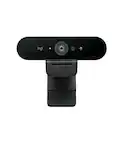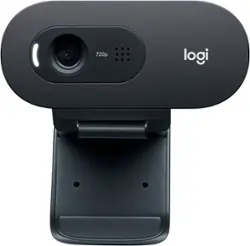
Logitech - C505 720 Webcam with Long-Range Mic - Black
- Key Specs
- Video Resolution: HD (720p) (Refers to the number of pixels, both horizontally and vertically, used to capture the video. The higher the resolution the finer the video detail that can be seen.)
- General
- Product Name: C505 720 Webcam with Long-Range Mic
- Brand: Logitech
- Model Number: 960-001363
- Color: Black
- Color Category: Black
- Camera
- Video Resolution: HD (720p) (Refers to the number of pixels, both horizontally and vertically, used to capture the video. The higher the resolution the finer the video detail that can be seen.)
- Maximum Video Frame Rate: 720p (HD) @ 30 FPS (The maximum frequency at which consecutive images can be captured by a video recording device.)
- Megapixels: 0.9 megapixels (Measures the amount of graphic resolution that the product can capture.)
- Image Resolution (Display): 1280 x 720 (Refers to the number of pixels, both horizontally and vertically, used to either capture an image or display it. The higher the resolution the finer the image details.)
- Autofocus: false (Allows the camera to automatically focus through the lens, rather than by adjusting the lens manually.)
- Features
- Integrated Microphone: true
- Plug And Play Operation: true (The product can work when first used or connected, without reconfiguration or adjustment by the user.)
- 360 Degrees Rotation: false (The product is capable of turning freely about an axis, incorporating horizontal points of view covering 360 degrees.)
- Connectivity
- System Requirements: Available USB-A port; Windows 7 or later, macOS 10.10 or later, Chrome OS (The software that a product must have for it to be able to integrate with another product.)
- Connectivity: USB Type A
- Dimensions
- Product Height: 1.26 inches (The out of box height of the item. Height is measured as the vertical distance from the bottom of the item to the top as it would be primarily used or placed.)
- Product Width: 2.87 inches (The out of box width of the item. Width is measured as the horizontal distance from one side of the item to the other as it would be primarily used or placed.)
- Product Depth: 2.62 inches (The out of box depth of the item. Depth is measured as the distance from the front of the item to the back as it would be primarily used or placed.)
- Product Weight: 0.17 pounds (The out of box weight of the item.)
- Warranty
- Manufacturer's Warranty - Parts: 2 Years
- Manufacturer's Warranty - Labor: None
- Other
- UPC: 097855163554
Step up from built-in laptop optics with a webcam that delivers crisp, smooth and colorful widescreen HD 720p video with a 60° diagonal field of view, fixed focus and auto light correction that adjusts to the illumination of any meeting space. The single, omnidirectional mic features noise-reduction technology and is engineered to support clear, natural conversation up to 3 meters away, even in busy environments like open workspaces and classrooms. Plus, the extra-long USB-A cable and universal clip let you position the webcam on your computer or mount up to 7 ft away.
- HD 720P widescreen video: C505 delivers crisp video quality with widescreen HD 720p/30 fps resolution, 60° diagonal field of view, fixed focus, and auto light correction that adjusts to most personal meeting spaces.
- Clear natural audio: The single, omnidirectional mic features noise-reduction technology and is engineered to support clear, natural conversation up to 10 ft away, even in busy environments like open workspaces and classrooms.
- 7 in cable extends setup options: C505 offers a range of versatile mounting possibilities with its extra-long USB-A cable and universal clip. Position it securely on a laptop, external screen, or elsewhere up to 7 ft away.
- Auto light correction: C505’s RightLight 2 feature adjusts to lighting conditions, producing brighter, contrasted images to help you look good in all your conference calls.
- Platform compatibility: Compatible with Windows 7 or later, macOS 10.10 or later, and Chrome OS.
- More sustainable: Certified carbon neutral: the carbon impact of the product and packaging has been reduced to zero.
Whats Included
- C505 webcam with 7 ft (2 m) attached USB-A cable
- User documentation
A: You're difference between a 1080p webcam and a 720p webcam will mainly be the picture quality. A 1080p webcam is going to look better than a 720p webcam. Plus the 1080p webcams, generally, have a better microphone on them. The main difference between the C505 and the C270 is really only going to be the length of the USB cable. The C505 has a 7 foot cable and the C270 has a 5 foot cable. Otherwise, the have the same picture quality, microphone, and field of view.
A: Hello JLGK! The C505 HD Webcam does not have a zoom option, unfortunately. It has a fixed lens with a Field of View of 60°, so a bit less wide than our regular Full HD 1080p cameras, If you'd like a webcam that you'll be able to zoom in and out with, I'd recommend checking the c920s HD Webcam https://www.bestbuy.com/site/logitech-c920s-hd-webcam/6321794.p?skuId=6321794 or higher tier models, that will work with the free Logitech Capture software https://www.logitech.com/en-ca/product/capture, and offer the zoom option.
A: Hi Shelly, it is actually that simple! Just plug the webcam into your computer, clip it to your monitor or position it as desired. The webcam only comes on when there is software, like Zoom trying to use it. In your Zoom video settings you can check to ensure it is using the Logitech C505 webcam as the video source. For support, please refer to: https://prosupport.logi.com/hc/en-us/articles/360055446873 - Will, Logitech.
Q: Can I use this for my MacAir?
A: Hello Dee. The C505 will work well with your MacBook Air. Keep in mind, if you only have USB-C ports, you will need an adapter since the C505 has a USB-A plug.
Q: Does this work on my HP laptop - my current built in webcam just doesn't work anymore.
A: Hello Perry! Yes, the C505 HD Webcam will work on your HP laptop no problem, you simply have to connect it to one of the USB ports, launch your video conferencing app, and select it as your camera to use within the app!
Q: Is this webcam compatible with Windows 10?
A: I have successfully used this webcam with my computer that has Windows10.
A: Has a built in mik
A: Hello StrouthoDroid, The C505 features an omnidirectional mic with noise-reduction technology that is engineered to support clear, natural conversations up to 3 meters away (9.84 feet). It also comes with an extra long 7' cable that will give you more setup options other than the traditional position atop your laptop or external screen---i.e. a shelf or fixture. Hope this helped and that all is going well. - Richard from Logitech