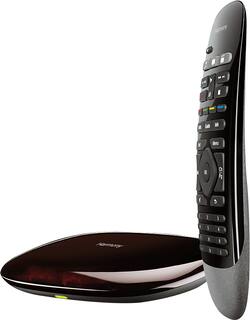
Logitech - Harmony Smart Control (Remote Control and Smart Hub) - Black
- Key Specs
- Remote Control Type: Universal
- Remote Control Features: Backlit
- Number Of Devices Controlled: 8
- Works With: Amazon Alexa, Google Assistant, Hue, Nest, SmartThings, Wink (Compatible with or able to be connected to other smart devices or applications.)
- General
- Product Name: Harmony Smart Control (Remote Control and Smart Hub)
- Brand: Logitech
- Model Number: 915-000194
- Features
- Remote Control Type: Universal
- Remote Control Features: Backlit
- Setup Method: App, Online
- Display Type: None
- Connectivity
- Number Of Devices Controlled: 8
- Wireless: true
- Connectivity Technology: Infrared (The manner in which a device sends data to another device over a short distance.)
- Compatibility
- Works With: Amazon Alexa, Google Assistant, Hue, Nest, SmartThings, Wink (Compatible with or able to be connected to other smart devices or applications.)
- Compatibility: Compatible with select Bluetooth 3.0-enabled iOS and Android mobile devices
- Brand Compatibility: Universal
- Power
- Rechargeable: false
- Battery Size: Button (The battery size required for operation.)
- Number of Batteries Required: 0
- Number Of Batteries Included: 0
- Warranty
- Manufacturer's Warranty - Parts: 1 year
- Manufacturer's Warranty - Labor: Not available
- Other
- UPC: 097855084637
This Logitech Harmony 915-000194 smart control lets you use your compatible Apple® iPhone®, iPod® touch or iPad® or Android device to control up to 8 components for simple, multifunction use.
- Compatible with select Bluetooth 3.0-enabled devices: Including Apple iPad, iPhone and iPod touch with an iOS 5.0 or later operating system, and Wi-Fi-enabled Android mobile phones with an Android 2.3 or later operating system.
- Harmony Hub and app (download required): Turn your mobile device into a Harmony remote, so you can enjoy personalized control of up to 8 compatible A/V components, even through cabinet doors and walls.
- Works with more than 5,000 brands and more than 225,000 devices: Including game consoles, such as PlayStation 3, Nintendo Wii and Xbox 360, for wide-ranging control options.
- 50 favorite channel icons and volume and media playback functions: Enable one-touch control of your entertainment system.
- Works with Alexa and Google Home: Voice control your home and entertainment. Tell Alexa or Google Assistant to turn on Netflix, dim the lights, play music, check traffic, order food, adjust the thermostat, and much more.
- System requirements: Windows XP, Vista, 7 and 8 and Mac OS X 10.5 or later.
Whats Included
- Logitech Harmony Smart Control 8-Device Universal Remote
- Harmony Hub
- IR mini blaster
- Remote with battery
- Coin cell battery (CR2032)
- USB cable, AC adapter
- Owner's manual
A: This is the predecessor to the home, but the software can be upgraded to allow it to do everything the home can. The remote just doesn't have the buttons for lights and switches.
A: I just purchased this yesterday to replace my Harmony 900 (I want to use Alexa/Echo voice control). During setup i was able to bypass the 8 device limit, when i got everything setup and started to configure the HUB using the Desktop Software, not the APP (I am using the APP on an older Ipad 2, so i had to use the Desktop to setup the HUB). I am not sure if it will work if you setup using the app but with the Desktop version of MyHarmony software it worked. My harmony 900 allows 15 devices to be controlled, when i was asked if i wanted to copy the settings of my 900 to the Hub i said yes and it copied all 15 devices and all the Activities i setup. It works great, just don't remove any of the devices because you wont be able to add them back individually, it will tell you you have reached the max devices. So if you accidentally remove an item, you can just run the Setup process over again. Hope this helps anyone who needs a couple more Devices added without having to spend the extra money on the more Costly HUB Combo.
A: The remote comes with a hub and 2 mini IR blasters. One purpose for the mini blasters is to receive RF signals and transmit that signal to equipment that may be tucked away in a cabinet.
Q: Can this be used with Amazon Echo and TFTTT recipes
A: Yes, it does. That's exactly how I use it. With the MyHarmony application, I add devices and activities, connect MyHarmony as an IFTTT channel, then add a recipe with Alexa to turn on or off the different activities.
A: Yes it will access all devices in the list for the activity chosen
Q: Will this remote work with a Roku device?
A: yes, it should work with all models.
A: Yes. This one comes with the hub which is where the actual control takes place. The hub this comes with also can control the Roku devices that support IP control. Once added, the hub can control any Roku model (IR or IP) with the included remote or by the free app on your mobile device.