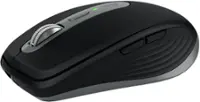
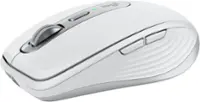
Logitech - MX Master 4 Wireless Laser Ergonomic Mouse with Advanced Performance Haptic Feedback - Wireless - Pale Gray
More Buying Options

Specifications
- Lighting TypeNoneMaximum Sensitivity8000 dots per inchNumber of Buttons (Total)8Connection TypeWireless
- Key Specs
- Lighting Type: None
- Maximum Sensitivity: 8000 dots per inch (Mouse sensitivity is measured in dots per inch (DPI). The higher the DPI, the more sensitive the mouse is and may be more useful for high-density pixel screens. Lower DPI typically means more precision and accuracy in mouse movement.)
- Number of Buttons (Total): 8
- Connection Type: Wireless
- General
- Brand: Logitech
- Model Number: 910-007559
- Product Name: MX Master 4 Wireless Laser Ergonomic Mouse with Advanced Performance Haptic Feedback
- Color: Pale Gray
- System Requirements: Via Bluetooth® Low Energy (BLE): Windows 11, or later, macOS 13 or later, ChromeOS, Linux, Android 12 or later, iPadOS 15 or later. Via Logi Bolt receiver: available USB port, Windows 11, or later,macOS 13 or later, ChromeOS, Linux (The software that a product must have for it to be able to integrate with another product.)
- Features
- Mouse Type: Standard
- Lighting Type: None
- Performance
- Mouse Operation: Button(s), Scroll wheel
- Mouse Grip Style: Ergonomic, Contoured, Palm grip (In comparison to many palm and claw grips, ergonomic grip mice are designed for a specific handedness and put the hand and wrist in a position to promote comfort. Customizable grips feature buttons/keys that can be configured to perform specific actions and may also have customizable calibration and sensitivity settings.)
- Handedness: Right-handed
- Tracking Method: Laser (There are several types of computer mice, optical and laser being among the most common. Optical mice detect less detail and provide more precise and accurate movement. Laser mice detect more detail and can be used on a wider variety of surfaces, but are more sensitive to small movements.)
- Maximum Sensitivity: 8000 dots per inch (Mouse sensitivity is measured in dots per inch (DPI). The higher the DPI, the more sensitive the mouse is and may be more useful for high-density pixel screens. Lower DPI typically means more precision and accuracy in mouse movement.)
- Minimum Sensitivity: 200 dots per inch (Mouse sensitivity is measured in dots per inch (DPI). The higher the DPI, the more sensitive the mouse is. Lower DPI typically means more precision and accuracy in mouse movement, but higher DPI may be useful for high-density pixel screens.)
- Number of Buttons (Total): 8
- Number of Thumb Buttons: 3
- Number of Programmable Buttons: 8
- Adjustable Weight: false
- Connectivity
- Connection Type: Wireless
- Wireless Connectivity: Radio Frequency (RF - 2.4 Ghz/Low Latency), Bluetooth (The manner in which a device sends data to another device over a short distance without the use of wires or cables.)
- Maximum Wireless Range: 33 feet
- Operating System Compatibility: Windows, Mac, Apple iPadOS, Chrome, Linux, Android
- Plug and Play Operation: true
- Number of Devices Connectable Simultaneously: 3
- Power
- Mouse Power Source: Battery-powered
- On/Off Switch: true
- Rechargeable Battery (Mouse): true
- Wireless Charging: false
- Charging Interface(s): USB-C (The connection for transmitting power to charge the device.)
- Battery Chemistry: Lithium
- Dimensions
- Product Height: 2 inches (The out of box height of the item. Height is measured as the vertical distance from the bottom of the item to the top as it would be primarily used or placed.)
- Product Length: 5.05 inches (The out of box length of the item. Length is measured as the longest dimension of the item.)
- Product Width: 3.48 inches (The out of box width of the item. Width is measured as the horizontal distance from one side of the item to the other as it would be primarily used or placed.)
- Product Weight: 150 grams (The out of box weight of the item.)
- Warranty
- Warranty - Parts: 1 year
- Warranty - Labor: None
- Other
- UPC: 097855207579
MX Master 4 Wireless Ergonomic Mouse with Advanced Performance Haptic Feedback
- Precision you can feel with the Haptic Sense Panel: Customizable haptic feedback on specific actions, shortcuts, notifications enhancing productivity on this wireless Bluetooth mouse.¹
- Effortlessly access favorite tools with Actions Ring on this MX Series mouse: A dynamic, customizable overlay adapts to each app, placing most used filters, adjustments, and shortcuts at your cursor.
- Ultra-fast scrolling: Scroll 1,000 lines per second and stop on a pixel with the MagSpeed scroll wheel—Logitech’s fastest, quietest, and most precise scrolling experience.
- More powerful connectivity: Enjoy 2X more powerful connectivity with a USB-C dongle, advanced radio chip, and optimized antenna for faster, stronger, reliable performance—or use Bluetooth for more versatility.²
- Ergonomic mouse designed for comfort: MX Master 4 keeps you in flow with a natural tilt, intuitive buttons, and a thumb scroll wheel that reduces hand stress for fluid navigation.
- Quiet Clicks: Quiet Clicks on MX Master 4 reduce noise and distractions, offering a soft, satisfying feel with 90% less click noise—perfect for focused workflows.³
- MX + Adobe Creative Cloud: Get a complimentary 1-month Adobe Creative Cloud subscription with your purchase of MX Master 4.
- Designed for a positive future: Plastic parts include recycled plastic - 54% Black; 48% Pale Grey; 100% recycled cobalt in the battery; built to last with improved stain resistance.⁴
- 1-month of Adobe Creative Cloud on us (a value of $59.99)*: Pair two of the world’s top creative tools. Buy one MX Master 4 and claim your free 1-month Adobe Creative Cloud membership. *Value calculated based on Adobe Creative Cloud All Apps monthly value of $59.99 valid on Adobe.com on Sept 12, 2024. Terms & Conditions apply.¹ ² ³
Whats Included
- MX Master 4 wireless mouse
- Logi Bolt USB-C receiver
- User documentation
Disclaimers
- ¹ Requires Logi Options+ app, available for Windows and macOS at app.logi.com
- ² Compared to MX Master 3S
- ³ Compared to MX Master 3, MX Master 4 has 90% less Sound Power Level left and right click.
- ⁴ Excludes plastic in printed wiring assembly (PWA), receiver, wire, FFC cable, and packaging.
Q: What's the difference between this and the Adobe edition besides the color?
A: The primary difference between the MX Master 4 and the Adobe Edition, aside from the color, is the customizable software profiles. The Adobe Edition comes pre-configured with optimized settings for Adobe software, offering enhanced efficiency for tasks like Photoshop and Illustrator.
Compare similar products

MX Master 4 Wireless Ergonomic Mouse with Advanced Performance Haptic Feedback


Minimize movement and maximize comfort with the Logitech ERGO M575S wireless trackball mouse. Thumb control lets you move the cursor without moving your arm, while the sculpted ergonomic design fully supports your hand and keeps your forearm in a more natural position. This wireless ergonomic mouse has been developed by Logi Ergo Lab experts, user-tested and certified by ergonomists to give you 25% less muscle strain in your forearm . The smooth and responsive thumb control can be used anywhere – and since it doesn’t need to be moved, the ERGO M575S is perfect for tight setups and busy desks.

The ultimate precision mouse for power users. Harness the power of Logitech Flow and seamlessly move content between three computers. Scroll through documents and web pages faster and easier with the speed-adaptive scroll wheel. Powers up for an entire day in just three minutes. A sculpted, hand-crafted shape ensures comfortable hand and wrist support.
| Pros for Logitech - MX Master 4 Wireless Laser Ergonomic Mouse with Advanced Performance Haptic Feedback - Wireless - Pale Gray | |||
|---|---|---|---|
| Ergonomics, Button Functionality | Button Functionality, Ergonomics, Haptic Feedback, Battery Life, Build Quality | Ergonomics, Overall Performance, Ease of Use, Connectivity, Noise Level | There were no pros for this product— |
| Cons for Logitech - MX Master 4 Wireless Laser Ergonomic Mouse with Advanced Performance Haptic Feedback - Wireless - Pale Gray | |||
| There were no cons for this product— | Size, Weight | Cursor Control | There were no cons for this product— |
Specs



Reviews
Customer Images
The vast majority of our reviews come from verified purchases. Reviews from customers may include My Best Buy members, employees, and Tech Insider Network members (as tagged). Select reviewers may receive discounted products, promotional considerations or entries into drawings for honest, helpful reviews.
- Rated 5 out of 5 stars
Really impressive mouse.
I switched from the Razer Basilisk V3 Pro to this mouse looking for an ergonomic improvement to reduce wrist fatigue and this mouse does not disappoint, the addition of the side scroll button and the haptic button have been a game changer for me in terms of productivity and saving time during work hours. The battery is a huge jump compared to the Basilisk's battery (taking into account that this mouse does not have RGB like the Basilisk) if what you are looking for is to optimize your productivity and more importantly take care of the health of your wrist, this is the way to go.
Posted by EmmanuelA
- Rated 5 out of 5 stars
“Logitech MX Master 4 Review: Subtle Evolution, Se
What’s Great (Strengths & Features) • Excellent Ergonomics & Build • Very comfortable sculpted design for right-handed users; great for long work sessions. • Premium build: smooth feet, sturdy feel, improved coating that lasts longer. • Quiet-click buttons make it ideal for office or shared spaces. • High Precision & Smart Scrolling • 8,000 DPI sensor tracks on almost any surface — even glass. • MagSpeed wheel switches between precise steps and fast free-spin scrolling. • Multiple customizable buttons + horizontal thumb wheel → huge productivity boost. • New Haptic Feedback + Action Ring • Built-in haptics give subtle vibration cues for actions, scrolls & shortcuts. • Fully customizable or can be turned off. • “Action Ring” overlay lets you pull up app-specific shortcuts with tactile confirmation. • Strong, reliable wireless performance + USB-C receiver. • Excellent battery life (up to ~70 days). • Great for Productivity & Multi-Device Workflows • Perfect for coding, editing, spreadsheets, design, and multitasking. • Smooth device switching (up to 3 devices) via Easy-Switch or Action Ring. • Broad Compatibility • Works with Windows, macOS, Linux, ChromeOS, and even iPadOS via Bluetooth. • Supports Bluetooth LE and the included USB-C Logi Bolt receiver. • Ideal for people using PCs, Macs, tablets, and modern USB-C laptops. What’s Not Great (Cons & Limitations) • Size & Handedness • Large, right-handed shape — not ideal for small hands or left-handed users. • Heavier than travel mice; meant for desktop use, not portability. • Haptics Are Hit-or-Miss • Limited app support so far. • Many users may find it cool but not essential. • Not for Gaming • 125 Hz polling rate feels slow for fast/competitive games. • Some note slightly slower response than older MX models under fast movement. • Missing Convenience Features • No onboard memory for profiles — settings tied to software. • No storage slot for the Bolt receiver (easy to lose during travel). • Premium Price • ~$120–$130 is expensive. • Upgrade from MX Master 3S is noticeable but not huge unless you want haptics & USB-C dongle. Who Should Buy It • Professionals who work long hours on a computer. • Developers, editors, designers, analysts, and heavy productivity users. • People who work across multiple devices (PC, Mac, iPad, laptop). • Anyone who wants comfort + tons of customization. Who Should Skip It • Left-handed or small-handed users. • Gamers looking for high polling rates. • Travelers needing a compact mouse. • Users who don’t care about shortcuts, haptics, or customization.
Posted by Anshuman
- Rated 5 out of 5 stars
Best mouse rifgt now
Excellent ergonomic mouse. It is worth it, and fun to use
Posted by JesusP