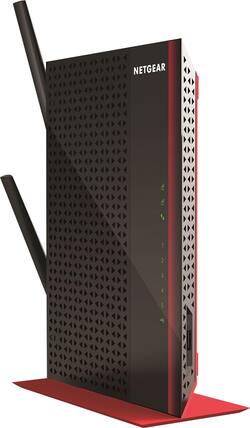
NETGEAR - AC1200 Dual-Band Wi-Fi Range Extender
- Key Specs
- Wireless Standard: AC (The wireless networking protocol used by the device. Each iteration of the protocol is based on the 802.11 standard developed by the Institute of Electrical and Electronics Engineers (IEEE) Standards Association. Denoted by letters following 802.11 (802.11a, 802.11ac, etc.), each version, published in alphabetical order, encompasses all previous versions.)
- Band Technology: Dual (Refers to the number of frequency bands used to wirelessly transmit an internet signal. For example, dual-band devices may use one 2.4 and one 5 GHz band, while tri-band devices may use one 2.4 and two 5 GHz bands. Multiple bands also provide more flexibility for designating connected devices to specific band use.)
- Frequency Band: 2.4 GHz, 5.0 GHz (Bands may be grouped into categories such as low- and high-band VHF (Very High Frequency), low- and high-band UHF (Ultra High Frequency), or certain frequency channels (measured in MHz or GHz). Generally, higher frequencies transmit information faster but have shorter range than lower frequencies.)
- Antenna Type: External
- Number of Antennas: 2
- Number of LAN Ports: 5 (Number of devices able to be connected to the Local Area Network (LAN). LAN ports allow wired connections to other networking devices (wireless access points, range extenders, etc.) in order to share the internet connection received through a WAN port.)
- Wireless Networking Standard: Wi-Fi 5 (The wireless networking standard used by the device. Each iteration of the standard developed by the Wi-Fi Alliance corresponds to an existing IEEE 802.11 protocol; for example, standard 802.11ac (or AC) is termed Wi-Fi 5. Refers specifically to the standard the device is designed to use, but ultimately determines product interoperability and backward compatibility including previous versions.)
- General
- Product Name: AC1200 Dual-Band Wi-Fi Range Extender
- Brand: NETGEAR
- Model Number: EX6200-100NAS
- Network
- Attached Antenna: true
- Maximum Frequency: 5 gigahertz (The highest signal frequency that the device is able to amplify or transmit. Generally, the higher the frequency, the more data that can be transmitted and the more likely the signal is attenuated (weakened over distance/passing through buildings).)
- Maximum Coverage Area: 0 square feet
- Wireless Networking Standard: Wi-Fi 5 (The wireless networking standard used by the device. Each iteration of the standard developed by the Wi-Fi Alliance corresponds to an existing IEEE 802.11 protocol; for example, standard 802.11ac (or AC) is termed Wi-Fi 5. Refers specifically to the standard the device is designed to use, but ultimately determines product interoperability and backward compatibility including previous versions.)
- Ports
- Number Of USB Port(s): 1 (The total number of USB ports including all generations and versions.)
- Compatibility
- System Requirements: 2.4GHz and/or 5.0GHz 802.11a/b/g/n/ac Wi-Fi router or gateway; Microsoft Internet Explorer 5.0, Firefox 2.0, Safari 1.4 or Google Chrome 11.0 or higher browser (The software that a product must have for it to be able to integrate with another product.)
- Security
- Security Features: true
- Dimensions
- Product Height: 9.9 inches (The out of box height of the item. Height is measured as the vertical distance from the bottom of the item to the top as it would be primarily used or placed.)
- Product Length: 1.2 inches (The out of box length of the item. Length is measured as the longest dimension of the item.)
- Product Width: 6.9 inches (The out of box width of the item. Width is measured as the horizontal distance from one side of the item to the other as it would be primarily used or placed.)
- Product Weight: 10.7 pounds (The out of box weight of the item.)
- Other
- UPC: 606449099751
NETGEAR AC1200 High Power WiFi Range Extender boosts your existing network range & speed, delivering AC dual band WiFi up to 1200Mbps. The 700mW high-power design provides ultimate range, while the dual core processor enables maximum WiFi performance. It compatible with any standard WiFi router and is ideal for very large homes and frustration free HD video streaming and gaming.
- Next Generation WiFi: Create faster dual band WiFi access with 802.11ac technology up to 1200 Mbps.
- Ultimate Range: 700 mW high-power amplifiers & high-gain 5 dBi antennas for maximum WiFi coverage.
- Blazing Fast CPU: Powerful dual core ARM A9 processor enables maximum WiFi throughput at Gigabit speed.
- 5 Gigabit Ethernet Ports: Connect up to five wired devices like Blu-ray players, game consoles, smart TVs or streaming players to your WiFi network.
- Beamforming+: Focuses WiFi signals directly to wireless devices for more reliable connections.
- FastLane Technology: Use both WiFi bands to establish one super high-speed connection; ideal for HD streaming & gaming.
- Works with any WiFi router: Connects to any WiFi and for extreme WiFi speed.
- ReadySHARE USB: Wirelessly share and access USB storage connected to the USB 3.0 port.
- Wireless Printing: Print documents & photos to any USB printer connected to the WiFi Range Extender.
- Detachable External Antennas: For better WiFi coverage & more speed.
Whats Included
- 2x 5dBi dual-band detachable external antenna
- AC1200 WiFi Range Extender (EX6200)
- Do More booklet
- Installation guide
- Power adapter
- Stand
Q: How far will this device extend my signal without delay?
A: I have 5 acres, it covers more than an acre each way, I would say Yes.
Q: Do I need to set up a new wifi network for this?
A: You have to name the "extended network" something, but is automatically keeps the name you already have and adds to it. When you get on it for the first time with your phone or other equipment, you sign in to the new network once and save it. Then it automatically recognizes it in the future.
A: Absolutely! I had the exact same problem and this extender remedied that issue. Once the extender was installed, my signal and speed nearly doubled. I would highly recommend this product to anyone!
Q: Can i lay this on its side? Or does it have to be standing up?
A: It can lay down or stand up - your choice
Q: Compatibility with WNDA3100
A: Sure--should be. Any range extender should be compatible with your AC1200 because they are backwards compatible--meaning they will work with AC, N, G or B wifi signals. But aside from that, all routers and extenders, regardless of manufacturer, should be compatible--they are just sending out and receiving wireless signals, and none of the frequencies they are using are proprietary--in other words they are all working in the same frequency range, so they are fully compatible--they're specifically made to be.
A: Ours connects wireless.. I think you can connect with cable too... we have xfinity internet so we have good internet, we use the extender to get stronger wifi out in our garage... It seems to work fine for us...
Q: USB port
A: All usb 3.0 are backward compatible with usb 2.0. It should work with no issues. You won't get the fast 3.0 speed but you will still be able to access the files.
A: Try resetting your extender (a small hole for a paper clip) and do the WPA auto setup. Press the WPA button on your router then within 5 minutes press the WEP setup button on your extender. Do this with the extender in the same room as the router. You can change locations later. It is always best to use the same manufacturers equipment, just seems to work best but the Belkin should work with the Netgear.


















