Winter SaleEnds 1/19. Limited quantities. No rainchecks.Shop now

Main Content

Questions & Answers

Your price for this item is $1,049.99
Page Showing 21-40 of 86 questions
  • QuestionCan I hook up my VHS player? RCA cables

    Asked by Ronspage.

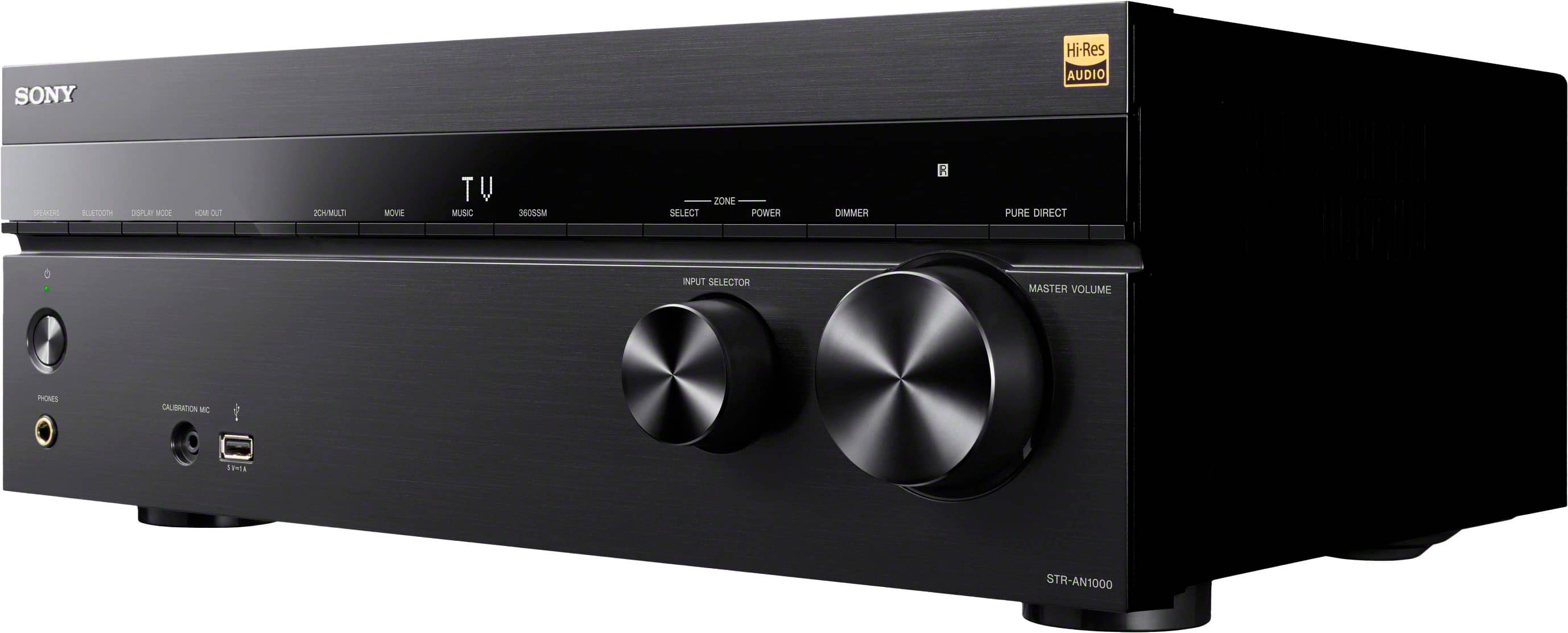
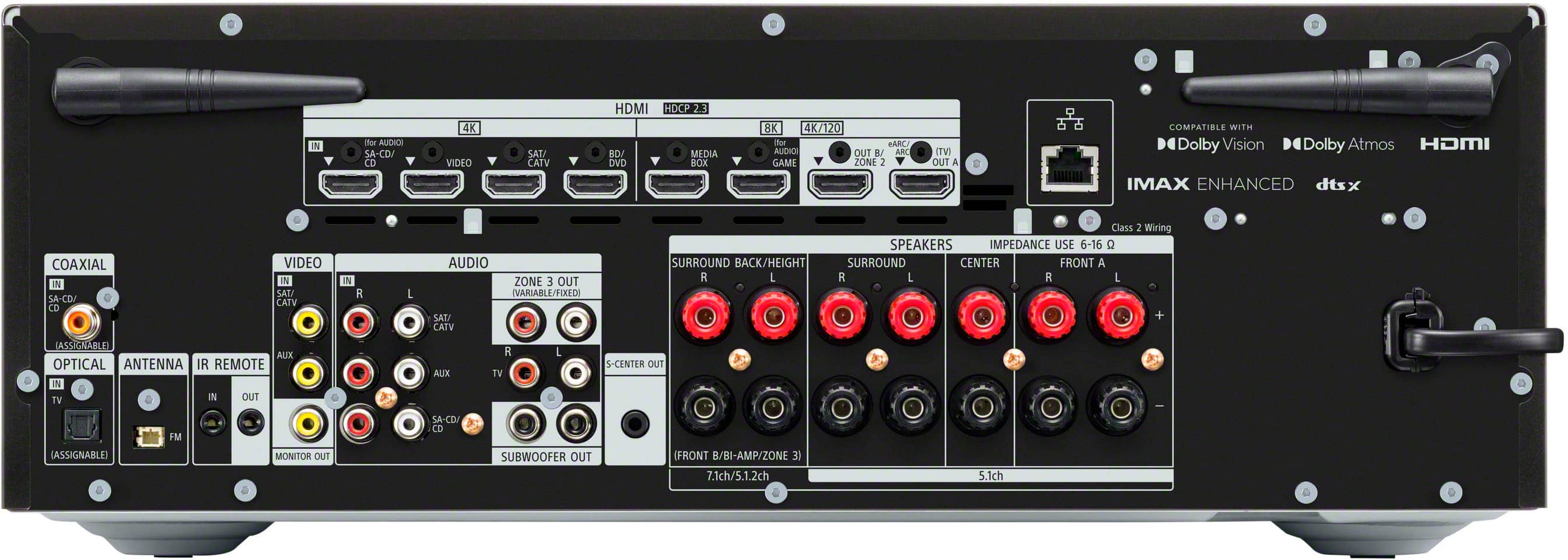
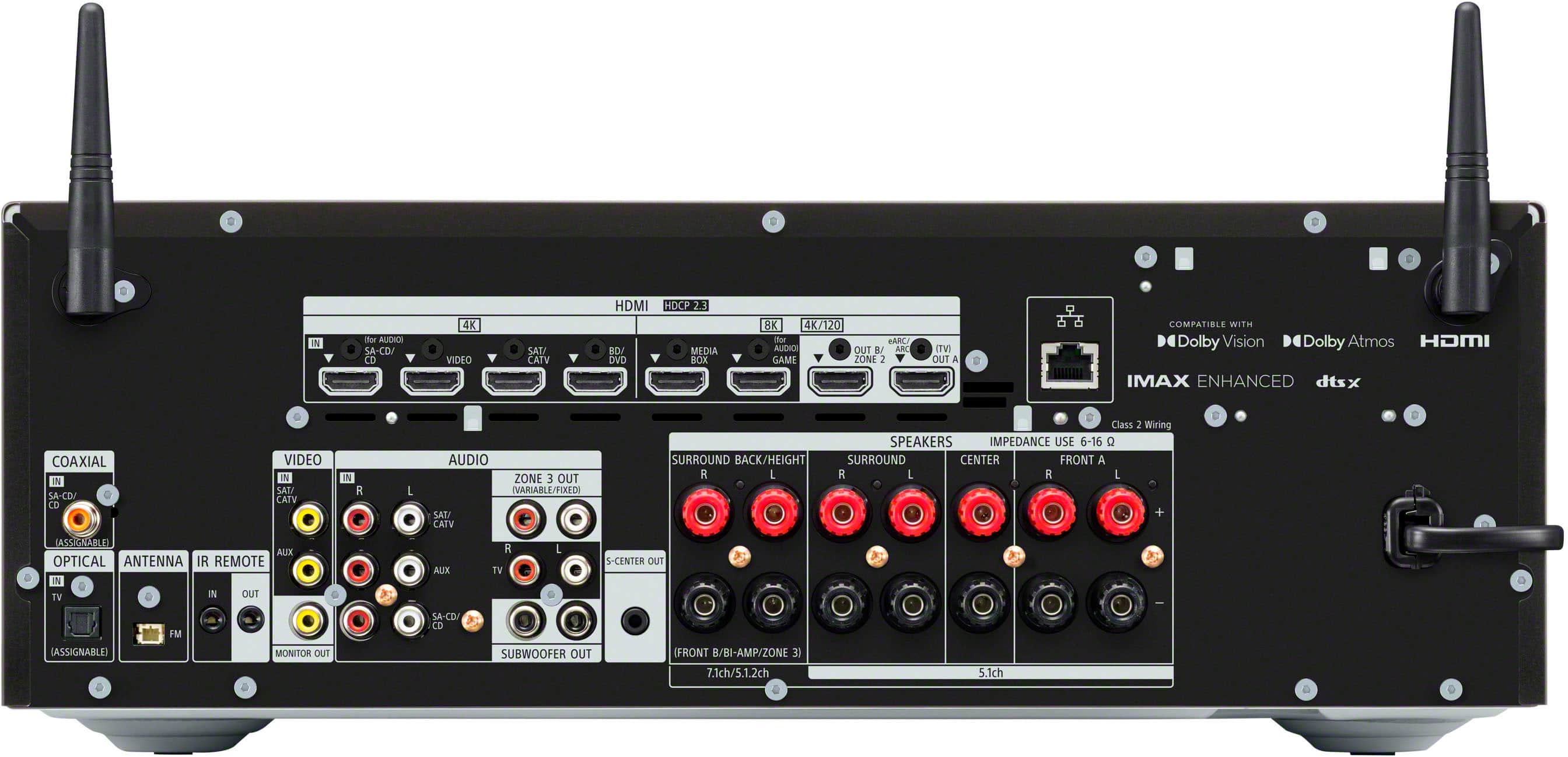
    • Answer Hi Ronspage, thank you for your question. Yes, you can hook up your VHS player to the STR-AN1000 receiver. The receiver supports various audio and video inputs. To connect your VHS player, you will need to use the appropriate analog video and audio cables (such as composite or component cables) to connect the VHS player's output to the corresponding input ports on the receiver. Experience breathtaking 8K video and immersive 3D audio with our new 7.2-channel 8K receiver. Enjoy space-filling sound from your 7.2 or 5.2.2 setup with Dolby Atmos® and DTS:X.® It’s easy to enjoy all your content with Works with SONOS, Chromecast Built-in, Apple AirPlay®, and Spotify Connect—all via Wi-Fi or Bluetooth®.

      Answered by SonyListens

  • QuestionCan I use front speakers and subwoofers wired In and have a wireless subwoofer in the rear. As it notes I can use 2 subwoofers can 1 be wired and the 2nd wireless?

    Asked by Dtkent1.

    • Answer Hi Dtkent1, Great question. Yes, you can use a front speaker, a wired subwoofer, and wireless subwoofer in the rear of STRAN1000. Please check the Help/Startup Guide for more details. Experience breathtaking 8K video and immersive 3D audio with our new 7.2-channel 8K receiver. Enjoy space-filling sound from your 7.2 or 5.2.2 setup with Dolby Atmos® and DTS:X.® It’s easy to enjoy all your content with Works with SONOS, Chromecast Built-in, Apple AirPlay®, and Spotify Connect—all via Wi-Fi or Bluetooth®. Regards, Erin
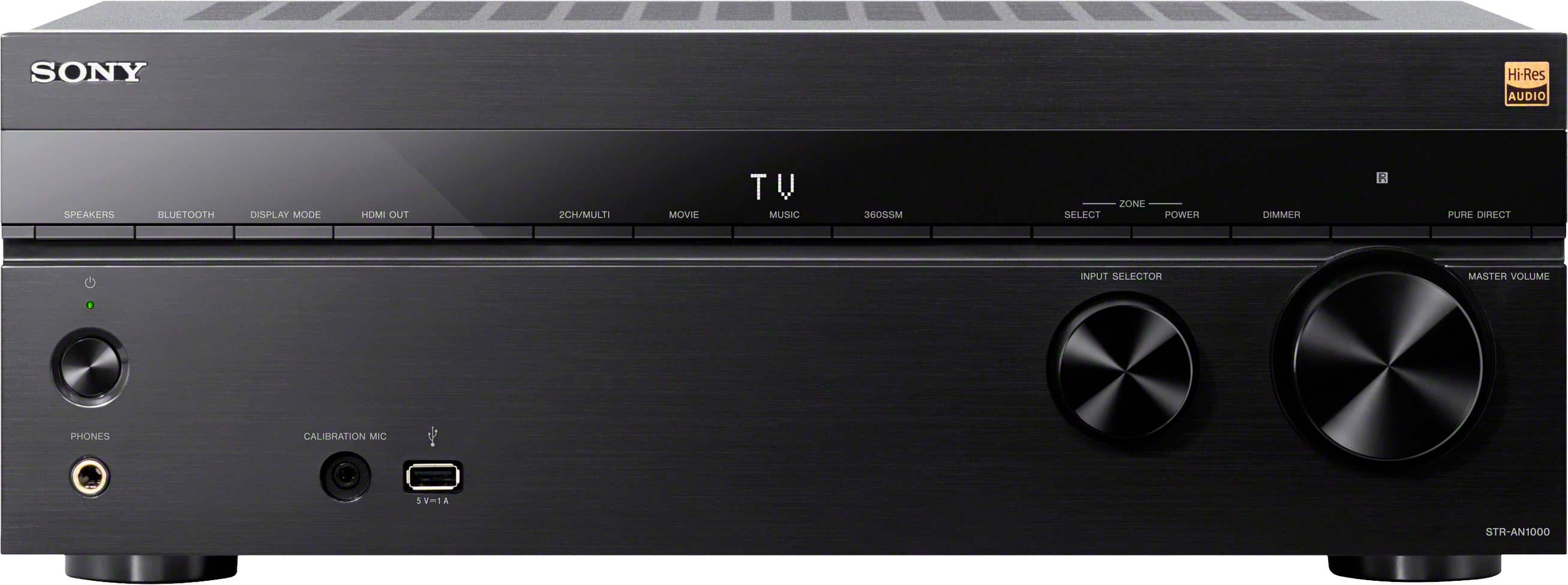
      Answered by SonyListens

  • QuestionCan all zones be played together at the sane time?

    Asked by Jesus.

    • Answer Yes, in multiple channel zone

      Answered by user939901

  • QuestionHow do I tune the FM tuner? It sits on 87.50

    Asked by Scott.

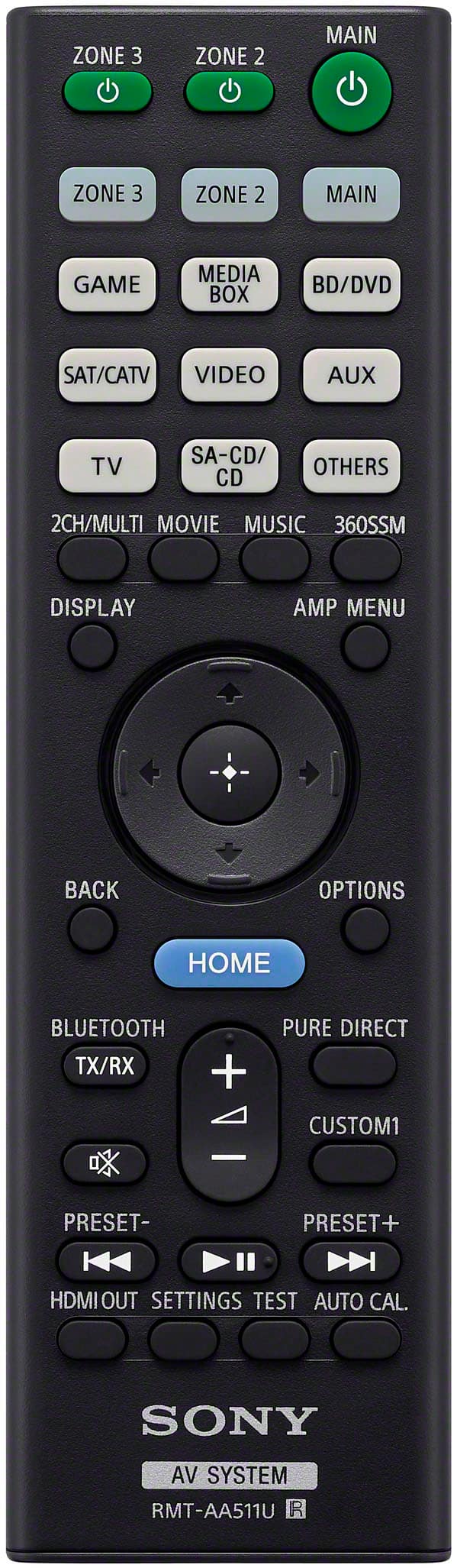
    • Answer Press the Home button on the receiver's remote, select Listen, then the FM tuner. The FM channels can be changed and programmed by selecting Options on the remote. There are 30 presets to program FM stations. Use the up/down toggle buttons in the center of the remote to select a preset channel to program. Press the Options nutton. Select the Preset Memory by pressing the center button on the remote. You will need to use the left button to select the FM channel, 87.5 by default. Once the channel is selected, press the up or down button to change the channel for Auto Tuning. Press the center button to lock-in the station to that preset number. Repeat to program your remaining FM stations. The receiver will automatically advance to the next preset channel after a station is programmed. If you want to change the name of the channel, e.g., FM1, FM2, etc. to the station's call sign, e.g., WQFM, or Rock, Jazz, etc, use the "Preset Name Input"

      Answered by Anonymous

  • Questiondoes using wireless speakers (surround back) disable that input on the receiver? or can I still hook up another speaker and make it 9.2?

    Asked by HonduranHomey.

    • Answer Sorry but No. When you add wireless speakers, they take the place of wired counterpart. The AN1000 is a 7.2 or a 5.2.2 and you cannot get past that with the AN1000. Step up Sony models allow for more channels. Example: The AZ1000ES allows you to add an extra amp and add 2 more channels. The processor in the AZ1000 can support 9.2, but the AN1000 can only support 7.2. For full support of 9.2 you need to jump up to the AZ3000 or higher.

      Answered by MrChuck

  • QuestionCan a amplifier be connected to this reciever?

    Asked by Anonymous.

    • Answer Hello there, Thank you for your interest in Sony products! We appreciate your inquiry and are happy to assist. The Sony STR-AN1000 is a 7.2-channel AV receiver with built-in amplification for up to seven speakers. While it does not feature dedicated pre-out connections for connecting an external amplifier to power additional speakers, you can extend your audio setup by connecting an external amplifier or receiver to the STR-AN1000’s Zone 2 or Zone 3 outputs. For detailed information on connection methods and further guidance, please refer to the following link: https://helpguide.sony.net/ha/strtaan10/v1/en/contents/TP1000547514.html Best regards, -Fred

      Answered by SonyListens

  • QuestionWill this system connect wireless with Bose subwoofers ?

    Asked by Beast.

    • Answer Hi Beast, Thanks for reaching out! We can certainly assist you with that. The STR-AN1000 receiver is designed to work wirelessly with specific Sony subwoofers; namely, the SA-SW3 and SA-SW5 models. You can even connect two of the same Sony wireless subwoofers to the receiver at once. However, there’s no support for connecting third-party wireless subwoofers like those from Bose. The wireless connection process and compatibility are tailored for Sony’s own wireless subwoofers, and there’s no official way to pair a Bose subwoofer wirelessly with this receiver. If you’re looking to add a subwoofer from another brand, you’d need to use a wired connection, provided the subwoofer has the right inputs and your setup allows for it. But for wireless, it’s Sony-only on this model. You can learn more about this on our site: https://helpguide.sony.net/ha/strtaan10/v1/en/contents/TP1000735431.html?search=subwoofer Thank you for making Sony part of your purchasing consideration! Best regards, Estefany

      Answered by SonyListens

  • QuestionI am replacing a Denon AVR-S750H. Will this Sony receiver replace a 5.2.2? I have two wired subwoofers. Can I wire two subs in?

    Asked by Shawn.

    • Answer Thank you for contacting Sony, Shawn. That is an excellent question! The STR-AN1000 is a fantastic choice to upgrade your home theater. Yes! The Sony STR-AN1000 is a 7.2-channel receiver and fully supports a 5.2.2 speaker layout with Dolby Atmos and DTS:X. Yes! The receiver has two dedicated Subwoofer Pre-Outs on the back panel, allowing you to easily connect both of your wired subwoofers. It will be a powerful and impressive replacement for your Denon unit! We appreciate your interest in Sony products. Should you require any further assistance, please don't hesitate to reach out for support here: https://us.esupport.sony.com/support/s/support-contact?language=en_US&category=ht Best regards, Gus, Sony North America Customer Support

      Answered by SonyListens

  • QuestionWhat is the warranty on this? I purchased mine less than one year ago but didn’t get any extended warranty. Do I take it into Best Buy or would I have to ship to Sony? Thanks

    Asked by PaulyV.

    • Answer UPDATE: problem resolved. I wasn’t trying any sound coming from TV and thought it was a bad port or cable. All I had to do was press the HDMI button on the front panel and it activated my speakers and I’m super excited to have it working again. Operator error

      Answered by PaulV

  • QuestionHow many watts per channel

    Asked by Anonymous.

    • Answer Hi there, Thanks for the question and the interest in Sony products! Regarding your concern, the STR-AN1000 provides 165 watts per channel at 6ohms. We hope this information comes helpful, and if you have any more concerns, feel free to let us know! Best regards, DiegoV

      Answered by SonyListens

  • QuestionWill this reciever work with an rf remote

    Asked by Mommj.

    • Answer Hello Mommj, Thank you for choosing Sony! We appreciate your question and are here to assist you. The Sony STR-AN1000 receiver uses an infrared (IR) remote, so the remote needs a direct line of sight to the receiver to work. It is not compatible with a radio frequency (RF) remote. If you need to control the receiver when it's out of sight, like in a cabinet or another room, you can use an IR repeater. The STR-AN1000 has an "IR REMOTE IN" jack on the back specifically for this purpose. An IR repeater is an external device that's sold separately and acts as an extension for your remote, allowing you to control the receiver without a direct line of sight. For more information on connecting an IR repeater, see the "IR REMOTE IN/OUT jacks" section on page 10 of the owner's manual here: https://www.sony.com/electronics/support/res/manuals/5037/b33415fde106bb6d2fc890a4347b078d/50370281M.pdf Best regards, -Fred

      Answered by SonyListens

  • QuestionIs this receiver compatible with Alexa

    Asked by Breeze120.

    • Answer Yes

      Answered by ThomasW

  • QuestionHow do I control my 3 zone speakers throughout my home?

    Asked by Anonymous.

    • Answer Hi there, To control your 3-zone speaker setup, you will need to use the receiver's multi-zone features. The full details are available in the online Help Guide and the product's owner's manual. You can find detailed instructions, including connections and settings for Zone 2 and Zone 3, in the "Using the Multi-Zone Features" section here: https://helpguide.sony.net/ha/strtaan10/v1/en/contents/TP1000544615.html Thanks for considering Sony productcs. Best regards, Eliab

      Answered by SonyListens

  • QuestionCan this receiver be used for a turntable

    Asked by darnouil.

    • Answer Hi Darnouil, thanks for contacting Sony! Yes, the STR-AN1000 can be used to connect a turntable, but there are a few details you have to keep in mind: 1- You can connect the turntable to the receiver using the Digital coaxial output or the red and white audio cables (R and L) output. 2- To connect a turntable that only has a PHONO output jack, you need to connect a phono equalizer (not supplied) between the turntable and this receiver. This will allow the turntable's output signal to be properly amplified so that it can be connected to the audio input on the unit. For detailed information about this setup, you can check the manuals on the link below: https://helpguide.sony.net/ha/strtaan10/v1/en/contents/TP1000544563.html We hope you find this information helpful. If you have any further questions, please feel free to reach out to us. You can find contact options here: https://us.esupport.sony.com/support/s/support-contact?category=ht Best regards, Gus, Sony Social Media Team

      Answered by SonyListens

  • Questioncan I use a 20 amp curit recept instead of a 15 amp recept to power sony str-an1000 7.2

    Asked by ken.

    • Answer Yes

      Answered by ThomasW

  • QuestionDoes it have wi fi?

    Asked by Lenovofan.

    • Answer Hi Lenovofan! Thank you for reaching out regarding our STR-AN1000 receiver! We're here to assist you. The STR-AN1000 does indeed have built-in Wi-Fi connectivity. This allows for convenient access to various streaming services, firmware updates and other network features, enhancing your overall audio experience. For additional details, please refer to the following links: https://helpguide.sony.net/ha/strtaan10/v1/en/contents/TP1000544698.html https://helpguide.sony.net/ha/strtaan10/v1/en/contents/TP1000544699.html Thanks for considering Sony products! Best regards, Estefany

      Answered by SonyListens

  • QuestionDoes the STR AN1000H have 4K upscaling?

    Asked by Pminter.

    • Answer Hi OffroadOne, thanks for contacting Sony. The STRAN1000 is equipped with impressive 4K upscaling capabilities, allowing you to up-convert video signals to 4K or 8K and output them via the HDMI OUT jack. To access this feature, follow these steps: 1. From the home menu, select [Setup] and navigate to [HDMI Settings]. 2. Choose [4K/8K Upscaling]. 3. Select your desired setting: - Auto: This setting automatically enables video scaling control for 4K or 8K HDMI output when connected to a compatible TV. - Off: Disables upscaling. Please note the following important considerations: - This feature only operates when video signals are received from the HDMI IN jacks. The compatible input signals must be either 1920x1080p at 24/50/60 Hz (2D) or 3840x2160p at 24/50/60 Hz. - If [HDMI OUT B Mode] is set to [Zone2], the HDMI OUT B/ZONE 2 jack will not support [4K/8K Upscaling]. - Upscaling is not functional with compressed video signals, VRR signals, or Dolby Vision signals. For further details, please refer to the help guide, where you will find comprehensive information about the receiver: https://helpguide.sony.net/ha/strtaan10/v1/en/contents/TP1000544513.html Thanks for considering Sony products! Gus, Sony North America Customer Support

      Answered by SonyListens

  • QuestionWill it connect to wireless speakers

    Asked by Shu.

    • Answer Hi Shu, thank you for your interest in the STR-AN1000! Regarding wireless speaker connectivity, the STR-AN1000 can certainly connect to wireless speakers. It primarily supports wireless connectivity through Sony's own wireless surround sound technology and Bluetooth. This means you can wirelessly connect compatible Sony wireless rear speakers for a surround sound experience. The following models are compatible with the receiver: SA-RS3S and SA-RS5. For more information, please visit this link: https://www.sony.com/electronics/support/articles/00345716?utm_source=glean Thanks for considering Sony products! Best regards, Estefany

      Answered by SonyListens