Customer Ratings & Reviews












- Model:
- 910-005178
- SKU:
- 6080600
Rating by feature
- Value
Rating 4.4 out of 5 stars
- Quality
Rating 4.7 out of 5 stars
- Ease of Use
Rating 4.7 out of 5 stars
Customers are saying
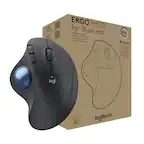
Customers express satisfaction with the MX ERGO Plus Wireless Trackball Mouse, particularly highlighting its ergonomic design and ease of use. Many appreciate the long battery life, Bluetooth connectivity, adjustable angle, and precision button. While the price and size are concerns for some, the mouse is reported to alleviate wrist pain for some users. Some customers have reported issues with the button quality and weight of the mouse.
This summary was generated by AI based on customer reviews.
- Pros mentioned:Ease of use
Ergo is the way to go.
||Posted . Owned for 1 month when reviewed.This reviewer received promo considerations or sweepstakes entry for writing a review.It took a while to get used to using the scroll ball but after about a week it was seamless. Only thing I wish this product had more shortcut keys.
I would recommend this to a friendBrand response from Logitech
Posted .Thanks for the feedback on the MX ERGO Plus! It's great to hear the scroll ball became comfortable for you. We appreciate your suggestion regarding more shortcut keys for future designs.

- Pros mentioned:Bluetooth, Ease of use
Worth it.
||Posted . Owned for 3 months when reviewed.This reviewer received promo considerations or sweepstakes entry for writing a review.Makes navigating and scrolling so much easier. I barely have to move. Connected very easily via USB and Bluetooth.
I would recommend this to a friend - Pros mentioned:Ergonomic design
Orthopedic mouse are the best!
||Posted . Owned for 1.5 years when reviewed.This reviewer received promo considerations or sweepstakes entry for writing a review.I normally use regular or steelseries mouse for playing video games but for general use I use this one. It has 2 modes regular and precision ( regular sensitivity and SUPER sensitive) which helps when your trying to click on specific things. It also has 2 connection memory so you can connect it to two different computers for settings 1 and 2. It is a great investment and really helps prevent things like carpal tunnel. It even comes with a magnetic adjuster to make it more comfortable based on your wrist placement... I dont use it but its helpful!
I would recommend this to a friend - Pros mentioned:Ergonomic design
Best mouse I have ever had or used.
||Posted . Owned for 3 weeks when reviewed.This reviewer received promo considerations or sweepstakes entry for writing a review.Absolutely love this mouse. This is, bar none, the best mouse I have ever held. It is very ergonomic and super comfortable; I’m partial to trackball mice and some aren’t; if you are this is the best one I’ve used and if you’re not or are looking for a first trackball mouse this is the perfect balance of cost and function- you’ll never need another. The adjustable function makes it nice for using for a while since you can change the angle if your wrist ever did get tired (it probably won’t)
I would recommend this to a friend - Pros mentioned:Bluetooth
Connect to a MacBook and PC at the same time!
||Posted .This reviewer received promo considerations or sweepstakes entry for writing a review.#1 feature I love: My work from home setup has me using a MacBook (for work) and my own Windows PC. I connected it to the MacBook via Bluetooth and to the PC via the USB receiver. To switch the mouse from controlling one to the other, I simply press the button under the wheel. No more having two mice on the desk! Worth the price because it's two mice in one. (btw, the same thing will work with two PCs or two Macs--connect one via BT and the other via the USB receiver) Next up, I need to get the MX keyboard because it has the same feature.
I would recommend this to a friend - Pros mentioned:Bluetooth, Ergonomic design
Wireless trackball
||Posted . Owned for 5 months when reviewed.This reviewer received promo considerations or sweepstakes entry for writing a review.This wireless trackball mouse works great. I love the ergonomics of the trackball and the wireless connection is a plus.
I would recommend this to a friend - Pros mentioned:Battery life, Ergonomic design
Best mouse I have owned!
||Posted . Owned for 3 weeks when reviewed.This reviewer received promo considerations or sweepstakes entry for writing a review.Extremely accurate with a "fine focus" switch for more precise clicking, long battery life (USB rechargeable). Ergonomically comfortable.
I would recommend this to a friend - Pros mentioned:Ease of use, Ergonomic design
Ergo Mouse
||Posted . Owned for 9 months when reviewed.This reviewer received promo considerations or sweepstakes entry for writing a review.Easy to use. It does minimize wrist movement. Better than regular mouse. Minor adjustment to using thumb to move around versus wrist.
I would recommend this to a friend - Pros mentioned:Bluetooth, Ease of use
No mouse pad need
||Posted . Owned for 3 weeks when reviewed.This reviewer received promo considerations or sweepstakes entry for writing a review.Easy to use. Great when sitting on the couch. Bluetooth. Connects every time.
I would recommend this to a friend - Pros mentioned:Ergonomic design
Comfortable and easy to use.
||Posted . Owned for 3 weeks when reviewed.This reviewer received promo considerations or sweepstakes entry for writing a review.New base reminds me of old fashion shoes with lifts attached. The new base seems to make using the trackball more comfortable. The trackball has always been my go-to mouse selection since this was the mouse I first learned to use at least 30 years ago in the Air Force. Those trackballs looked like small bowling balls.
I would recommend this to a friend - Pros mentioned:Angle, Ergonomic design
Love it.
||Posted . Owned for 3 weeks when reviewed.This reviewer received promo considerations or sweepstakes entry for writing a review.Not a big fan of mice, start a big truck ball person. I really like the strike ball very ergonomic, and I love the tilt. Super responsive
I would recommend this to a friend - Pros mentioned:Ergonomic design
Great
||Posted . Owned for 1 year when reviewed.This reviewer received promo considerations or sweepstakes entry for writing a review.Great for people dealing with carpal tunnel. Changing the angle helps with not overworking the same part of the wrist
I would recommend this to a friendBrand response from Logitech
Posted .We're glad to hear the Logitech MX ERGO Plus is helping with carpal tunnel! The adjustable angle is designed to provide a more ergonomic experience. Thank you for your feedback.
- Pros mentioned:Battery life, Ease of use
Comfortable, USB3 compatible, wireless
||Posted .This reviewer received promo considerations or sweepstakes entry for writing a review.This is a comfortable device that has a dongle to plug into your device's USB port. Works very well, easy to use. Battery lasts a long time too. Great tool!
I would recommend this to a friend - Pros mentioned:Ergonomic design
Comfortable and fast mouse for long work days
||Posted . Owned for 10 months when reviewed.This reviewer received promo considerations or sweepstakes entry for writing a review.Best mouse I’ve ever had! Great for multi-machine use. Very easy on hands and helps to survive long days of working, especially if you have multi-monitor setup (or 49” screen) with a lot of estate to navigate between. The ball is the savior. Plus, you can set up hot keys on the additional ones and that is helpful too. It takes a day to get used to it, especially after a Magic Mouse, but does the hand enjoy this mouse! Also, easy to clean the ball.
I would recommend this to a friend - Pros mentioned:Ergonomic design
The best trackball to have
||Posted .This reviewer received promo considerations or sweepstakes entry for writing a review.Having spent over 25 years working on a computer using various cad systems, this is hands down one of the best peripherals to have. Very comfortable. Having the ability to adjust the angle to more ergonomically fit the hand has done wonders. I was using a Kensington Trackball and this simply blows it out the water. That model was a horrendous trackball design that was causing some severe forearm issues for me. Once I started using the Logitech MX Ergo Plus, the pain has gone away. Being able to adjust the resolution on the ball on the fly when doing fine work has helped as well. I would highly highly recommend this.
I would recommend this to a friend - Pros mentioned:Ease of useCons mentioned:Size
I like it
||Posted . Owned for less than 1 week when reviewed.This reviewer received promo considerations or sweepstakes entry for writing a review.This is very easy to use very flexible actually really like it it's kind of big though that's my only complaint but I like it.
I would recommend this to a friend - Pros mentioned:Battery life
Excellent mouse
||Posted . Owned for 1 week when reviewed.This reviewer received promo considerations or sweepstakes entry for writing a review.The mouse is great for those with larger hands and the ability to change it's grip. I like the fact that it does not use a battery. I had to buy another one because I dropped it and broke spin wheel.
I would recommend this to a friendBrand response from Logitech
Posted .Thank you for your positive feedback on the Logitech MX ERGO Plus! We appreciate you highlighting its ergonomic design and battery-free operation. We're sorry to hear about the accident, but it's a testament to the mouse's popularity that you chose to replace it with the same model.
- Pros mentioned:Ergonomic design
Really happy with this purchase
||Posted .This reviewer received promo considerations or sweepstakes entry for writing a review.I have a really bad right hand and after my conventional mouse broke I decided to give this a try. I would typically wait longer to write a review so that I could speak on the quality or longevity of a product but if anyone out there is in as bad of shape as I am and is considering this product I highly recommend giving it a try. It has given me the ability to move the cursor around which I was struggling to do before.. I would typically type with my left hand and use my left hand to move the mouse but now I can rest my right hand on this mouse and use my thumb to move the cursor.
I would recommend this to a friend - Pros mentioned:Ease of use
Excellent
||Posted . Owned for 3 weeks when reviewed.This reviewer received promo considerations or sweepstakes entry for writing a review.I have been suffering from lateral epicondylitis for a while and concluded that it was because of my computer mouse. I changed to this ergo design and within a week pain was gone. Trackball very easy to get used to. Can perform many functions just by programming the buttons. Perfect for those with Tennis elbow (lateral epicondylitis) AKA mouse elbow. Would highly recommend.
I would recommend this to a friendBrand response from Logitech
Posted .Hi
Thank you for your five-star review! It is greatly appreciated. Continue to enjoy your device. If you ever need assistance, please contact Logitech Support on the website.
LaShonda from Logitech
- Pros mentioned:Ergonomic design
Great mouse!
||Posted . Owned for 3 weeks when reviewed.This reviewer received promo considerations or sweepstakes entry for writing a review.I was skeptical of purchasing this mouse due to its price tag. Makes you think twice to pay $100 on a mouse when you see others selling for $20 or so. I decided to give them a try. I figured if I didn’t like them I puke alway return it and get your typical mouse. At the first use, I really lived how it felt and how comfortable this mouse is. Personally, it took my about two days to get use to it. Once I used the software to customize it, I fell in love with it more. No more pre-carpertunal pain. Recommend it!
I would recommend this to a friend