Customer Ratings & Reviews












- Model:
- CTL4100WLE0
- |
- SKU:
- 6196630
Customer reviews
Rating 4.5 out of 5 stars with 1444 reviews
(1,444 customer reviews)Rating by feature
- Value4.4
Rating 4.4 out of 5 stars
- Quality4.6
Rating 4.6 out of 5 stars
- Ease of Use4.3
Rating 4.3 out of 5 stars
Customers are saying
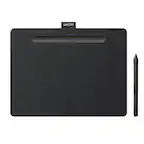
Customers are positive about the Intuos Graphic Drawing Tablet's ease of use, overall performance, wireless capabilities, and included software. Many appreciate the tablet's price and compatibility with various graphic programs. However, some customers have noted issues with lag when using Bluetooth, as well as some difficulty during the initial setup. A few customers also feel the tablet surface could be smoother.
This summary was generated by AI based on customer reviews.
- Pros mentioned:Ease of use, Overall performance
Rated 4 out of 5 stars
Great aside from some connectivity issues
||Posted . Owned for 9 months when reviewed.This reviewer received promo considerations or sweepstakes entry for writing a review.This tablet works great and I'd still recommend it outside of some connectivity issues hence the 4 stars. There are times when you turn it on wirelessly and it is not picked up on the Wacom app... essentially forcing you to plug it in with the wire. Aside from that it's responsive at tracking, comfortable, super portable and imo a better ergonomic alternative than a mouse. Having used medium and large tablets, if you aren't drawing, the small size is more than enough and worth the savings in desk space and portability. I also. The touch pad on the intuos pro is a nice feature, but I don't find it's a deal breaker for the value/cost you're getting this small one for.
This review is from Wacom - Intuos Graphic Drawing Tablet for Mac, PC, Chromebook & Android (Small) with Software Included (Wireless) - Black
I would recommend this to a friend - Pros mentioned:Size, Wireless
Rated 5 out of 5 stars
Great Tablet, Good Price
||Posted . Owned for 1 month when reviewed.This reviewer received promo considerations or sweepstakes entry for writing a review.This tablet is one of the best I’ve used, it is compact, light weight and bluetooth enabled. But the fact that you can still use it while it is charging makes it worth it right there. I don’t have to waste time waiting for my pencil to charge (if you know what I mean). The art software is also fantastic.
This review is from Wacom - Intuos Graphic Drawing Tablet for Mac, PC, Chromebook & Android (Small) with Software Included (Wireless) - Black
I would recommend this to a friend - Pros mentioned:Ease of use, Size
Rated 5 out of 5 stars
Perfect graphic tablet for casual use.
||Posted . Owned for 3 weeks when reviewed.This reviewer received promo considerations or sweepstakes entry for writing a review.The tablet is easy to use and is very responsive to the pen tip. I have done several drawings with it and it's great! If I was a pro, I would spend more money for a bigger one, but this one is perfect for me. If you just like to draw as a hobby, this is just the thing. I have included a drawing that I did with this tablet.
This review is from Wacom - Intuos Graphic Drawing Tablet for Mac, PC, Chromebook & Android (Small) with Software Included (Wireless) - Black
I would recommend this to a friend - Pros mentioned:Overall performance, Price
Rated 5 out of 5 stars
Editing made easier
||Posted . Owned for 1 month when reviewed.This reviewer received promo considerations or sweepstakes entry for writing a review.Highly recommend having this for your editing needs. It’s one thing to edit with your mouse or your fingers on the pad but this takes it to another level. The quality is great, not that expensive, and you can really get in on editing photos or if you’re a artist with drawling.
This review is from Wacom - Intuos Graphic Drawing Tablet for Mac, PC, Chromebook & Android (Small) with Software Included (Wireless) - Black
I would recommend this to a friend - Pros mentioned:Ease of use, Wireless
Rated 5 out of 5 stars
Pairs well with MacBook Pro
||Posted . Owned for 1 month when reviewed.This reviewer received promo considerations or sweepstakes entry for writing a review.Works really well with my MacBook Pro. I bought it to use with photoshop. Makes editing images a lot easier and I love that it’s wireless, but it does come with a cord as well.
This review is from Wacom - Intuos Graphic Drawing Tablet for Mac, PC, Chromebook & Android (Small) with Software Included (Wireless) - Black
I would recommend this to a friend Rated 5 out of 5 stars
Works
||Posted . Owned for 1 week when reviewed.This reviewer received promo considerations or sweepstakes entry for writing a review.It is easy to use and set up. I draw on Krita and also make designs for school, and this is useful for those purposes. Additionally, it includes a wire for connecting to computers, which is useful because I'm not a big fan of Bluetooth drawing tablets. All assets are functional, and the product description is accurate. Overall a good purchase that I recommend as a budget choice.
This review is from Wacom - Intuos Graphic Drawing Tablet for Mac, PC, Chromebook & Android (Small) with Software Included (Wireless) - Black
I would recommend this to a friend- Pros mentioned:Overall performance
Rated 5 out of 5 stars
Great Budget Wacom
||Posted . Owned for 3 weeks when reviewed.This reviewer received promo considerations or sweepstakes entry for writing a review.The tablet works exactly as expected, great for doodling, drawing, lining, coloring, etc. Great budget option!
This review is from Wacom - Intuos Graphic Drawing Tablet for Mac, PC, Chromebook & Android (Small) with Software Included (Wireless) - Black
I would recommend this to a friend - Pros mentioned:Price
Rated 5 out of 5 stars
Better than expected!
||Posted . Owned for 1 month when reviewed.This reviewer received promo considerations or sweepstakes entry for writing a review.The device works exactly as expected. I love the customizability of the different buttons on the device and pen as well, plus the seamless setup and connectivity. A big feature for me also was the pressure sensitivity. A fantastic device for a great price!
This review is from Wacom - Intuos Graphic Drawing Tablet for Mac, PC, Chromebook & Android (Small) with Software Included (Wireless) - Black
I would recommend this to a friend - Pros mentioned:Size
Rated 5 out of 5 stars
Compact and affordable
||Posted . Owned for 3 weeks when reviewed.This reviewer received promo considerations or sweepstakes entry for writing a review.Nice and compact but not too small to be useful. It works well with both a wired connection and via bluetooth. Setup was very simple on both a PC and a Samsung tablet (which I tried just because... no real need to use this with a tablet, unless you just really like the wacom experience.)
This review is from Wacom - Intuos Graphic Drawing Tablet for Mac, PC, Chromebook & Android (Small) with Software Included (Wireless) - Black
I would recommend this to a friend - Pros mentioned:Ease of use
Rated 5 out of 5 stars
Love
||Posted .This reviewer received promo considerations or sweepstakes entry for writing a review.My daughter is totally in love with this Wacom tablet. She drew this drawing with it.
I would recommend this to a friend - Pros mentioned:Overall performance
Rated 5 out of 5 stars
Great
||Posted .This reviewer received promo considerations or sweepstakes entry for writing a review.I have used it in Adobe Photoshop, and it works pretty well for the price I paid!
This review is from Wacom - Intuos Graphic Drawing Tablet for Mac, PC, Chromebook & Android (Small) with Software Included (Wireless) - Black
I would recommend this to a friend Rated 5 out of 5 stars
Great foe retouching
||Posted .This reviewer received promo considerations or sweepstakes entry for writing a review.This is a great tablet for retouching photos pen point accuracy, long lasting battery and conivent in tight spaces and on the go
This review is from Wacom - Intuos Graphic Drawing Tablet for Mac, PC, Chromebook & Android (Small) with Software Included (Wireless) - Black
I would recommend this to a friendRated 5 out of 5 stars
Great product
||Posted . Owned for 3 weeks when reviewed.This reviewer received promo considerations or sweepstakes entry for writing a review.Loving my new art tablet so far! Came with tons of fun programs to try and works beautifully! Tried with my own art programs and it runs just as great! Very happy
I would recommend this to a friend- Pros mentioned:Ease of use
Rated 5 out of 5 stars
Works great
||Posted . Owned for 1 month when reviewed.This reviewer received promo considerations or sweepstakes entry for writing a review.Works great! Makes editing pictures a lot easier. Highly recommend!
This review is from Wacom - Intuos Graphic Drawing Tablet for Mac, PC, Chromebook & Android (Small) with Software Included (Wireless) - Black
I would recommend this to a friend - Pros mentioned:Overall performance
Rated 4 out of 5 stars
Wacom Creative pen tablet
||Posted . Owned for 3 weeks when reviewed.This reviewer received promo considerations or sweepstakes entry for writing a review.Great quality, work well with apple and Great value
This review is from Wacom - Intuos Graphic Drawing Tablet for Mac, PC, Chromebook & Android (Small) with Software Included (Wireless) - Black
I would recommend this to a friend Rated 5 out of 5 stars
Best gift for a 10 year old!
||Posted . Owned for 1 month when reviewed.This reviewer received promo considerations or sweepstakes entry for writing a review.My son informed me, the product works very well. Driver in install was easy and flawless! The stylis feels wonderful to writes well. Overall install and driver work extremely well. He is beyond excited! Thank you BestBuy, xoxo, single mom here and im so glad he was so happy.
This review is from Wacom - Intuos Graphic Drawing Tablet for Mac, PC, Chromebook & Android (Small) with Software Included (Wireless) - Black
I would recommend this to a friendRated 4 out of 5 stars
Great buy
||Posted . Owned for 2 weeks when reviewed.This reviewer received promo considerations or sweepstakes entry for writing a review.It’s been a few years since I used a pen tablet, but the Intuos makes it easy to get back into it. The programmable buttons makes it easy to open apps, change brushes, swap through open apps, etc., it’s perfect. The battery on the small unit doesn’t last as long as I hoped. I’m sure the larger units and pro units have a better battery, but the fact that I can still use the tablet while it is plugged in and charging is convenient.
This review is from Wacom - Intuos Graphic Drawing Tablet for Mac, PC, Chromebook & Android (Small) with Software Included (Wireless) - Black
I would recommend this to a friend- Pros mentioned:Ease of use
Rated 5 out of 5 stars
Excelent to use to photoshop
||Posted . Owned for 1 year when reviewed.This reviewer received promo considerations or sweepstakes entry for writing a review.This tablet is excellent to edit photos in photoshop.
This review is from Wacom - Intuos Graphic Drawing Tablet for Mac, PC, Chromebook & Android (Small) with Software Included (Wireless) - Black
I would recommend this to a friend - Pros mentioned:Overall performance
Rated 5 out of 5 stars
Excellent product
||Posted . Owned for 1 month when reviewed.This reviewer received promo considerations or sweepstakes entry for writing a review.The product is excellent. Works well. better than expect. Fair price
This review is from Wacom - Intuos Graphic Drawing Tablet for Mac, PC, Chromebook & Android (Small) with Software Included (Wireless) - Black
I would recommend this to a friend - Pros mentioned:Price
Rated 5 out of 5 stars
Great buy!
||Posted . Owned for 3 weeks when reviewed.This reviewer received promo considerations or sweepstakes entry for writing a review.Great drawing tablet for the price! A must buy for digital art.
This review is from Wacom - Intuos Graphic Drawing Tablet for Mac, PC, Chromebook & Android (Small) with Software Included (Wireless) - Black
I would recommend this to a friend