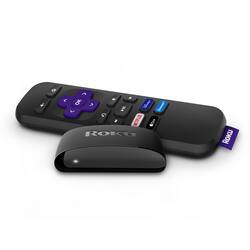
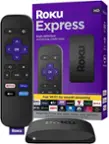
Roku - Express (2019) HD Streaming Media Player with High Speed HDMI Cable and Simple Remote - Black
- Key Specs
- Featured Streaming Services: Apple TV+, Disney+, Peacock, Hulu, Netflix, Prime Video, SHOWTIME, Sling TV, HBO Max (Streaming services and other programs are available on this device. Keep in mind, there may be more services supported than just those shown here.)
- Maximum Supported Resolution: 1080p
- High Dynamic Range (HDR): false (An HDR-compatible 4K TV or other HDR-compatible product displays HDR video content when it's available from sources like 4K Ultra HD Blu-ray Discs and 4K streaming services.)
- Operating System Compatibility: Not Applicable
- Remote Control Included: true
- Power Source: AC adapter
- Media Card Slot: false
- Works With: Apple HomeKit, Amazon Alexa, Google Assistant (Compatible with or able to be connected to other smart devices or applications.)
- General
- Brand: Roku
- Model Number: 3930R
- Product Name: Express (2019) HD Streaming Media Player with High Speed HDMI Cable and Simple Remote
- Color: Black
- TV Compatibility: Most TVs with HDMI input
- Features
- Smart Capable: true (Smart, or smart-capable devices are able to connect directly to your home network in order to stream content from the Internet, run Internet-based apps, or connect to other smart devices.)
- Remote Control Type: Dedicated
- Remote Control Features: Standard
- Screen Mirroring: true (Casts the screen of one device onto another wirelessly, using a common protocol (typically Bluetooth).)
- Compatibility
- App Compatible: true (The product can be connected to a program or software application on a mobile device, which then receives collected data from the product.)
- Compatible Wireless Standard(s): Wireless N (The wireless networking standard(s) the device is backwards compatible with. This includes networking protocols based on the IEEE 802.11 standard (alphabetically ascending) and the Wi-Fi Alliance standard (numerically ascending), both of which provide high-throughput wireless local area networks (WLANs). Devices designed to work with specific standard(s) will be backwards compatible with previous versions but may not run at optimal performance when using earlier iterations.)
- Interface(s): HDMI (Refers to the types of connections that devices use to interact and communicate with each other.)
- Works With: Apple HomeKit, Amazon Alexa, Google Assistant (Compatible with or able to be connected to other smart devices or applications.)
- Audio
- Surround Sound Supported: DTS Digital Surround (Surround sound systems use multiple audio channels and speakers to create an immersive sound experience for the listener. There are also various proprietary technologies that imitate this kind of sound via a device's built-in speakers or soundbar.)
- Other
- UPC: 829610003252
Enjoy a smooth HD streaming experience on your TV at our best price with Roku Express. Setup is incredibly simple—just use the included High Speed HDMI® Cable to plug it into your TV and connect to the internet. A short step-by-step setup and easy on-screen experience make Roku Express perfect for new users and seasoned pros alike. Enjoy a massive selection of free, live, and premium TV, including Roku® Originals only on The Roku Channel. All your favorite channels like Disney+, Prime Video, HBO Max, Apple TV+, Netflix, Sling, and Hulu are front and center on the customizable home screen, so you can spend your time streaming—not scrolling. Access even more features with the free Roku mobile app, including a convenient second remote, voice search, private listening with wireless headphones, and more. This Roku Express also works with popular voice assistants. Ask your Alexa or Google Assistant-enabled device to launch channels, search for entertainment, control your streaming, and more. You can also control your TV using the Apple Home app or Siri on your Apple devices plus share videos, photos, and music from your Apple device using AirPlay.
- Watch what you love: Start streaming with a massive selection of free, live, and premium TV, including Roku® Originals and 200+ live TV channels for free on The Roku Channel
- Quick and easy setup: It’s easy to get started with everything you need included in the box, including a High Speed HDMI® Cable—just plug it into your TV and connect to the internet
- Tons of power, tons of fun: Compact and power-packed, you'll stream your favorites with ease, including movies and series on HBO Max, Netflix, Disney+, and Prime Video
- Simple remote: Incredibly easy to use, this remote features shortcut buttons to popular streaming channels
- The free Roku mobile app: Control your Roku device with a convenient second remote, search with your voice, enjoy private listening with wireless headphones, and more on your iOS® or Android™ device
- Always up to date: Get the latest features, newest channels, and more with automatic software updates
- Works with popular voice assistants: Enjoy easy voice control with Siri, Alexa, or Hey Google
- Share it with Apple AirPlay: Effortlessly share videos, photos, music, and more from your Apple devices to your TV
- Watch what you love: Start streaming with a massive selection of free, live, and premium TV, including Roku® Originals and 200+ live TV channels for free on The Roku Channel
- Quick and easy setup: It’s easy to get started with everything you need included in the box, including a High Speed HDMI® Cable—just plug it into your TV and connect to the internet
- Tons of power, tons of fun: Compact and power-packed, you'll stream your favorites with ease, including movies and series on HBO Max, Netflix, Disney+, and Prime Video
- Simple remote: Incredibly easy to use, this remote features shortcut buttons to popular streaming channels
- The free Roku mobile app: Control your Roku device with a convenient second remote, search with your voice, enjoy private listening with wireless headphones, and more on your iOS® or Android™ device
- Always up to date: Get the latest features, newest channels, and more with automatic software updates
- Works with popular voice assistants: Enjoy easy voice control with Siri, Alexa, or Hey Google
- Share it with Apple AirPlay: Effortlessly share videos, photos, music, and more from your Apple devices to your TV
Whats Included
- High speed HDMI cable
- Owner's manual
- Power adapter
- Remote with pre-set channel shortcut buttons
- Removable adhesive strip
- Roku Express HD Streaming Media Player 2019
- Two AAA batteries
- USB power cable
- High speed HDMI cable
- Owner's manual
- Power adapter
- Remote with pre-set channel shortcut buttons
- Removable adhesive strip
- Roku Express HD Streaming Media Player 2019
- Two AAA batteries
- USB power cable
Product Manuals
A: (GOOGLE ANSWER)
Q: Will this work on a tv that's not a smart tv
A: Yes, I have one. It turns your TV into a smart TV for streaming and some games. Just need to have HDMI on TV
Q: Can I have more than one ROKU device on my WiFi network on separate TVs? Would I need two accounts?
A: Hi! Yes you have up to 20 Roku devices on the same Roku account. You will need to long into each device for initial setup. Each Roku device may only be linked to one Roku account at a time.When you link multiple Roku devices to a single Roku account, the channels and purchases will be the same on each device. When a channel is added or removed on one device, the channel is automatically added or removed on all devices linked to that account that support the channel.Channels must be activated separately on each Roku device.
Q: Can you get local news and weather? I
A: Yes. I have local news and weather set up on all 3 of my Roku devices.
Q: Is the spectrum tv app available?
A: If you have Spectrum as your internet provider, you'll have no problem using Roku. If you have a streaming stick you may have to add the Spectrum channel. No big deal and no extra cost. I have a Roku tv on my Spectrum system.
A: No credit card information is required but you may have to create an account name with certain channels. I've used the Roku to stream many channels and have not had to give out my credit card info. I will say I am very happy with my Roku purchase. It was easy to set up and the quality of the streaming is excellent on my LG 4K TV. Hope this helps.
Q: Do I pay a separate fee for each channel I use? ex..HBO, Netflix...
A: It depends upon the app. YouTube is still free; However, YouTube TV costs money. Any streaming app that charges a fee without Roku, still charges a fee using Roku. Roku makes it easy to continue watching your favorite channels without a cable tv subscription. For my household, we have many tv’s. We use Roku to reduce the cost of our cable subscription and purchase 1 or 2 apps on a rotating basis. Disney plus for 2-3 months, then switch to HBO for 2-3 months. And so on with other apps. Also, it limits the number of cable lines that need to be added and maintained throughout our home.
Q: Does this have Disney+ available?
A: Yes...Disney+ is available on this device.



















![The text on the image reads:
17 F8 Home P End F10 PgUp it PgDn F12 Ies Del * 8 ( 9 ) 0 I I + = Backspace I o P : [ ] ] I / K L : : .. . Enter M V > . ? / Shift Alt <
The corrected text should be:
17 F8 Home PgUp it PgDn F10 F12 Ies Del * 8 ( 9 ) 0 I I + = Backspace I o P : [ ] ] I / K L : : .. . Enter M V > . ? / Shift Alt <
The corrected text groups the keys in a more organized manner, making it easier to read and understand.](https://pisces.bbystatic.com/image2/BestBuy_US/images/products/699c06f5-6aba-4ab2-bbf6-114986b58b2a.jpg;maxHeight=144;maxWidth=200?format=webp)